
[macOS] keychain的跳坑之旅!git拉取的权限问题
故事背景,svn与git各有长处,不过git大势所趋吧,那就搞搞。git的服务端,是基于phabricator搭建的,关于它的资料自行google就好了。其实之前运维已经搭好了phabricator了,也给过我叫做test的账号去试过了,只不过还有些问题没处理好,拖了一段时间后,我着手来弄一下。
1. 建diffusion
详细就不多说,diffusion名字叫swallowframework,很简单,也有教程。
第一次,没有分权限,所有人都可以visit, push
```
git clone http://phabricator.eelly.test/diffusion/SWALLOWFRAMEWORK/swallowframework.git eelly_swallow
```
代码可以正常拉取,没问题
第二次,将用户按项目分了组,只有php项目的人才能visit, push,将我自己加入到php项目里面去
```
git clone http://phabricator.eelly.test/diffusion/SWALLOWFRAMEWORK/swallowframework.git eelly_swallow
```
报错了!
```
fatal: unable to access 'http://phabricator.eelly.test/diffusion/SWALLOWFRAMEWORK/swallowframework.git/': The requested URL returned error: 403
```
一看这提示就是权限问题。当然是google啦,找来找去,phabricator上面的设置都是正常的。
又叫了在php项目的同事去拉代码。卧槽,他们是正常的,而且拉取的时候,会提示让他输入账号,密码,而我的拉取过程,根本就没有提示我去输入账号密码!
只能通过输出拉取的调试信息来看看问题在哪里了,使用的是GIT_CURL_VERBOSE=1
```
GIT_CURL_VERBOSE=1 git clone http://phabricator.eelly.test/diffusion/SWALLOWFRAMEWORK/swallowframework.git eelly_swallow
```
输出的详细信息如下
```
Cloning into 'eelly_swallow'...
* Couldn't find host phabricator.eelly.test in the .netrc file; using defaults
* Trying 172.18.107.96...
* TCP_NODELAY set
* Connected to phabricator.eelly.test (172.18.107.96) port 80 (#0)
> GET /diffusion/SWALLOWFRAMEWORK/swallowframework.git/info/refs?service=git-upload-pack HTTP/1.1
Host: phabricator.eelly.test
User-Agent: git/2.10.1 (Apple Git-78)
Accept: */*
Accept-Encoding: gzip
Pragma: no-cache
< HTTP/1.1 401 You must log in to access repositories.
< Server: nginx
< Date: Thu, 09 Mar 2017 13:59:26 GMT
< Content-Type: text/html; charset=utf-8
< Transfer-Encoding: chunked
< Connection: keep-alive
< WWW-Authenticate: Basic realm="Phabricator Repositories"
<
* Curl_http_done: called premature == 0
* Connection #0 to host phabricator.eelly.test left intact
* Couldn't find host phabricator.eelly.test in the .netrc file; using defaults
* Found bundle for host phabricator.eelly.test: 0x7ff01250c7c0 [can pipeline]
* Hostname phabricator.eelly.test was found in DNS cache
* Trying 172.18.107.96...
* TCP_NODELAY set
* Connected to phabricator.eelly.test (172.18.107.96) port 80 (#1)
> GET /diffusion/SWALLOWFRAMEWORK/swallowframework.git/info/refs?service=git-upload-pack HTTP/1.1
Host: phabricator.eelly.test
User-Agent: git/2.10.1 (Apple Git-78)
Accept: */*
Accept-Encoding: gzip
Pragma: no-cache
< HTTP/1.1 401 You must log in to access repositories.
< Server: nginx
< Date: Thu, 09 Mar 2017 13:59:26 GMT
< Content-Type: text/html; charset=utf-8
< Transfer-Encoding: chunked
< Connection: keep-alive
< WWW-Authenticate: Basic realm="Phabricator Repositories"
<
* Ignoring the response-body
* Curl_http_done: called premature == 0
* Connection #1 to host phabricator.eelly.test left intact
* Issue another request to this URL: 'http://phabricator.eelly.test/diffusion/SWALLOWFRAMEWORK/swallowframework.git/info/refs?service=git-upload-pack'
* Couldn't find host phabricator.eelly.test in the .netrc file; using defaults
* Found bundle for host phabricator.eelly.test: 0x7ff01250c7c0 [can pipeline]
* Re-using existing connection! (#1) with host phabricator.eelly.test
* Connected to phabricator.eelly.test (172.18.107.96) port 80 (#1)
* Server auth using Basic with user 'test'
> GET /diffusion/SWALLOWFRAMEWORK/swallowframework.git/info/refs?service=git-upload-pack HTTP/1.1
Host: phabricator.eelly.test
Authorization: Basic dGVzdDp0MTIzNDU2Nzg=
User-Agent: git/2.10.1 (Apple Git-78)
Accept: */*
Accept-Encoding: gzip
Pragma: no-cache
< HTTP/1.1 403 You do not have permission to access this repository.
< Server: nginx
< Date: Thu, 09 Mar 2017 13:59:26 GMT
< Content-Type: text/html; charset=utf-8
< Transfer-Encoding: chunked
< Connection: keep-alive
< Vary: Accept-Encoding
< Content-Encoding: gzip
<
* Curl_http_done: called premature == 0
* Connection #1 to host phabricator.eelly.test left intact
fatal: unable to access 'http://phabricator.eelly.test/diffusion/SWALLOWFRAMEWORK/swallowframework.git/': The requested URL returned error: 403
```
这里涉及的几次握手的过程就不详细解释了,大家用心看一下还是可以明白的。
重点关注这几行代码
```
* Ignoring the response-body
* Curl_http_done: called premature == 0
* Connection #1 to host phabricator.eelly.test left intact
* Issue another request to this URL: 'http://phabricator.eelly.test/diffusion/SWALLOWFRAMEWORK/swallowframework.git/info/refs?service=git-upload-pack'
* Couldn't find host phabricator.eelly.test in the .netrc file; using defaults
* Found bundle for host phabricator.eelly.test: 0x7ff01250c7c0 [can pipeline]
* Re-using existing connection! (#1) with host phabricator.eelly.test
* Connected to phabricator.eelly.test (172.18.107.96) port 80 (#1)
* Server auth using Basic with user 'test'
> GET /diffusion/SWALLOWFRAMEWORK/swallowframework.git/info/refs?service=git-upload-pack HTTP/1.1
Host: phabricator.eelly.test
Authorization: Basic dGVzdDp0MTIzNDU2Nzg=
User-Agent: git/2.10.1 (Apple Git-78)
Accept: */*
Accept-Encoding: gzip
Pragma: no-cache
```
这里的意思是,Ignoring the response-body,忽略响应的内容,Server auth using Basic with user 'test',直接用test这个账号去尝试登录。我在其它同事debug这个clone的过程,是没有这些步骤的,他们是,去到 WWW-Authenticate: Basic realm="Phabricator Repositories" 这一步的时候,就会显示输入账号密码的过程,怎么回事呢?为什么一直都是用test这个账号去尝试登录呢?
过程是很复杂的,反正也花了两个小时去找解决方案,也尝试了不同方法。最后在这里找到了头绪,http://git.vger.kernel.narkive.com/iW0NHyKd/git-https-transport-and-wrong-password
这文章里面关键点在于这些对话
```
1. Using a credential helper that supports secure long-term storage
(osxkeychain, wincred, etc).
2. Specifying the username to the credential subsystem explicitly, by
putting something like:
[credential "https://yourhost/"]
username = yourusername
in your git config.
```
意思是说,在你的git config里面,直接针对某个远程地址,设置账号,于是我改了一下自己的git配置
```
vim ~/.gitconfig
```
在后面加入
```
[credential "http://phabricator.eelly.test"]
username = xxxxxxx
```
再次进行拉取
```
GIT_CURL_VERBOSE=1 git clone http://phabricator.eelly.test/diffusion/SWALLOWFRAMEWORK/swallowframework.git eelly_swallow
```
这次就正常了,提示我输入密码,搞掂!从以上文章,大概联想了一下,应该是macOS的keychain保存了一些账号导致在clone的时候,默认使用了test这个账号去进行登录的,于是再看了下keychain里面的东西。真是无语了,果然是这样子
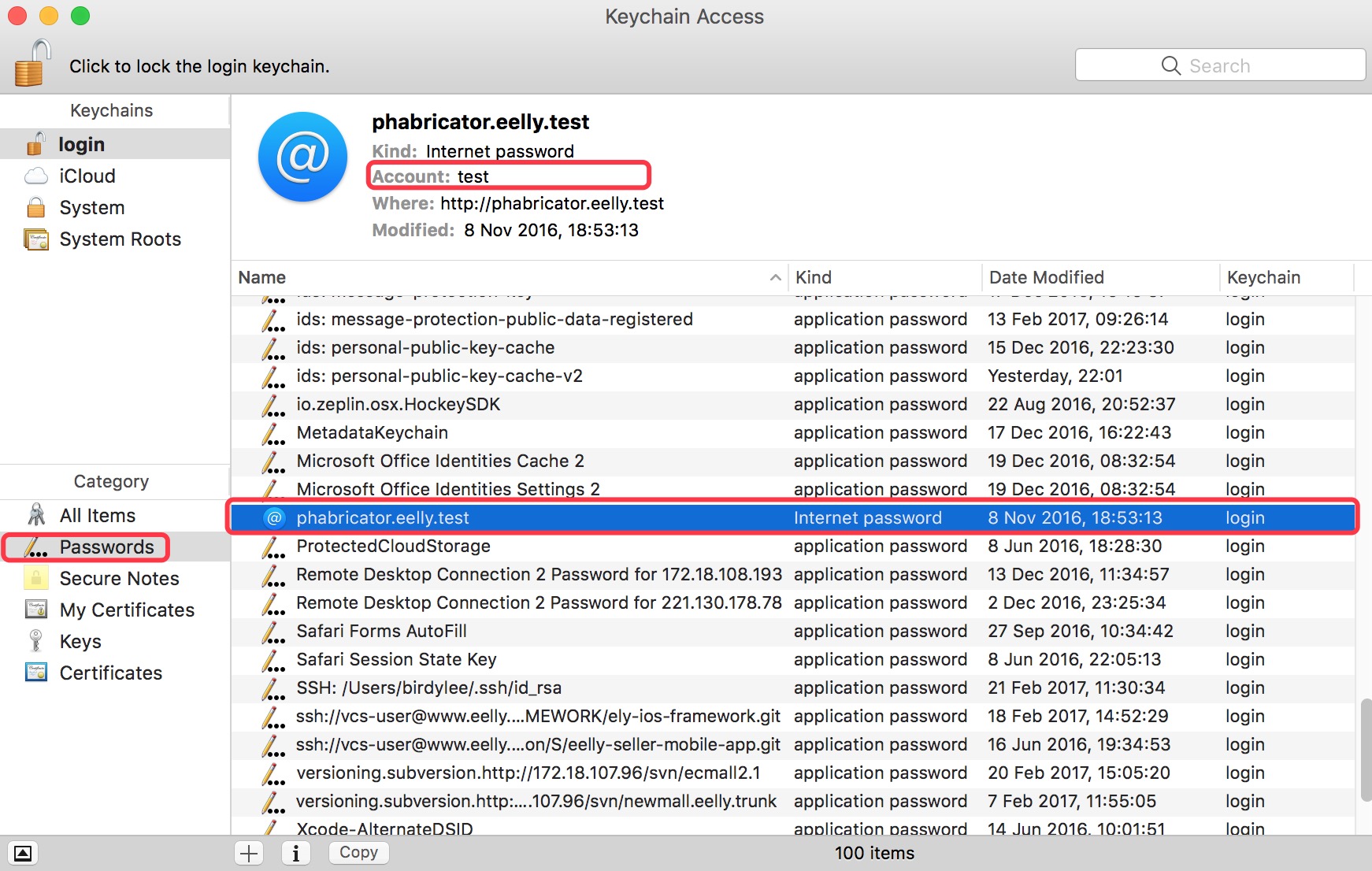
干脆一做二不休,直接将keychain对应的账号密码,由test改为我自己的账号密码,完成!
have fun with macOS & git!
[macOS] keychain的跳坑之旅!git拉取的权限问题的更多相关文章
- git拉取远程分支并创建本地分支和Git中从远程的分支获取最新的版本到本地
git拉取远程分支并创建本地分支 一.查看远程分支 使用如下Git命令查看所有远程分支: git branch -r 二.拉取远程分支并创建本地分支 方法一 使用如下命令: git checkout ...
- git 拉取远程代码
git 拉取远程代码 || 利用vscode编辑器自带了git,可在ctrl+~打开控制台拉取代码,非常好用哦~在实际项目开发过程中,往往是已经存在远程项目了,我们定义的需求是只需要简单的操作git, ...
- Git拉取项目时报错“remote: HTTP Basic: Access denied”解决方法
问题: Git拉取项目时报错“remote: HTTP Basic: Access denied”,此问题多为本地密码与远端密码不符导致. 解决方法: 在下载地址中加上用户名和密码即可,如下: htt ...
- git拉取远程分支到本地
git拉取远程分支到本地 一.查看远程分支 -- 查看远程分支 git branch -r 二.拉取远程分支并创建本地分支 -- 采用此种方法建立的本地分支会和远程分支建立映射关系. git chec ...
- git 拉取某个分支到本地
git 拉取其实只需要 git fetch origin xxx. git pull origin xxx即可
- git拉取GitLab工程报错Repository not found
# git clone http://xxx/jiqing/frog.git 正克隆到 'frog'... fatal: repository 'http://xxx/jiqing/frog.git/ ...
- git 拉取远程分支到本地并建立关联关系
git拉取远程分支到本地 一.查看远程分支 使用如下git命令查看所有远程分支: git branch -r 二.拉取远程分支并创建本地分支 方法一 使用如下命令: git checkout ...
- 持续集成高级篇之Jenkins Pipeline git拉取
系列目录 PipeLine中拉取远程git仓库 前面讲自由式任务的时候,我们可以看到通过自由式job里提供的图形界面配置git拉取非常方便的,实际上使用PipeLine也并不复杂.这一节我们展示一下如 ...
- vscode链接git拉取项目
vscode终端中就可操作 初始化 git init 链接 git git remote add origin http://**************.git 拉取项目 git clone ht ...
随机推荐
- 接口和多态都为JAVA技术的核心。
类必须实现接口中的方法,否则其为一抽象类. 实现中接口和类相同. 接口中可不写public,但在子类中实现接口的过程中public不可省. (如果剩去public则在编译的时候提示出错:对象无法从 ...
- php -- 断点调试 之 选择合适的xdebug
这里不讲如何在不同的ide里安装断点调试,讲一个不起眼却很容易犯的错误: 如何寻找适合你的环境的xdebug! 不要小看这个问题,如果说xdebug都错了,你再怎么安装断点调试,都不会成功,反而还找不 ...
- Gin框架初识
一.安装 使用go下载gin库,命令行输入:go get github.com/gin-gonic/gin ,一般使用需要的依赖: import "github.com/gin-gonic/ ...
- Unity长连接
http://blog.csdn.net/claine/article/details/52374546
- javascript:没有定义的变量和没有定义的属性
1. 没有定义的变量 window.onload = function() { alert(a); // 报错: Uncaught ReferenceError: a is not defined / ...
- Flask学习笔记(2)--最简单的小应用
0x01 第一个小程序 PyCharm新建一个flask项目,第一个小程序,我们来看一下 #引入flask类 from flask import Flask #将Flask对象实例化 app = Fl ...
- Java中excel转换为jpg/png图片 采用aspose-cells-18.6.jar
一 Java中excel转换为jpg/png图片 package com.thinkgem.jeesite.modules.task.util; import com.aspose.cells.Im ...
- Qt编写自定义控件9-导航按钮控件
前言 导航按钮控件,主要用于各种漂亮精美的导航条,我们经常在web中看到导航条都非常精美,都是html+css+js实现的,还自带动画过度效果,Qt提供的qss其实也是无敌的,支持基本上所有的CSS2 ...
- Mac Eclipse安装lombok
Lombok是一个可以通过注解的形式可以帮助消除一些必须但是显得很臃肿的Java代码的工具,通过使用对应的注解,可以在进行编译源码的时候生成对应的方法,比如类属性的get/set/toString() ...
- 在POM配置Maven plugin提示错误“Plugin execution not covered by lifecycle configuration”的解决方案
eclipse在其POM文件的一处提示出错如下: Plugin execution not covered by lifecycle configuration: org.apache.maven.p ...