
Nginx负载均衡后端健康检查
参考文档:https://www.cnblogs.com/kevingrace/p/6685698.html
本次使用第三方模块nginx_upstream_check_module的,要使用这个第三方模块首先您需要进行下载,然后通过patch命令将补丁打入您原有的Nginx源码中,并且重新进行编译安装。
下载nginx_upstream_check_module模块
wget https://codeload.github.com/yaoweibin/nginx_upstream_check_module/zip/master
解压
unzip master
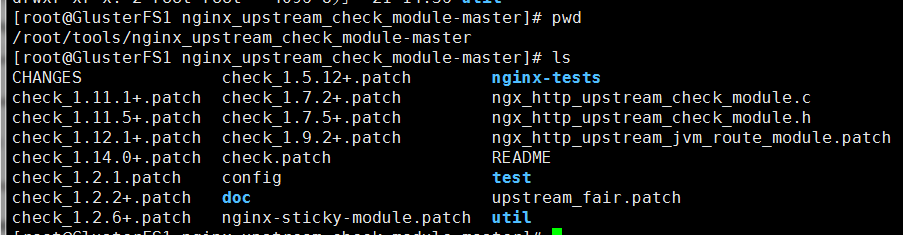
解压后的Nginx和nginx_upstream_check_module-master在同一目录下

将补丁打入源码(没有patch命令使用yum -y install patch安装)
cd nginx-1.6.3

patch -p1 < ../nginx_upstream_check_module-master/check_1.5.12+.patch
出现以下代表成功(根据nginx版本选择不同的check)

编译安装nginx
./configure --prefix=/usr/local/nginx --add-module=../nginx_upstream_check_module-master --with-http_stub_status_module

make && make install
通过以上的步骤,第三方的nginx_upstream_check_module模块就在Nginx中准备好了。接下来我们讲解一下如何使用这个模块。首先看一下upstream的配置信息
interval:必要参数,检查请求的间隔时间。
fall:当检查失败次数超过了fall,这个服务节点就变成down状态。
rise:当检查成功的次数超过了rise,这个服务节点又会变成up状态。
timeout:请求超时时间,超过等待时间后,这次检查就算失败。
default_down:后端服务器的初始状态。默认情况下,检查功能在Nginx启动的时候将会把所有后端节点的状态置为down,检查成功后,在置为up。
type:这是检查通信的协议类型,默认为http。以上类型是检查功能所支持的所有协议类型。
一个完整的nginx配置信息如下nginx.conf
worker_processes  4;

error_log  logs/error.log;

events {

    worker_connections  10240;

}

http {

    include       mime.types;

    default_type  application/octet-stream;

    sendfile        on;

    keepalive_timeout  65;

	upstream   ekp   {

	server	10.1.1.131:8080;

	server	10.1.1.132:8080;

	server	10.1.1.135:8080;

      check interval=3000 rise=2 fall=5;

      check_keepalive_requests 100;

      check_http_send "HEAD / HTTP/1.1\r\nConnection: keep-alive\r\n\r\n";

      check_http_expect_alive http_2xx http_3xx;

     }

    server {

        listen       80;

        server_name  www.test.com;

	access_log  /usr/local/nginx/logs/access.log;

        location / {

            root   ekp;

            index  index.html index.htm index.jsp;

            proxy_pass         http://ekp;

            proxy_set_header   Host             $host;

            proxy_set_header   X-Real-IP        $remote_addr;

            proxy_set_header   X-Forwarded-For  $proxy_add_x_forwarded_for;

	    client_max_body_size     200m;

	    proxy_connect_timeout       10;

	    proxy_read_timeout          300;

	    proxy_send_timeout          300;

        }

	location /nstatus {

         check_status;

         access_log on;

       }

    }

}
PS:这里配置按照参考文档加timeout=1000 type=http 否则无法负载均衡
访问测试 http://ip/nstatus

Nginx负载均衡后端健康检查的更多相关文章
- Nginx负载均衡后端健康检查(支持HTTP和TCP)
之前有一篇文章记录nginx负载均衡后端检查,链接为 https://www.cnblogs.com/minseo/p/9511456.html 但是只包含http健康检查不包含tcp下面安装ngin ...
- nginx高性能WEB服务器系列之六--nginx负载均衡配置+健康检查
nginx系列友情链接:nginx高性能WEB服务器系列之一简介及安装https://www.cnblogs.com/maxtgood/p/9597596.htmlnginx高性能WEB服务器系列之二 ...
- Nginx负载均衡之健康检查
负载均衡实例 http{ upstream myserver { server 10.10.10.1 weight=3 max_fails=3 fail_timeout=20s; server 10. ...
- Nginx负载均衡 后端服务器怎么共享Session 问题
Nginx负载均衡 Nginx负载均衡一些基础知识: nginx 的 upstream目前支持 4 种方式的分配 1).轮询(默认) 每个请求按时间顺序逐一分配到不同的后端服务器,如果后端 ...
- Nginx 负载均衡 后端服务器获取前端用户真实IP
Nginx 后端 日志文件 获取的都是 前端 负载均衡器的IP 想要获取用户的真实IP 必须 使用Nginx 的模块 http_realip_module 才行!! 1. 编译 Nginx 的时候 ...
- Nginx 负载均衡 后端 监控检测 nginx_upstream_check_module 模块的使用
在使用nginx 的负载均衡 中,我们通常会使用到 Nginx 自带的 ngx_http_proxy_module 健康检测模块. ngx_http_proxy_module 自带的 健康检测模块参数 ...
- nginx负载均衡后端tomcat无法加载js资源
JS或css无法完全加载 nginx的代理缓存区,默认较小导致部分文件出现加载不全的问题,比较典型的如jQuery框架,可以通过配置调整nginx的缓存区即可.主要参考proxy参数 最终完整配置如下 ...
- Nginx负载均衡中后端节点服务器健康检查的操作梳理
正常情况下,nginx做反向代理,如果后端节点服务器宕掉的话,nginx默认是不能把这台realserver踢出upstream负载集群的,所以还会有请求转发到后端的这台realserver上面,这样 ...
- Nginx负载均衡中后端节点服务器健康检查的一种简单方式
摘自:https://cloud.tencent.com/developer/article/1027287 一.利用nginx自带模块ngx_http_proxy_module和ngx_http_u ...
随机推荐
- python接口自动化测试(二)-requests.get()
环境搭建好后,接下来我们先来了解一下requests的一些简单使用,主要包括: requests常用请求方法使用,包括:get,post requests库中的Session.Cookie的使用 其它 ...
- go在ubuntu下安装
http://blog.csdn.net/Ceciiiilia/article/details/71483221 综合目前网站上的各种安装方法,找到如下简单配置(不会报错或者少报错…) (一)从官网安 ...
- EAS开发之挂菜单
一:以管理员账号登录 二:挂菜单 点击菜单栏"系统"——客户化菜单编辑——选中上级目录——点击 新建——命名.键入唯一编码,把ui.java类的全路径,拷贝到 ...
- etcdv3 集群的搭建和使用
etcd是一个开源的分布式键值对数据库,他的每一个节点都有一份数据的copy,当有节点故障时保证了高可用性.etcd使用Raft算法来保证一致性. 第一次接触etcd是在学习k8s时.k8s用etcd ...
- Visual Studio进行Web性能测试- Part II
Visual Studio进行Web性能测试- Part II 2012-08-31 14:34 by 知平软件, 7557 阅读, 5 评论, 收藏, 编辑 原文作者:Ambily.raj 对于一个 ...
- 一次python 内存泄漏解决过程
最近工作中慢慢开始用python协程相关的东西,所以用到了一些相关模块,如aiohttp, aiomysql, aioredis等,用的过程中也碰到的很多问题,这里整理了一次内存泄漏的问题 通常我们写 ...
- Atitit uke公司简介与基本制度建设草案v11 r66 .docx
Atitit uke公司简介与基本制度建设草案v11 r66 .docx Uke org prj Author撰写人: 作者:: 绰号:老哇的爪子claw of Eagle 偶像破坏者Iconocl ...
- 同一个tomcat下面放多个项目 每个项目用不同的域名访问
vim ./conf/server.conf <Host name=" appBase="/www/test1/webapps" ##这是war包存放的位置 unp ...
- 解決中文地址Uri.IsWellFormedUriString返回false
數字和大小寫字母都ok,但是中文地址就會有問題 public bool IslocalURL(string url) { if (string.IsNullOrEmpty(url)) { return ...
- A*算法详解链接
A星算法详解(个人认为最详细,最通俗易懂的一个版本) Introduction to the A* Algorithm 路径规划: a star, A星算法详解 实现A星算法