
python学习笔记_week26
一、CMDB

    -采集资产

    -API

    -后台管理

        -资产列表(CURD)

        -业务线列表(CURD)

        -用户列表(CURD)

        -组列表(CURD)

        ...

        ===>简单<===

        公共组件:删改查

        查:

            资产列表(CURD)

                config=[

                {

                    "q":"id",

                },{

                    "q":"name",

                }]

                values_list=["id","name"]

                result=model.TB.objects.filter(条件).values(*values_list)

                #[{},{},{}]                      具体列

                ===>标配:配置+数据操作

二、算法
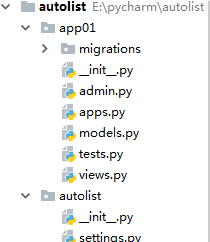
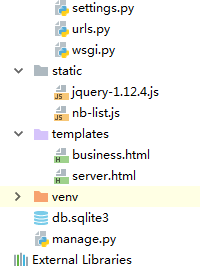
 from django.db import models

 # Create your models here.

 class UserInfo(models.Model):

     name=models.CharField(max_length=32)

     age=models.IntegerField()

 class BusinessUnit(models.Model):

     name = models.CharField(max_length=32)

 class Server(models.Model):

     server_type_choices=(

         (1,"WEB"),

         (2,"存储"),

         (3,"缓存"),

     )

     server_type=models.IntegerField(choices=server_type_choices)

     hostname=models.CharField(max_length=32)

     port=models.IntegerField()

     business_unit=models.ForeignKey('BusinessUnit',on_delete=models.CASCADE)

     user=models.ForeignKey('UserInfo',on_delete=models.CASCADE)
 from django.shortcuts import render

 from django.views import View

 from django.shortcuts import HttpResponse

 from django.views import View

 from app01 import models

 import json

 # Create your views here.

 class BaseResponse(object):

     def __init__(self):

         self.status=True

         self.data=None

         self.message=None

 class ServerView(View):

     def get(self,request,*args,**kwargs):

         return render(request,'server.html')

 class ServerJsonView(View):

     def get(self,request,*args,**kwargs):

         response=BaseResponse()

         try:

             # 获取要显示的列

             # 获取数据

             table_config=[{

                     'q':'id',

                     'title': '主机名',

                     'display':0,

                     'text':{},

                     'attr':{}

                 },{

                 'q':'hostname',

                 'title':'主机名',

                 'display':1,

                 'text':{'content':'{m}','kwargs':{'m':'@hostname'}},

                 'attr': {'k1':'@hostname','k2':'v2'}

             },# '{n}-{m}'.format({'n':'@hostname','m':'@hostname'}) =>hostname-c1.com

                 {

                 'q':'port',

                 'title': '端口',

                 'display': 1,

                 'text': {'content':'{m}', 'kwargs': { 'm': '@port'}},

                  'attr': {'k1': '@port', 'k2': 'v2'}

             },{

                 'q':'business_unit_id',

                 'title': '业务线ID',

                 'display': 1,

                 #去全局变量business_unit_list=[

                     # {id:1,name:'WEB'},

                     # {id:2,name:'存储'},

                     # {id:1,name:'商城'},]

                 'text': {'content': '{m}', 'kwargs': { 'm': '@@business_unit_list'}},

                 'attr': {'k1': '@business_unit_id', 'k2': 'v2'}

             },{

                 'q':'business_unit__name',

                 'title': '业务线名称',

                 'display': 1,

                 'text': {'content': '{key}-{m}', 'kwargs': { 'key':'@business_unit_id','m': '@business_unit__name'}},

                     'attr': {'k1': '@business_unit__name', 'k2': 'v2'}

             },{

                 'q':None,

                 'title': '操作',

                 'display': 1,

                 'text': {'content': '<a herf="server-detail-{n}.html">查看详细</a>', 'm': '@id'},

                 'attr': {'k1': '@id', 'k2': 'v2'}

             },]

             values_list=[]

             for item in table_config:

                 if item['q']:

                     values_list.append(item['q'])

             data_list=models.Server.objects.values(*values_list)

             #[{},{}]

             data_list=list(data_list)

             print(data_list)

             response.data={

                 'table_config': table_config,

                 'data_list':data_list,

             }

         except Exception as e:

             response.status=False

             response.message=str(e)

         return HttpResponse(json.dumps(response.__dict__))

 class BusinessView(View):

     def get(self,request,*args,**kwargs):

         return render(request,'business.html')

 class BusinessJsonView(View):

     def get(self,request,*args,**kwargs):

         response=BaseResponse()

         try:

             # 获取要显示的列

             # 获取数据

             table_config=[{

                 'q':'id',

                 'title':'ID',

                 'display':1,

             },{

                 'q':'name',

                 'title': '业务线名称',

                 'display': 1,

             },{

                 'q':None,

                 'title': '操作',

                 'display': 1,

             },]

             values_list=[]

             for item in table_config:

                 if item['q']:

                     values_list.append(item['q'])

             data_list=models.BusinessUnit.objects.values(*values_list)

             #[{},{}]

             data_list=list(data_list)

             print(data_list)

             response.data={

                 'table_config': table_config,

                 'data_list':data_list,

             }

         except Exception as e:

             response.status=False

             response.message=str(e)

         return HttpResponse(json.dumps(response.__dict__))
 from django.contrib import admin

 #from django.urls import path

 from django.conf.urls import url

 from app01 import  views

 urlpatterns = [

     url(r'^admin/',admin.site.urls),

     url(r'^server.html',views.ServerView.as_view()),

     url(r'^server-json.html',views.ServerJsonView.as_view()),

     url(r'^business.html', views.BusinessView.as_view()),

     url(r'^business-json.html', views.BusinessJsonView.as_view()),

 ]
 (function (jq) {

     var requestURL;

     //为字符串创建format方法,用于字符串格式化

     String.prototype.format=function(args){

         return this.replace(/\{(\w+)\}/g,function(s,i){

             return args[i];

         });

     };

     function init() {

             //获取要显示的列

             //获取数据

             $.ajax({

                 url:requestURL,

                 type:'GET',

                 dataType:'JSON',

                 success:function (arg) {

                     if(arg.status){

                         //创建表格标题

                         createTablehead(arg.data.table_config);

                         /*

                         [{'hostname': 'c1.com', 'port': 11}, {'hostname': 'c2.com', 'port': 23}]

                         */

                         createTablebody(arg.data.table_config,arg.data.data_list);

                     }else{

                         alert(arg.message)

                     }

             }

                 })

         }

     function createTablehead(config){

             /*

             tr

                 td

                 td

             tr

              [{

                 'title':'主机名',

                 'display':0,

             },{

                 'title': '端口',

                 'display': 1,

             }] */

             var tr = document.createElement('tr')

             $.each(config,function(k,v){

                 if(v.display){

                     var th = document.createElement('th')

                     th.innerHTML=v.title;

                     $(tr).append(th);

                 }

             });

             $('#thead').append(tr);

         }

     function createTablebody(tableConfig,dataList){

             /*

             ,dataList=[{'hostname': 'c1.com', 'port': 11}, {'hostname': 'c2.com', 'port': 23}]

             tableConfig=[{

                 'q':'hostname',

                 'title':'主机名',

                 'display':1,

             },{

                 'q':'port',

                 'title': '端口',

                 'display': 1,

             },{

                 'q':None,

                 'title': '操作',

                 'display': 1,

             }]*/

         $.each(dataList,function (k1,row) {

             //row={'port':11,'hostname':'c1.com'}

             //row={'port':22,'hostname':'c2.com'}

             var tr=document.createElement('tr');

             $.each(tableConfig,function (k2,configItem) {

                 if(configItem.display){

                     /*configItem={

                     'q':'hostname',

                     'title':'主机名',

                     'display':1,},

                     'text': {'content': '<a herf="server-detail-{n}.html">查看详细</a>',  'm': '@id'}

                     'attr':{},  */

                     var td =document.createElement('td');

                     //td.innerHTML=row[configItem.q];

                     //configItem.text.content

                     var kwargs={};

                     $.each(configItem.text.kwargs,function (key,value) {

                         if(value.startsWith("@")){

                             var temp=value.substring(1,value.length);

                             kwargs[key]=row[temp]

                         }else{

                             kwargs[key]=value;

                         }

                     });

                     td.innerHTML=configItem.text.content.format(kwargs);

                     $.each(configItem.attr,function (key,value) {

                         if(value.startsWith("@")){

                             var temp=value.substring(1,value.length);

                             td.setAttribute(key,row[temp]);

                         }else{

                              td.setAttribute(key,value);

                         }

                     });

                     $(tr).append(td);

                 }});

             $('#tbody').append(tr);

         })}

     jq.extend({

         'linan': function (url) {

             requestURL=url

             init();

         }

     })

 })(jQuery);
 <!DOCTYPE html>

 <html lang="en">

 <head>

     <meta charset="UTF-8">

     <title></title>

 </head>

 <body>

     <table border="1">

         <thead id="thead"></thead>

             <tr>

             </tr>

         <tbody id="tbody"></tbody>

     </table>

     <script src="/static/jquery-1.12.4.js"></script>

     <script src="/static/nb-list.js"></script>

     <script>

         $(function () {

             $.linan('/business-json.html');

         });

     </script>

 </body>

 </html>
 <!DOCTYPE html>

 <html lang="en">

 <head>

     <meta charset="UTF-8">

     <title></title>

 </head>

 <body>

     <table border="1">

         <thead id="thead"></thead>

             <tr>

             </tr>

         <tbody id="tbody"></tbody>

     </table>

     <script src="/static/jquery-1.12.4.js"></script>

     <script src="/static/nb-list.js"></script>

     <script>

         $(function () {

             $.linan('/server-json.html');

         });

     </script>

 </body>

 </html>
CMDB
python学习笔记_week26的更多相关文章
- python学习笔记整理——字典
python学习笔记整理 数据结构--字典 无序的 {键:值} 对集合 用于查询的方法 len(d) Return the number of items in the dictionary d. 返 ...
- VS2013中Python学习笔记[Django Web的第一个网页]
前言 前面我简单介绍了Python的Hello World.看到有人问我搞搞Python的Web,一时兴起,就来试试看. 第一篇 VS2013中Python学习笔记[环境搭建] 简单介绍Python环 ...
- python学习笔记之module && package
个人总结: import module,module就是文件名,导入那个python文件 import package,package就是一个文件夹,导入的文件夹下有一个__init__.py的文件, ...
- python学习笔记(六)文件夹遍历,异常处理
python学习笔记(六) 文件夹遍历 1.递归遍历 import os allfile = [] def dirList(path): filelist = os.listdir(path) for ...
- python学习笔记--Django入门四 管理站点--二
接上一节 python学习笔记--Django入门四 管理站点 设置字段可选 编辑Book模块在email字段上加上blank=True,指定email字段为可选,代码如下: class Autho ...
- python学习笔记--Django入门0 安装dangjo
经过这几天的折腾,经历了Django的各种报错,翻译的内容虽然不错,但是与实际的版本有差别,会出现各种奇葩的错误.现在终于找到了解决方法:查看英文原版内容:http://djangobook.com/ ...
- python学习笔记(一)元组,序列,字典
python学习笔记(一)元组,序列,字典
- Pythoner | 你像从前一样的Python学习笔记
Pythoner | 你像从前一样的Python学习笔记 Pythoner
- OpenCV之Python学习笔记
OpenCV之Python学习笔记 直都在用Python+OpenCV做一些算法的原型.本来想留下发布一些文章的,可是整理一下就有点无奈了,都是写零散不成系统的小片段.现在看 到一本国外的新书< ...
随机推荐
- Visual Studio Code--开发大大们都在用的编辑器
老公推荐的炒鸡nb的编辑器...说让我看起来像个假大神(微笑脸) 如何用VSCode练习python呢,还有VSCode有哪些常用的功能和快捷键呢?我会持续更新中... 1. 先来换个喜欢的颜色主题吧 ...
- mysql中describe关键字
今天写代码的时候,有一个类的数据始终不能插入,老是提示在You have an error in your SQL syntax; check the manual that corresponds ...
- 数据文件resize回收空间
场景说明: 客户 ASM磁盘组,data磁盘组空闲空间90G,空间不足,因此强烈建议回收空间 空间回收方案: 1.数据文件resize,回收部分可用性空间(好处就是能够将ASM磁盘组free大小增加) ...
- LCA - Tarjan 算法
void dfs(int u) { ; i <= n; i++) { if(visit[i]&&ask[u][i]) { LCA[u][i] = Find(i); } } vis ...
- 常见模块(三) pickle模块和json模块
(一)json和pickle的区别 1.json是不同编程语言实现数据交换的工具,他是用来把python中的数据对象转换成字符串或者写入文件中的,再由其他语言通过json加载进来. 2.pickle是 ...
- Burpsuite 1.7.33启动的一点小问题。
最近用的burp到期了,就想找个新版本的. https://www.52pojie.cn/thread-691448-1-1.html 上面帖子里贴了最新的几个版本的burp,下载以后,问题出现了,无 ...
- String引用数据类型
一.String类的第一种方式 (原文地址:https://blog.csdn.net/wangdajiao/article/details/52087302)1.直接赋值 例:String str ...
- PythonStudy——数据类型总结 Data type summary
按存储空间的占用分(从低到高) 数字 字符串 集合:无序,即无序存索引相关信息,可变.集合中的元素必须是可hash的,即不可变的数据类型. 元组:有序,需要存索引相关信息,不可变 列表:有序,需要存索 ...
- c# automapper 使用(一)
一.最简单的用法 有两个类User和UserDto public class User { public int Id { get; set; } public string Name { get; ...
- shutil 拷贝 / 移动 / 压缩 / 解压缩
# shutil_demo.py 高级文件操作(拷贝 / 移动 / 压缩 / 解压缩) import shutil def shutil_demo(): # 拷贝文件 shutil.copy2('fi ...