
Bootstrap Table 表格参数详解
表格参数
|
名称
|
标签
|
类型
|
默认
|
描述
|
|---|---|---|---|---|
| - | data-toggle | String | 'table' | 不用写 JavaScript 直接启用表格。 |
| classes | data-classes | String | 'table table-hover' | 表格的类名称。默认情况下,表格是有边框的,你可以添加 'table-no-bordered' 来删除表格的边框样式。 |
| sortClass | data-sort-class | String | undefined | The class name of the td elements which are sorted. |
| height | data-height | Number | undefined | 定义表格的高度。 |
| undefinedText | data-undefined-text | String | '-' | 当数据为 undefined 时显示的字符 |
| striped | data-striped | Boolean | false | 设置为 true 会有隔行变色效果 |
| sortName | data-sort-name | String | undefined | 定义排序列,通过url方式获取数据填写字段名,否则填写下标 |
| sortOrder | data-sort-order | String | 'asc' | 定义排序方式 'asc' 或者 'desc' |
| sortStable | data-sort-stable | Boolean | false | 设置为 true 将获得稳定的排序,我们会添加_position属性到 row 数据中。 |
| iconsPrefix | data-icons-prefix | String | 'glyphicon' | 定义字体库 ('Glyphicon' or 'fa' for FontAwesome),使用"fa"时需引用 FontAwesome,并且配合 icons 属性实现效果 Glyphicon 集成于Bootstrap可免费使用 参考:http://glyphicons.com/ FontAwesome 参考:http://fortawesome.github.io/ |
| icons | data-icons | Object | { paginationSwitchDown: 'glyphicon-collapse-down icon-chevron-down', paginationSwitchUp: 'glyphicon-collapse-up icon-chevron-up', refresh: 'glyphicon-refresh icon-refresh' toggle: 'glyphicon-list-alt icon-list-alt' columns: 'glyphicon-th icon-th' detailOpen: 'glyphicon-plus icon-plus' detailClose: 'glyphicon-minus icon-minus' } |
自定义图标 |
| columns | - | Array | [] | 列配置项,详情请查看 列参数 表格. |
| data | - | Array | [] | 加载json格式的数据 |
| ajax | data-ajax | Function | undefined | 自定义 AJAX 方法,须实现 jQuery AJAX API |
| method | data-method | String | 'get' | 服务器数据的请求方式 'get' or 'post' |
| url | data-url | String | undefined | 服务器数据的加载地址 |
| cache | data-cache | Boolean | true | 设置为 true 禁用 AJAX 数据缓存 |
| contentType | data-content-type | String | 'application/json' | 发送到服务器的数据编码类型 |
| dataType | data-data-type | String | 'json' | 服务器返回的数据类型 |
| ajaxOptions | data-ajax-options | Object | {} | 提交ajax请求时的附加参数,可用参数列请查看http://api.jquery.com/jQuery.ajax. |
| queryParams | data-query-params | Function | function(params) { return params; } |
请求服务器数据时,你可以通过重写参数的方式添加一些额外的参数,例如 toolbar 中的参数 如果 queryParamsType = 'limit' ,返回参数必须包含 limit, offset, search, sort, order 否则, 需要包含: pageSize, pageNumber, searchText, sortName, sortOrder. 返回false将会终止请求 |
| queryParamsType | data-query-params-type | String | 'limit' | 设置为 'limit' 则会发送符合 RESTFul 格式的参数. |
| responseHandler | data-response-handler | Function | function(res) { return res; } |
加载服务器数据之前的处理程序,可以用来格式化数据。 参数:res为从服务器请求到的数据。 |
| pagination | data-pagination | Boolean | false | 设置为 true 会在表格底部显示分页条 |
| paginationLoop | data-pagination-loop | Boolean | true | 设置为 true 启用分页条无限循环的功能。 |
| onlyInfoPagination | data-only-info-pagination | Boolean | false | 设置为 true 只显示总数据数,而不显示分页按钮。需要 pagination='True' |
| sidePagination | data-side-pagination | String | 'client' | 设置在哪里进行分页,可选值为 'client' 或者 'server'。设置 'server'时,必须设置 服务器数据地址(url)或者重写ajax方法 |
| pageNumber | data-page-number | Number | 1 | 如果设置了分页,首页页码 |
| pageSize | data-page-size | Number | 10 | 如果设置了分页,页面数据条数 |
| pageList | data-page-list | Array | [10, 25, 50, 100, All] | 如果设置了分页,设置可供选择的页面数据条数。设置为All 则显示所有记录。 |
| selectItemName | data-select-item-name | String | 'btSelectItem' | radio or checkbox 的字段名 |
| smartDisplay | data-smart-display | Boolean | true | True to display pagination or card view smartly. |
| escape | data-escape | Boolean | false | 转义HTML字符串,替换 &, <, >, ", `, 和 ' 字符. |
| search | data-search | Boolean | false | 是否启用搜索框 |
| searchOnEnterKey | data-search-on-enter-key | Boolean | false | 设置为 true时,按回车触发搜索方法,否则自动触发搜索方法 |
| strictSearch | data-strict-search | Boolean | false | 设置为 true启用 全匹配搜索,否则为模糊搜索 |
| searchText | data-search-text | String | '' | 初始化搜索文字 |
| searchTimeOut | data-search-time-out | Number | 500 | 设置搜索超时时间 |
| trimOnSearch | data-trim-on-search | Boolean | true | 设置为 true 将允许空字符搜索 |
| showHeader | data-show-header | Boolean | true | 是否显示列头 |
| showFooter | data-show-footer | Boolean | false | 是否显示列脚 |
| showColumns | data-show-columns | Boolean | false | 是否显示 内容列下拉框 |
| showRefresh | data-show-refresh | Boolean | false | 是否显示 刷新按钮 |
| showToggle | data-show-toggle | Boolean | false | 是否显示 切换试图(table/card)按钮 |
| showPaginationSwitch | data-show-pagination-switch | Boolean | false | 是否显示 数据条数选择框 |
| minimumCountColumns | data-minimum-count-columns | Number | 1 | 当列数小于此值时,将隐藏内容列下拉框。 |
| idField | data-id-field | String | undefined | 指定主键列 |
| uniqueId | data-unique-id | String | undefined | Indicate an unique identifier for each row. |
| cardView | data-card-view | Boolean | false | 设置为 true将显示card视图,适用于移动设备。否则为table试图,适用于pc |
| detailView | data-detail-view | Boolean | false | 设置为 true 可以显示详细页面模式。 |
| detailFormatter | data-detail-formatter | Function | function(index, row) { return ''; } |
格式化详细页面模式的视图。 |
| searchAlign | data-search-align | String | 'right' | 指定 搜索框 水平方向的位置。'left' or 'right' |
| buttonsAlign | data-buttons-align | String | 'right' | 指定 按钮 水平方向的位置。'left' or 'right' |
| toolbarAlign | data-toolbar-align | String | 'left' | 指定 toolbar 水平方向的位置。'left' or 'right' |
| paginationVAlign | data-pagination-v-align | String | 'bottom' | 指定 分页条 在垂直方向的位置。'top' or 'bottom' or 'bonth' |
| paginationHAlign | data-pagination-h-align | String | 'right' | 指定 分页条 在水平方向的位置。'left' or 'right' |
| paginationDetailHAlign | data-pagination-detail-h-align | String | 'left' | 指定 分页详细信息 在水平方向的位置。'left' or 'right' |
| paginationPreText | data-pagination-pre-text | String | '<' | 指定分页条中上一页按钮的图标或文字 |
| paginationNextText | data-pagination-next-text | String | '>' | 指定分页条中下一页按钮的图标或文字 |
| clickToSelect | data-click-to-select | Boolean | false | 设置true 将在点击行时,自动选择rediobox 和 checkbox |
| singleSelect | data-single-select | Boolean | false | 设置True 将禁止多选 |
| toolbar | data-toolbar | String | undefined | 一个jQuery 选择器,指明自定义的toolbar 例如: #toolbar, .toolbar. |
| checkboxHeader | data-checkbox-header | Boolean | true | 设置false 将在列头隐藏check-all checkbox . |
| maintainSelected | data-maintain-selected | Boolean | false | 设置为 true 在点击分页按钮或搜索按钮时,将记住checkbox的选择项 |
| sortable | data-sortable | Boolean | true | 设置为false 将禁止所有列的排序 |
| silentSort | data-silent-sort | Boolean | true | 设置为 false 将在点击分页按钮时,自动记住排序项。仅在 sidePagination设置为 server时生效. |
| rowStyle | data-row-style | Function | function(row,index) { return class; } |
自定义行样式 参数为: row: 行数据 index: 行下标 返回值可以为class或者css |
| rowAttributes | data-row-attributes | Function | function(row,index) { return attributes; } |
自定义行属性 参数为: row: 行数据 index: 行下标 返回值可以为class或者css 支持所有自定义属性 |
| customSearch | data-custom-search | Function | $.noop | The custom search function is executed instead of built-in search function, takes one parameters: text: the search text. Example usage: function customSearch(text) {
|
| customSort | data-custom-sort | Function | $.noop | The custom sort function is executed instead of built-in sort function, takes two parameters: sortName: the sort name. sortOrder: the sort order. Example usage: function customSort(sortName, sortOrder) {
|
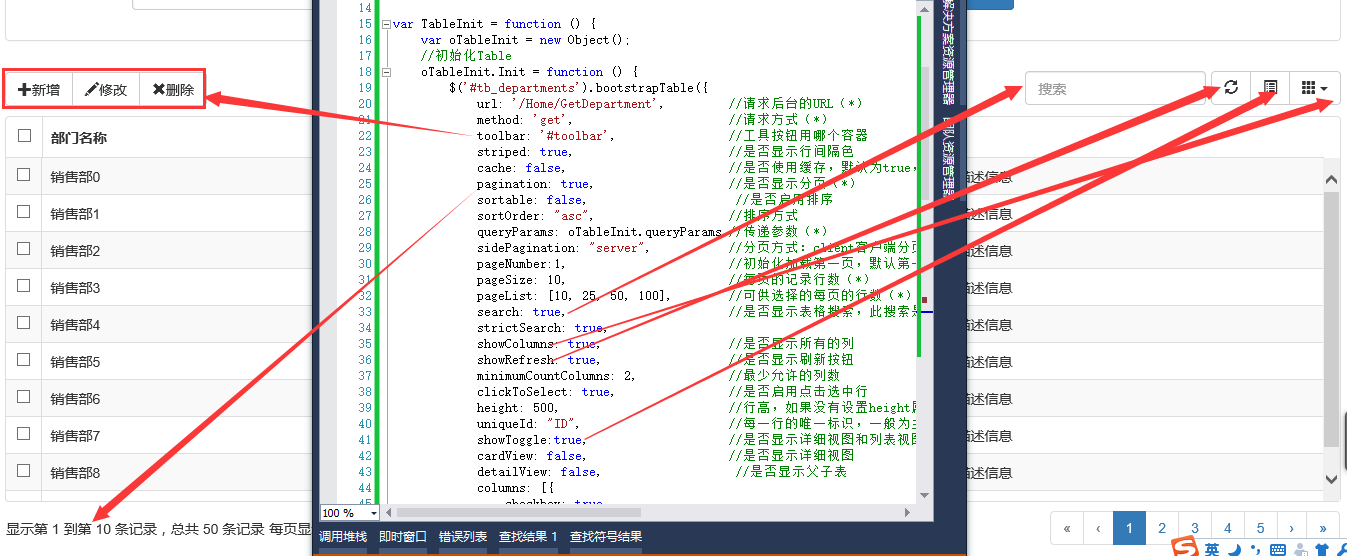
Bootstrap Table 表格参数详解的更多相关文章
- Bootstrap Table使用方法详解
http://www.jb51.net/article/89573.htm bootstrap-table使用总结 bootstrap-table是在bootstrap-table的基础上写出来的,专 ...
- Bootstrap Table的使用详解
Bootstrap Table是基于 Bootstrap 的 jQuery 表格插件,通过简单的设置,就可以拥有强大的单选.多选.排序.分页,以及编辑.导出.过滤(扩展)等等的功能.接下来我们来介绍B ...
- 【转】jqGrid 各种参数 详解
[原文]http://www.cnblogs.com/younggun/archive/2012/08/27/2657922.htmljqGrid 各种参数 详解 JQGrid JQGrid是一个 ...
- 【Jquery系列】JqGrid参数详解
1 概述 本篇文章主要与大家分享JqGrid插件参数问题. 2 参数详解 2.1 初始化参数 2.2 ColModel参数 3 json数据 jqGrid可支持的数据类型:xml.jso ...
- MySQL程序之mysql参数详解
MySQL程序之mysql参数详解 mysql 是一个命令行客户程序,用于交互式或以批处理模式执行SQL语句 用法: mysql [OPTIONS] [database] 参数: 1.-? --hel ...
- vsftpd 配置用户及根目录及其参数详解
vsftpd 常用功能参数配置及参数详解 Table of Contents 1. 配置超级服务 2. 配置匿名用户 3. 配置本地用户登录 4. 配置虚拟用户登录 5. 使用SSL登入 6. 日志文 ...
- JS组件系列——Bootstrap Table 表格行拖拽(二:多行拖拽)
前言:前天刚写了篇JS组件系列——Bootstrap Table 表格行拖拽,今天接到新的需要,需要在之前表格行拖拽的基础上能够同时拖拽选中的多行.博主用了半天时间研究了下,效果是出来了,但是感觉不尽 ...
- iptables参数详解
iptables参数详解 搬运工:尹正杰 注:此片文章来源于linux社区. Iptalbes 是用来设置.维护和检查Linux内核的IP包过滤规则的. 可以定义不同的表,每个表都包含几个内部的链,也 ...
- mha配置参数详解
mha配置参数详解: 参数名字 是否必须 参数作用域 默认值 示例 hostname Yes Local Only - hostname=mysql_server1, hostname=192.168 ...
随机推荐
- Java for LeetCode 208 Implement Trie (Prefix Tree)
Implement a trie with insert, search, and startsWith methods. Note: You may assume that all inputs a ...
- Icon Font的转换
Icon Font是用于网页的纯色图标,这里引用一张网络图片: 由于体积小,易维护等特点,IconFont应用非常广泛. 这里推荐一个转换器,通过Upload一个后缀ttf的字体文件,可以反解出文件下 ...
- Aix下如何运行Java程序
windows下:java -classpath %classpath%;bb.jar;aa.jar [main class]main class是打包的主类,已经指定了主类,可以不输入.另外,IBM ...
- UIView和CALayer的区别
CALayer属于Core Animation部分的内容,比较重要而不太好理解.以下是园子中看到的一篇文章的摘录: 以下摘自<<核心动画编程指南>>: 两者最大的区别是,图层不 ...
- 魔法禁书目录2:回家(codevs 3024)
题目描述 Description 大妈打完三战回家,我知道他是怎么回来的,欧洲到日本有L个站点他决定乘坐恰好n次飞机(不是学院都市的超音速飞机)和m次火车来从第一个站点到达最后一个站点.但是有一点很重 ...
- SOCKet 编程 简介
“一切皆Socket!” 话虽些许夸张,但是事实也是,现在的网络编程几乎都是用的socket. ——有感于实际编程和开源项目研究. 我们深谙信息交流的价值,那网络中进程之间如何通信,如我们每天打开浏览 ...
- Mac平台下Opencv开发环境搭建
OpenCV(Open Source Computer Vision Library),是一个开源的跨平台的计算机视觉库,它实现了图像处理和计算机视觉领域的很多通用算法,可以在多种计算机平台上运行,支 ...
- MyEclipse破解(MEGen.java)
步骤: 1.将MEGen.java粘贴到任意web项目下,运行结果如下: 2.输入注册名:如sun,得到注册码: 3.Window >> Preference >> S ...
- 查看当前文件系统 df -lhT -B G
[root@ok-T test]# df -lhT -B G Filesystem Type 1G-blocks Used Available Use% Mounted on /dev/mapper/ ...
- C#的yield关键字
using System; using System.Collections.Generic; using System.Reflection; using System.Text.RegularEx ...