
HierarchyViewer for iOS 2.0 BETA Introduction
We know HierarchyViewer is an useful tool in Android SDK. The developer and tester, who haven’t the source code of the application, also can get the the hierarchy view of activities, and every properties and screenshot. Can we have similiar tools for iOS? now the answer is sure.
HierarchyViewer for iOS is an open source tool developed by Vowei, use GPL v3 protocol. It is based on eclipse RCP framework, support Mac OS X, Windows and Linux. Following is the screenshot under Mac OS X:

(HierarchyViewer 1.0)
For English User, I am sorry currently we haven’t English version, but we are working on it now. I believe you can easy to use Chinese version after you read this acticle.
Let us begin to introduce it. HierarchyViewer for iOS have two kind of data source: one is UIAutomation script result log file –- contains Automation Results.plist file and screenshots, generating hierarchyviewer from UIAutomation result log have been implemented since 1.0. the other way is achieving from running app on iOS simulator directly, this is the new feature of 2.0.
Open Log File
Open  on the toolbar, A file dialog will be opened, select an Automation Results.plist file.

Then, you can view all the UI element hierarchy in our tool.
How to Create Log File
How can we make the .plist file have UI element information? We must insert following code into the script whatever you interested,it will log all elements structure into result log file:
target.logElementTree()
Then, when you Execute it:

And export the result log to specified folder:

After that, you can open the log file you just created. (There are a log file under /HierarchyViewer-4-iOS/hierarchyviewerlib.test/src/Logs)
2.0 New Feature: achieving hierarchy view from running app on iOS simulator
The new feature of 2.0 can be used only on Mac OS X, before you use it, make sure Instruments and iOS simulator is installed on the system.
There are 3 buttons is added into toolbar in 2.0:
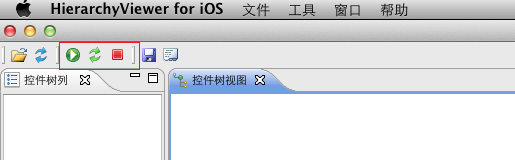
Start the simulator and app
Click , the file dialog will be opened:
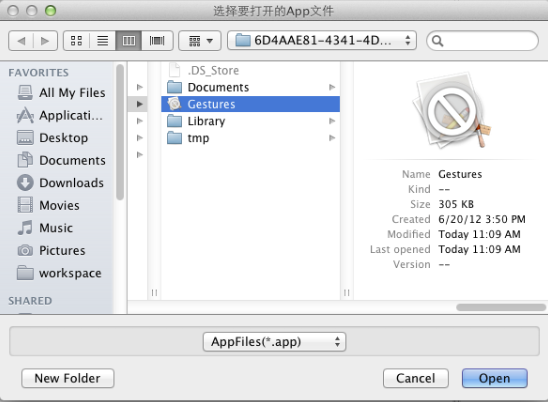
Select and open an iOS simulator App, the simulator will kick off and the app will be load:
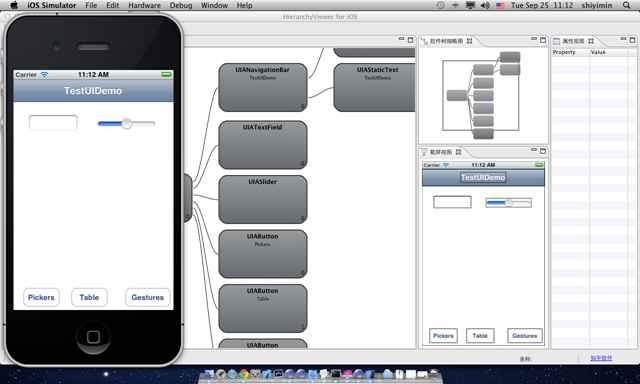
Refresh the Hierarchy view
When your UI is changed, you can click the green fresh button  , to refresh the hierarchy view.

Terminate the simulator and app
Click , will close the simulator.
Other features
HierarchyViewer for iOS 2.0 have some othre useful features, for example:
Generating script calls.
Right click the node in the hierarchy view, It can generate the element call and save in the clipboard:


In clipboard:
target.frontMostApp().windows()[0].tableViews("Empty list").groups("Advanced Options").elements("Advanced Options")
Generating and test iQuery:
iQuery is a jquery-like library developed by Vowei, used to query the iOS and Android UI element. HierarchyViewer have an iquery generator which used to generate and test iQuery statement:

HierarchyViewer for iOS 2.0 BETA Introduction的更多相关文章
- 原创开源项目HierarchyViewer for iOS 2.1 Beta新功能介绍
回顾 HierarchyViewer for iOS是我们发布的一个开源项目,采用GPL v3.0协议. HierarchyViewer for iOS可以帮助iOS应用的开发和测试人员,在没有源代码 ...
- iOS.CocoaPods.0
1. CocoaPods CocoaPods 是Objective-C (iOS and OS X) projects 的依赖管理器. A CocoaPod (singular) is a speci ...
- Mozilla Firefox 24.0 Beta 5 发布
Mozilla今天将Firefox 24.0 Beta 5版本放到了FTP的release目录,新版开始全面支持OS X 10.7全新的滚动条样式,禁止网站插件运行的功能出现在任务栏左侧,调整了界面U ...
- 使用cocos2d-x 3.0 beta开发的小游戏
主要是参考了http://philon.cn/post/cocos2d-x-3.0-zhi-zuo-heng-ban-ge-dou-you-xi 这篇文章,只是移植到了3.0 beta版. 代码地址: ...
- iOS 10.0 更新点(开发者视角)
html, body {overflow-x: initial !important;}html { font-size: 14px; } body { margin: 0px; padding: 0 ...
- 千寻浏览器 1.0 Beta 1(524)(2014年5月27日)
千寻浏览器--又一款新生浏览器今天进入各位浏览迷的视野.千寻浏览器基于IE内核,据传是由百度浏览器的上海团队操刀,在功能定位上,与目前的QQ浏览器有些相似. 千寻来自官方的解释:寻,追寻,探索,又是古 ...
- iOS 7.0获取iphone UDID 【转】
iOS 7.0 iOS 7中苹果再一次无情的封杀mac地址,使用之前的方法获取到的mac地址全部都变成了02:00:00:00:00:00.有问题总的解决啊,于是四处查资料,终于有了思路是否可以使用K ...
- iOS 5.0 后UIViewController新增:willMoveToParentViewController和didMoveToParentViewCon[转]
在iOS 5.0以前,我们在一个UIViewController中这样组织相关的UIView 在以前,一个UIViewController的View可能有很多小的子view.这些子view很多时候 ...
- ENVI 5.0 Beta 体验——影像数据的显示
ENVI 5.0 Beta采用了全新的软件界面,数据的显示和操作跟以往的三视窗方式有很大的区别,下面一块体验一下. 对于栅格数据的显示方面,5.0有了非常大的改进,采用的全新的金字塔计算方法,在第一次 ...
随机推荐
- js console 一些拓展技巧
console.time 方法 / console.timeEnd() 方法 统计一段代码的执行时间, 形参必须一致 console.time("string"); for(var ...
- Xstream(对象和xml转换)
package com.vcredit.framework.utils; import java.io.Writer; import org.apache.commons.lang3.StringUt ...
- IOS第四天(2:字典转模型plist)
HMQuestion.h #import <Foundation/Foundation.h> @interface HMQuestion : NSObject @property (non ...
- Python之编写函数
Python之编写函数 在Python中,定义一个函数要使用 def 语句,依次写出函数名.括号.括号中的参数和冒号:,然后,在缩进块中编写函数体,函数的返回值用 return 语句返回. 我们以自定 ...
- WPF 关于窗口的一些显示效果
0. 一些常用尺寸大小: 1920x1080; 1600x900; 1280x720; 1024x576; 1. 设置窗口的边框样式 使用 Window.WindowStyle 属性可以设置窗口的边框 ...
- youtube视频下载
开你的电脑,然后打开你的浏览器,浏览器可以是IE.Chrome.Firefox等等 在浏览器中输入这个网址:en.savefrom.net,点击Enter键,进入这个网页: 打开你需要下载的y ...
- xmlunit
一个比较方便但也是有点坑的工具. 它能把<struct><int>3</int><boolean>false</boolean></s ...
- CSS之border-radius
1.圆角设置 CSS3圆角只需设置一个属性:border-radius(含义是"边框半径").你为这个属性提供一个值,就能同时设置四个圆角的半径.所有合法的CSS度量值都可以使用: ...
- spring02
1.在spring容器中的一个bean的整个生命周期 1.启动spring容器 2.bean实例化 3.装配属性 4.BeanNameAware:setBeanName 5.BeanFactoryAw ...
- asp.net页面间传值方式
使用asp.net开发项目,必然会在页面间进行传值,本文介绍几种常见的页面传值方式,仅作笔记,以便后续查找使用. 前提:新建两个页面:ValuePage.aspx,ObtainValue.aspx,本 ...