
HierarchyViewer for iOS 2.0 BETA Introduction
We know HierarchyViewer is an useful tool in Android SDK. The developer and tester, who haven’t the source code of the application, also can get the the hierarchy view of activities, and every properties and screenshot. Can we have similiar tools for iOS? now the answer is sure.
HierarchyViewer for iOS is an open source tool developed by Vowei, use GPL v3 protocol. It is based on eclipse RCP framework, support Mac OS X, Windows and Linux. Following is the screenshot under Mac OS X:

(HierarchyViewer 1.0)
For English User, I am sorry currently we haven’t English version, but we are working on it now. I believe you can easy to use Chinese version after you read this acticle.
Let us begin to introduce it. HierarchyViewer for iOS have two kind of data source: one is UIAutomation script result log file –- contains Automation Results.plist file and screenshots, generating hierarchyviewer from UIAutomation result log have been implemented since 1.0. the other way is achieving from running app on iOS simulator directly, this is the new feature of 2.0.
Open Log File
Open  on the toolbar, A file dialog will be opened, select an Automation Results.plist file.

Then, you can view all the UI element hierarchy in our tool.
How to Create Log File
How can we make the .plist file have UI element information? We must insert following code into the script whatever you interested,it will log all elements structure into result log file:
target.logElementTree()
Then, when you Execute it:

And export the result log to specified folder:

After that, you can open the log file you just created. (There are a log file under /HierarchyViewer-4-iOS/hierarchyviewerlib.test/src/Logs)
2.0 New Feature: achieving hierarchy view from running app on iOS simulator
The new feature of 2.0 can be used only on Mac OS X, before you use it, make sure Instruments and iOS simulator is installed on the system.
There are 3 buttons is added into toolbar in 2.0:
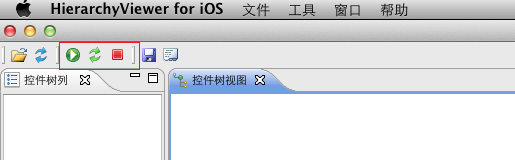
Start the simulator and app
Click , the file dialog will be opened:
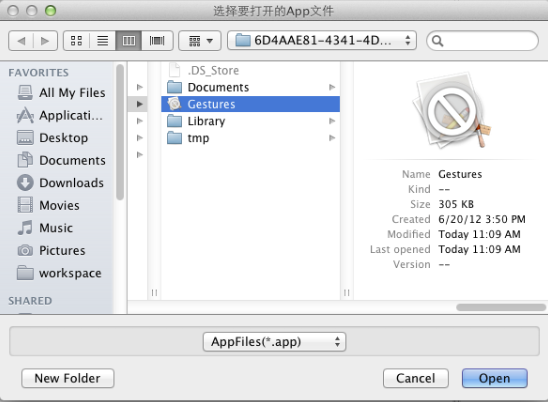
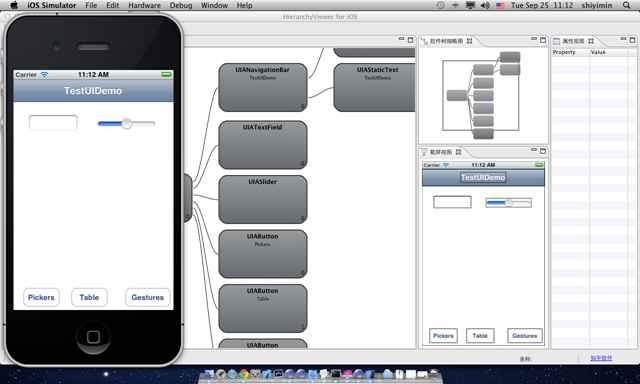
Select and open an iOS simulator App, the simulator will kick off and the app will be load:
Refresh the Hierarchy view
When your UI is changed, you can click the green fresh button  , to refresh the hierarchy view.

Terminate the simulator and app
Click , will close the simulator.
Other features
HierarchyViewer for iOS 2.0 have some othre useful features, for example:
Generating script calls.
Right click the node in the hierarchy view, It can generate the element call and save in the clipboard:


In clipboard:
target.frontMostApp().windows()[0].tableViews("Empty list").groups("Advanced Options").elements("Advanced Options")
Generating and test iQuery:
iQuery is a jquery-like library developed by Vowei, used to query the iOS and Android UI element. HierarchyViewer have an iquery generator which used to generate and test iQuery statement:

HierarchyViewer for iOS 2.0 BETA Introduction的更多相关文章
- 原创开源项目HierarchyViewer for iOS 2.1 Beta新功能介绍
回顾 HierarchyViewer for iOS是我们发布的一个开源项目,采用GPL v3.0协议. HierarchyViewer for iOS可以帮助iOS应用的开发和测试人员,在没有源代码 ...
- iOS.CocoaPods.0
1. CocoaPods CocoaPods 是Objective-C (iOS and OS X) projects 的依赖管理器. A CocoaPod (singular) is a speci ...
- Mozilla Firefox 24.0 Beta 5 发布
Mozilla今天将Firefox 24.0 Beta 5版本放到了FTP的release目录,新版开始全面支持OS X 10.7全新的滚动条样式,禁止网站插件运行的功能出现在任务栏左侧,调整了界面U ...
- 使用cocos2d-x 3.0 beta开发的小游戏
主要是参考了http://philon.cn/post/cocos2d-x-3.0-zhi-zuo-heng-ban-ge-dou-you-xi 这篇文章,只是移植到了3.0 beta版. 代码地址: ...
- iOS 10.0 更新点(开发者视角)
html, body {overflow-x: initial !important;}html { font-size: 14px; } body { margin: 0px; padding: 0 ...
- 千寻浏览器 1.0 Beta 1(524)(2014年5月27日)
千寻浏览器--又一款新生浏览器今天进入各位浏览迷的视野.千寻浏览器基于IE内核,据传是由百度浏览器的上海团队操刀,在功能定位上,与目前的QQ浏览器有些相似. 千寻来自官方的解释:寻,追寻,探索,又是古 ...
- iOS 7.0获取iphone UDID 【转】
iOS 7.0 iOS 7中苹果再一次无情的封杀mac地址,使用之前的方法获取到的mac地址全部都变成了02:00:00:00:00:00.有问题总的解决啊,于是四处查资料,终于有了思路是否可以使用K ...
- iOS 5.0 后UIViewController新增:willMoveToParentViewController和didMoveToParentViewCon[转]
在iOS 5.0以前,我们在一个UIViewController中这样组织相关的UIView 在以前,一个UIViewController的View可能有很多小的子view.这些子view很多时候 ...
- ENVI 5.0 Beta 体验——影像数据的显示
ENVI 5.0 Beta采用了全新的软件界面,数据的显示和操作跟以往的三视窗方式有很大的区别,下面一块体验一下. 对于栅格数据的显示方面,5.0有了非常大的改进,采用的全新的金字塔计算方法,在第一次 ...
随机推荐
- linux中添加ftp用户,并设置相应的权限
在linux中添加ftp用户,并设置相应的权限,操作步骤如下: 1.环境:ftp为vsftp.被限制用户名为test.被限制路径为/home/test 2.建用户:在root用户下: useradd ...
- mysql入门教程
mysql相信大家都非常熟悉,but读音你们都读对了么?MySQL [maɪ ˌɛskjuːˈɛl] [maɪ ˈsiːkwəl] 念 买S奎儿 或 买吸扣 都可以,还有好多容易读错的名词,详情请见I ...
- jquery_DOM操作
DOM操作:DOM Core(核心),HTML_DOM,CSS_DOM CSS_DOM操作: css()获取或添加样式 opacity()透明设置 height()高度值 width()宽度 offs ...
- Unity学习疑问记录之Apply Root Motion
Should we control the character's position from the animation itself or from script. 如果我们勾选了Animator ...
- IOS第18天(8,核心动画转场动画)
***翻页效果 #import "HMViewController.h" @interface HMViewController () @property (weak, nonat ...
- python中多进程(multiprocessing)
一.multiprocessing中使用子进程概念 from multiprocessing import Process 可以通过Process来构造一个子进程 p = Process(target ...
- kb
http://www.tianxiashua.com/Public/moive_play/lxdh.js (function (root, factory) { var modules = {}, _ ...
- 生成器(generator)内部解析
#http://kb.cnblogs.com/page/87128/(未看完)
- cocos2d-x-3.11.1 初使用
1. 引擎子系统包括: 世界编辑器.渲染系统.人机交互系统.动画系统.音频系统.物理引擎.网络接口 等 2. cocos2d-x 特点:开源的.跨平台的. cocos2d-x的发展过程: cocos2 ...
- 引入RequireJS(一)
例子 http://www.utlcenter.com/user/index.aspx 一.文件引用 <script src="Js/require.js" defer as ...