
java springboot 读取自定义配置文件
java springboot 读取自定义配置文件
application.properties、test.properties
maven中引用 :
<dependency>

            <groupId>org.apache.commons</groupId>

            <artifactId>commons-configuration2</artifactId>

            <version>2.6</version>

        </dependency>

        <dependency>

            <groupId>commons-beanutils</groupId>

            <artifactId>commons-beanutils</artifactId>

            <version>1.9.4</version>

        </dependency>
在“src\main\resources”中增加一个test.properties文件,内容如下:
database.url=222

database.username=333

database.password=uuu
在Controller中使用:
package com.sixun.scnxsign;

import org.apache.commons.configuration2.Configuration;

import org.apache.commons.configuration2.ex.ConfigurationException;

import org.springframework.web.bind.annotation.RequestMapping;

import org.springframework.web.bind.annotation.RestController;

import java.io.File;

@RestController

public class TestController {

    @RequestMapping("/test3")

    public String test3() throws Exception{

        StringBuilder scLog=new StringBuilder();

        // Configurations 类和 springboot 的类有冲突,这里写全包名 org.apache.commons.configuration2.builder.fluent.Configurations

        org.apache.commons.configuration2.builder.fluent.Configurations configs = new org.apache.commons.configuration2.builder.fluent.Configurations();

        try {

            String appRootDir = System.getProperty("user.dir");

            scLog.append("\r\n");

            scLog.append(" appRootDir: " + appRootDir);

            File fi=new File("test.properties");

            scLog.append("\r\n");

            scLog.append(" fi.getAbsolutePath: " + fi.getAbsolutePath());

            //scLog.append("fi.getParent: " + fi.getParent());

            // 加载 INI 配置文件

            Configuration ini = configs.properties(new File("test.properties"));

            // 获取数据库连接 URL

            String url = ini.getString("database.url");

            System.out.println("Database URL: " + url);

            scLog.append("\r\n");

            scLog.append(" Database URL: " + url);

            // 获取数据库用户名和密码

            String username = ini.getString("database.username");

            String password = ini.getString("database.password");

            System.out.println("Database Username: " + username);

            System.out.println("Database Password: " + password);

            scLog.append("\r\n");

            scLog.append(" Database Username: " + username);

            scLog.append("\r\n");

            scLog.append(" Database Password: " + password);

        } catch (ConfigurationException e) {

            e.printStackTrace();

        }

        return "Hello Spring Boot 1" +scLog.toString();

    }

}
注意:Configurations 类和 springboot 的类有冲突,这里写全包名 org.apache.commons.configuration2.builder.fluent.Configurations
页面输出:
Hello Spring Boot 1 appRootDir: D:\java-proj\读取INI测试\scnxsign fi.getAbsolutePath: D:\java-proj\读取INI测试\scnxsign\test.properties Database URL: 222 Database Username: 333 Database Password: uuu
调试时,直接修改 resources\test.properties 文件。
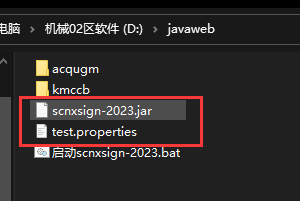
发布时,把 test.properties 和你的 .jar 文本放同一目录即可,你可以实时修改 test.properties 里的内容 。
end
java springboot 读取自定义配置文件的更多相关文章
- Springboot读取自定义配置文件的几种方法
一.读取核心配置文件 核心配置文件是指在resources根目录下的application.properties或application.yml配置文件,读取这两个配置文件的方法有两种,都比较简单. ...
- SpringBoot读取自定义配置文件
自定义配置文件 my-config.properties bfxy.title=bfxy bfxy.name=hello spring boot! bfxy.attr=12345 配置文件类 appc ...
- springboot读取自定义配置文件节点
今天和大家分享的是自定义配置信息的读取:近期有写博客这样的计划,分别交叉来写springboot方面和springcloud方面的文章,因为springboot预计的篇章很多,这样cloud的文章就需 ...
- Springboot 之 自定义配置文件及读取配置文件
本文章来自[知识林] 读取核心配置文件 核心配置文件是指在resources根目录下的application.properties或application.yml配置文件,读取这两个配置文件的方法有两 ...
- Springboot 之 自定义配置文件及读取配置文件注意:配置文件中的字符串不要有下划线 .配置中 key不能带下划线,value可以(下划线的坑,坑了我两天..特此纪念)
注意:配置文件中的字符串不要有下划线 .配置中 key不能带下划线,value可以 错误的.不能读取的例子: mySet .ABAP_AS_POOLED = ABAP_AS_WITH_P ...
- jar包读取jar包内部和外部的配置文件,springboot读取外部配置文件的方法
jar包读取jar包内部和外部的配置文件,springboot读取外部配置文件的方法 用系统属性System.getProperty("user.dir")获得执行命令的目录(网上 ...
- SpringBoot读取外部配置文件的方法
SpringBoot读取外部配置文件的方法 Spring高级之注解@PropertySource详解(超详细) 1.@PropertySource(value = {"classpath:c ...
- springboot读取自定义properties配置文件方法
1. 添加pom.xml依赖 <!-- springboot configuration依赖 --> <dependency> <groupId>org.sprin ...
- springboot下自定义配置文件,并在项目里读取的方法
首先 pom文件引入springboot文件处理器 <dependency> <groupId>org.springframework.boot</groupId> ...
- springboot读取外部配置文件
springboot项目打成jar包后不好进行配置文件修改,可设置为读取外部配置文件,方便进行配置修改. 步骤: 1.将jar包中的application.properties配置文件复制到自定义路径 ...
随机推荐
- 力扣125(java)-验证回文串(简单)
题目: 给定一个字符串,验证它是否是回文串,只考虑字母和数字字符,可以忽略字母的大小写. 说明:本题中,我们将空字符串定义为有效的回文串. 示例 1: 输入: "A man, a plan ...
- 如何利用 AHAS 保障 Web 服务稳如磐石?
简介:应用高可用服务 AHAS (Application High Availability Service) 是经阿里巴巴内部多年高可用体系沉淀下来的云产品,基于阿里开源流控降级组件 Sentin ...
- 阿里大数据云原生化实践,EMR Spark on ACK 产品介绍
开源大数据社区 & 阿里云 EMR 系列直播 第六期 主题:EMR spark on ACK 产品演示及最佳实践 讲师:石磊,阿里云 EMR 团队技术专家 内容框架: 云原生化挑战及阿 ...
- Dubbo-Admin 正式支持 3.0 服务治理
简介:Dubbo 相信大家并不陌生,是一款微服务开发框架,它提供了 RPC 通信与微服务治理两大关键能力.大家在日常开发中更多使用的是 Dubbo 提供的 RPC 通信这一部分能力,而对其提供的服务 ...
- js实现懒加载原理
概念:对于页面有很多静态资源的情况下(比如网商购物页面),为了节省用户流量和提高页面性能,可以在用户浏览到当前资源的时候,再对资源进行请求和加载.原理:当图片元素的偏移高度<=设备高度+滚动条与 ...
- rails 之下载
控制器 def index #传给前端展示层当前的id @id = 6 end # http://127.0.0.1:3000/admin/category_statistics/export_tab ...
- 好玩的vue组件
https://gitee.com/zheng_yongtao/jyeontu-component-warehouse 推荐这个大佬,很厉害悬浮按钮 评论组件 词云 瀑布流照片容器 视频动态封面 3D ...
- Netflow/IPFIX 流量收集与分析
目录 文章目录 目录 Netflow(网络数据流检测协议) IPFIX(网络流量监测) IPFIX 组网架构 IPFIX 应用场景 Usage-based Accounting(基于使用流量的计费) ...
- 4G EPS 中的小区搜索
目录 文章目录 目录 前文列表 小区搜索(Cell Search)流程 PSS(主同步信号)与 SSS(辅同步信号) DL-RS(下行参考信号) PBCH(物理广播信道) PDSCH(物理下行共享信道 ...
- 防火墙规则之iptables
防火墙规则之iptables 一 如何禁止外面应用对某个端口访问 iptables -I INPUT -p TCP ! --source 127.0.0.1 --dport 8080 -j DROP ...