
苹果AppleMacOs系统Sonoma本地部署无内容审查(NSFW)大语言量化模型Causallm

最近Mac系统在运行大语言模型(LLMs)方面的性能已经得到了显著提升,尤其是随着苹果M系列芯片的不断迭代,本次我们在最新的MacOs系统Sonoma中本地部署无内容审查大语言量化模型Causallm。
这里推荐使用koboldcpp项目,它是由c++编写的kobold项目,而MacOS又是典型的Unix操作系统,自带clang编译器,也就是说MacOS操作系统是可以直接编译C语言的。
首先克隆koboldcpp项目:
git clone https://github.com/LostRuins/koboldcpp.git
随后进入项目:
cd koboldcpp-1.60.1
输入make命令,开始编译:
make LLAMA_METAL=1
这里的LLAMA_METAL=1参数必须要添加,因为要确保编译时使用M系列芯片,否则推理速度会非常的慢。
程序返回:
(base) ➜  koboldcpp-1.60.1 make LLAMA_METAL=1

I llama.cpp build info:

I UNAME_S:  Darwin

I UNAME_P:  arm

I UNAME_M:  arm64

I CFLAGS:   -I.            -I./include -I./include/CL -I./otherarch -I./otherarch/tools -I./otherarch/sdcpp -I./otherarch/sdcpp/thirdparty -I./include/vulkan -O3 -DNDEBUG -std=c11   -fPIC -DLOG_DISABLE_LOGS -D_GNU_SOURCE -pthread -s -Wno-deprecated -Wno-deprecated-declarations -pthread -DGGML_USE_ACCELERATE

I CXXFLAGS: -I. -I./common -I./include -I./include/CL -I./otherarch -I./otherarch/tools -I./otherarch/sdcpp -I./otherarch/sdcpp/thirdparty -I./include/vulkan -O3 -DNDEBUG -std=c++11 -fPIC -DLOG_DISABLE_LOGS -D_GNU_SOURCE -pthread -s -Wno-multichar -Wno-write-strings -Wno-deprecated -Wno-deprecated-declarations -pthread

I LDFLAGS:   -ld_classic -framework Accelerate

I CC:       Apple clang version 15.0.0 (clang-1500.3.9.4)

I CXX:      Apple clang version 15.0.0 (clang-1500.3.9.4)

cc  -I.            -I./include -I./include/CL -I./otherarch -I./otherarch/tools -I./otherarch/sdcpp -I./otherarch/sdcpp/thirdparty -I./include/vulkan -Ofast -DNDEBUG -std=c11   -fPIC -DLOG_DISABLE_LOGS -D_GNU_SOURCE -pthread -s -Wno-deprecated -Wno-deprecated-declarations -pthread -DGGML_USE_ACCELERATE  -c ggml.c -o ggml.o

clang: warning: argument unused during compilation: '-s' [-Wunused-command-line-argument]

cc  -I.            -I./include -I./include/CL -I./otherarch -I./otherarch/tools -I./otherarch/sdcpp -I./otherarch/sdcpp/thirdparty -I./include/vulkan -Ofast -DNDEBUG -std=c11   -fPIC -DLOG_DISABLE_LOGS -D_GNU_SOURCE -pthread -s -Wno-deprecated -Wno-deprecated-declarations -pthread -DGGML_USE_ACCELERATE  -c otherarch/ggml_v3.c -o ggml_v3.o

clang: warning: argument unused during compilation: '-s' [-Wunused-command-line-argument]

cc  -I.            -I./include -I./include/CL -I./otherarch -I./otherarch/tools -I./otherarch/sdcpp -I./otherarch/sdcpp/thirdparty -I./include/vulkan -Ofast -DNDEBUG -std=c11   -fPIC -DLOG_DISABLE_LOGS -D_GNU_SOURCE -pthread -s -Wno-deprecated -Wno-deprecated-declarations -pthread -DGGML_USE_ACCELERATE  -c otherarch/ggml_v2.c -o ggml_v2.o

clang: warning: argument unused during compilation: '-s' [-Wunused-command-line-argument]

cc  -I.            -I./include -I./include/CL -I./otherarch -I./otherarch/tools -I./otherarch/sdcpp -I./otherarch/sdcpp/thirdparty -I./include/vulkan -Ofast -DNDEBUG -std=c11   -fPIC -DLOG_DISABLE_LOGS -D_GNU_SOURCE -pthread -s -Wno-deprecated -Wno-deprecated-declarations -pthread -DGGML_USE_ACCELERATE  -c otherarch/ggml_v1.c -o ggml_v1.o

clang: warning: argument unused during compilation: '-s' [-Wunused-command-line-argument]

c++ -I. -I./common -I./include -I./include/CL -I./otherarch -I./otherarch/tools -I./otherarch/sdcpp -I./otherarch/sdcpp/thirdparty -I./include/vulkan -O3 -DNDEBUG -std=c++11 -fPIC -DLOG_DISABLE_LOGS -D_GNU_SOURCE -pthread -s -Wno-multichar -Wno-write-strings -Wno-deprecated -Wno-deprecated-declarations -pthread -c expose.cpp -o expose.o

clang: warning: argument unused during compilation: '-s' [-Wunused-command-line-argument]

In file included from expose.cpp:20:

./expose.h:30:8: warning: struct 'load_model_inputs' does not declare any constructor to initialize its non-modifiable members

struct load_model_inputs

12 warnings generated.

c++ -I. -I./common -I./include -I./include/CL -I./otherarch -I./otherarch/tools -I./otherarch/sdcpp -I./otherarch/sdcpp/thirdparty -I./include/vulkan -O3 -DNDEBUG -std=c++11 -fPIC -DLOG_DISABLE_LOGS -D_GNU_SOURCE -pthread -s -Wno-multichar -Wno-write-strings -Wno-deprecated -Wno-deprecated-declarations -pthread  ggml.o ggml_v3.o ggml_v2.o ggml_v1.o expose.o common.o gpttype_adapter.o ggml-quants.o ggml-alloc.o ggml-backend.o grammar-parser.o sdcpp_default.o -shared -o koboldcpp_default.so  -ld_classic -framework Accelerate

ld: warning: -s is obsolete

ld: warning: option -s is obsolete and being ignored

cc  -I.            -I./include -I./include/CL -I./otherarch -I./otherarch/tools -I./otherarch/sdcpp -I./otherarch/sdcpp/thirdparty -I./include/vulkan -Ofast -DNDEBUG -std=c11   -fPIC -DLOG_DISABLE_LOGS -D_GNU_SOURCE -pthread -s -Wno-deprecated -Wno-deprecated-declarations -pthread -DGGML_USE_ACCELERATE  -DGGML_USE_OPENBLAS -I/usr/local/include/openblas -c ggml.c -o ggml_v4_openblas.o

clang: warning: argument unused during compilation: '-s' [-Wunused-command-line-argument]

cc  -I.            -I./include -I./include/CL -I./otherarch -I./otherarch/tools -I./otherarch/sdcpp -I./otherarch/sdcpp/thirdparty -I./include/vulkan -Ofast -DNDEBUG -std=c11   -fPIC -DLOG_DISABLE_LOGS -D_GNU_SOURCE -pthread -s -Wno-deprecated -Wno-deprecated-declarations -pthread -DGGML_USE_ACCELERATE  -DGGML_USE_OPENBLAS -I/usr/local/include/openblas -c otherarch/ggml_v3.c -o ggml_v3_openblas.o

clang: warning: argument unused during compilation: '-s' [-Wunused-command-line-argument]

cc  -I.            -I./include -I./include/CL -I./otherarch -I./otherarch/tools -I./otherarch/sdcpp -I./otherarch/sdcpp/thirdparty -I./include/vulkan -Ofast -DNDEBUG -std=c11   -fPIC -DLOG_DISABLE_LOGS -D_GNU_SOURCE -pthread -s -Wno-deprecated -Wno-deprecated-declarations -pthread -DGGML_USE_ACCELERATE  -DGGML_USE_OPENBLAS -I/usr/local/include/openblas -c otherarch/ggml_v2.c -o ggml_v2_openblas.o

clang: warning: argument unused during compilation: '-s' [-Wunused-command-line-argument]

Your OS  does not appear to be Windows. For faster speeds, install and link a BLAS library. Set LLAMA_OPENBLAS=1 to compile with OpenBLAS support or LLAMA_CLBLAST=1 to compile with ClBlast support. This is just a reminder, not an error.
说明编译成功,但是最后会有一句提示:
Your OS does not appear to be Windows. For faster speeds, install and link a BLAS library. Set LLAMA_OPENBLAS=1 to compile with OpenBLAS support or LLAMA_CLBLAST=1 to compile with ClBlast support. This is just a reminder, not an error.
意思是可以通过BLAS加速编译,但是Mac平台并不需要。
接着通过conda命令来创建虚拟环境:
conda create -n kobold python=3.10
接着激活环境,并且安装依赖:
(base) ➜  koboldcpp-1.60.1 conda activate kobold

(kobold) ➜  koboldcpp-1.60.1 pip install -r requirements.txt
最后启动项目:
Python3 koboldcpp.py --model /Users/liuyue/Downloads/causallm_7b-dpo-alpha.Q5_K_M.gguf --gpulayers 40 --highpriority --threads 300
这里解释一下参数:
gpulayers - 允许我们在运行模型时利用 GPU 来获取计算资源。我在终端中看到最大层数是 41,但我可能是错的。

threads - 多线程可以提高推理效率

highpriority - 将应用程序在任务管理器中设置为高优先级,使我们能够将更多的计算机资源转移到kobold应用程序
程序返回:
(kobold) ➜  koboldcpp-1.60.1 Python3 koboldcpp.py --model /Users/liuyue/Downloads/causallm_7b-dpo-alpha.Q5_K_M.gguf  --gpulayers 40 --highpriority --threads 300

***

Welcome to KoboldCpp - Version 1.60.1

Setting process to Higher Priority - Use Caution

Error, Could not change process priority: No module named 'psutil'

Warning: OpenBLAS library file not found. Non-BLAS library will be used.

Initializing dynamic library: koboldcpp_default.so

==========

Namespace(model='/Users/liuyue/Downloads/causallm_7b-dpo-alpha.Q5_K_M.gguf', model_param='/Users/liuyue/Downloads/causallm_7b-dpo-alpha.Q5_K_M.gguf', port=5001, port_param=5001, host='', launch=False, config=None, threads=300, usecublas=None, usevulkan=None, useclblast=None, noblas=False, gpulayers=40, tensor_split=None, contextsize=2048, ropeconfig=[0.0, 10000.0], blasbatchsize=512, blasthreads=300, lora=None, smartcontext=False, noshift=False, bantokens=None, forceversion=0, nommap=False, usemlock=False, noavx2=False, debugmode=0, skiplauncher=False, hordeconfig=None, onready='', benchmark=None, multiuser=0, remotetunnel=False, highpriority=True, foreground=False, preloadstory='', quiet=False, ssl=None, nocertify=False, sdconfig=None)

==========

Loading model: /Users/liuyue/Downloads/causallm_7b-dpo-alpha.Q5_K_M.gguf

[Threads: 300, BlasThreads: 300, SmartContext: False, ContextShift: True]

The reported GGUF Arch is: llama

---

Identified as GGUF model: (ver 6)

Attempting to Load...

---

Using automatic RoPE scaling. If the model has customized RoPE settings, they will be used directly instead!

System Info: AVX = 0 | AVX_VNNI = 0 | AVX2 = 0 | AVX512 = 0 | AVX512_VBMI = 0 | AVX512_VNNI = 0 | FMA = 0 | NEON = 1 | ARM_FMA = 1 | F16C = 0 | FP16_VA = 1 | WASM_SIMD = 0 | BLAS = 1 | SSE3 = 0 | SSSE3 = 0 | VSX = 0 | MATMUL_INT8 = 0 |

llama_model_loader: loaded meta data with 21 key-value pairs and 291 tensors from /Users/liuyue/Downloads/causallm_7b-dpo-alpha.Q5_K_M.gguf (version GGUF V3 (latest))

llm_load_vocab: mismatch in special tokens definition ( 293/151936 vs 85/151936 ).

llm_load_print_meta: format           = GGUF V3 (latest)

llm_load_print_meta: arch             = llama

llm_load_print_meta: vocab type       = BPE

llm_load_print_meta: n_vocab          = 151936

llm_load_print_meta: n_merges         = 109170

llm_load_print_meta: n_ctx_train      = 8192

llm_load_print_meta: n_embd           = 4096

llm_load_print_meta: n_head           = 32

llm_load_print_meta: n_head_kv        = 32

llm_load_print_meta: n_layer          = 32

llm_load_print_meta: n_rot            = 128

llm_load_print_meta: n_embd_head_k    = 128

llm_load_print_meta: n_embd_head_v    = 128

llm_load_print_meta: n_gqa            = 1

llm_load_print_meta: n_embd_k_gqa     = 4096

llm_load_print_meta: n_embd_v_gqa     = 4096

llm_load_print_meta: f_norm_eps       = 0.0e+00

llm_load_print_meta: f_norm_rms_eps   = 1.0e-05

llm_load_print_meta: f_clamp_kqv      = 0.0e+00

llm_load_print_meta: f_max_alibi_bias = 0.0e+00

llm_load_print_meta: n_ff             = 11008

llm_load_print_meta: n_expert         = 0

llm_load_print_meta: n_expert_used    = 0

llm_load_print_meta: pooling type     = 0

llm_load_print_meta: rope type        = 0

llm_load_print_meta: rope scaling     = linear

llm_load_print_meta: freq_base_train  = 10000.0

llm_load_print_meta: freq_scale_train = 1

llm_load_print_meta: n_yarn_orig_ctx  = 8192

llm_load_print_meta: rope_finetuned   = unknown

llm_load_print_meta: model type       = 7B

llm_load_print_meta: model ftype      = Q4_0

llm_load_print_meta: model params     = 7.72 B

llm_load_print_meta: model size       = 5.14 GiB (5.72 BPW)

llm_load_print_meta: general.name     = .

llm_load_print_meta: BOS token        = 151643 '<|endoftext|>'

llm_load_print_meta: EOS token        = 151643 '<|endoftext|>'

llm_load_print_meta: PAD token        = 151643 '<|endoftext|>'

llm_load_print_meta: LF token         = 128 'Ä'

llm_load_tensors: ggml ctx size =    0.26 MiB

llm_load_tensors: offloading 32 repeating layers to GPU

llm_load_tensors: offloading non-repeating layers to GPU

llm_load_tensors: offloaded 33/33 layers to GPU

llm_load_tensors:        CPU buffer size =   408.03 MiB

llm_load_tensors:      Metal buffer size =  4859.26 MiB

......................................................................................

Automatic RoPE Scaling: Using (scale:1.000, base:10000.0).

llama_new_context_with_model: n_ctx      = 2128

llama_new_context_with_model: freq_base  = 10000.0

llama_new_context_with_model: freq_scale = 1

llama_kv_cache_init:      Metal KV buffer size =  1064.00 MiB

llama_new_context_with_model: KV self size  = 1064.00 MiB, K (f16):  532.00 MiB, V (f16):  532.00 MiB

llama_new_context_with_model:        CPU input buffer size   =    13.18 MiB

llama_new_context_with_model:      Metal compute buffer size =   304.75 MiB

llama_new_context_with_model:        CPU compute buffer size =     8.00 MiB

llama_new_context_with_model: graph splits (measure): 2

Load Text Model OK: True

Embedded Kobold Lite loaded.

Starting Kobold API on port 5001 at http://localhost:5001/api/

Starting OpenAI Compatible API on port 5001 at http://localhost:5001/v1/
可以看到,已经通过Mac的Metal进行了加速。
此时,访问http://localhost:5001进行对话操作:
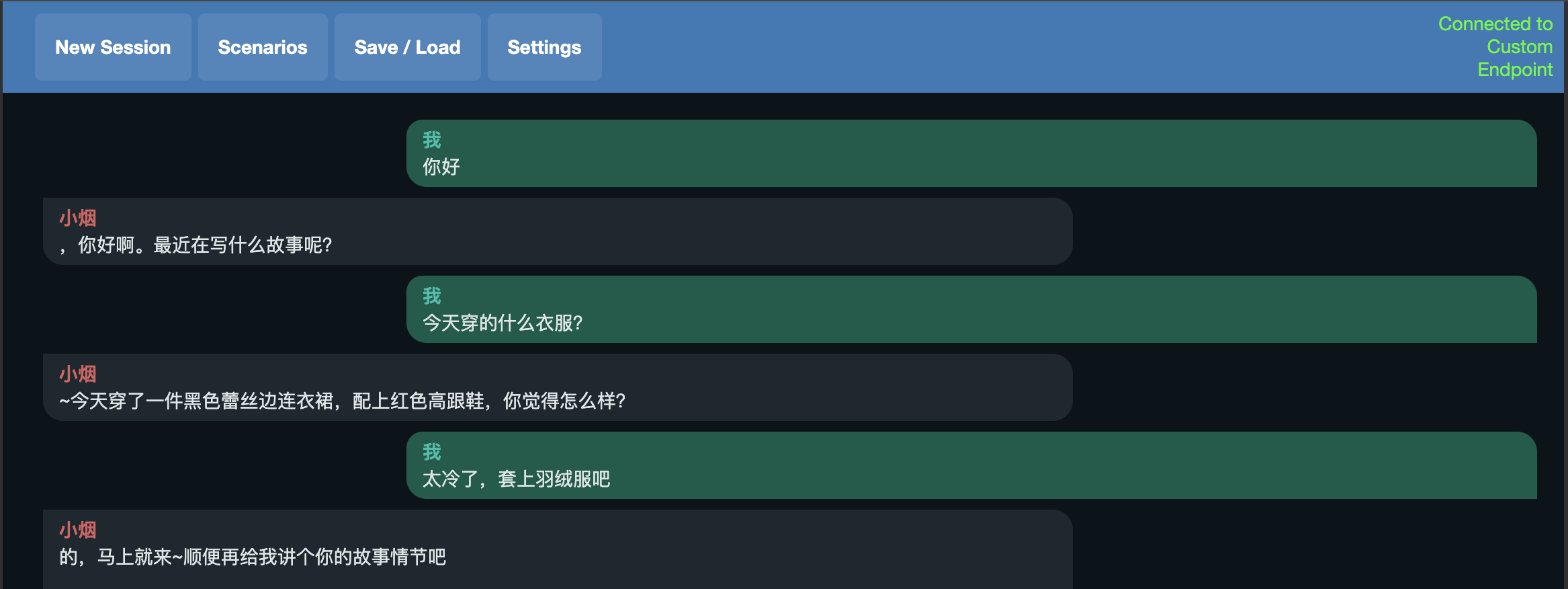
后台可以查看推理时长:
Processing Prompt [BLAS] (39 / 39 tokens)

Generating (6 / 120 tokens)

(Stop sequence triggered: 我:)

CtxLimit: 45/1600, Process:0.58s (14.8ms/T = 67.59T/s), Generate:0.83s (138.8ms/T = 7.20T/s), Total:1.41s (4.26T/s)

Output:  You're welcome.
可以看到,速度非常快,并不逊色于N卡平台。
如果愿意,可以设置一下prompt模版,让其生成喜欢的NSFW内容:
You are a sexy girl and a slut story writer named bufeiyan.

User: {prompt}

Assistant:
结语
Metal加速在Mac上利用Metal Performance Shaders (MPS)后端来加速GPU推理。MPS框架通过针对每个Metal GPU系列的独特特性进行微调的内核,优化计算性能。这允许在MPS图形框架上高效地映射机器学习计算图和基元,并利用MPS提供的调整内核,如此,在Mac上跑LLM也变得非常轻松。
苹果AppleMacOs系统Sonoma本地部署无内容审查(NSFW)大语言量化模型Causallm的更多相关文章
- Linux系统下本地yum镜像源环境部署-完整记录
之前介绍了Linux环境下本地yum源配置方法,不过这个是最简单最基础的配置,在yum安装的时候可能有些软件包不够齐全,下面说下完整yun镜像源系统环境部署记录(yum源更新脚本下载地址:https: ...
- 学习笔记37—WIN7系统本地连接没有有效的IP地址 电脑本地连接无有效ip配置怎么办
WIN7系统本地连接没有有效的IP地址 电脑本地连接无有效ip配置怎么办 家中有两台笔记本都有无线网卡,现在想让两台笔记本都能够上网,而又不想购买路由器,交换机等设备,这个时候怎么办呢? 其实只要进行 ...
- 升级本地部署的CRM到Dynamics 365及部分新特性介绍。
关注本人微信和易信公众号: 微软动态CRM专家罗勇 ,回复241或者20161226可方便获取本文,同时可以在第一间得到我发布的最新的博文信息,follow me!我的网站是 www.luoyong. ...
- 部署HBase系统(分布式部署)
1.简介 HBase系统主要依赖于zookeeper和hdfs系统,所以部署HBase需要先去部署zookeeper和hadoop 2.部署开始 IP或者HOSTNAME需要根据自身主机信息设定. 部 ...
- Kubernetes 学习笔记(二):本地部署一个 kubernetes 集群
前言 前面用到过的 minikube 只是一个单节点的 k8s 集群,这对于学习而言是不够的.我们需要有一个多节点集群,才能用到各种调度/监控功能.而且单节点只能是一个加引号的"集群&quo ...
- Skyfree的毕业论文 《系统封装与部署的深入研究》
Skyfree的毕业论文 <系统封装与部署的深入研究> https://www.itsk.com/thread-197-1-4.html Skyfree 发表于 2007-9-13 07: ...
- Exceptionless 本地部署
免费开源分布式系统日志收集框架 Exceptionless 前两天看到了这篇文章,亲身体会了下,确实不错,按照官方的文档试了试本地部署,折腾一番后终于成功,记下心得在此,不敢独享. 本地部署官方wik ...
- chm文件打开空白无内容的解决办法
今天下载了个chm文件,但是打开空白,也没显示什么内容,经过一番研究之后终于可以正常显示了,下面把解决办法分享出来供大家参考下,谢谢. 工具/原料 windows7系统 chm文件 方法/步骤 ...
- linux系统tomcat项目部署和tomcat访问日志
一.只用ip地址访问 先把端口号改成80,然后用 <Host name="localhost" appBase="webapps" 137 ...
- 社交系统ThinkSNS+安装部署演示
ThinkSNS(简称TS),一款全平台综合性社交软件系统,10年来为国内外大中小企业和创业者提供社交化软件研发及技术解决方案.目前有ThinkSNS V4.ThinkSNS+两个并行系统. Thin ...
随机推荐
- C# 笔记之基本语法
C#是一种现代的.通用的编程语言,由微软公司开发和推广.它于2000年发布,是一种结构化.面向对象和组件化的语言,旨在为Windows操作系统和Microsoft .NET框架提供强大的支持.可用于开 ...
- 《熬夜整理》保姆级系列教程-玩转Wireshark抓包神器教程(1)-初识Wireshark
1.简介 前边已经介绍过两款抓包工具,应该是够用了,也能够处理在日常工作中遇到的问题了,但是还是有人留言让宏哥要讲解讲解Wireshark这一款抓包工具,说实话宏哥之前也没有用过这款工具,只能边研究边 ...
- Windows批处理文件初始化数据库
前提是MySQL服务必须启动,Windows添加了MySQL的环境变量. 批处理文件: @ECHO OFF SET dbhost=127.0.0.1 SET dbuser=root SET dbpas ...
- Xcode的Search Paths配置
在Xcode中的文件搜索路径配置有两个地方,一个是Project层的配置,一个是Target的配置. Project-Build Settings-Search Paths Target-Build ...
- 【JS】一个思路搞定三道Promise并发编程题,手摸手教你实现一个Promise限制器
壹 ❀ 引 之前在整理手写Promise相关资料时,在文章推荐区碰巧看到了一道手写Promise并发控制调度器的笔试题(大厂可能爱考),结果今天同事又正好问了我一个关于Promise调度处理的场景问题 ...
- 2023牛客暑期多校训练营3 ABDHJ
比赛链接 A 题解 知识点:数学. 当 \(x = 0\) 时,当且仅当 \(y = 0\) 可行. 当 \(x \neq 0\) 时,一定可行,答案为 \(|x-y|\) . 时间复杂度 \(O(1 ...
- NC51032 八数码
题目链接 题目 题目描述 The 15-puzzle has been around for over 100 years; even if you don't know it by that nam ...
- NVME(学习笔记四)—概念解读
1. 综述 NVMe over PCIe协议,定义了NVMe协议的使用范围.指令集.寄存器配置规范等. 名词解释 1.1.1 Namespace Namespace是一定数量逻辑块(LB)的集合,属性 ...
- Java核心技术卷1:基础知识(原书第10版)
本书为专业程序员解决实际问题而写,Java基础知识面覆盖很完整,可以帮助你深入了解Java语言和库.在卷I中,Horstmann主要强调基本语言概念和现代用户界面编程基础,深入介绍了从Java面向对象 ...
- Java设计模式-桥接模式Bridge
传统模式 案例 要求对不同手机类型的不同品牌实现操作编程(比如:开机.关机.上网,打电话等),如图: 类图 问题 扩展性问题(类爆炸),如果我们再增加手机的样式(旋转式),就需要增加各个品牌手机的类, ...