
原创软件 | 系统服务工具箱原创软件(587KB)--基于aardio开发的第一个程序
1 系统服务工具箱简介
该软件是我使用aardio开发的第一个程序,它集成了多个系统常用的快捷键,无需记住各种命令就能快捷使用cmd管理员、计算机管理、控制面板、组策略、注册表、服务、任务管理、卸载程序八大功能,相当适合计算机小白用户使用。
下载地址:https://www.123pan.com/s/9Rn9-A5kpH.html
2 系统服务工具箱展示
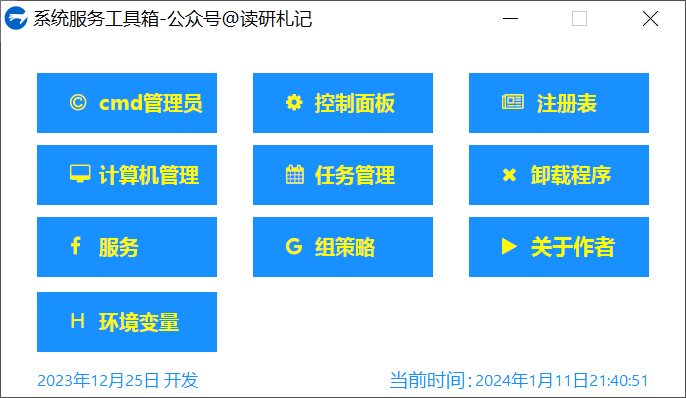
3 系统服务工具箱-aardio源代码
aardio工程的源代码(仅供参考)如下:
import fonts.fontAwesome;

import win.ui;

import process;

import com;

/*DSG{{*/

mainForm = win.form(text="系统服务工具箱-公众号@读研札记";right=455;bottom=239;bgcolor=16777215;border="thin";max=false)

mainForm.add(

plus_about_author={cls="plus";text="关于作者";left=312;top=120;right=432;bottom=160;align="left";bgcolor=16748568;color=65298;font=LOGFONT(h=-13;weight=700);iconStyle={align="left";font=LOGFONT(h=-13;name='FontAwesome');padding={left=20}};iconText='\uF04B';notify=1;textPadding={left=39};z=9};

plus_appwiz={cls="plus";text="卸载程序";left=312;top=72;right=432;bottom=112;align="left";bgcolor=-28648;color=64511;font=LOGFONT(h=-13;name='微软雅黑';weight=700);iconStyle={align="left";font=LOGFONT(h=-13;name='FontAwesome');padding={left=20}};iconText='\uF00D';notify=1;textPadding={left=39};z=5};

plus_cmd_admin={cls="plus";text="cmd管理员";left=24;top=24;right=144;bottom=64;align="left";bgcolor=-28648;color=64511;font=LOGFONT(h=-13;name='微软雅黑';weight=700);iconStyle={align="left";font=LOGFONT(h=-13;name='FontAwesome');padding={left=20}};iconText='\uF1F9';notify=1;textPadding={left=39};z=2};

plus_compmgmt={cls="plus";text="计算机管理";left=24;top=72;right=144;bottom=112;align="left";bgcolor=-28648;color=64511;font=LOGFONT(h=-13;name='微软雅黑';weight=700);iconStyle={align="left";font=LOGFONT(h=-13;name='FontAwesome');padding={left=20}};iconText='\uF108';notify=1;textPadding={left=39};z=3};

plus_control={cls="plus";text="控制面板";left=168;top=24;right=288;bottom=64;align="left";bgcolor=-28648;color=64511;font=LOGFONT(h=-13;name='微软雅黑';weight=700);iconStyle={align="left";font=LOGFONT(h=-13;name='FontAwesome');padding={left=20}};iconText='\uF013';notify=1;textPadding={left=39};z=4};

plus_gpedit={cls="plus";text="组策略";left=168;top=120;right=288;bottom=160;align="left";bgcolor=-28648;color=64511;font=LOGFONT(h=-13;name='微软雅黑';weight=700);iconStyle={align="left";font=LOGFONT(h=-13;name='FontAwesome');padding={left=20}};iconText='\uF1A0';notify=1;textPadding={left=39};z=8};

plus_path={cls="plus";text="环境变量";left=24;top=170;right=144;bottom=210;align="left";bgcolor=-28648;color=64511;font=LOGFONT(h=-13;name='微软雅黑';weight=700);iconStyle={align="left";font=LOGFONT(h=-14;name='FontAwesome');padding={left=20}};iconText="H";notify=1;textPadding={left=39};z=12};

plus_regedit={cls="plus";text=" 注册表";left=312;top=24;right=432;bottom=64;align="left";bgcolor=-28648;color=64511;font=LOGFONT(h=-13;name='微软雅黑';weight=700);iconStyle={align="left";font=LOGFONT(h=-13;name='FontAwesome');padding={left=20}};iconText='\uF1EA';notify=1;textPadding={left=39};z=1};

plus_services={cls="plus";text="服务";left=24;top=120;right=144;bottom=160;align="left";bgcolor=-28648;color=64511;font=LOGFONT(h=-13;name='微软雅黑';weight=700);iconStyle={align="left";font=LOGFONT(h=-13;name='FontAwesome');padding={left=20}};iconText='\uF09A';notify=1;textPadding={left=39};z=7};

plus_taskmgr={cls="plus";text="任务管理";left=168;top=72;right=288;bottom=112;align="left";bgcolor=-28648;color=64511;font=LOGFONT(h=-13;name='微软雅黑';weight=700);iconStyle={align="left";font=LOGFONT(h=-13;name='FontAwesome');padding={left=20}};iconText='\uF073';notify=1;textPadding={left=39};z=6};

static={cls="static";text="Static";left=296;top=221;right=432;bottom=237;align="right";color=16748568;font=LOGFONT(h=-11);transparent=1;z=10};

static2={cls="static";text="2023年12月25日 开发";left=24;top=221;right=152;bottom=237;color=16748568;font=LOGFONT(h=-11);transparent=1;z=11};

static3={cls="static";text="当前时间:";left=259;top=220;right=330;bottom=237;color=16748568;transparent=1;z=13}

)

/*}}*/

//显示时间

tmid = mainForm.setInterval(

    50/*毫秒*/,

    function(hwnd,msg,id,tick){//定时执行代码

        //显示现在时间

        tm = time()

        timestr = tm.year+"年"+tm.month+"月"+tm.day+"日"+tm.hour+":"+tm.minute+":"+tm.second

        mainForm.static.text=timestr;

        //mainForm.killtimer(id)//移除此定时器

        //mainForm.settimer(id,2000)//重新设定时间间隔

    }

);

//通用按钮配色

var skin_general ={

background={

        default=0xFF1890FF;

        disabled=0xFFCCCCCC;

        hover=0xFF1890FF

    };

    color={

        default=0xFFFFFB00;

        disabled=0xFF1890FF

    }

}

//通用按钮配色加载

mainForm.plus_gpedit.skin(skin_general)

mainForm.plus_services.skin(skin_general)

mainForm.plus_taskmgr.skin(skin_general)

mainForm.plus_appwiz.skin(skin_general)

mainForm.plus_control.skin(skin_general)

mainForm.plus_compmgmt.skin(skin_general)

mainForm.plus_cmd_admin.skin(skin_general)

mainForm.plus_regedit.skin(skin_general)

mainForm.plus_about_author.skin(skin_general)

mainForm.plus_path.skin(skin_general)

//cmd按钮 实现

mainForm.plus_cmd_admin.oncommand = function(id,event){

    process.shellAs("cmd");

}

//控制面板 按钮实现

mainForm.plus_control.oncommand = function(id,event){

    process.execute("control.exe")

}

 //注册表 按钮实现

mainForm.plus_regedit.oncommand = function(id,event){

    process.execute("regedit.exe")

}

//计算机管理 按钮实现

mainForm.plus_compmgmt.oncommand = function(id,event){

    process.execute("mmc.exe", "compmgmt.msc")

}

//任务管理 按钮实现

mainForm.plus_taskmgr.oncommand = function(id,event){

    process.execute("taskmgr.exe")

}

//卸载程序 按钮实现

mainForm.plus_appwiz.oncommand = function(id,event){

    process.execute("control.exe", "appwiz.cpl")

}

//服务 按钮实现

mainForm.plus_services.oncommand = function(id,event){

    process.execute("mmc.exe", "services.msc")

}

//组策略 按钮实现

mainForm.plus_gpedit.oncommand = function(id,event){

    process.execute("mmc.exe", "gpedit.msc")

}

//关于我 按钮实现

mainForm.plus_about_author.oncommand = function(id,event){

     process.openUrl("https://mp.weixin.qq.com/s/rht9MkxPV4Dk5iQityjrUQ")

}

//环境变量 按钮实现

mainForm.plus_path.oncommand = function(id,event){

    process.execute("rundll32.exe", "sysdm.cpl EditEnvironmentVariables")

}

mainForm.show();

return win.loopMessage();
软件下载地址:https://www.123pan.com/s/9Rn9-A5kpH.html
原创软件 | 系统服务工具箱原创软件(587KB)--基于aardio开发的第一个程序的更多相关文章
- [原创]基于SpringAOP开发的方法调用链分析框架
新人熟悉项目必备工具!基于SpringAOP开发的一款方法调用链分析插件,简单到只需要一个注解,异步非阻塞,完美嵌入Spring Cloud.Dubbo项目!再也不用担心搞不懂项目! 很多新人进入一家 ...
- 让你提前认识软件开发(21):C程序中的定时器
版权声明:本文为博主原创文章.对文章内容有不论什么意见或建议.欢迎与作者单独交流.作者QQ(微信):245924426. https://blog.csdn.net/zhouzxi/article/d ...
- qt的应用层主要是大型3d,vr,管理软件和器械嵌入软件(有上千个下一代软件黑科技项目是qt的,美国宇航局,欧洲宇航局,超级战舰DDG1000)
作者:Nebula.Trek链接:https://www.zhihu.com/question/24316868/answer/118944490来源:知乎著作权归作者所有.商业转载请联系作者获得授权 ...
- WP7 手机软件纪念 - 稍后读软件
在本月换机之际,决定写篇博客纪念一下我在 WP7 手机上开发的一个稍后读软件.这个工具开发完成后,两年间,我的 WP7 手机 80% 的用途,都发挥在了它身上. 这个软件其实是一个离线阅读工具,非常类 ...
- 第一章-第四题(ACM 比赛的程序是软件么? “写程序” 和 ”做软件“ 有区别么?软件工程是不是教那些不怎么会写程序的人开发软件? 你怎么看?这个游戏团队, 有很好的软件,但是商业模式和其他软件之外的因素呢?有没有考虑到)--By梁旭晖
引用 http://baike.baidu.com/link?url=z_phkcEO4_HjFG_Lt163dGFAubdb68IbfcfzWscTOrrZ55WbJEQKzyMQ5eMQKyatD ...
- 海蜘蛛网络科技官方网站 :: 做最好的中文软路由 :: 软件路由器 :: 软路由 :: 软件路由 :: RouterOs
海蜘蛛网络科技官方网站 :: 做最好的中文软路由 :: 软件路由器 :: 软路由 :: 软件路由 :: RouterOs 企业简介 武汉海蜘蛛网络科技有限公司成立于2005年,是一家专注于网络新技术研 ...
- 【原创翻译】认识MVC设计模式:web应用开发的基础(实际编码篇)
原文地址:http://www.larryullman.com/2009/10/15/understanding-mvc-part-3/ 全系列INDEX [原创翻译]认识MVC设计模式:web应用开 ...
- 外呼系统APP外呼软件手机电销软件拨号销售软件功能设计
外呼系统APP外呼软件 1 系统概述 该软件系统设计功能主要为贷款.投资.资产管理等金融中介公司提供方便快捷的线上管理各类资源的一款应用软件工具. 可根据不同职位的账号登录APP来管理电话营销.客户签 ...
- Mac 上有哪些值得推荐的软件?冷门小众软件但实用
确实Mac上有很多小众.冷门,但却是十分实用.值得推荐的工具,小编针对用的比较多的软件,整理了一些,希望有帮助. The Unarchive:解压缩工具 macOS 对于压缩文件的处理不是很好.如果你 ...
- 将RAC软件转换为单实例软件
将RAC软件转换为单实例软件 http://blog.itpub.net/26736162/viewspace-2155632/ 1. Stop database and CRS on both no ...
随机推荐
- js 中你不知道的各种循环测速
在前端 js 中,有着多种数组循环的方式: for 循环: while 和 do-while 循环: forEach.map.reduce.filter 循环: for-of 循环: for-in 循 ...
- webview2 示例 Samples Selenium
https://github.com/MicrosoftEdge/WebView2Samples https://learn.microsoft.com/zh-cn/microsoft-edge/we ...
- HashMap设置初始容量一直都用错了?
1 背景 今天在代码审查的时候,发现一位离职的同事留下了这样一串代码: Map<String,String> map = new HashMap<>((int)(list.si ...
- 使用Rainbond部署Logikm,轻松管理Kafka集群
简介 滴滴Logi-KafkaManager脱胎于滴滴内部多年的Kafka运营实践经验,是面向Kafka用户.Kafka运维人员打造的共享多租户Kafka云平台.专注于Kafka运维管控.监控告警.资 ...
- tomcat部署Jenkins
安装环境 jdk 1.8 tomcat 9.0 jenkins 2.290 准备工作 安装好Tomcat,8080端口启动 安装好jdk,配置好环境变量 ECS服务器安全组放开8080端口 关闭防火墙 ...
- INFINI Labs 产品更新 | Console 1.24.0 操作日志审计功能发布
INFINI Labs 产品又更新啦~,包括 Console,Gateway 1.24.0.本次各产品更新了很多亮点功能,如 Console 增加操作日志审计功能,优化数据探索字段统计,修复 Gate ...
- windows 命令行调整分辨率
windows 命令行调整分辨率 下载:qres_v1.1 https://abcker.lanzouq.com/i1uzA1a5uo8j 解压出来,如:D:\Soft\QRes,不要使用中文名目录. ...
- categraf托管与自升级
categraf支持多种方式进行部署.托管,社区里部署和管理categraf也是五花八门,大家自己使用方便即可. 之前我们觉得大家通过ansible之类的工具批量下发/更新就能很简单地完成任务,最近很 ...
- 讯飞有一个可以根据描述文本自动生成PPT的AI接口,有趣
文档:https://www.xfyun.cn/doc/spark/PPTGeneration.html 价格方面提供了免费1000点的额度,生成一次是10点,正好100次,如果要购买的话最低要购买1 ...
- xshell和xftp远程SSH密钥连接腾讯云服务器
1.在腾讯云中创建密钥,关机,绑定. 2.xshell和xftp导入密钥,填写的用户名和密码验证是 腾讯云的主机的root和密码(关键,而不是创建密钥的用户名和密码),该密码可以重置.