
uniapp实现点击加载更多
使用场景
举个栗子:外卖app当订单商品数量比较多时,不方便一次性展示出来。通常会展示一部分,并在页面给出一个查看更多功能。点击后即可自定义展示剩余内容,比如可以每次点击多展示N个内容,或展示所有。
实现效果
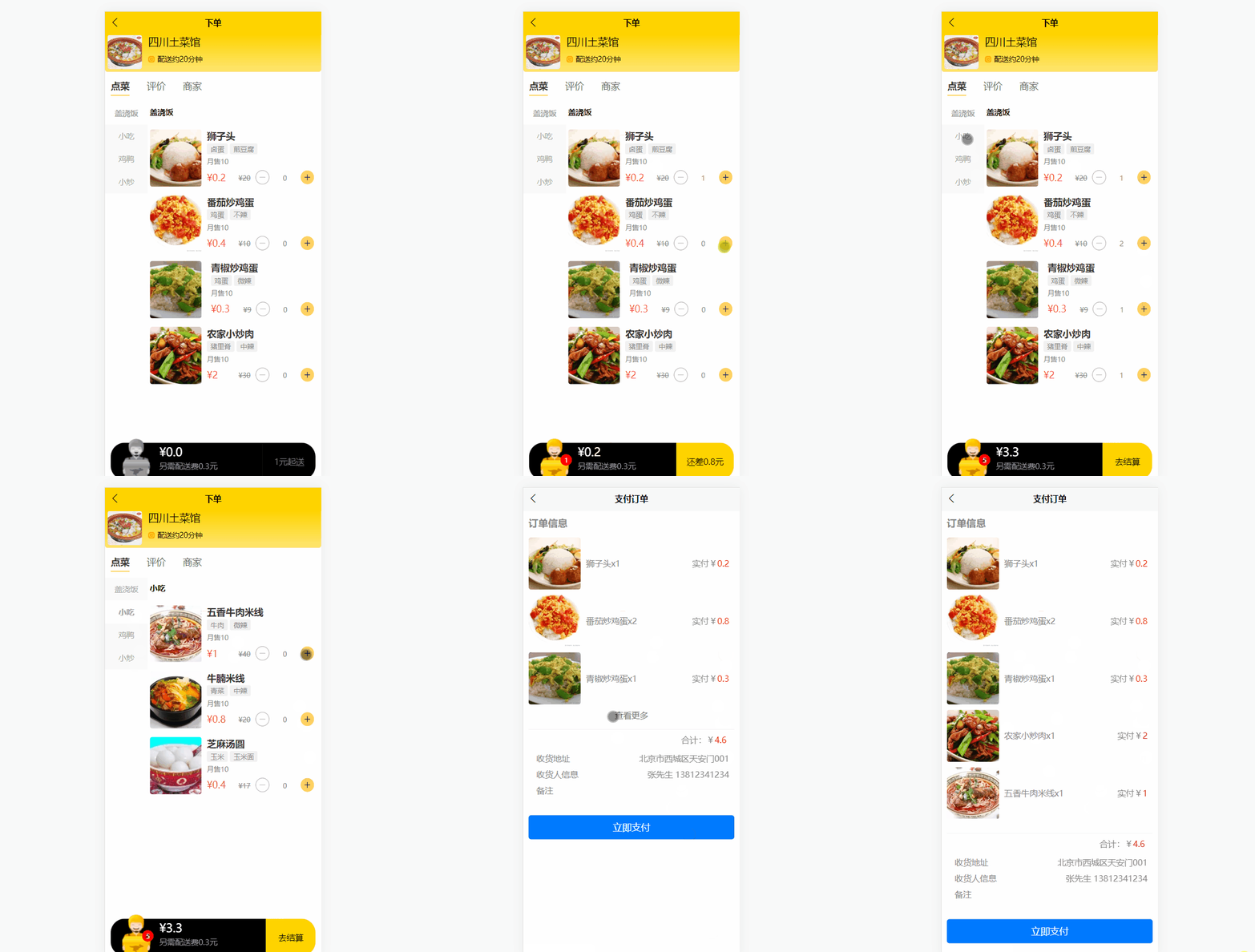
实现步骤
以下为整个页面的所有代码,涉及到的数据可以自己造一些,此处不再赘述。
vue页面
<template>

	<view class="box">

		<h3>订单信息</h3>

		<!-- 商品列表-->

		<view class="productlist">

				<block v-for="(item,index) in cartList" :key="index">

					<view class="product" v-show="index < max">

						<!-- 左边商品图片 -->

						<view class="image">

							<image :src="item.image" mode="aspectFill"></image>

						</view>

						<view class="info">

							<text>{{item.name}}</text>

							<text>x{{item.count}}</text>

						</view>

						<view class="price">

							实付¥<text class="red-text">{{item.totalPrice}}</text>

						</view>

					</view>

				</block>

				<view style="text-align: center;color: #737373;" v-show="total > max" @tap="more">查看更多</view>

		</view>

		<view class="summary">

			<uni-list :border="true">

				<view class="right-fixed">

					合计:¥<text class="red-text">{{totalPrice}}</text>

				</view>

				<view class="receive">

					<view>

						<text>收货地址</text>

						<text class="right-fixed">{{checkedAddress.address}}</text>

					</view>

					<view>

						<text>收货人信息</text>

						<text class="right-fixed">{{checkedAddress.receiver}} {{checkedAddress.contact}}</text>

					</view>

					<view>

						<text>备注</text>

						<!-- <text class="right-fixed">少放辣!</text> -->

						<input type="text" name="remark" v-model="remark">

					</view>

				</view>

			</uni-list>

		</view>

		<button @click="pay" type="primary">立即支付</button>

	</view>

</template>
JS
<script>

	import {

		mapState,

		mapMutations

	} from 'vuex'

	import {guid} from '../../util/util.js'

	export default {

		data(){

			return{

				max: 3, //默认展示几条数据

				remark: ''

			}

		},

		components: {

		},

		computed: {

			...mapState(['cartList']),

			...mapState({

				checkedAddress: state => state.checkedAddr,

				orderShopInfo: state => state.orderShopInfo

			}),

			// 计算所有商品总数量

			totalCount() {

				return this.cartList.reduce((total, item) => {

					return total + item.count

				}, 0)

			},

			// 所有商品累积的总价

			totalPrice() {

				let amount = this.cartList.reduce((total, item) => {

					return total + item.totalPrice

				}, 0)

				// 加上配送费

				return (Math.round((amount+this.orderShopInfo.physical) * 10) / 10).toFixed(1)

			},

			// 商品个数

			total(){

				return this.cartList.length

			}

		},

		methods: {

			more() {

				console.log(this.max)

				this.max = this.total; //每次点击加1条

			},

			pay() {

				let that = this

				uni.showModal({

					title: '提示',

					content: '确定支付订单?',

					success: function (res) {

						if (res.confirm) {

							// 遍历购物车中商品信息

							let items = [];

							that.cartList.forEach((item)=>{

								let e = {

									product_id: item.gid,

									product_name: item.name,

									image: item.image,

									qty: item.count,

									amount: item.totalPrice

								}

								items.push(e)

							})

							//console.log(JSON.stringify(items))

							let mydate = new Date();

							// 构建订单实体

							let order = {

								userid: that.$store.state.loginUser._id,

								order_no: 'sa'+guid(),

								shop_id: that.orderShopInfo._id,

								shop_name: that.orderShopInfo.shop,

								shop_image: that.orderShopInfo.logo,

								total_qty: that.totalCount,

								total_amount: that.totalPrice,

								deliver_fee: that.orderShopInfo.physical,

								address: that.checkedAddress.address,

								receiver: that.checkedAddress.receiver,

								contact: that.checkedAddress.contact,

								remark: that.remark,

								order_time: mydate.toLocaleDateString()+' '+mydate.toLocaleTimeString(),

								items: items

							}

							console.log(order);

							// 提交订单

							that.$post('/addOrder', JSON.stringify(order)).then(res => {

								// 清空购物车

								that.$store.commit('clearCart')

								uni.showToast({

									title:'添加成功!',

									duration:1000

								})

								setTimeout(function () {

									uni.switchTab({

										url:'/pages/order/order'

									})

								}, 1000);

							})

						} else if (res.cancel) {

							console.log('用户点击取消');

						}

					}

				});

			}

		}

	}

</script>
CSS
<style lang="scss" scoped>

	$base-color: red;

	.red-text{

		color: $base-color;

	}

	.box {

		padding: 10px;

		color: #898989;

	}

	.productlist {

		justify-content: space-between;

		margin: 30upx 0;

		color: #898989;

		.product {

			height: 110px;

			display: flex;

		}

		.product .image {

			width: 100px !important;

			height: 100px !important;

			overflow: hidden;

		}

		.product .image image {

			width: 100%;

			height: 100%;

			border-radius: 10upx;

			overflow: hidden;

		}

		.product .info {

			width: 300upx;

			line-height: 100px;

			padding-left: 10px;

		}

		.product .price {

			position: fixed;

			right: 20px;

			line-height: 100px;

		}

	}

	.summary{

		view{

			padding: 5px;

		}

		.receive{

			margin-top: 30px;

		}

	}

	// 右对齐

	.right-fixed{

		position: fixed;

		right: 20px;

	}

</style>
uniapp实现点击加载更多的更多相关文章
- tableView中的“点击加载更多”点击不到
假设当前的tableView是_tableView,则可以这样设置 _tableView.contentInset = UIEdgeInsetsMake(0, 0, 100, 0); 该属性用于设置当 ...
- android ListView的上部下拉刷新下部点击加载更多具体实现及拓展
android ListView的上部下拉刷新下部点击加载更多具体实现及拓展 ListView下拉刷新,上拉自动加载更多 下拉刷新以及加载更多
- ajax点击加载更多数据图片(预加载)
<!DOCTYPE html> <html> <head> <meta charset="UTF-8"> <title> ...
- js点击加载更多可以增加几条数据的显示
<div class="list"> <div class="one"> <div class="img" ...
- jQuery+php+Ajax文章列表点击加载更多功能
jQuery+php+Ajax实现的一个简单实用的文章列表点击加载更多功能,点击加载更多按钮,文章列表加载更多数据,加载中有loading动画效果. js部分: <script type=&qu ...
- Vue——轻松实现vue底部点击加载更多
前言 需求总是不断改变的,好吧,今天就把vue如何实现逐步加载更多和分布加载更多说下,默认你知道如何去请求数据的哈 一次请求 页面 使用slice来进行限制展现从0,a的数据 <div v-fo ...
- Spring+Hibernate+struts2+JPA 注解+跨域//完成手机端点击加载更多 下拉加载更多
一.使用IDEA新建一个maven项目(student) 1.1.0编写pom文件,添加项目所需要的包 <?xml version="1.0" encoding=" ...
- PHP+Ajax点击加载更多列表数据实例
一款简单实用的PHP+Ajax点击加载更多列表数据实例,实现原理:通过“更多”按钮向服务端发送Ajax请求,PHP根据分页参数查询将最新的几条记录,数据以JSON形式返回,前台Query解析JSON数 ...
- PHP+Ajax点击加载更多内容 -这个效果好,速度快,只能点击更多加载,不能滚动自动加载
这个效果好,速度快,只能点击更多加载,不能滚动自动加载 一.HTML部分 <div id="more"> <div class="single_item ...
- Jquery点击加载更多
一.点击加载更多有点像分页获取数据类似,下面是本人写的一个简单的小例子 <!DOCTYPE html PUBLIC "-//W3C//DTD XHTML 1.0 Transitiona ...
随机推荐
- JS - dom绑定函数中 return false 的作用
1,可以阻止事件冒泡 2,可以阻止浏览器默认操作
- [转帖]直接内存监控不准确,netty玩了什么花?
https://segmentfault.com/a/1190000044509636 是挺久没有"宠爱"我们netty小婊贝了,最近又开始搞事了. 于是,趁机探究了下MX ...
- Oceanbase部分参数学习与验证
Oceanbase部分参数学习与验证 字符集等参数查看 yum install obclient -y 然后使用客户端连接: obclient -h172.24.110.175 -P2881 -uro ...
- Oracle 高低水位线的学习
Oracle 高低水位线的学习 背景 最近产品的一些脚本会大量的给一些流程表里面插入数据 因为只是一个流程相关没有时序查询的需求 所以数据量挺大, 但是按照石时间戳删除非常麻烦. 自己执行过多次del ...
- [转帖]03-rsync传输模式(本地传输、远程方式传输、守护进程模式传输)
https://developer.aliyun.com/article/885801?spm=a2c6h.24874632.expert-profile.282.7c46cfe9h5DxWK 简介: ...
- CentOS8 设置开机自动登录账户的方法
CentOS8 设置开机自动登录账户的方法 修改/etc/gdm/custom.conf文件, 并且添加内容即可. vim /etc/gdm/custom.conf # 在配置节下添加如下内容. [d ...
- pytest单元测试基本使用
一.pytest安装 pip install pytest:安装 pip install pytest==version:指定版本安装 pytest --version:查看版本 pip instal ...
- 【K哥爬虫普法】字节前高管,离职后入侵今日头条数据库,是阴谋、还是利诱?
案情介绍 2016年至2017年间,张洪禹.宋某.侯明强作为被告单位上海晟品网络科技有限公司主管人员,在上海市共谋采用技术手段抓取北京字节跳动网络技术有限公司(办公地点位于本市海淀区北三环西路43号中 ...
- OpenIM Open Source Instant Messaging Project Docker Compose Deployment Guide
The deployment of OpenIM involves multiple components and supports various methods including source ...
- win11和win10的快捷键列表
win11特有的快捷键 win键就是图案是windows图标的那个按键 作用 快捷键 打开快速设置,win11是展开音量,wifi,蓝牙的设置项,win10也可以用 win + a 打开通知中心和日历 ...