
Using MultiPath TCP to enhance home networks
Over the last few months I’ve been playing with MultiPath TCP and in this post I will show how I use it to leverage my humble True ADSL line at home.
For performance and security reasons, I tunnel all my traffic thru a VPN. This is not necessarily to circumvent censorship, but to circumvent the evil transparent proxiesmy ISP puts in middle. The total bandwidth available is ~10 mbps down / ~1 mbps up.
Introduction to MultiPath TCP
MultiPath TCP is an interesting effort to use multiple interfaces/networks for any single TCP connection. A Linux kernel implementation is being developed at multipath-tcp.org. Its main use cases are for mobile (transition between Wi-Fi and 3G) and datacenters. I exploit it to get better Internet browsing experience.
Old way
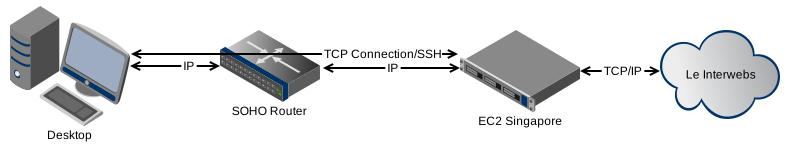
- SSH tunnel to EC2 instance in Singapore. Browser configured to use this tunnel as proxy
- SSH tunnel to EC2 instance in us-east (for accessing geo-blocked services)
Main drawback : If my ISP has issues talking to AWS, then I’m totally screwed. This happened a month or so ago where most links coming into True was severely limited, however link from Digital Ocean to True was healthy. I had to manually change my tunnels to a $5 Digital Ocean instance.
New way
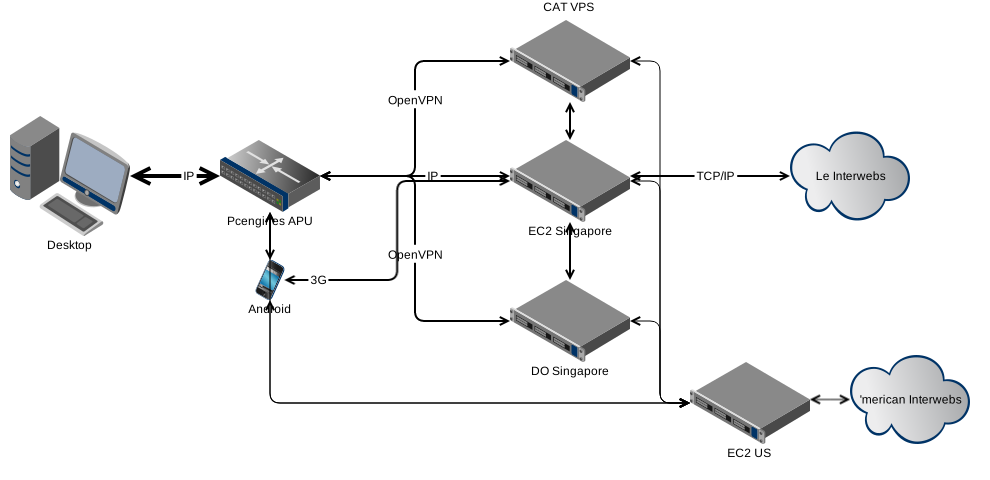
Note: This is a constantly evolving setup as I find new things to play with.
Infrastructure involved :-
- PC Engines APU system board - Replaces router. All magic happens here. gateway
- ADSL modem in bridge mode.
- EC2 instance in Singapore - The main proxy endpoint. Runs shadowsocksserver over MPTCP kernel. destination, jumpbox
- EC2 instance in us-west - The proxy endpoint for US geo blocked traffic. Runs shadowsocks server over MPTCP kernel. destination
- Digital Ocean instance in Singapore - An alternate path to reach the EC2 instance(s) jumpbox
- VPS in CAT datacenter in Thailand - Another alternate path. All Thai ISPs usually have good connectivity to CAT. jumpbox
- Android phone - With Dtac 3G for extra boost when needed. USB tethering. Bandwidth fluctuates a lot. I typically use it to get a boost in my upload bandwidth which is generally 100 kbps to 8 mbps.
All TCP Traffic is intercepted by the APU using iptables, diverted to redsocks, which sends it to the shadowsocks client, which sends it to the shadowsocks server running in EC2 Singapore. This socks connection has several ways to communicate with the EC2 instance.
APU <--> True ADSL Directly <--> EC2

APU <--> True ADSL Directly over OpenVPN/UDP <--> EC2

APU <--> True ADSL <--> via CAT VPS over OpenVPN/UDP <--> EC2

APU <--> True ADSL <--> via DO Singapore over OpenVPN/UDP <--> EC2

APU <--> Dtac 3G Directly <--> EC2 (Optional/ondemand)
Now I have 5 possible paths. MPTCP kernel creates a TCP connection over each available path and bonds them together and exposes it as a single TCP connection to the application. Packets are sent over paths that currently have the lowest delay. Now my available bandwidth is not impacted by congestion over some of these paths. All paths need to be congested for me to have a bad day… Also some path might have good uplink, some might have good downlink, with MPTCP you mix the best of both…
Example bmon stats when downloading a large file (I removed irreverent interfaces.)
  #   Interface                RX Rate         RX #     TX Rate         TX #

─────────────────────────────────────────────────────────────────────────────

xxx (source: local)

  0   tun1                     621.28KiB        628      38.82KiB        636

  3   tun3                     200.22KiB        198       9.42KiB        149

  5   ppp0                       1.07MiB       1018     119.42KiB        980

  9   tun0                      90.06KiB         90       5.94KiB         97
Configurations
Jumpbox
Jumpbox is pretty basic setup. It’s role is to provide additional gateways which MPTCP uses to build additional paths.
OpenVPN server configured normally. Set to not redirect default gateway. In my current setup I need to ensure that the server assigns the same IP to my client. This is not really that crucial, but it keeps things simple. Its important to configure each jumpbox to use a different IP range.
net.ipv4.ip_forward needs to be set to 1 to allow forwarding. In fact almost all boxes in the setup need this.
iptables rules needed :-
iptables -t nat -A POSTROUTING -o eth0 -j MASQUERADE

iptables -t filter -A FORWARD -i tun0 -j ACCEPT

iptables -t filter -A FORWARD -o tun0 -j ACCEPT
Replace the tun0 and eth0 to suit your environment.
Destination
A destination server is remote end of our socks tunnel. It’s job is to service the socks connections patching them to the real destination.
This needs to run a MultiPath TCP kernel. On EC2 it is pretty simple. Launch an Ubuntu 14.04 instance with a pv-grub AKI. Then follow the apt-repository installation method. And ensure the grub loads the MPTCP kernel as its first choice.
Next we also need shadowsocks server running. RTFM its pretty simple. Before using shadowsocks I was using a simple ssh -D tunnel, but I found it to be inefficient. Often times one large transfer would make all other TCP streams stuck. Perhaps this has something to do with the fact that with SSH everything is happening over a single TCP stream whereas shadowsocks makes a new socks connection dedicated to each TCP connection.
Gateway
The gateway is the most complicated component. Running stock Debian wheezy with MPTCP kernel installed via their apt repository. A lot of services run here. I will not elaborate on some of them.
dbcpd - Assign LAN users with IP
bind - For DNS recursion. Since we tunnel most traffic to Singapore, I also set bind to send DNS queries thru OpenVPN.
iptables - I use iptables to do the NAT. NAT all UDP packets to OpenVPN. Send all outgoing TCP connections to redsocks.
# Generated by iptables-save v1.4.14 on Sat Nov 22 00:37:10 2014

*nat

:PREROUTING ACCEPT [378881:57485495]

:INPUT ACCEPT [210208:17266788]

:OUTPUT ACCEPT [4099955:310913862]

:POSTROUTING ACCEPT [3239510:252587265]

:REDSOCKS - [0:0]

- -A PREROUTING -i br0 -p tcp -j REDSOCKS

- -A PREROUTING -i br0 -j REDSOCKS

- -A POSTROUTING -o tun1 -j MASQUERADE

- -A POSTROUTING -o tun0 -j MASQUERADE

- -A POSTROUTING -o tun2 -j MASQUERADE

- -A POSTROUTING -o eth0 -j MASQUERADE

- -A REDSOCKS -d 0.0.0.0/8 -j RETURN

- -A REDSOCKS -d 10.0.0.0/8 -j RETURN

- -A REDSOCKS -d 127.0.0.0/8 -j RETURN

- -A REDSOCKS -d 169.254.0.0/16 -j RETURN

- -A REDSOCKS -d 172.16.0.0/12 -j RETURN

- -A REDSOCKS -d 192.168.0.0/16 -j RETURN

- -A REDSOCKS -d 224.0.0.0/4 -j RETURN

- -A REDSOCKS -d 240.0.0.0/4 -j RETURN

- -A REDSOCKS -d a.b.c.d/32 -j RETURN

- -A REDSOCKS -d e.f.g.h/32 -j RETURN

- -A REDSOCKS -d i.j.k.l/32 -j RETURN

- -A REDSOCKS -d m.n.o.p/32 -j RETURN

- -A REDSOCKS -d q.r.s.t/32 -j RETURN

- -A REDSOCKS -s 192.168.5.1/32 -j RETURN

- -A REDSOCKS -s 192.168.5.1/32 -j RETURN

- -A REDSOCKS -s 192.168.1.2/32 -j RETURN

- -A REDSOCKS -s 192.168.5.32/27 -p tcp -j REDIRECT --to-ports 12345

COMMIT

# Completed on Sat Nov 22 00:37:10 2014

# Generated by iptables-save v1.4.14 on Sat Nov 22 00:37:10 2014

*filter

:INPUT ACCEPT [115657469:73738905421]

:FORWARD ACCEPT [64078:47442189]

:OUTPUT ACCEPT [122121802:63701527314]

- -A FORWARD -i eth1 -j ACCEPT

- -A FORWARD -o eth1 -j ACCEPT

- -A FORWARD -i br0 -j ACCEPT

- -A FORWARD -o br0 -j ACCEPT

- -A FORWARD -i eth0 -j ACCEPT

- -A FORWARD -o eth0 -j ACCEPT

COMMIT

# Completed on Sat Nov 22 00:37:10 2014

# Generated by iptables-save v1.4.14 on Sat Nov 22 00:37:10 2014

*mangle

:PREROUTING ACCEPT [118734314:74507536093]

:INPUT ACCEPT [115635709:73734306355]

:FORWARD ACCEPT [3100331:759352048]

:OUTPUT ACCEPT [122104929:63698976437]

:POSTROUTING ACCEPT [125198421:64456746251]

- -A PREROUTING ! -d 192.168.5.0/24 -i br0 -j MARK --set-xmark 0x1/0xffffffff

- -A PREROUTING -d 10.8.0.10/32 -i br0 -j MARK --set-xmark 0x3/0xffffffff

- -A PREROUTING -d 192.168.10.1/32 -i br0 -j MARK --set-xmark 0x2/0xffffffff

COMMIT

# Completed on Sat Nov 22 00:37:10 2014
Note: a.b.c.d, e.f.g.h, i.j.k.l, m.n.o.p and q.r.s.t are public internet ips that I don’t want redsocks to intercept.
Interfaces
- br0 - LAN
- tun[0-3] - Various Jumpboxes. OpenVPN tunnels.
Also, each interface is maintains its own routing tables using if-up scripts. For example this is what gets executed when one of the tunnels comes alive.
<pre><code>#!/bin/sh

ip rule add from 10.8.0.20 table 2 || true

ip route add 10.8.0.0/24 dev tun0 scope link table 2 || true

ip route add default via 10.8.0.21 dev tun0 table 2 || true

ip rule add fwmark 3 table 2 || true

</code></pre>
The fwmark is added so if in future I want to pipe different traffic to go thru this interface I can set the corresponding iptables rule.
All local services are scoped to listen only on local interfaces to avoid random people connecting to local services.
redsocks - Accepts intercepted connections and pipes it off to shadowsocks client
shadowsocks client - sends all TCP connections to shadowsocks servers running in EC2 Singapore and US. By default intercepted traffic is sent to Singapore, however any application on any computer in the network could be set to explicitly use any of the available proxies.
wvdial - To dial the ADSL connection which is itself behind a Carrier-grade NAT. Sometimes the connection stops working while pppd things its still connected. Am ugly CRON script to test the network and flip it if needed.
<pre><code>#!/bin/bash

IP=`/sbin/ip route | grep -v default | grep ppp0 | cut -d " " -f 1`

COUNT=`echo $IP | wc -l`

echo $IP $COUNT

if [ $COUNT -eq 1 ]

then

  ping -c 10 $IP > /dev/null

  if [ $? -eq 0 ]

  then

    echo "ppp0 is up"

  else

    echo "ppp0 is down"

    kill -SIGHUP `pgrep pppd`

    beep -l 25

  fi

else

  echo "ppp0 not found?!?!?!?1"

fi

</code></pre>
The script above tries to ping the default gateway of the ppp0 interface to find out if it is really up. SIGHUP signals pppd to handup and redial. I don’t bother maintaining the pid of pppd because currently I use ppp0 exclusively for the ADSL modem.
Missing parts
There are some issues I am having that I need to sort out work-around for.
- Default connection unstable. If the initial syn packet for ppp0 (my default interface) fails, then the connection cant be established. I need to look deeper into MPTCP docs to figure out how to make it such that if the initial TCP connection setup fails on ppp0 then make it try tun0, tun1 and so on.
- Connection fairness. Sometimes if I am doing a big upload, everything else (like browsing websites) seems too slow. The upload is hogging all the available uplink, which is already too tiny. I have my suspicions on buffer bloat…
- Higher uplink usage. When downloading something, I see ~10% upload traffic corresponding to it. This is lot higher than a simple setup. I need to investigate deeper whats causing it. Perhaps MPTCP or the socks setup or OpenVPN. The example bmon stats above show this as well 119.42KiB uplink while downloading @ 1.07MiB.
- EC2 bandwidth is expensive. I would like to use Digital Ocean boxes for socks proxies. This is a little tricky since DO does not allow loading custom kernels. I need to figure out kexec to make this possible. Unsure if this way is stable…
- Advanced routing. I would like to programatically decide which external IP should go thru which proxy. For example most Thai IPs I would like to go direct. Some American destinations should go thru the US proxy, rest thru Singapore proxy. Perhaps in future add an European proxy.. Currently the only way to use the American proxy is to explicitly configure a particular application to use socks proxy.
- UDP tunneling. UDP traffic currently goes directly using a single OpenVPN session. There is no load-balancing being performed on it. I would like to switch to a different socks client/server. One that does UDP associate.
Future path enhancements
More paths can be added to get better throughput.
- 3G dongles from various providers.
- The shitty Wi-Fi that your apartment/office provides.
- More ADSL/Cable connections from diverse providers with different backbones.
Conclusion
MPTCP is a fantastic piece of technology. Hat-tip to everyone who contributed to it. The PC Engines ALU box is also awesome. Decent x86_64 box consuming only about 6 to 12W power.
In the future I will do a walk-thru type post on how to setup a Raspberry Pi as a one-arm gateway doing a subset of what I described above. The most challenging part is getting a MPTCP enabled kernel on the pi, which requires kernel patching and compiling. The throughput will likely be very limited because MPTCP has a higher CPU overhead than regular TCP.
Using MultiPath TCP to enhance home networks的更多相关文章
- Multipath TCP and load balancers
Load balancers play a very important role in today’s Internet. Most Internet services are provided b ...
- Multipath TCP on iOS11 : A closer look at the TCP Options(转)
Multipath TCP uses a variety of TCP options to use different paths simultaneously. Several Multipath ...
- 揭开 iOS 7 之 Multipath TCP 的面纱(转)
看到中文圈似乎讨论 iOS 7 的这个特性的还不多,于是我稍微研究了一下这个「Mutlipath TCP」,写点心得.过程是这样的: Olivier Bonaventure 通过 Wireshark ...
- 使用 Multipath TCP 为 iOS 创建备份连接(转)
这篇文章的英文版如下: https://support.apple.com/en-us/HT201373 这里咱们采用苹果手机打开测试网站,发现没有检测到MPTCP,初步猜想可能需要打开什么设置,后续 ...
- Apple uses Multipath TCP
http://blog.multipath-tcp.org/blog/html/2018/12/15/apple_and_multipath_tcp.html December 15, 2018 Ap ...
- multipath tcp experiment
git clone https://github.com/Neohapsis/mptcp-abuse.git sudo apt-get install python-pip sudo pip inst ...
- [转载] TCP协议缺陷不完全记录
原文: http://www.blogjava.net/yongboy/archive/2015/05/07/424917.html tcp是一个非常复杂并且古老的协议, 之前教科书上将的很多东西应用 ...
- TCP 函数
[root@localhost tt]# man listen LISTEN() Linux Programmer’s Manual LISTEN() NAME listen - listen for ...
- Congestion Avoidance in TCP
Congestion Avoidance in TCP Consequence of lack of congestion control When a popular resource is sha ...
随机推荐
- 惊艳的cygwin——Windows下的Linux命令行环境的配置和使用
http://www.tuicool.com/articles/2MramqI 时间 2014-07-29 09:28:36 点滴之间 聚沙成金 原文 http://www.path8.net/t ...
- cocos2dx-3.1 接入多盟广告sdk+Android (2)
上篇,把基本工作做完了,接下来,在C++下加入代码. 1.打开win32下的project,加入一个类.DomobAd.代码例如以下, <pre name="code" cl ...
- Java Web Start
1. JNLP 2. Security issue: https://java.com/en/download/help/win_controlpanel.xml Windows 7, Vista C ...
- LeetCode(88)题解-- Merge Sorted Array
https://leetcode.com/problems/merge-sorted-array/ 题目: Given two sorted integer arrays nums1 and nums ...
- SAM4E单片机之旅——4、LED闪烁之PWM
两个LED灯虽然可以闪了,但是总是需要CPU的参与.现在尝试使用一种更为自动化的方法:让脉宽调制(PWM)控制器输出具有一定周期和占空比的方波,以此控制LED灯的亮灭. 一.实现思路 依然使用蓝色和琥 ...
- spring 集成 mybatis 后数据源初始化失败问题分析
问题背景: 项目使用spring,springmvc框架,后边需操作关系数据库,选择了mybatis + durid,集成mybatis后,项目一直启动失败.错误的原因是dataSource初始化的时 ...
- 2018.11.23-day26 面向对象(终结)
1.私有成员不能被继承2.装饰器方法--(类方法&静态方法)3.装饰器--property方法4.反射
- 建立FTP服务器(FTP服务器名要与创建的用户名一致)
1新建用户 2. 3.建立FTP
- ubuntu搭建mysql
步骤1 – 安装MySQL 在 Ubuntu 16.04 中,默认情况下,只有最新版本的 MySQL 包含在 APT 软件包存储库中.在撰写本文时,那是 MySQL 5.7 要安装它,只需更新服务器上 ...
- ActivityManagerService服务线程启动源码分析【转】
本文转载自:http://blog.csdn.net/yangwen123/article/details/8177702 Android系统服务线程都驻留在SystemServer进程中,由Syst ...