
Objective-C Operators and Expressions
What is an Expression?
The most basic expression consists of an operator, two operands and an assignment. The following is an example of an expression:
1 int myresult = 1 + 2;
In the above example the (+) operator is used to add two operands (1 and 2) together. The assignment operator (=) subsequently assigns the result of the addition to an integer variable named myresult. The operands could just have easily been variables (or a mixture of constants and variables) instead of the actual numerical values used in the example.
In the remainder of this chapter we will look at the various types of operators available in Objective-C.
The Basic Assignment Operator
We have already looked at the most basic of assignment operators, the = operator. This assignment operator simply assigns the result of an expression to a variable. In essence, the = assignment operator takes two operands. The left hand operand is the variable to which a value is to be assigned and the right hand operand is the value to be assigned. The right hand operand is, more often than not, an expression which performs some type of arithmetic or logical evaluation, the result of which will be assigned to the variable. The following examples are all valid uses of the assignment operator:
 int x; // declare the variable

 x = 10; // Assigns the value 10 to a variable named x

 x = y + z; // Assigns the result of variable y added to variable z to variable x

 x = y; // Assigns the value of variable y to variable x
Assignment operators may also be chained to assign the same value to multiple variables. For example, the following code example assigns the value 20 to the x, y and z variables:
 int x, y, z;

 x = y = z = 20;
Objective-C Arithmetic Operators
Objective-C provides a range of operators for the purpose of creating mathematical expressions. These operators primarily fall into the category of binary operators in that they take two operands. The exception is the unary negative operator (-) which serves to indicate that a value is negative rather than positive. This contrasts with the subtraction operator (-) which takes two operands (i.e. one value to be subtracted from another). For example:
 int x = -10; // Unary - operator used to assign -10 to a variable named x

 x = y - z; // Subtraction operator. Subtracts z from y
The following table lists the primary Objective-C arithmetic operators:
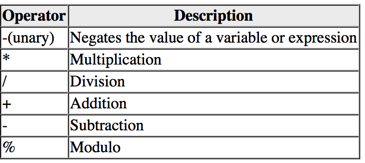
Note that multiple operators may be used in a single expression.
For example:
x = y * 10 + z - 5 / 4;
Whilst the above code is perfectly valid it is important to be aware that Objective-C does not evaluate the expression from left to right or right to left, but rather in an order specified by the precedence of the various operators. Operator precedence is an important topic to understand since it impacts the result of a calculation and will be covered in detail the chapter entitled Objective-C 2.0 Operator Precedence.
Compound Assignment Operators
In an earlier section we looked at the basic assignment operator (=). Objective-C provides a number of operators designed to combine an assignment with a mathematical or logical operation. These are primarily of use when performing an evaluation where the result is to be stored in one of the operands. For example, one might write an expression as follows:
x = x + y;
The above expression adds the value contained in variable x to the value contained in variable y and stores the result in variable x. This can be simplified using the addition compound assignment operator:
x += y
<google>IOSBOX</google> The above expression performs exactly the same task as x = x + y but saves the programmer some typing.
Numerous compound assignment operators are available in Objective-C. The most frequently used are outlined in the following table:
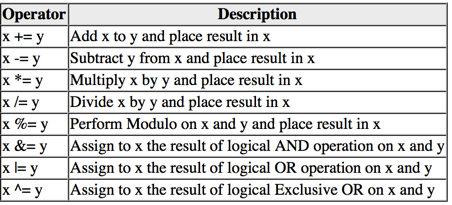
Increment and Decrement Operators
Another useful shortcut can be achieved using the Objective-C increment and decrement operators (also referred to as unary operators because they operate on a single operand). As with the compound assignment operators described in the previous section, consider the following Objective-C code fragment:
x = x + 1; // Increase value of variable x by 1

x = x - 1; // Decrease value of variable x by 1
These expressions increment and decrement the value of x by 1. Instead of using this approach it is quicker to use the ++ and -- operators. The following examples perform exactly the same tasks as the examples above:
x++; Increment x by 1

x--; Decrement x by 1
These operators can be placed either before or after the variable name. If the operator is placed before the variable name the increment or decrement is performed before any other operations are performed on the variable. For example, in the following example, x is incremented before it is assigned to y, leaving y with a value of 10:
int x = 9;

int y;

y = ++x;
In the next example, however, the value of x (9) is assigned to variable y before the decrement is performed. After the expression is evaluated the value of y will be 9 and the value of x will be 8.
int x = 9;

int y;

y = x--;
Comparison Operators
In addition to mathematical and assignment operators, Objective-C also includes set of logical operators useful for performing comparisons. These operators all return a Boolean (BOOL) true (1) or false (0) result depending on the result of the comparison. These operators are binary operators in that they work with two operands.
Comparison operators are most frequently used in constructing program flow control logic. For example an if statement may be constructed based on whether one value matches another:
if (x == y)
// Perform task
The result of a comparison may also be stored in a BOOL variable. For example, the following code will result in a true (1) value being stored in the variable result:
BOOL result;
int x = 10;

int y = 20;

result = x < y;
Clearly 10 is less than 20, resulting in a true evaluation of the x < y expression. The following table lists the full set of Objective-C comparison operators:
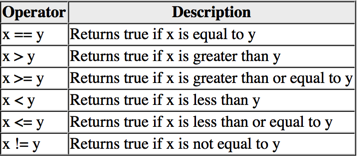
Boolean Logical Operators
Objective-C also provides a set of so called logical operators designed to return boolean true and false. In practice true equates to 1 and false equates to 0. These operators both return boolean results and take boolean values as operands. The key operators are NOT (!), AND (&&), OR (||) and XOR (^).
The NOT (!) operator simply inverts the current value of a boolean variable, or the result of an expression. For example, if a variable named flag is currently 1 (true), prefixing the variable with a '!' character will invert the value to 0 (false):
bool flag = true; //variable is true

bool secondFlag;

secondFlag = !flag; // secondFlag set to false
The OR (||) operator returns 1 if one of its two operands evaluates to true, otherwise it returns 0. For example, the following example evaluates to true because at least one of the expressions either side of the OR operator is true:
if ((10 < 20) || (20 < 10))

NSLog (@"Expression is true");
The AND (&&) operator returns 1 only if both operands evaluate to be true. The following example will return 0 because only one of the two operand expressions evaluates to true:
if ((10 < 20) && (20 < 10))

NSLog (@"Expression is true");
The XOR (^) operator returns 1 if one and only one of the two operands evaluates to true. For example, the following example will return 1 since only one operator evaluates to be true:
if ((10 < 20) ^ (20 < 10))

NSLog (@"Expression is true");
If both operands evaluated to be true or both were false the expression would return false.
The Ternary Operator
Objective-C uses something called a ternary operator to provide a shortcut way of making decisions. The syntax of the ternary operator (also known as the conditional operator) is as follows:
[condition] ? [true expression] : [false expression]
The way this works is that [condition] is replaced with an expression that will return either true (1) or false (0). If the result is true then the expression that replaces the [true expression] is evaluated. Conversely, if the result was false then the [false expression] is evaluated. Let's see this in action:
int x = 10;

int y = 20;

NSLog(@"Largest number is %i", x > y ? x : y );
The above code example will evaluate whether x is greater than y. Clearly this will evaluate to false resulting in y being returned to the NSLog call for display to the user:
2009-10-07 11:14:06.756 t[5724] Largest number is 20
Bitwise Operators
In the chapter entitled Objective-C 2.0 Data Types we talked about the fact that computers work in binary. These are essentially streams of ones and zeros, each one referred to as a bit. Bits are formed into groups of 8 to form bytes. As such, it is not surprising that we, as programmers, will occasionally end up working at this level in our code. To facilitate this requirement, Objective-C provides a range of bit operators. Those familiar with bitwise operators in other languages such as C, C++, C# and Java will find nothing new in this area of the Objective-C language syntax. For those unfamiliar with binary numbers, now may be a good time to seek out reference materials on the subject in order to understand how ones and zeros are formed into bytes to form numbers. Other authors have done a much better job of describing the subject than we can do within the scope of this book.
For the purposes of this exercise we will be working with the binary representation of two numbers. Firstly, the decimal number 171 is represented in binary as:
10101011
Secondly, the number 3 is represented by the following binary sequence:
00000011
Now that we have two binary numbers with which to work, we can begin to look at the Objective-C's bitwise operators:
Bitwise AND
The Bitwise AND is represented by a single ampersand (&). It makes a bit by bit comparison of two numbers. Any corresponding position in the binary sequence of each number where both bits are 1 results in a 1 appearing in the same position of the resulting number. If either bit position contains a 0 then a zero appears in the result. Taking our two example numbers, this would appear as follows:
10101011 AND

00000011

========

00000011
As we can see, the only locations where both numbers have 1s are the last two positions. If we perform this in Objective-C code, therefore, we should find that the result is 3 (00000011):

int x = 171;

int y = 3;

int z;

z = x & y; // Perform a bitwise AND on the values held by variables x and y

NSLog(@"Result is %i", z);
2009-10-07 15:38:09.176 t[12919] Result is 3
Bitwise OR
The bitwise OR also performs a bit by bit comparison of two binary sequences. Unlike the AND operation, the OR places a 1 in the result if there is a 1 in the first or second operand. The operator is represented by a single vertical bar character (|). Using our example numbers, the result will be as follows:
10101011 OR

00000011

========

10101011
If we perform this operation in an Objective-C example we see the following:
int x = 171;

int y = 3;

int z;

z = x | y;

NSLog(@"Result is %i", z);
2009-10-07 15:41:39.647 t[13153] Result is 171
Bitwise XOR
The bitwise XOR (commonly referred to as exclusive OR and represented by the caret '^' character) performs a similar task to the OR operation except that a 1 is placed in the result if one or other corresponding bit positions in the two numbers is 1. If both positions are a 1 or a 0 then the corresponding bit in the result is set to a 0. For example:
10101011 XOR

00000011

========

10101000
The result in this case is 10101000 which converts to 168 in decimal. To verify this we can, once again, try some Objective-C code:
int x = 171;

int y = 3;

int z;

z = x ^ y;

NSLog(@"Result is %i", z);
When executed, we get the following output from NSLog:
2009-10-07 16:09:40.097 t[13790] Result is 168
Bitwise Left Shift
The bitwise left shift moves each bit in a binary number a specified number of positions to the left. As the bits are shifted to the left, zeros are placed in the vacated right most (low order) positions. Note also that once the left most (high order) bits are shifted beyond the size of the variable containing the value, those high order are discarded:
10101011 Left Shift one bit

========

01010110
In Objective-C the bitwise left shift operator is represented by the '<<' sequence, followed by the number of bit positions to be shifted. For example, to shift left by 1 bit:
int x = 171;

int z;

z = x << 1;

NSLog(@"Result is %i", z);
When compiled and executed, the above code will display a message stating that the result is 342 which, when converted to binary, equates to 101010110.
Bitwise Right Shift
A bitwise right shift is, as you might expect, the same as a left except that the shift takes place in the opposite direction. Note that since we are shifting to the right there is no opportunity to retain the lower most bits regardless of the data type used to contain the result. As a result the low order bits are discarded. Whether or not the vacated high order bit positions are replaced with zeros or ones depends on whether the sign bit used to indicate positive and negative numbers is set or not and, unfortunately, on the particular system and Objective-C implementation in use.
10101011 Right Shift one bit

========

01010101
The bitwise right shift is represented by the '>>' character sequence followed by the shift count:
int x = 171;

int z;

z = x >> 1;

NSLog(@"Result is %i", z);
When executed, the above code will report the result of the shift as being 85, which equates to binary 01010101.
Compound Bitwise Operators
As with the arithmetic operators, each bitwise operator has a corresponding compound operator that allows the operation and assignment to be performed using a single operator:
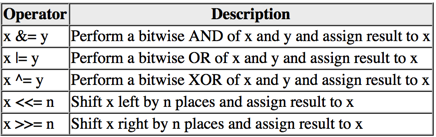
Objective-C Operators and Expressions的更多相关文章
- [转]50 Shades of Go: Traps, Gotchas, and Common Mistakes for New Golang Devs
http://devs.cloudimmunity.com/gotchas-and-common-mistakes-in-go-golang/ 50 Shades of Go: Traps, Gotc ...
- python27读书笔记0.3
#-*- coding:utf-8 -*- ##D.has_key(k): A predicate that returns True if D has a key k.##D.items(): Re ...
- scheme一页纸教程
这是一个大学教授写的,非常好,原文:http://classes.soe.ucsc.edu/cmps112/Spring03/languages/scheme/SchemeTutorialA.html ...
- 实例说明Java中的null
翻译人员: 铁锚 翻译时间: 2013年11月11日 原文链接: What exactly is null in Java? 让我们先来看下面的语句: String x = null; 1. 这个语句 ...
- 实例说明Java中的null(转)
让我们先来看下面的语句: String x = null; 1. 这个语句到底做了些什么? 让我们回顾一下什么是变量,什么是变量值.一个常见的比喻是 变量相当于一个盒子.如同可以使用盒子来储存物品一 ...
- A Byte of Python (for Python 3.0) 下载
在线阅读:http://www.swaroopch.org/notes/Python_en:Table_of_Contents 英文版 下载地址1:http://files.swaroopch.com ...
- Module ngx_http_rewrite_module
http://nginx.org/en/docs/http/ngx_http_rewrite_module.html Directives break if return ...
- SQL Server解惑——为什么ORDER BY改变了变量的字符串拼接结果
在SQL Server中可能有这样的拼接字符串需求,需要将查询出来的一列拼接成字符串,如下案例所示,我们需要将AddressID <=10的AddressLine1拼接起来,分隔符为|.如下 ...
- Automake
Automake是用来根据Makefile.am生成Makefile.in的工具 标准Makefile目标 'make all' Build programs, libraries, document ...
随机推荐
- 选择合适的innodb_log_file_size
如果对 Innodb 数据表有大量的写入操作,那么选择合适的 innodb_log_file_size 值对提升MySQL性能很重要.然而设置太大了,就会增加恢复的时间,因此在MySQL崩溃或者突然断 ...
- 蓝桥杯 2014本科C++ B组 六角填数 枚举排列
标题:六角填数 如图[1.png]所示六角形中,填入1~12的数字. 使得每条直线上的数字之和都相同. 图中,已经替你填好了3个数字,请你计算星号位置所代表的数字是多少? 请通过浏览器提交答案,不要填 ...
- CentOS6.6 zookeeper完全集群搭建
centos6.6搭建zookeeper-3.4.6完全分布式环境 转载 2015-06-28 22:14:17 标签:it 为了搭建HBase完全分布式环境,前提就是搭建好zookeeper和Had ...
- vscode实现列编辑
ctrl + shift + 左键选择要编辑的列 好用,再也不用使用\n替换了
- 把myeclipse中html/jsp文件的视图调到只看代码
烦恼———————————————————— 解决方法: ok---------------------------- *.jsp 同理
- SourceTree切换语言
点击ok,重启SourceTree即生效 over!over!over!
- CodeForces 761C 【DP】
总结:能这么DP就这么写! 多练位运算标记. #include<bits/stdc++.h> using namespace::std; const int N=55; const int ...
- uoj#268. 【清华集训2016】数据交互(动态dp+堆)
传送门 动态dp我好像还真没咋做过--通过一个上午的努力光荣的获得了所有AC的人里面的倒数rk3 首先有一个我一点也不觉得显然的定理,如果两条路径相交,那么一定有一条路径的\(LCA\)在另一条路径上 ...
- C++中各种简写及全称的库
ATL(Active TEmplate Library)活动模板库 RPC(Remote Procedure Call Protocol)远程过程调用协议 DCE(Distributed Comput ...
- 计算机网络自顶向下方法第2章-应用层(application-layer).1
2.1 应用层协议原理 2.1.1网络应用程序体系结构 1)在客户-服务器体系结构 (client-server architecture)中,有一个总是打开的主机称为服务器,它服务于来自许多其他称为 ...