
10 Vue 学习 shortList页面
1: shortList页面代码如下:
<template>
<div class="fillcontain">
<head-top></head-top>
<div class="table_container">
<el-table
:data="tableData"
style="width: 100%">
<el-table-column type="expand">
<template scope="props">
<el-form label-position="left" inline class="demo-table-expand">
<el-form-item label="店铺名称">
<span>{{ props.row.name }}</span>
</el-form-item>
<el-form-item label="店铺地址">
<span>{{ props.row.address }}</span>
</el-form-item>
<el-form-item label="店铺介绍">
<span>{{ props.row.description }}</span>
</el-form-item>
<el-form-item label="店铺 ID">
<span>{{ props.row.id }}</span>
</el-form-item>
<el-form-item label="联系电话">
<span>{{ props.row.phone }}</span>
</el-form-item>
<el-form-item label="评分">
<span>{{ props.row.rating }}</span>
</el-form-item>
<el-form-item label="销售量">
<span>{{ props.row.recent_order_num }}</span>
</el-form-item>
<el-form-item label="分类">
<span>{{ props.row.category }}</span>
</el-form-item>
</el-form>
</template>
</el-table-column>
<el-table-column
label="店铺名称"
prop="name">
</el-table-column>
<el-table-column
label="店铺地址"
prop="address">
</el-table-column>
<el-table-column
label="店铺介绍"
prop="description">
</el-table-column>
<el-table-column label="操作" width="200">
<template scope="scope">
<el-button
size="mini"
@click="handleEdit(scope.$index, scope.row)">编辑</el-button>
<el-button
size="mini"
type="Success"
@click="addFood(scope.$index, scope.row)">添加食品</el-button>
<el-button
size="mini"
type="danger"
@click="handleDelete(scope.$index, scope.row)">删除</el-button>
</template>
</el-table-column>
</el-table>
<div class="Pagination">
<el-pagination
@size-change="handleSizeChange"
@current-change="handleCurrentChange"
:current-page="currentPage"
:page-size="20"
layout="total, prev, pager, next"
:total="count">
</el-pagination>
</div>
<el-dialog title="修改店铺信息" v-model="dialogFormVisible">
<el-form :model="selectTable">
<el-form-item label="店铺名称" label-width="100px">
<el-input v-model="selectTable.name" auto-complete="off"></el-input>
</el-form-item>
<el-form-item label="详细地址" label-width="100px">
<el-autocomplete
v-model="address.address"
:fetch-suggestions="querySearchAsync"
placeholder="请输入地址"
style="width: 100%;"
@select="addressSelect"
></el-autocomplete>
<span>当前城市:{{city.name}}</span>
</el-form-item>
<el-form-item label="店铺介绍" label-width="100px">
<el-input v-model="selectTable.description"></el-input>
</el-form-item>
<el-form-item label="联系电话" label-width="100px">
<el-input v-model="selectTable.phone"></el-input>
</el-form-item>
<el-form-item label="店铺分类" label-width="100px">
<el-cascader
:options="categoryOptions"
v-model="selectedCategory"
change-on-select
></el-cascader>
</el-form-item>
<el-form-item label="商铺图片" label-width="100px">
<el-upload
class="avatar-uploader"
:action="baseUrl + '/v1/addimg/shop'"
:show-file-list="false"
:on-success="handleServiceAvatarScucess"
:before-upload="beforeAvatarUpload">
<img v-if="selectTable.image_path" :src="baseImgPath + selectTable.image_path" class="avatar">
<i v-else class="el-icon-plus avatar-uploader-icon"></i>
</el-upload>
</el-form-item>
</el-form>
<div slot="footer" class="dialog-footer">
<el-button @click="dialogFormVisible = false">取 消</el-button>
<el-button type="primary" @click="updateShop">确 定</el-button>
</div>
</el-dialog>
</div>
</div>
</template> <script>
import headTop from '../components/headTop'
import {baseUrl, baseImgPath} from '@/config/env'
import {cityGuess, getResturants, getResturantsCount, foodCategory, updateResturant, searchplace, deleteResturant} from '@/api/getData'
export default {
data(){
return {
baseUrl,
baseImgPath,
city: {},
offset: 0,
limit: 20,
count: 0,
tableData: [],
currentPage: 1,
selectTable: {},
dialogFormVisible: false,
categoryOptions: [],
selectedCategory: [],
address: {},
}
},
created(){
this.initData();
},
components: {
headTop,
},
methods: {
async initData(){
try{
this.city = await cityGuess();
const countData = await getResturantsCount();
if (countData.status == 1) {
this.count = countData.count;
}else{
throw new Error('获取数据失败');
}
this.getResturants();
}catch(err){
console.log('获取数据失败', err);
}
},
async getCategory(){
try{
const categories = await foodCategory();
categories.forEach(item => {
if (item.sub_categories.length) {
const addnew = {
value: item.name,
label: item.name,
children: []
}
item.sub_categories.forEach((subitem, index) => {
if (index == 0) {
return
}
addnew.children.push({
value: subitem.name,
label: subitem.name,
})
})
this.categoryOptions.push(addnew)
}
})
}catch(err){
console.log('获取商铺种类失败', err);
}
},
async getResturants(){
const {latitude, longitude} = this.city;
const restaurants = await getResturants({latitude, longitude, offset: this.offset, limit: this.limit});
this.tableData = [];
restaurants.forEach(item => {
const tableData = {};
tableData.name = item.name;
tableData.address = item.address;
tableData.description = item.description;
tableData.id = item.id;
tableData.phone = item.phone;
tableData.rating = item.rating;
tableData.recent_order_num = item.recent_order_num;
tableData.category = item.category;
tableData.image_path = item.image_path;
this.tableData.push(tableData);
})
},
handleSizeChange(val) {
console.log(`每页 ${val} 条`);
},
handleCurrentChange(val) {
this.currentPage = val;
this.offset = (val - 1)*this.limit;
this.getResturants()
},
handleEdit(index, row) {
this.selectTable = row;
this.address.address = row.address;
this.dialogFormVisible = true;
this.selectedCategory = row.category.split('/');
if (!this.categoryOptions.length) {
this.getCategory();
}
},
addFood(index, row){
this.$router.push({ path: 'addGoods', query: { restaurant_id: row.id }})
},
async handleDelete(index, row) {
try{
const res = await deleteResturant(row.id);
if (res.status == 1) {
this.$message({
type: 'success',
message: '删除店铺成功'
});
this.tableData.splice(index, 1);
}else{
throw new Error(res.message)
}
}catch(err){
this.$message({
type: 'error',
message: err.message
});
console.log('删除店铺失败')
}
},
async querySearchAsync(queryString, cb) {
if (queryString) {
try{
const cityList = await searchplace(this.city.id, queryString);
if (cityList instanceof Array) {
cityList.map(item => {
item.value = item.address;
return item;
})
cb(cityList)
}
}catch(err){
console.log(err)
}
}
},
addressSelect(vale){
const {address, latitude, longitude} = vale;
this.address = {address, latitude, longitude};
},
handleServiceAvatarScucess(res, file) {
if (res.status == 1) {
this.selectTable.image_path = res.image_path;
}else{
this.$message.error('上传图片失败!');
}
},
beforeAvatarUpload(file) {
const isRightType = (file.type === 'image/jpeg') || (file.type === 'image/png');
const isLt2M = file.size / 1024 / 1024 < 2; if (!isRightType) {
this.$message.error('上传头像图片只能是 JPG 格式!');
}
if (!isLt2M) {
this.$message.error('上传头像图片大小不能超过 2MB!');
}
return isRightType && isLt2M;
},
async updateShop(){
this.dialogFormVisible = false;
try{
Object.assign(this.selectTable, this.address);
this.selectTable.category = this.selectedCategory.join('/');
const res = await updateResturant(this.selectTable)
if (res.status == 1) {
this.$message({
type: 'success',
message: '更新店铺信息成功'
});
this.getResturants();
}else{
this.$message({
type: 'error',
message: res.message
});
}
}catch(err){
console.log('更新餐馆信息失败', err);
}
},
},
}
</script> <style lang="less">
@import '../style/mixin';
.demo-table-expand {
font-size: 0;
}
.demo-table-expand label {
width: 90px;
color: #99a9bf;
}
.demo-table-expand .el-form-item {
margin-right: 0;
margin-bottom: 0;
width: 50%;
}
.table_container{
padding: 20px;
}
.Pagination{
display: flex;
justify-content: flex-start;
margin-top: 8px;
}
.avatar-uploader .el-upload {
border: 1px dashed #d9d9d9;
border-radius: 6px;
cursor: pointer;
position: relative;
overflow: hidden;
}
.avatar-uploader .el-upload:hover {
border-color: #20a0ff;
}
.avatar-uploader-icon {
font-size: 28px;
color: #8c939d;
width: 120px;
height: 120px;
line-height: 120px;
text-align: center;
}
.avatar {
width: 120px;
height: 120px;
display: block;
}
</style>
el-table:
data = "tableData": table和这个tableData绑定。
el-table-column:
        <el-table-column
          label="店铺名称"    // 列名称
          prop="name">       // 和tableData.name绑定
理解vue中的scope的使用:
  这里scope的位置是el-table-column, 所以它绑定的是一行的值。 并且值是 {"row":{"name":"XXXX","address":"XXXX","ID":"XXX"},"$index":0}
下面看点击“编辑”弹出框的功能:
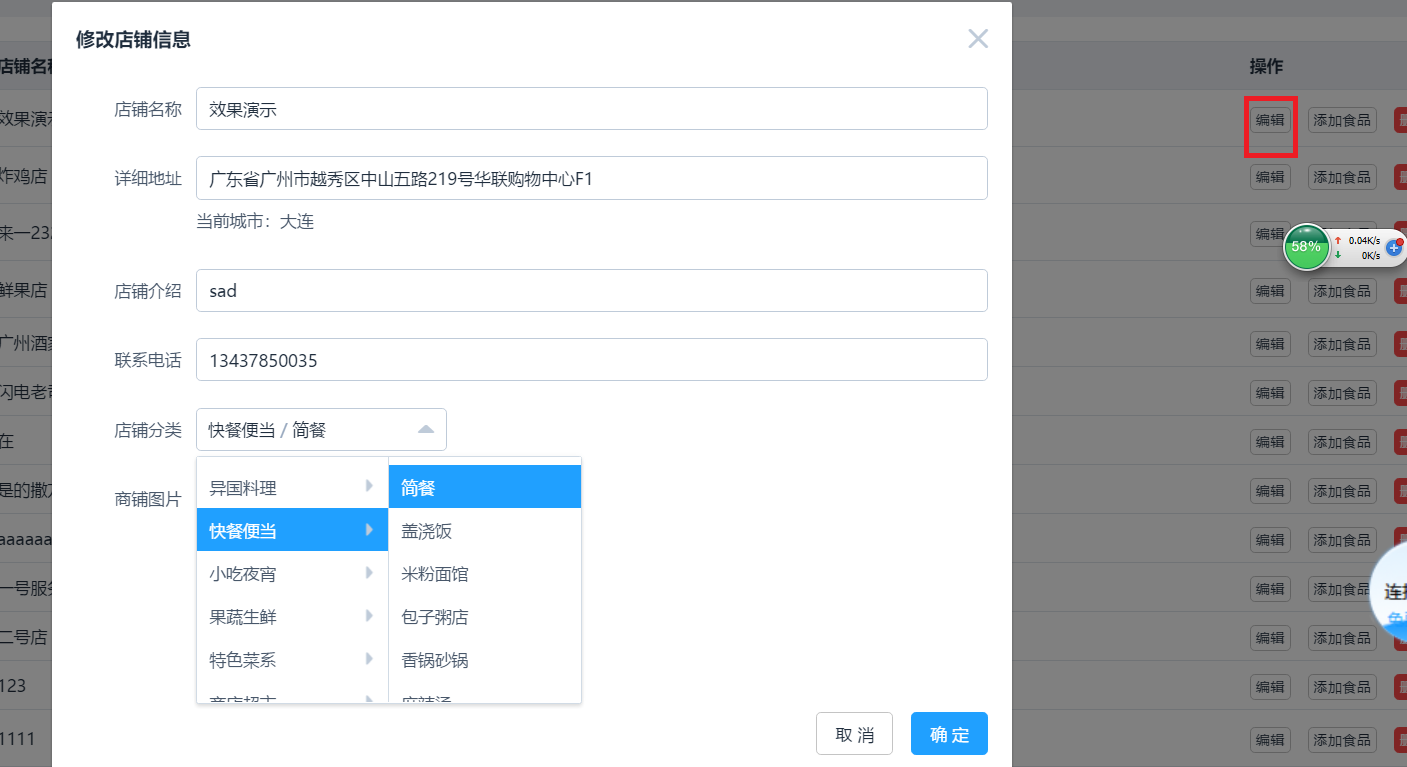
el-dialog:用v-model来控制dialog的显示和隐藏。
<el-dialog title="修改店铺信息" v-model="dialogFormVisible">
el-autocomplete
          详细地址有输入时自动补全的功能,用这个el-autocomplete
el-cascader : 商铺分类的选择列表功能用这个控件。
created(){                          // 页面还没渲染的时候执行,取得数据
    this.initData();
},
el-pagination :   分页相关的控件

点击 “添加食品” 的时候:跳转到 addGoods页面,还要传递参数,这个是如何实现的?

   页面跳转之前把restaurant_id: row.id放到query中,然后跳转过去;
addFood(index, row){
       this.$router.push({ path: 'addGoods', query: { restaurant_id: row.id }})
   },

    在新页面渲染之前,从this.$route.query中可以得到参数。
  created(){
   if (this.$route.query.restaurant_id) {
      this.restaurant_id = this.$route.query.restaurant_id;
10 Vue 学习 shortList页面的更多相关文章
- 10.VUE学习之使用lodash库减少watch对后台请求的压力
问题描述 使用watch监听库里word的值的变化,获取新值后,用oxios发送的ajax异步请求, 此时会多次发送请求,浪费服务器资料. 解决办法 使用lodash库里的_.debounce函数延缓 ...
- 九 Vue学习 manager页面布局
1: 登录后系统页面如下: 对应代码: <template> <div class="manage_page fillcontain"> <el-r ...
- vue学习【三】vue-router路由显示多页面
大家好,我是一叶,今天是七夕,单身狗的我还在这里写踩坑文.在这里还是要祝大家早日脱单(能不能脱单自己心里没个数吗).本篇继续踩坑,在单页面上展示多页的内容,大家的想法是什么,估计大家第一印象会是ifr ...
- 后端开发者的Vue学习之路(一)
目录 前言: iview组件库示例 element组件库示例 Vue的介绍 兼容性: 学习Vue需要的前置知识: MVVM模型 补充: 安装/导入 导入Vue 安装 两种方式的区别: HelloWor ...
- day 81 Vue学习一之vue初识
Vue学习一之vue初识 本节目录 一 Vue初识 二 ES6的基本语法 三 Vue的基本用法 四 xxx 五 xxx 六 xxx 七 xxx 八 xxx 一 vue初识 vue称为渐进式js ...
- VUE学习总结
VUE学习总结 文档:https://cn.vuejs.org/v2/guide/ Webstorm的一些常用快捷键:1. ctrl + shift + n: 打开工程中的文件,目的是打开当前工程下任 ...
- vue学习【二】vue结合axios动态引用echarts
大家好,我是一叶,本篇是vue学习的第二篇,本篇将要讲述vue结合axios动态引用echarts. 在vue中,异步刷新使用的是axios,类似于大家常用的ajax,其实axios已经是vue的第二 ...
- day 83 Vue学习之五DIY脚手架、webpack使用、vue-cli的使用、element-ui
Vue学习之五DIY脚手架.webpack使用.vue-cli的使用.element-ui 本节目录 一 vue获取原生DOM的方式 二 DIY脚手架 三 vue-cli脚手架的使用 四 we ...
- day 83 Vue学习四之过滤器、钩子函数、路由、全家桶等
Vue学习四之过滤器.钩子函数.路由.全家桶等 本节目录 一 vue过滤器 二 生命周期的钩子函数 三 vue的全家桶 四 xxx 五 xxx 六 xxx 七 xxx 八 xxx 一 Vue的过滤 ...
随机推荐
- Qt QImageReader 相似乎有bug
Qt 版本号 5.4.1 (VS2010) 近期在做一个小程序,事实上非常easy,就是打开一个gif 动画.能够静态显示当中随意一帧图像.Qt 中有一个QImageReader 类.用这个类理论上说 ...
- 用array_search 数组中查找是否存在这个 值
#判读里面是否还有id=1的超级管理员 $key=array_search(1, $ids); #判读这个是否存在 if($key!==FALSE){ #如果存在就unset掉这个 unset($id ...
- linux 上操作常用的命苦与出错的地方
帮助信息 ./configure -help|grep mysql 出错提示安装libxml2 tar -zxvf libxml2xxxx.tar cd libxml2xxx ./configure ...
- python 基础 1.6 python 帮助信息及数据类型间相互转换
一. 帮助信息 # dir() 方法 查看函数的方法 # help() # type() 查看类型 name = raw_input('please input you name ...
- JSON格式之GSON解析
JSON格式之GSON解析 最近在做websocket相关,项目需要JSON解析.相较之下感觉google的GSON解析不错. JAVA后台 Gson提供了fromJson()方法来实现从Json相关 ...
- 在java项目中使用protobuf
1 通用方式 第一步,定义数据结构 第二步,使用protoc.exe生成java代码 第三步,序列化 第四步,反序列化 2 grpc方式 grpc官方推荐的方式,通过maven插件来生成java代码. ...
- 记录Elasticsearch的一次坑
Elasticsearch建立mapping关系时,默认会给string类型加上分词. 所以例如openid这种,如果你用默认的分词,就可能会出现查不到数据的情况. 解决方案: 1.将数据备份 2.r ...
- Android进程的生命周期
Android系统想要永久的保留一个应用进程差点儿是不可能的.所以系统就须要不断的释放老的或者不太重要的进程以便腾出足够的内存空间来执行新的或者更重要的进程,那么系统怎样决定哪个进程应该保留哪个应该杀 ...
- iOS中常见的设计模式(MVC/单例/委托/观察者)
关于设计模式这个问题,在网上也找过一些资料,下面是我自己总结的,分享给大家 如果你刚接触设计模式,我们有好消息告诉你!首先,多亏了Cocoa的构建方式,你已经使用了许多的设计模式以及被鼓励的最佳实践. ...
- qemu仿真执行uboot和barebox
先安装qemu: apt-get install qemu-system 交叉编译器可以选择友善之臂:http://arm9download.cncncn.com/mini2440/linux/arm ...