
Bootstrap多层模态框modal嵌套问题
一、问题
在项目里忽然新加了一个需求,在原本弹出的模态框里,点击模态框里面的按钮再弹出一个模态框,出来另个模态框来展示详细信息。此时就存在两个模态框在这个需求没加之前有一个弹出的模态框也是需要继续点击(大致示意图如下),那个是时候去查过bootstrap的这个modal,官网上写着:
不支持同时打开多个模态框

千万不要在一个模态框上重叠另一个模态框。要想同时支持多个模态框,需要自己写额外的代码来实现。
于是就没打算同时打开多个模态框,因为第二个模态框打开后不再需要第一个模态框,于是就将这个功能改成当点击按钮后,将原本的模态框关闭,然后再出现第二个模态框,不让他们重叠显示。
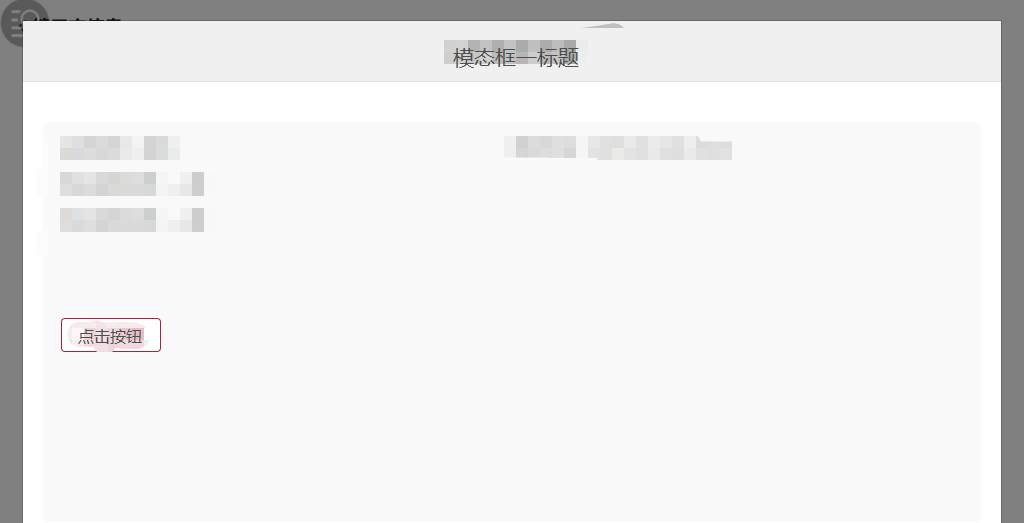

<div class="modal fade" tabindex="-1" role="dialog" aria-labelledby="Info" id="Info">

    <div class="modal-dialog" role="document">

        <div class="modal-content">

            <div class="modal-header">

                <h4 class="modal-title">模态框一标题</h4>

            </div>

            <div class="modal-body">

                    <button type="button" class="ui-button ui-button-small ui-button-outline-primary" data-dismiss="modal">点击按钮</button>

            </div>

            <!--<div class="modal-footer">-->

            <!--<button type="button" class="ui-button ui-button-small ui-button-outline-primary" data-dismiss="modal"-->

            <!--aria-label="Close"><span aria-hidden="true">关闭</span></button>-->

            <!--</div>-->

        </div>

    </div>

</div>
  $('#Info').on('hidden.bs.modal', function () {

      //模态框关闭时执行

      $("#Info2").modal({

        keyboard: false,

        show:true

      });

    });
给按钮上绑定data-dismiss="modal"属性,当点击按钮的时候,执行关闭操作,然后将第二个模态框打开。
现在新的需求是点击可查看图片详情,关闭图片详情还需要继续回到之前的模态框,进行其他的操作(如下图所示),所以之前的那种解决方案不再适用,必须要实现模态框的叠加。


<p class="m2">查看图片</p>

//第二层预览图片的模态框

<div id="secondmodal" class="modal fade" tabindex="-1" role="dialog" aria-labelledby="mySmallModalLabel">

    <div class="modal-dialog modal-sm2" role="document">

        <div class="modal-content">

            <button type="button" class="close" data-dismiss="modal" aria-label="Close">

                <span aria-hidden="true">×</span>

            </button>

            <div class="modal-body">

                <div class="icon-"><img src="/assets/app/images/yulan.png" alt="1"></div>

            </div>

        </div>

    </div>

</div>
  $('.m2').on("click", function () {

            $('#secondmodal').modal();

        });
好像这种层叠的模态框会使背景颜色不断叠加变深的,这种好像是通过修改控制背景颜色的class和js方法便可解决。(没有去试过)
Bootstrap多层模态框modal嵌套问题的更多相关文章
- 黄聪:bootstrap中模态框modal在苹果手机上会失效
bootstrap中模态框在苹果手机上会失效 可将代码修改为<a data-toggle="modal" data-target="#wrap" hre ...
- Bootstrap使用模态框modal实现表单提交弹出框
Bootstrap 模态框(Modal)插件 模态框(Modal)是覆盖在父窗体上的子窗体.通常,目的是显示来自一个单独的源的内容,可以在不离开父窗体的情况下有一些互动.子窗体可提供信息.交互等.如果 ...
- 黄聪:bootstrap的模态框modal插件在苹果iOS Safari下光标偏离问题解决方案
一行CSS代码搞定: body.modal-open { position: fixed; width: 100%; }
- Bootstrap中模态框多层嵌套时滚动条问题
在使用Bootstrap中模态框过程中,如果出现多层嵌套的时候,如打开模态框A,然后在A中打开模态框B,在关闭B之后,如果A的内容比较多,滚动条会消失,而变为Body的滚动条,这是由于模态框自带的遮罩 ...
- bootstrap模态框modal使用remote第二次加载显示相同内容解决办法
bootstrap模态框modal使用remote动态加载内容,第二次加载显示相同内容解决办法 bootstrap的modal中,使用remote可以动态加载页面到modal-body中,并弹窗显示 ...
- Bootstrap(v3.2.0)模态框(modal)垂直居中
Bootstrap(v3.2.0)模态框(modal)垂直居中方法: 在bootstrap.js文件900行后面添加如下代码,便可以实现垂直居中. that.$element.children().e ...
- Bootstrap 实例 - 模态框(Modal)插件
<!DOCTYPE html> <html> <head> <meta charset="utf-8"> <title> ...
- Bootstrap历练实例:模态框(Modal)插件
模态框(Modal)是覆盖在父窗体上的子窗体.通常,其目的是显示来自一个单独源的内容,可以在不离开父窗体的情况下进行一些交互,子窗体提供一些交互或信息. <!DOCTYPE html>&l ...
- Bootstrap 3 模态框播放视频
Bootstrap 3 模态框播放视频 I'm trying to use the Modal feature from Bootstrap 3 to show my Youtube video. I ...
随机推荐
- OpenCV学习笔记(五) 文件存取
转自输入输出XML和YAML文件 To be filled
- laravel5.2总结--序列化
序列化 构建Json格式的API接口时,经常需要转换 '模型' 和 '关联关系' 为数组或者JSON. 1>转换模型为数组: $user = App\User::with('roles')- ...
- bash shell命令与监测的那点事(一)
bash shell命令与监测的那点事之ps 学习LInux,不得不谈谈bash shell命令,介绍Linux命令行与Shell脚本的书有很多很多,bash shell命令也有很多,此次我们只谈谈有 ...
- 编写高性能React组件-传值篇
很多人在写React组件的时候没有太在意React组件的性能,使得React做了很多不必要的render,现在我就说说该怎么来编写搞性能的React组件. 首先我们来看一下下面两个组件 import ...
- 微信小程序--问题汇总及详解之图片上传和地图
地图用的是百度的地图,链接:http://lbsyun.baidu.com/index.php?title=wxjsapi/guide/getlocation 获取日期时间可以用小程序里自带的js文件 ...
- 微信公众平台OAuth2.0网页授权
微信公众平台最近新推出微信认证,认证后可以获得高级接口权限,其中一个是OAuth2.0网页授权,很多朋友在使用这个的时候失败了或者无法理解其内容,希望我出个教程详细讲解一下,于是便有了这篇文章. 一. ...
- 监视网络接口TCP状态信息数据有多种工具或命令。下面举例一些:
nstat命令 nstat kernel ======= ss -s == netstat -i netstat -s ip -s link sar -n DEV 1
- Log4j官方文档翻译(九、输出到数据库)
log4j提供了org.apache.log4j.JDBCAppender对象,可以把日志输出到特定的数据库. 常用的属性: bufferSize 设置buffer的大小,默认是1 driver 设置 ...
- SPOJ 10628 Count on a tree(Tarjan离线 | RMQ-ST在线求LCA+主席树求树上第K小)
COT - Count on a tree #tree You are given a tree with N nodes.The tree nodes are numbered from 1 to ...
- BZOJ-2618 [CQOI2006]凸多边形
半平面交模版题.. #include <cstdlib> #include <cstdio> #include <cmath> #include <cstri ...