
用Windows Native API枚举所有句柄及查找文件句柄对应文件名的方法
NTSTATUS WINAPI NtQuerySystemInformation(

  _In_      SYSTEM_INFORMATION_CLASS SystemInformationClass,

  _Inout_   PVOID                    SystemInformation,

  _In_      ULONG                    SystemInformationLength,

  _Out_opt_ PULONG                   ReturnLength

);
typedef enum _SYSTEM_INFORMATION_CLASS {

    SystemBasicInformation = ,

    SystemPerformanceInformation = ,

    SystemTimeOfDayInformation = ,

    SystemProcessInformation = ,

    SystemProcessorPerformanceInformation = ,

    SystemInterruptInformation = ,

    SystemExceptionInformation = ,

    SystemRegistryQuotaInformation = ,

    SystemLookasideInformation = ,

    SystemPolicyInformation = ,

} SYSTEM_INFORMATION_CLASS;
typedef enum _SYSTEM_INFORMATION_CLASS {

    SystemBasicInformation,

    SystemProcessorInformation,

    SystemPerformanceInformation,

    SystemTimeOfDayInformation,

    SystemPathInformation,

    SystemProcessInformation,

    SystemCallCountInformation,

    SystemDeviceInformation,

    SystemProcessorPerformanceInformation,

    SystemFlagsInformation,

    SystemCallTimeInformation,

    SystemModuleInformation,

    SystemLocksInformation,

    SystemStackTraceInformation,

    SystemPagedPoolInformation,

    SystemNonPagedPoolInformation,

    SystemHandleInformation,

    SystemObjectInformation,

    SystemPageFileInformation,

    SystemVdmInstemulInformation,

    SystemVdmBopInformation,

    SystemFileCacheInformation,

    SystemPoolTagInformation,

    SystemInterruptInformation,

    SystemDpcBehaviorInformation,

    SystemFullMemoryInformation,

    SystemLoadGdiDriverInformation,

    SystemUnloadGdiDriverInformation,

    SystemTimeAdjustmentInformation,

    SystemSummaryMemoryInformation,

    SystemMirrorMemoryInformation,

    SystemPerformanceTraceInformation,

    SystemObsolete0,

    SystemExceptionInformation,

    SystemCrashDumpStateInformation,

    SystemKernelDebuggerInformation,

    SystemContextSwitchInformation,

    SystemRegistryQuotaInformation,

    SystemExtendServiceTableInformation,

    SystemPrioritySeperation,

    SystemVerifierAddDriverInformation,

    SystemVerifierRemoveDriverInformation,

    SystemProcessorIdleInformation,

    SystemLegacyDriverInformation,

    SystemCurrentTimeZoneInformation,

    SystemLookasideInformation,

    SystemTimeSlipNotification,

    SystemSessionCreate,

    SystemSessionDetach,

    SystemSessionInformation,

    SystemRangeStartInformation,

    SystemVerifierInformation,

    SystemVerifierThunkExtend,

    SystemSessionProcessInformation,

    SystemLoadGdiDriverInSystemSpace,

    SystemNumaProcessorMap,

    SystemPrefetcherInformation,

    SystemExtendedProcessInformation,

    SystemRecommendedSharedDataAlignment,

    SystemComPlusPackage,

    SystemNumaAvailableMemory,

    SystemProcessorPowerInformation,

    SystemEmulationBasicInformation,

    SystemEmulationProcessorInformation,

    SystemExtendedHandleInformation,

    SystemLostDelayedWriteInformation,

    SystemBigPoolInformation,

    SystemSessionPoolTagInformation,

    SystemSessionMappedViewInformation,

    SystemHotpatchInformation,

    SystemObjectSecurityMode,

    SystemWatchdogTimerHandler,

    SystemWatchdogTimerInformation,

    SystemLogicalProcessorInformation,

    SystemWow64SharedInformation,

    SystemRegisterFirmwareTableInformationHandler,

    SystemFirmwareTableInformation,

    SystemModuleInformationEx,

    SystemVerifierTriageInformation,

    SystemSuperfetchInformation,

    SystemMemoryListInformation,

    SystemFileCacheInformationEx,

    MaxSystemInfoClass  // MaxSystemInfoClass should always be the last enum

} SYSTEM_INFORMATION_CLASS;
typedef struct _SYSTEM_HANDLE_INFORMATION_EX

{

    ULONG NumberOfHandles;

    SYSTEM_HANDLE_INFORMATION Information[];//注意655360这个值是我自己定义的,你们可以自己定义其他的常量值

}SYSTEM_HANDLE_INFORMATION_EX, *PSYSTEM_HANDLE_INFORMATION_EX;
typedef struct _SYSTEM_HANDLE_INFORMATION

{

    ULONG ProcessId;//进程标识符

    UCHAR ObjectTypeNumber;//打开的对象的类型

    UCHAR Flags;//句柄属性标志

    USHORT Handle;//句柄数值,在进程打开的句柄中唯一标识某个句柄

    PVOID Object;//这个就是句柄对应的EPROCESS的地址

    ACCESS_MASK GrantedAccess;//句柄对象的访问权限

}SYSTEM_HANDLE_INFORMATION, *PSYSTEM_HANDLE_INFORMATION;


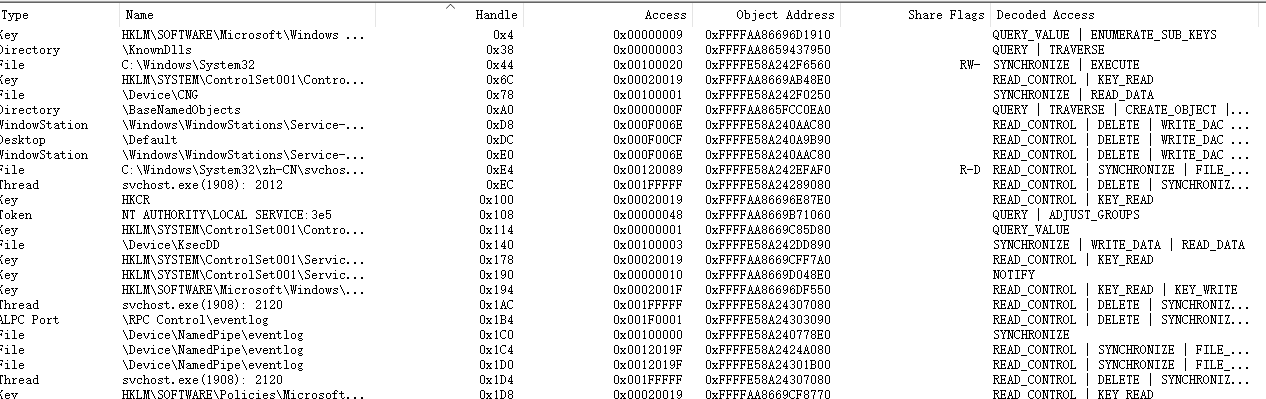

//头文件引#include <winternl.h>

#define SystemHandleInformation 0x10

typedef DWORD(WINAPI *NTQUERYSYSTEMINFORMATION)(DWORD, PVOID, DWORD, PDWORD);

HMODULE hNtDll = LoadLibrary(L"ntdll.dll");

NTQUERYSYSTEMINFORMATION NtQuerySystemInformation =

        (NTQUERYSYSTEMINFORMATION)GetProcAddress(hNtDll, "NtQuerySystemInformation");

ULONG cbBuffer = sizeof(SYSTEM_HANDLE_INFORMATION_EX);

LPVOID pBuffer = (LPVOID)malloc(cbBuffer);

if (pBuffer)

{

       NtQuerySystemInformation(SystemHandleInformation, pBuffer, cbBuffer, NULL);

       PSYSTEM_HANDLE_INFORMATION_EX pInfo = (PSYSTEM_HANDLE_INFORMATION_EX)pBuffer;

       for (ULONG r = ; r < pInfo->NumberOfHandles; r++)

       {

           //dosomething

       }

    free(pBuffer);

}

FreeModule(hNtDll);
NTSTATUS ZwQueryInformationFile(

  _In_  HANDLE                 FileHandle,

  _Out_ PIO_STATUS_BLOCK       IoStatusBlock,

  _Out_ PVOID                  FileInformation,

  _In_  ULONG                  Length,

  _In_  FILE_INFORMATION_CLASS FileInformationClass

);
typedef struct _IO_STATUS_BLOCK {

  union {

    NTSTATUS Status;

    PVOID    Pointer;

  };

  ULONG_PTR Information;

} IO_STATUS_BLOCK, *PIO_STATUS_BLOCK;
typedef enum _FILE_INFORMATION_CLASS {

  FileDirectoryInformation                 = ,

  FileFullDirectoryInformation,

  FileBothDirectoryInformation,

  FileBasicInformation,

  FileStandardInformation,

  FileInternalInformation,

  FileEaInformation,

  FileAccessInformation,

  FileNameInformation,

  FileRenameInformation,

  FileLinkInformation,

  FileNamesInformation,

  FileDispositionInformation,

  FilePositionInformation,

  FileFullEaInformation,

  FileModeInformation,

  FileAlignmentInformation,

  FileAllInformation,

  FileAllocationInformation,

  FileEndOfFileInformation,

  FileAlternateNameInformation,

  FileStreamInformation,

  FilePipeInformation,

  FilePipeLocalInformation,

  FilePipeRemoteInformation,

  FileMailslotQueryInformation,

  FileMailslotSetInformation,

  FileCompressionInformation,

  FileObjectIdInformation,

  FileCompletionInformation,

  FileMoveClusterInformation,

  FileQuotaInformation,

  FileReparsePointInformation,

  FileNetworkOpenInformation,

  FileAttributeTagInformation,

  FileTrackingInformation,

  FileIdBothDirectoryInformation,

  FileIdFullDirectoryInformation,

  FileValidDataLengthInformation,

  FileShortNameInformation,

  FileIoCompletionNotificationInformation,

  FileIoStatusBlockRangeInformation,

  FileIoPriorityHintInformation,

  FileSfioReserveInformation,

  FileSfioVolumeInformation,

  FileHardLinkInformation,

  FileProcessIdsUsingFileInformation,

  FileNormalizedNameInformation,

  FileNetworkPhysicalNameInformation,

  FileIdGlobalTxDirectoryInformation,

  FileIsRemoteDeviceInformation,

  FileUnusedInformation,

  FileNumaNodeInformation,

  FileStandardLinkInformation,

  FileRemoteProtocolInformation,

  FileRenameInformationBypassAccessCheck,

  FileLinkInformationBypassAccessCheck,

  FileVolumeNameInformation,

  FileIdInformation,

  FileIdExtdDirectoryInformation,

  FileReplaceCompletionInformation,

  FileHardLinkFullIdInformation,

      FileIdExtdBothDirectoryInformation,

  FileMaximumInformation

} FILE_INFORMATION_CLASS, *PFILE_INFORMATION_CLASS;
typedef struct _NM_INFO

{

    HANDLE   hFile;

    FILE_NAME_INFORMATION Info;

} NM_INFO, *PNM_INFO;
typedef struct _FILE_NAME_INFORMATION {

    ULONG FileNameLength;

    WCHAR FileName[];//256我自己定的,可以改成其他的,只要够放位置就行

} FILE_NAME_INFORMATION, *PFILE_NAME_INFORMATION;
NM_INFO nmInfo = {  };

nmInfo.hFile = hFile;

PNM_INFO         NmInfo = (PNM_INFO)lpParameter;

IO_STATUS_BLOCK IoStatus;

ZWQUERYINFORMATIONFILE ZwQueryInformationFile =

        (ZWQUERYINFORMATIONFILE)GetProcAddress(hNtDll, "ZwQueryInformationFile");

ZwQueryInformationFile(NmInfo->hFile, &IoStatus, &NmInfo->Info, , FILE_INFORMATION_CLASS::FileNameInformation);
#include <afx.h>

#include <winternl.h>

typedef DWORD(WINAPI *NTQUERYSYSTEMINFORMATION)(DWORD, PVOID, DWORD, PDWORD);

typedef struct _SYSTEM_HANDLE_INFORMATION

{

    ULONG ProcessId;

    UCHAR ObjectTypeNumber;

    UCHAR Flags;

    USHORT Handle;

    PVOID Object;

    ACCESS_MASK GrantedAccess;

}SYSTEM_HANDLE_INFORMATION, *PSYSTEM_HANDLE_INFORMATION;

#define STATUS_INFO_LENGTH_MISMATCH 0x004

typedef struct _SYSTEM_HANDLE_INFORMATION_EX

{

    ULONG NumberOfHandles;

    SYSTEM_HANDLE_INFORMATION Information[];

}SYSTEM_HANDLE_INFORMATION_EX, *PSYSTEM_HANDLE_INFORMATION_EX;

#define SystemHandleInformation 0x10  //

typedef struct _FILE_NAME_INFORMATION {

    ULONG FileNameLength;

    WCHAR FileName[];

} FILE_NAME_INFORMATION, *PFILE_NAME_INFORMATION;

typedef struct _NM_INFO

{

    HANDLE   hFile;

    FILE_NAME_INFORMATION Info;

} NM_INFO, *PNM_INFO;

typedef enum _RFILE_INFORMATION_CLASS {

    FileDirectoryInformation1 = ,

    FileFullDirectoryInformation,

    FileBothDirectoryInformation,

    FileBasicInformation,

    FileStandardInformation,

    FileInternalInformation,

    FileEaInformation,

    FileAccessInformation,

    FileNameInformation,

    FileRenameInformation,

    FileLinkInformation,

    FileNamesInformation,

    FileDispositionInformation,

    FilePositionInformation,

    FileFullEaInformation,

    FileModeInformation,

    FileAlignmentInformation,

    FileAllInformation,

    FileAllocationInformation,

    FileEndOfFileInformation,

    FileAlternateNameInformation,

    FileStreamInformation,

    FilePipeInformation,

    FilePipeLocalInformation,

    FilePipeRemoteInformation,

    FileMailslotQueryInformation,

    FileMailslotSetInformation,

    FileCompressionInformation,

    FileObjectIdInformation,

    FileCompletionInformation,

    FileMoveClusterInformation,

    FileQuotaInformation,

    FileReparsePointInformation,

    FileNetworkOpenInformation,

    FileAttributeTagInformation,

    FileTrackingInformation,

    FileIdBothDirectoryInformation,

    FileIdFullDirectoryInformation,

    FileValidDataLengthInformation,

    FileShortNameInformation,

    FileIoCompletionNotificationInformation,

    FileIoStatusBlockRangeInformation,

    FileIoPriorityHintInformation,

    FileSfioReserveInformation,

    FileSfioVolumeInformation,

    FileHardLinkInformation,

    FileProcessIdsUsingFileInformation,

    FileNormalizedNameInformation,

    FileNetworkPhysicalNameInformation,

    FileIdGlobalTxDirectoryInformation,

    FileIsRemoteDeviceInformation,

    FileUnusedInformation,

    FileNumaNodeInformation,

    FileStandardLinkInformation,

    FileRemoteProtocolInformation,

    FileRenameInformationBypassAccessCheck,

    FileLinkInformationBypassAccessCheck,

    FileVolumeNameInformation,

    FileIdInformation,

    FileIdExtdDirectoryInformation,

    FileReplaceCompletionInformation,

    FileHardLinkFullIdInformation,

    FileIdExtdBothDirectoryInformation,

    FileMaximumInformation

} RFILE_INFORMATION_CLASS, *PRFILE_INFORMATION_CLASS;

typedef NTSTATUS(WINAPI *ZWQUERYINFORMATIONFILE)(HANDLE, PIO_STATUS_BLOCK, PVOID, ULONG, RFILE_INFORMATION_CLASS);

CString GetFileName(HMODULE hNtDll, PNM_INFO lpParameter)

{

    PNM_INFO         NmInfo = (PNM_INFO)lpParameter;

    IO_STATUS_BLOCK IoStatus;

    ZWQUERYINFORMATIONFILE ZwQueryInformationFile =

        (ZWQUERYINFORMATIONFILE)GetProcAddress(hNtDll, "ZwQueryInformationFile");

    ZwQueryInformationFile(NmInfo->hFile, &IoStatus, &NmInfo->Info, , RFILE_INFORMATION_CLASS::FileNameInformation);

    if (NmInfo->Info.FileNameLength != )

    {

        CString str;

        str.Append(NmInfo->Info.FileName, NmInfo->Info.FileNameLength / sizeof(WCHAR));

        return str;

    }

    return CString();

}

extern "C" int WINAPI _tWinMain(HINSTANCE /*hInstance*/, HINSTANCE /*hPrevInstance*/,

    LPTSTR /*lpCmdLine*/, int nShowCmd)

{

    HMODULE hNtDll = LoadLibrary(L"ntdll.dll");

    NTQUERYSYSTEMINFORMATION NtQuerySystemInformation =

        (NTQUERYSYSTEMINFORMATION)GetProcAddress(hNtDll, "ZwQuerySystemInformation");

    ULONG cbBuffer = sizeof(SYSTEM_HANDLE_INFORMATION_EX);

    LPVOID pBuffer = (LPVOID)malloc(cbBuffer);

    auto id=  GetCurrentProcessId();

    if (pBuffer)

    {

        NtQuerySystemInformation(SystemHandleInformation, pBuffer, cbBuffer, NULL);

        PSYSTEM_HANDLE_INFORMATION_EX pInfo = (PSYSTEM_HANDLE_INFORMATION_EX)pBuffer;

        for (ULONG r = ; r < pInfo->NumberOfHandles; r++)

        {

            if (pInfo->Information[r].ObjectTypeNumber == )

            {

                NM_INFO nmInfo = {  };

                nmInfo.hFile = (HANDLE)pInfo->Information[r].Handle;

                CString fileName = GetFileName(hNtDll, &nmInfo);

                if (!fileName.IsEmpty())

                {

                    if (fileName.Find(L"ABC") != -)

                    {

                        CloseHandle(nmInfo.hFile);

                    }

                }

            }

        }

        free(pBuffer);

    }

    FreeModule(hNtDll);

    return ;

}
用Windows Native API枚举所有句柄及查找文件句柄对应文件名的方法的更多相关文章
- 掉坑日志:Windows Native API与DPI缩放
高DPI显示器越来越普及,软件自然也要适应这个变化,最近实习的时候也遇到了一个关于DPI缩放的问题.因为内部框架的一个控件有BUG,会导致内容的显示出问题,后来实在没办法改成了用Windows Nat ...
- Windows Native API
http://en.wikipedia.org/wiki/Native_API Windows 的原生 API 函数通常在系统启动时(这里其他 Windows 组件还不可用).kernel32.dll ...
- 不可或缺 Windows Native (8) - C 语言: 结构体,共用体,枚举,类型定义符
[源码下载] 不可或缺 Windows Native (8) - C 语言: 结构体,共用体,枚举,类型定义符 作者:webabcd 介绍不可或缺 Windows Native 之 C 语言 结构体 ...
- Windows下如何枚举所有进程
要编写一个类似于 Windows 任务管理器的软件,首先遇到的问题是如何实现枚举所有进程.暂且不考虑进入核心态去查隐藏进程一类的,下面提供几种方法.请注意每种方法的使用局限,比如使用这些 API 所需 ...
- 驱动开发:内核枚举PspCidTable句柄表
在上一篇文章<驱动开发:内核枚举DpcTimer定时器>中我们通过枚举特征码的方式找到了DPC定时器基址并输出了内核中存在的定时器列表,本章将学习如何通过特征码定位的方式寻找Windows ...
- mfc 调用Windows的API函数实现同步异步串口通信(源码)
在工业控制中,工控机(一般都基于Windows平台)经常需要与智能仪表通过串口进行通信.串口通信方便易行,应用广泛. 一般情况下,工控机和各智能仪表通过RS485总线进行通信.RS485的通信方式是半 ...
- 不可或缺 Windows Native 系列文章索引
[源码下载] 不可或缺 Windows Native 系列文章索引 作者:webabcd 1.不可或缺 Windows Native (1) - C 语言: hello c 介绍不可或缺 Window ...
- node-webkit教程(9)native api 之Tray(托盘)
node-webkit教程(9)native api 之Tray(托盘) 文/玄魂 目录 node-webkit教程(9)native api 之Tray(托盘) 前言 9.1 Tray简介 9.2 ...
- Native Application 开发详解(直接在程序中调用 ntdll.dll 中的 Native API,有内存小、速度快、安全、API丰富等8大优点)
文章目录: 1. 引子: 2. Native Application Demo 展示: 3. Native Application 简介: 4. Native Ap ...
随机推荐
- css正方形盒子 自适应
<!DOCTYPE html> <html lang="en"> <head> <meta charset="U ...
- Linux服务器上的禅道迁移及升级方法(Linux to Linux)
由于阿里云服务器(Linux系统)到期停用,故需要将部署在该服务器上的禅道迁移到新的Linux服务器上.另外,借此机会,正好可以对旧版禅道进行一次升级.下面总结此次迁移和升级的具体操作方法. 一.禅道 ...
- UVaLive6435(dp)
要点 题意:两个数据传输数列,每个数列里有若干个数据包并给出发出时间\(t\),每个数据包到达的时间\(T\)是\(t <= T < t + D\),问有多少种到达序列. 将题目转化为第二 ...
- JS——三种嵌入页面的方式
一 行间事件 二 页面script标签嵌入 三 外部引入 <!DOCTYPE html> <html lang="en"> <head> < ...
- Ubuntu系统修改服务器的静态ip地址
Ubuntu 16.04 #vi /etc/network/interfaces auto lo iface lo inet loopback auto ens3 iface ens3 inet st ...
- .net C#实现 中文转Unicode、Unicode转中文 及与js对应关系
中文转Unicode:HttpUtility.UrlEncodeUnicode(string str); 转换后中文格式:"%uxxxx" 举例:"柳_abc123&q ...
- T-SQL查询处理执行顺序(一)
对于T-SQL编程,用得最广泛的,莫过于查询(Querying).要想写出高质量.高性能的查询语句,必须深入地了解逻辑查询处理. 一.逻辑查询处理的各个阶段 (5)SELECT DISTINCT TO ...
- Sql server 查询指定时间区间工作日数、休息日数等日期操作
1.查询指定时间区间的工作日 这个主要难点是法定节假日,国家的法定节假日每年都不一样,还涉及到调休,所以我们设计一个假日表.主要字段有年份,类型(是否调休),假期日期.如下: CREATE TABLE ...
- readonly与const的区别
readonly 关键字与 const 关键字不同.const 字段只能在该字段的声明中初始化.readonly字段可以在声明或构造函数中初始化.因此,根据所使用的构造函数,readonly字段可能具 ...
- webpack.config.js====output出口文件的配置
output: { filename: './js/[name].[hash:8].js', /* * filename:在使用webpack-dev-server模式时,如果要使用hash,是不可以 ...