
vuex的state,mutation,getter,action
开始!正常的简单的拆分下是这样的文件当然module可以在store下面新建一个文件夹用来处理单独模块的vuex管理比较合适。
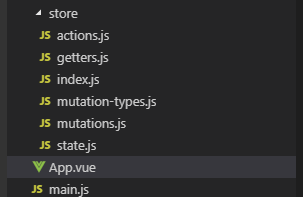
1.index.js下面
import Vue from 'vue'

import Vuex from 'vuex'

import state from './state'

import mutations from './mutations'

import * as actions from './actions'

import * as getters from './getters'

import createRenderer from 'vuex/dist/logger'

Vue.use(Vuex)

const debug = process.env.NODE_DEV !== 'production'

export default new Vuex.Store({

  state,

  mutations,

  actions,

  getters,

  strict: debug,

  plugins: debug ? [createRenderer()] : []

})
2.state.js 存放的都是公共数据源(简称全局数据或者全局变量)
const state = {

  count:0,

  num:1

}

export default state
3.mutations.js
import * as types from './mutation-types'

const mutations = {

  // ++操作

  [types.ADD_COUNT](state,count) {

    console.log(state, 'state状态', count, 'count额外参数')

    state.count++

  },

  // --操作

  [types.REDUCE_COUNT](state,count) {

    console.log(state, 'state状态', count, 'count额外参数')

    state.count--

  },

  // num ++

  [types.NUM_PLUS](state,count) {

    console.log(state, 'state状态', count, 'count额外参数')

    state.num++

  },

}

export default mutations
4.mutation-types.js mutation常量一般
export const ADD_COUNT = 'ADD_COUNT' // count ++

export const REDUCE_COUNT = 'REDUCE_COUNT' // count --

export const NUM_PLUS = 'NUM_PLUS' // num ++
5.getters.js vuex 中的getters 想当于vue中的computed ,getters是vuex 中的计算属性 ,计算属性写起来是方法,但它是个属性
export const count = state => state.count

export const num = state => state.num
7.actions.js
// import * as types from './mutation-types'

/* actions体验vuex 的异步特效*/

export const addCount = ({commit}) => {

  setTimeout(() => {

    commit('ADD_COUNT') // 提交的是mutation,mutation是同步操作

  }, 1000)

}

export const reduceCount = ({commit}) => {

  setTimeout(() => {

    commit('REDUCE_COUNT') // 提交的是mutation,mutation是同步操作

  }, 1000)

}

export const numPlus = ({commit}) => {

  setTimeout(() => {

    commit('NUM_PLUS') // 提交的是mutation,mutation是同步操作

  }, 1000)

}
8.组件内使用
<template>

  <div class="hello">

    <p>state:{},状态数据集</p>

    <p> getters:{},公共状态数据集</p>

    <p>mutations:{},主要用于改变状态</p>

    <p>actions:{},是可以解决异步问题</p>

    <hr/>

    <h1>{{ msg }}</h1>

    <p>在组件中如何获取vuex的state对象中的属性:方法一<span style="color:red;margin-left:15px">{{$store.state.count}}</span></p>

    <p>在组件中如何获取vuex的state对象中的属性:方法二<span style="color:red;margin-left:15px">{{count}}</span></p>

    <p>在组件中如何获取vuex的state对象中的属性:方法三(写法一可用别名)<span style="color:red;margin-left:15px">{{newCount}}</span></p>

    <p>在组件中如何获取vuex的state对象中的属性:方法三(写法二)<span style="color:red;margin-left:15px">{{count}}</span></p>

    <hr/>

    <h1>{{ msg1 }}</h1>

    <p>在组件中如何使用vuex的getters:写法一<span style="color:red;margin-left:15px">{{getNum}}</span></p>

    <p>在组件中如何使用vuex的getters:写法二<span style="color:red;margin-left:15px">{{num}}</span></p>

    <hr/>

    <h1>{{ msg2 }}</h1>

    <p style="margin-top:10px">

      <el-button @click="$store.commit('ADD_COUNT')">mutations写法一(count++操作)</el-button>

      <el-button type="primary" @click="$store.commit('REDUCE_COUNT')">mutations写法一(count--操作)</el-button>

      <el-button type="success" @click="$store.commit('NUM_PLUS')">mutations写法一(num++操作)</el-button>

    </p>

    <p style="margin-top:10px">

      <el-button type="info" @click="ADD_COUNT">mutations写法二(count++操作)</el-button>

      <el-button type="warning" @click="REDUCE_COUNT">mutations写法二(count++操作)</el-button>

      <el-button type="danger" @click="NUM_PLUS">mutations写法二(num++操作)</el-button>

    </p>

    <hr/>

    <h1>{{ msg3 }}</h1>

    <p style="margin-top:10px">

      <el-button @click="$store.dispatch('addCount')">actions写法一(count++操作)</el-button>

      <el-button type="primary" @click="$store.dispatch('reduceCount')">actions写法一(count--操作)</el-button>

      <el-button type="success" @click="$store.dispatch('numPlus')">actions写法一(num++操作)</el-button>

    </p>

    <p style="margin-top:10px">

      <el-button type="info" @click="addCount">actions写法二(count++操作)</el-button>

      <el-button type="warning" @click="reduceCount">actions写法二(count--操作)</el-button>

      <el-button type="danger" @click="numPlus">actions写法二(num++操作)</el-button>

    </p>

  </div>

</template>

<script>

// 使用vuex的各种常用姿势

import { mapActions, mapGetters, mapState, mapMutations } from 'vuex'

export default {

  name: 'HelloWorld',

  data () {

    return {

      msg: 'vuex之state',

      msg1: 'vuex之getters',

      msg2: 'vuex之mutations',

      msg3: 'vuex之actions',

    }

  },

  computed: {

    // vuex 取 state 方法二

    count() {

      return this.$store.state.count

    },

    // vuex 取 state 方法三

    ...mapState({

      newCount: state => state.count //写法一

    }),

    ...mapState(['count']), // 写法二

    /************************/

    // vuex 使用 getters 写法一

    getNum() {

      return this.$store.getters.num

    },

    ...mapGetters(['num'])

  },

  created() {

  },

  methods: {

    ...mapMutations(['ADD_COUNT','REDUCE_COUNT','NUM_PLUS']),

    ...mapActions(['addCount','reduceCount','numPlus'])

  },

}

</script>

<!-- Add "scoped" attribute to limit CSS to this component only -->

<style scoped>

</style>
9.App.vue 关于vuex数据刷新后消失的处理
<template>

  <div id="app">

    <!-- <img src="./assets/logo.png"> -->

    <router-view/>

  </div>

</template>

<script>

export default {

  name: 'App',

  data() {

    return {

    }

  },

  created() {

    //在页面加载时读取localStorage/ sessionstorage里的状态信息

    localStorage.getItem("store") && this.$store.replaceState(Object.assign(this.$store.state,JSON.parse(localStorage.getItem("store"))))

    //在页面刷新时将vuex里的信息保存到localStorage里解决vuex数据页面刷新丢失问题

    window.addEventListener("beforeunload",()=>{

      localStorage.setItem("store",JSON.stringify(this.$store.state))

    })

  }

}

</script>

<style>

#app {

  font-family: 'Avenir', Helvetica, Arial, sans-serif;

}

</style>
当然这只是参考。代码风格千万种只要找到合适自己的好用的都可以参考借鉴下。
vuex的state,mutation,getter,action的更多相关文章
- Vuex 的使用 State Mutation Getter Action
import Vue from 'vue' import Vuex from 'vuex' Vue.use(Vuex); /*1.state在vuex中用于存储数据*/ var state={ cou ...
- 挑战全网最幽默的Vuex系列教程:第二讲 Vuex旗下的State和Getter
先说两句 上一讲 「Vuex 到底是个什么鬼」,已经完美诠释了 Vuex 的牛逼技能之所在(纯属自嗨).如果把 Vuex 比喻成农药里面的刘备,那就相当于你现在已经知道了刘备他是一个会打枪的力量型英雄 ...
- 【vuex】mutation和action的区别
const store = new Vuex.Store({ state: { count: 0 }, mutations: { increment (state) { state.count++ } ...
- vuex mutation,action理解
1. 在store中分别注册mutation和action,action中用commit同步调用mutation来执行修改state,但是在组件中则使用dispatch异步调用action 2. 通俗 ...
- Do not mutate vuex store state outside mutation handlers.
组件代码: selectItem(item,index) { this.selectPlay({ list: this.songs, index }) }, ...mapActions([ 'sele ...
- 06-vue项目02:vuex、Mutation、Action、ElementUI、axios
1.Vuex 1.为什么使用VueX data从最上面的组件,一层层往下传值,一层层的验证 Vue单向数据流 “中央空调“,代理 VueX 解决数据 传值.. 2.Vuex介绍与安装 (1)Vuex官 ...
- vuex2.0 基本使用(2) --- mutation 和 action
我们的项目非常简单,当点击+1按钮的时候,count 加1,点击-1按钮的时候,count 减1. 1, mutation The only way to actually change state ...
- 【14】vuex2.0 之 mutation 和 action
我们的项目非常简单,当点击+1按钮的时候,count 加1,点击-1按钮的时候,count 减1. 1, mutation The only way to actually change state ...
- (转)vuex2.0 基本使用(2) --- mutation 和 action
我们的项目非常简单,当点击+1按钮的时候,count 加1,点击-1按钮的时候,count 减1. 1, mutation The only way to actually change state ...
随机推荐
- [hiho1578]Visiting Peking University
题意:签到题,不叙述了 解题关键:模拟即可. #include<bits/stdc++.h> #define inf 0x3f3f3f3f using namespace std; typ ...
- /dev/mapper/vg_zjxtest-lv_root 占用到达100%的解决方法
linux系统下报这个错误是磁盘满了,可以先做以下几个检查: 1.查看下面这个目录看看是否是回收站满了 du -sh ~/.local/share/Trash 2.查看/tmp目录和/var目录是否有 ...
- Socket 阻塞与非阻塞模式
http://blog.sina.com.cn/s/blog_5d0990c7010115ib.html
- JAVA企业级开发-JavaScript(02)
一.JavaScript介绍 Javascript语言诞生主要是完成页面的数据验证.因此它运行在客户端,需要运行浏览器来解析执行JavaScript代码. 特点: 交互性(它可以做的就是信息的动态交互 ...
- SQL SERVER动态列名
在ms sql server实现动态呈现列的方法很多.下面Insus.NET解决也算是另外一种参考. 如: 准备实现功能的数据: ) NOT NULL PRIMARY KEY) INSERT INTO ...
- js上传文件到后台时序列化数据
let fd = new FormData() // 定义传递的序列化对象,for (let i = 0; i < addArr.length; i++) { // addArr是选中文件的输入 ...
- 遍历问题 codevs
1029 遍历问题 1029 遍历问题 时间限制: 1 s 空间限制: 128000 KB 题目等级 : 钻石 Diamond 题目描述 Description 我们都很熟悉二叉树的前序.中序. ...
- 一个小时学会 MySQL 数据库
随着移动互联网的结束与人工智能的到来大数据变成越来越重要,下一个成功者应该是拥有海量数据的,数据与数据库你应该知道. 一.数据库概要 数据库(Database)是存储与管理数据的软件系统,就像一个存入 ...
- MySQL的slave_exec_mode参数作用
主从复制中常会遇到的问题就是1062主键重复 如果在读写分离的架构中,slave同步失败会对业务造成很大的影响的 因此,很有必要对主从复制做些监控,做些自动化的处理.涉及到MySQL的一个参数slav ...
- GYM 101933D(最短路、二分、dp)
要点 非要先来后到暗示多源最短路,求最小的最大值暗示二分 二分内部的check是关键,dp处理一下,\(dp[i]\)表示第\(i\)笔订单最早何时送达,如果在ddl之前到不了则\(return\ 0 ...