
vuex的state,mutation,getter,action
开始!正常的简单的拆分下是这样的文件当然module可以在store下面新建一个文件夹用来处理单独模块的vuex管理比较合适。
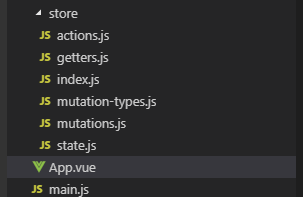
1.index.js下面
import Vue from 'vue'

import Vuex from 'vuex'

import state from './state'

import mutations from './mutations'

import * as actions from './actions'

import * as getters from './getters'

import createRenderer from 'vuex/dist/logger'

Vue.use(Vuex)

const debug = process.env.NODE_DEV !== 'production'

export default new Vuex.Store({

  state,

  mutations,

  actions,

  getters,

  strict: debug,

  plugins: debug ? [createRenderer()] : []

})
2.state.js 存放的都是公共数据源(简称全局数据或者全局变量)
const state = {

  count:0,

  num:1

}

export default state
3.mutations.js
import * as types from './mutation-types'

const mutations = {

  // ++操作

  [types.ADD_COUNT](state,count) {

    console.log(state, 'state状态', count, 'count额外参数')

    state.count++

  },

  // --操作

  [types.REDUCE_COUNT](state,count) {

    console.log(state, 'state状态', count, 'count额外参数')

    state.count--

  },

  // num ++

  [types.NUM_PLUS](state,count) {

    console.log(state, 'state状态', count, 'count额外参数')

    state.num++

  },

}

export default mutations
4.mutation-types.js mutation常量一般
export const ADD_COUNT = 'ADD_COUNT' // count ++

export const REDUCE_COUNT = 'REDUCE_COUNT' // count --

export const NUM_PLUS = 'NUM_PLUS' // num ++
5.getters.js vuex 中的getters 想当于vue中的computed ,getters是vuex 中的计算属性 ,计算属性写起来是方法,但它是个属性
export const count = state => state.count

export const num = state => state.num
7.actions.js
// import * as types from './mutation-types'

/* actions体验vuex 的异步特效*/

export const addCount = ({commit}) => {

  setTimeout(() => {

    commit('ADD_COUNT') // 提交的是mutation,mutation是同步操作

  }, 1000)

}

export const reduceCount = ({commit}) => {

  setTimeout(() => {

    commit('REDUCE_COUNT') // 提交的是mutation,mutation是同步操作

  }, 1000)

}

export const numPlus = ({commit}) => {

  setTimeout(() => {

    commit('NUM_PLUS') // 提交的是mutation,mutation是同步操作

  }, 1000)

}
8.组件内使用
<template>

  <div class="hello">

    <p>state:{},状态数据集</p>

    <p> getters:{},公共状态数据集</p>

    <p>mutations:{},主要用于改变状态</p>

    <p>actions:{},是可以解决异步问题</p>

    <hr/>

    <h1>{{ msg }}</h1>

    <p>在组件中如何获取vuex的state对象中的属性:方法一<span style="color:red;margin-left:15px">{{$store.state.count}}</span></p>

    <p>在组件中如何获取vuex的state对象中的属性:方法二<span style="color:red;margin-left:15px">{{count}}</span></p>

    <p>在组件中如何获取vuex的state对象中的属性:方法三(写法一可用别名)<span style="color:red;margin-left:15px">{{newCount}}</span></p>

    <p>在组件中如何获取vuex的state对象中的属性:方法三(写法二)<span style="color:red;margin-left:15px">{{count}}</span></p>

    <hr/>

    <h1>{{ msg1 }}</h1>

    <p>在组件中如何使用vuex的getters:写法一<span style="color:red;margin-left:15px">{{getNum}}</span></p>

    <p>在组件中如何使用vuex的getters:写法二<span style="color:red;margin-left:15px">{{num}}</span></p>

    <hr/>

    <h1>{{ msg2 }}</h1>

    <p style="margin-top:10px">

      <el-button @click="$store.commit('ADD_COUNT')">mutations写法一(count++操作)</el-button>

      <el-button type="primary" @click="$store.commit('REDUCE_COUNT')">mutations写法一(count--操作)</el-button>

      <el-button type="success" @click="$store.commit('NUM_PLUS')">mutations写法一(num++操作)</el-button>

    </p>

    <p style="margin-top:10px">

      <el-button type="info" @click="ADD_COUNT">mutations写法二(count++操作)</el-button>

      <el-button type="warning" @click="REDUCE_COUNT">mutations写法二(count++操作)</el-button>

      <el-button type="danger" @click="NUM_PLUS">mutations写法二(num++操作)</el-button>

    </p>

    <hr/>

    <h1>{{ msg3 }}</h1>

    <p style="margin-top:10px">

      <el-button @click="$store.dispatch('addCount')">actions写法一(count++操作)</el-button>

      <el-button type="primary" @click="$store.dispatch('reduceCount')">actions写法一(count--操作)</el-button>

      <el-button type="success" @click="$store.dispatch('numPlus')">actions写法一(num++操作)</el-button>

    </p>

    <p style="margin-top:10px">

      <el-button type="info" @click="addCount">actions写法二(count++操作)</el-button>

      <el-button type="warning" @click="reduceCount">actions写法二(count--操作)</el-button>

      <el-button type="danger" @click="numPlus">actions写法二(num++操作)</el-button>

    </p>

  </div>

</template>

<script>

// 使用vuex的各种常用姿势

import { mapActions, mapGetters, mapState, mapMutations } from 'vuex'

export default {

  name: 'HelloWorld',

  data () {

    return {

      msg: 'vuex之state',

      msg1: 'vuex之getters',

      msg2: 'vuex之mutations',

      msg3: 'vuex之actions',

    }

  },

  computed: {

    // vuex 取 state 方法二

    count() {

      return this.$store.state.count

    },

    // vuex 取 state 方法三

    ...mapState({

      newCount: state => state.count //写法一

    }),

    ...mapState(['count']), // 写法二

    /************************/

    // vuex 使用 getters 写法一

    getNum() {

      return this.$store.getters.num

    },

    ...mapGetters(['num'])

  },

  created() {

  },

  methods: {

    ...mapMutations(['ADD_COUNT','REDUCE_COUNT','NUM_PLUS']),

    ...mapActions(['addCount','reduceCount','numPlus'])

  },

}

</script>

<!-- Add "scoped" attribute to limit CSS to this component only -->

<style scoped>

</style>
9.App.vue 关于vuex数据刷新后消失的处理
<template>

  <div id="app">

    <!-- <img src="./assets/logo.png"> -->

    <router-view/>

  </div>

</template>

<script>

export default {

  name: 'App',

  data() {

    return {

    }

  },

  created() {

    //在页面加载时读取localStorage/ sessionstorage里的状态信息

    localStorage.getItem("store") && this.$store.replaceState(Object.assign(this.$store.state,JSON.parse(localStorage.getItem("store"))))

    //在页面刷新时将vuex里的信息保存到localStorage里解决vuex数据页面刷新丢失问题

    window.addEventListener("beforeunload",()=>{

      localStorage.setItem("store",JSON.stringify(this.$store.state))

    })

  }

}

</script>

<style>

#app {

  font-family: 'Avenir', Helvetica, Arial, sans-serif;

}

</style>
当然这只是参考。代码风格千万种只要找到合适自己的好用的都可以参考借鉴下。
vuex的state,mutation,getter,action的更多相关文章
- Vuex 的使用 State Mutation Getter Action
import Vue from 'vue' import Vuex from 'vuex' Vue.use(Vuex); /*1.state在vuex中用于存储数据*/ var state={ cou ...
- 挑战全网最幽默的Vuex系列教程:第二讲 Vuex旗下的State和Getter
先说两句 上一讲 「Vuex 到底是个什么鬼」,已经完美诠释了 Vuex 的牛逼技能之所在(纯属自嗨).如果把 Vuex 比喻成农药里面的刘备,那就相当于你现在已经知道了刘备他是一个会打枪的力量型英雄 ...
- 【vuex】mutation和action的区别
const store = new Vuex.Store({ state: { count: 0 }, mutations: { increment (state) { state.count++ } ...
- vuex mutation,action理解
1. 在store中分别注册mutation和action,action中用commit同步调用mutation来执行修改state,但是在组件中则使用dispatch异步调用action 2. 通俗 ...
- Do not mutate vuex store state outside mutation handlers.
组件代码: selectItem(item,index) { this.selectPlay({ list: this.songs, index }) }, ...mapActions([ 'sele ...
- 06-vue项目02:vuex、Mutation、Action、ElementUI、axios
1.Vuex 1.为什么使用VueX data从最上面的组件,一层层往下传值,一层层的验证 Vue单向数据流 “中央空调“,代理 VueX 解决数据 传值.. 2.Vuex介绍与安装 (1)Vuex官 ...
- vuex2.0 基本使用(2) --- mutation 和 action
我们的项目非常简单,当点击+1按钮的时候,count 加1,点击-1按钮的时候,count 减1. 1, mutation The only way to actually change state ...
- 【14】vuex2.0 之 mutation 和 action
我们的项目非常简单,当点击+1按钮的时候,count 加1,点击-1按钮的时候,count 减1. 1, mutation The only way to actually change state ...
- (转)vuex2.0 基本使用(2) --- mutation 和 action
我们的项目非常简单,当点击+1按钮的时候,count 加1,点击-1按钮的时候,count 减1. 1, mutation The only way to actually change state ...
随机推荐
- 数据字典生成工具(生成Excel, Word,PDF,html)
转自:http://www.cnblogs.com/yanweidie/p/3838765.html 数据字典生成工具之旅系列文章导航 数据字典生成工具之旅系列文章导航 宣传语 数据字典生成工具.数据 ...
- java——static声明方法注意事项
在使用 static 类型声明的方法时需要注意的是:如果在类中声明了一 static类型的属性,则此属性既可以在非 static 类型的方法中使用,也可以在 static类型的方法中使用.但用 sta ...
- [poj1222]EXTENDED LIGHTS OUT(高斯消元)
题意:每个灯开启会使自身和周围的灯反转,要使全图的灯灭掉,判断灯开的位置. 解题关键:二进制高斯消元模板题. 复杂度:$O({n^3})$ #include<cstdio> #includ ...
- iwork 文件格式分析
根据维基百科,到2015年苹果推出的iwork版本 第一章:iwork2008介绍 1.文档结构: 是一个资源合集:压缩格式的(内含文件夹和文件) 在windows下修改iwork的文件后缀为.rar ...
- LayUI 子父窗体的交互
---恢复内容开始--- 收到的工作是将一个ERP的窗体程序改为网页实现,所以就肯定需要弹框来选择(如:物料编码.部门.业务员等等) 本文采取的前段框架是LayUI. layUI的官网API网址:ht ...
- 渲染路径-surface shader 光照函数与渲染路径
https://docs.unity3d.com/Manual/SL-SurfaceShaderLighting.html Lighting Model declaration Lighting mo ...
- 51nod1109(bfs)
题目链接:http://www.51nod.com/onlineJudge/questionCode.html#!problemId=1109 题意:中文题诶- 思路:可以用二叉树构建,根节点为 1, ...
- java中对List进行分组和排序
排序 对List进行排序,有两种办法 第一个是用java提供的工具类Collections提供的sort方法进行排序 废话不多说,上代码 首先定义一个Student public class Stud ...
- servlet连接mysql数据库和oracle数据库
连接mysql数据库 package dao; import java.sql.Connection; import java.sql.DriverManager; import java.sql.P ...
- 小白入门AI教程:教你快速搭建大数据平台『Hadoop+Spark』
Apache Spark 简介 Apache Spark 是专为大规模数据处理而设计的快速通用的计算引擎.Spark是UC Berkeley AMP lab (加州大学伯克利分校的AMP实验室)所开源 ...