
bootstrap table 列求和
<div class="modal fade in" id="_modalDialog" tabindex="1" role="dialog" aria-labelledby="modalLabel"

     style="display: block;">

<div class="modal-dialog" aria-hidden="true" style="width:1520px;height:600px">

    <div class="modal-content">

        <div class="modal-header">

            <button aria-hidden="true" data-dismiss="modal" class="close"

                type="button">关闭</button>

            <h4 class="modal-title">预算调整预览</h4>

        </div>

        <div class="col-lg-5">

            <div class="text-left"><font style="color:red "><h4>调出金额合计:<span id="totalId"></span></h4></font></div>

        </div>

            <div class="modal-body">

                    <div class="row">

                        <div class="col-md-12">

                            <section class="panel">

                                <table class="table table-hover" id="oaTableId"></table>

                            </section>

                        </div>

                    </div>

            </div>

    </div>

</div>

</div>

<script th:inline="javascript">

    /*<![CDATA[*/

        //设置查询条件,把分页,查询条件,排序等信息拼接成一个models字符串对象传递至后台

    //var batchId=[[${batchId}]];

    $(function(){

        //初始化Table

        $('#oaTableId').bootstrapTable({

                            url : 'taskAgentsController/getAdjustDetailList.json', //请求后台的URL(*)

                            method: 'GET',

                            sidePagination : "client", //分页方式:client客户端分页,server服务端分页(*)

                            pagination : true, //是否显示分页(*)

                            queryParams : queryParams, //分页

                            pageSize : 10, //每页显示的记录数

                            pageNumber : 1, //当前第几页

                            pageList : [ 10, 25, 50, 100 ], //记录数可选列表

                            //showFooter: true,  方式一列求和

                            responseHandler: function (res) {

                                return res.data;

                            },
                  //方式二列求和

                             onLoadSuccess: function (res) {  //加载成功时执行

                                 var sum_1 = 0;

                                for (var i=0;i<res.length;i++) {

                                    sum_1 +=parseFloat(res[i].exportMoney);

                                }

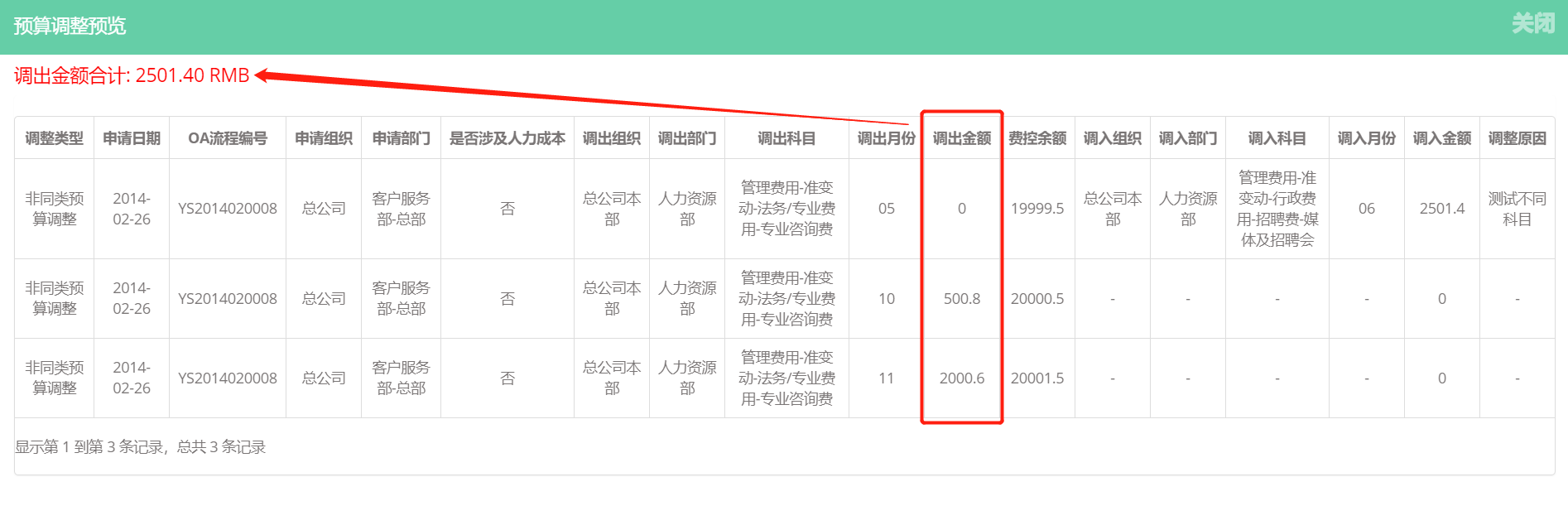
                                document.getElementById("totalId").innerText=sum_1.toFixed(2)+" RMB";//toFixed(2),保留2位小数,避免js中小数相加小数点后面多出很多位

                            },

                            columns : [

                                {title: '调整类型', field: 'adjustType', visible: true, align: 'center', valign: 'middle'},

                                {title: '申请日期', field: 'applyDate', visible: true, align: 'center', valign: 'middle'},

                                {title: 'OA流程编号', field: 'processCode', visible: true, align: 'center', valign: 'middle'},

                                {title: '申请组织', field: 'applyOrganization', visible: true, align: 'center', valign: 'middle'},

                                {title: '申请部门', field: 'applyDepartment', visible: true, align: 'center', valign: 'middle'},

                                {title: '是否涉及人力成本', field: 'flag', visible: true, align: 'center', valign: 'middle'},

                                {title: '调出组织', field: 'exportOrganization', visible: true, align: 'center', valign: 'middle'},

                                {title: '调出部门', field: 'exportDepartment', visible: true, align: 'center', valign: 'middle'},

                                {title: '调出科目', field: 'exportSubject', visible: true, align: 'center', valign: 'middle'},

                                {title: '调出月份', field: 'exportMonth', visible: true, align: 'center', valign: 'middle'},

                                {title: '调出金额', field: 'exportMoney', visible: true, align: 'center', valign: 'middle'

                                     /* footerFormatter: function (value) {    // showFooter: true, 非常重要

                                         var count = 0;

                                                for (var i in value) {

                                                    count += parseFloat(value[i].exportMoney);

                                                }

                                                alert(count)

                                                return count;

                                        } */

                                },

                                {title: '费控余额', field: 'costControl', visible: true, align: 'center', valign: 'middle'},

                                {title: '调入组织', field: 'importOrganization', visible: true, align: 'center', valign: 'middle'},

                                {title: '调入部门', field: 'importDepartment', visible: true, align: 'center', valign: 'middle'},

                                {title: '调入科目', field: 'importSubject', visible: true, align: 'center', valign: 'middle'},

                                {title: '调入月份', field: 'importMonth', visible: true, align: 'center', valign: 'middle'},

                                {title: '调入金额', field: 'importMoney', visible: true, align: 'center', valign: 'middle'},

                                {title: '调整原因', field: 'adjustReason', visible: true, align: 'center', valign: 'middle'}

                               ]

                        });

                });

    //参数

    function queryParams(params) {

        var batchId=[[${batchId}]];

        var param={"batchId":batchId};

        return param;

    }

    /*]]>*/

</script>
方式二效果展示:
bootstrap table 列求和的更多相关文章
- 关于如何解决bootstrap table 列 切换 刷新 高度不一样
在使用bootstrap table时候,碰到bootstrap table 列 切换 刷新 高度不一样的问题,如图所示: 解决这个问题很简单,在你的页头加一句<!DOCTYPE html> ...
- Bootstrap Table列宽拖动的方法
在之前做过的一个web项目中,前端表格是基于jQuery和Bootstrap Table实现的,要求能利用拖动改变列宽,现将实现的过程记录如下: 1. Bootstrap Table可拖动,需要用到它 ...
- JS组件系列——Bootstrap Table 冻结列功能IE浏览器兼容性问题解决方案
前言:最近项目里面需要用到表格的冻结列功能,所谓“冻结列”,就是某些情况下表格的列比较多,需要固定前面的几列,后面的列滚动.遗憾的是,bootstrap table里自带的fixed column功能 ...
- bootstrap table 标题列重复
使用bootstrap table生成表格,出现一个奇怪问题,标题列重复.查了一大堆资料,没有找到可以解决问题的. 以为是类库版本的问题,全部替换成了example中的引用,还是这个问题. 后来仔细查 ...
- [转] BootStrap table增加一列显示序号
原文地址:https://blog.csdn.net/aboboo5200/article/details/78839208 最近由于项目需要,使用BootStrap table做数据展示,其中要在第 ...
- [转]bootstrap table 动态列数
原文地址:https://my.oschina.net/u/2356355/blog/1595563 据说bootstrap table非常好用,从入门教程中了解到它的以下主要功能: 由于固定表头意味 ...
- bootstrap table 怎么实现前两列固定冻结?
$("#Table").bootstrapTable('destroy').bootstrapTable({ pagination: true,//分页 minimumCountC ...
- BootStrap table使用
bootstrap table git address https://github.com/wenzhixin/bootstrap-table 引入文件 <link rel="sty ...
- JS组件系列——表格组件神器:bootstrap table
前言:之前一直在忙着各种什么效果,殊不知最基础的Bootstrap Table用法都没有涉及,罪过,罪过.今天补起来吧.上午博主由零开始自己从头到尾使用了一遍Bootstrap Table ,遇到不少 ...
随机推荐
- learn the python the hard way习题11~17总结
关于 input() 格式: input("prompt")功能:从 CLI 获取 User 的一个输入,显示 promt 的内容,并且返回一个 string 类型的数值其他:如果 ...
- 自定义广播(BroadcastReceiver)事件 --Android开发
本例演示自定义广播事件.我们需要做的是,在主活动中写发送广播的代码,然后在接收广播的类中写接收广播的代码. 1.主活动中点击按钮后发送广播 MainActivity.java: public clas ...
- SQL的其他用法
SQL语言的其他用法 --求半径2米.高3米的圆柱体体积 select PI() select SQUARE(2)*PI()*3 '体积' --求字符串‘adsgdajfhwruhwuiriutoo ...
- 2.1 uml序言
UML Unified Modeling Language 统一建模语言 模型的定义 建模 modeling 重要的研发成果常常产自类比(analogy): 把不太理解的东西和一些已经较为理解.且十分 ...
- hdu 1542 Atlantis (线段树扫描线)
大意: 求矩形面积并. 枚举$x$坐标, 线段树维护$[y_1,y_2]$内的边是否被覆盖, 线段树维护边时需要将每条边挂在左端点上. #include <iostream> #inclu ...
- Anya and Cubes CodeForces - 525E (双端搜索)
大意: 给定$n$元素序列$a$, 可以任选不超过$k$个$a_i$变换为$a_i!$, 求变换后任选若干元素和为S的方案数. 分成两块暴搜, 复杂度$O(3^{\frac{n}{2}})$ #inc ...
- HTML(form标签)、CSS选择器一
一.表单标签<form> 功能:表单用于向服务器传输数据,从而实现用户与Web服务器的交互. 表单能够包含input系列标签,比如文本字段.复选框.单选框.提交按钮等等. 表单还可以包含t ...
- zend framwork黑箱测试
1.我采用的测试时phpunit 1).按照:https://phpunit.de/ 把下载的文件放到C:/window 目录,让后修改一下文件的后缀,使在敲击命令的时候可以不用敲文件的全称 如:p ...
- Cassandra V2.1.20单机安装
1. 系统调优 [root@sht-sgmhadoopcm- ~]# echo "vm.max_map_count=131072" >> /etc/sysctl.con ...
- SpringMvc4.2.5 零配置出现 No mapping found for HTTP request with URI(转)
原文地址:SpringMvc4.2.5 零配置出现 No mapping found for HTTP request with URI 采用 spring 零配置,参考 http://hanqunf ...