
Python3学习之路~4.3 装饰器
定义:本质是函数,装饰其他函数就是为其他函数添加附加功能。
原则:
- 不能修改被装饰函数的源代码
- 不能修改被装饰函数的调用方式
实现装饰器知识储备:
- 函数即“变量”
- 高阶函数
- 把一个函数名当做实参传递给另一个函数(在不修改函数源代码的情况下为其添加功能)
- 返回值中包含函数名(不修改函数的调用方式)
- 嵌套函数
高阶函数+嵌套函数——>装饰器
什么是函数即“变量”?如下图,x,y,test都可以看做是内存中的门牌号,一个值如果没有门牌号就会被回收。匿名函数没有函数名,它如果不显示地用一个变量存放,就会被立即回收。
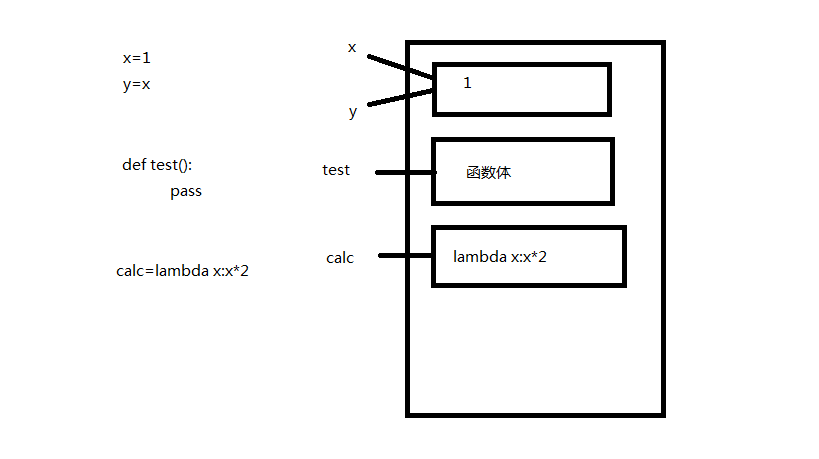
根据上图理解下面几段代码:
# 1.foo函数调用bar函数,bar函数未定义

def foo():

    print('in the foo')

    bar()

foo() # 报错:name 'bar' is not defined

# 2.在foo函数调用之前,先定义bar函数,再定义foo函数

def bar():

    print('in the bar')

def foo():

    print('in the foo')

    bar()

foo() # 运行成功

# 3.在foo函数调用之前,先定义foo函数,再定义bar函数

def foo():

    print('in the foo')

    bar()

def bar():

    print('in the bar')

foo() # 运行成功

# 4.在foo函数调用bar函数之前未定义bar函数

def foo():

    print('in the foo')

    bar()

foo() # 报错:name 'bar' is not defined

def bar():

    print('in the bar')
假如有如下一段代码:
import time

def bar():

    time.sleep(3)

    print('in the bar')

bar()
现在你要在不修改源代码的前提下为其增加一个功能:计算它的运行时间。此时你需要运用高阶函数的第一个知识点:把一个函数名当做实参传递给另一个函数。
import time

def bar():

    time.sleep(3)

    print('in the bar')

def test1(func):

    start_time = time.time()

    func()

    stop_time = time.time()

    print('the func run time is %s'%(stop_time-start_time))

test1(bar)

# 输出:

# in the bar

# the func run time is 3.000171661376953
上述代码还有缺陷,那就是改变了函数的调用方式。因为在实际的项目中可能会有多处都调用了这个函数,如果改变了函数的调用方式,意味着要在多处修改,你会被骂死。
所以现在你要修改这段代码,使之不改变原来函数的调用方式。此时你需要运用高阶函数的第二个知识点:返回值中包含函数名。看如下的例子
import time

def bar():

    time.sleep(3)

    print('in the bar')

def test2(func):

    print(func) #假设这个是新功能

    return func #返回func函数的内存地址

bar=test2(bar) #覆盖原来的bar

bar()
将上述例子应用到你的代码中
import time

def bar():

    time.sleep(3)

    print('in the bar')

def test1(func):

    start_time = time.time()

    return func #函数结束,后面代码不再执行

    stop_time = time.time()

    print('the func run time is %s'%(stop_time-start_time))

bar=test1(bar)

bar() # 输出:in the bar,并没有增加功能
你会发现,上述代码并没有实现增加新的功能,但是思想是对的。那么我们该如何实现呢?此时需要使用嵌套函数。
import time

def bar():

    time.sleep(3)

    print('in the bar')

def test1(func):

    def deco():

        start_time = time.time()

        func()

        stop_time = time.time()

        print('the func run time is %s'%(stop_time-start_time))

    return deco

bar = test1(bar)

bar()

# 输出:

# in the bar

# the func run time is 3.0001718997955322
以上代码在同时满足不改变函数的源代码和不改变函数的调用方式两个前提条件的情况下,实现了为bar函数增加了一个新功能。
其实,这是开发中一个常用的玩法,叫语法糖,官方名称“装饰器”。上面的代码可以更简单
def timer(func):

    def deco():

        start_time = time.time()

        func()

        stop_time = time.time()

        print('the func run time is %s'%(stop_time-start_time))

    return deco

@timer #在被装饰函数前面加上这个

def bar():

    time.sleep(3)

    print('in the bar')

#bar = timmer(bar) #去掉这行代码

bar()

# 输出:

# in the bar

# the func run time is 3.0001718997955322
至此,我们利用高阶函数+嵌套函数实现了装饰器。
下面利用装饰器装饰一个带参数的函数
import time

def timer(func):

    def warpper(x):

        start_time =time.time()

        func(x)

        stop_time =time.time()

        print("the func run time is %s"%(stop_time-start_time))

    return warpper

@timer

def test1(x):

    time.sleep(3)

    print("in the test1,x=%s"%x)

test1(1)

# 输出:

# in the test1,x=1

# the func run time is 3.000171422958374
写一个既可以装饰带参数、又可以装饰不带参数的函数的装饰器
import time

def timer(func):

    def warpper(*args,**kwargs):

        start_time =time.time()

        func(*args,**kwargs)

        stop_time =time.time()

        print("the func run time is %s"%(stop_time-start_time))

    return warpper

@timer

def test1():

    time.sleep(3)

    print("in the test1")

@timer

def test2(x):

    time.sleep(3)

    print("in the test2,x=%s"%x)

test1()

test2(1)

# 输出:

# in the test1

# the func run time is 3.0001718997955322

# in the test2,x=1

# the func run time is 3.000171422958374
来一个更高级的,一个网站有3个页面,index page、home page和bbs page,现在要给home page和bbs page加上登录认证。如下
user,passwd='alex',''

def auth(func):

    def wrapper(*args,**kwargs):

        username=input('Username:').strip()

        password=input('Password:').strip()

        if user == username and passwd == password:

            print('\033[32;1mUser has passed authentication\033[0m')

            func(*args,**kwargs)

        else:

            exit('\033[31;1mInvalid username or password\033[0m')

    return wrapper

def index():

    print('Welcome to index page')

@auth

def home():

    print('Welcome to home page')

@auth

def bbs():

    print('Welcome to bbs page')

index()

home()

bbs()
现在要让home page和bbs page的认证方式不同,一个为本地认证,一个为远程认证
user,passwd='alex',''

def auth(auth_type):

    def out_wrapper(func):

        def wrapper(*args,**kwargs):

            if auth_type == 'local':

                username = input('Username:').strip()

                password = input('Password:').strip()

                if user == username and passwd == password:

                    print('\033[32;1mUser has passed authentication\033[0m')

                    func(*args,**kwargs)

                else:

                    exit('\033[31;1mInvalid username or password\033[0m')

            elif auth_type == 'ldap':

                print('此处代表ldap的认证方式,不会。。。假设认证成功。。。')

                func(*args, **kwargs)

        return wrapper

    return out_wrapper

def index():

    print('Welcome to index page')

@auth(auth_type='local')

def home():

    print('Welcome to home page')

@auth(auth_type='ldap')

def bbs():

    print('Welcome to bbs page')

index()

home()

bbs()
好了,现在你应该学会装饰器了。赶快操练一下吧。
Python3学习之路~4.3 装饰器的更多相关文章
- python学习之路 六 :装饰器
本节重点: 掌握装饰器相关知识 python装饰器就是用于拓展原来函数功能的一种函数,这个函数的特殊之处在于它的返回值也是一个函数,使用python装饰器的好处就是在不用更改原函数的代码前提下给函 ...
- Python3学习之路~0 目录
目录 Python3学习之路~2.1 列表.元组操作 Python3学习之路~2.2 简单的购物车程序 Python3学习之路~2.3 字符串操作 Python3学习之路~2.4 字典操作 Pytho ...
- python3.5-day5_迭代器_生成器_装饰器_模块
笔者QQ 360212316 迭代器&生成器 生成器: 一个函数调用返回一个迭代器,那这个函数叫做生成器,如果函数中包含yield语法,那么这个函数就会变成生成器 生成器的特点: 1.生成器必 ...
- python学习笔记-(八)装饰器、生成器&迭代器
本节课程内容概览: 1.装饰器 2.列表生成式&迭代器&生成器 3.json&pickle数据序列化 1. 装饰器 1.1 定义: 本质上是个函数,功能是装饰其他函数—就是为其 ...
- Python之路-python(装饰器、生成器、迭代器、Json & pickle 数据序列化、软件目录结构规范)
装饰器: 首先来认识一下python函数, 定义:本质是函数(功能是装饰其它函数),为其它函数添加附件功能 原则: 1.不能修改被装饰的函数的源代码. 2.不 ...
- Python全栈之路----函数进阶----装饰器
Python之路,Day4 - Python基础4 (new版) 装饰器 user_status = False #用户登录后改为True def login(func): #传入想调用的函数名 de ...
- python学习总结---函数使用 and 装饰器
# 函数使用 ### 零碎知识 - 灵活的if-else ```python a = 3 if False else 5 print(a) ''' if False: a = 3 else: a = ...
- Python自学之路——自定义简单装饰器
看了微信公众号推送的一道面试题,发现了闭包的问题,学习时间短,从来没有遇到过这种问题,研究一下. Python函数作用域 global:全局作用域 local:函数内部作用域 enclosing:函数 ...
- python学习笔记(5)--迭代器,生成器,装饰器,常用模块,序列化
生成器 在Python中,一边循环一边计算的机制,称为生成器:generator. 如: >>> g = (x * x for xin range(10)) >>> ...
随机推荐
- Java中的引用类型Scanner类和随机类型Random
Scanner类 我们要学的Scanner类是属于引用数据类型,我们先了解下引用数据类型. 引用数据类型的使用 与定义基本数据类型变量不同,引用数据类型的变量定义及赋值有一个相对固定的步骤或格式. ...
- 看看大网站都用什么操作系统和Web服务器
以下内容为网络上转载总结,不是很准确 Google 用哪些软件做 Web Server? 除了有两个节点操作系统看出来是 Linux 外,其他的都是未知的. Web 服务器用的都是 GWS ? 我估计 ...
- 求大神帮解答calendar日期插件的问题
小颖最近公司的项目里用了一款日期插件 calendar.js 但是在用的过程中遇到了难题,就是当日期只需要选择具体的月份就可以了,不需要再选具体日期时,小颖解决不了,只能让它默认显示出月份,但是月 ...
- [原]jenkins(六)---jenkins远程部署脚本
/** * lihaibo * 文章内容都是根据自己工作情况实践得出. * 版权声明:本博客欢迎转发,但请保留原作者信息! http://www.cnblogs.com/horizonli/p/533 ...
- Unity3D Shader 空气扭动效果
//预览图 //原理 一个摄像机CullingMask设置只可见"Distortion"的Layer(需要自己手动加),输入到一张RenderTexture,其实就是用于确定哪里要 ...
- Phoenix系列:原子的Upsert
Phoenix的插入语句是Upsert,Update和Insert的组合语义.即,如果数据表中没有这条记录那么插入这条记录,如果有则更新.判断是否存在相同的数据是使用ON DUPLICATE KEY来 ...
- javascript基础学习系列-DOM盒子模型常用属性
最近在学习DOM盒子模型,各种属性看着眼花缭乱,下面根据三个系列来分别介绍一下: client系列 clientWidth :width+(padding-left)+(padding-right)— ...
- 洛谷 P1090合并果子【贪心】【优先队列】
题目描述 在一个果园里,多多已经将所有的果子打了下来,而且按果子的不同种类分成了不同的堆.多多决定把所有的果子合成一堆. 每一次合并,多多可以把两堆果子合并到一起,消耗的体力等于两堆果子的重量之和.可 ...
- [No0000147]深入浅出图解C#堆与栈 C# Heap(ing) VS Stack(ing)理解堆与栈4/4
前言 虽然在.Net Framework 中我们不必考虑内在管理和垃圾回收(GC),但是为了优化应用程序性能我们始终需要了解内存管理和垃圾回收(GC).另外,了解内存管理可以帮助我们理解在每一个程 ...
- 理解HTTP协议(转载)
一.HTTP协议的演进 HTTP(HyperText Transfer Protocol)协议是基于TCP的应用层协议,它不关心数据传输的细节,主要是用来规定客户端和服务端的数据传输格式,最初是用来向 ...