
vue入门模板——只需一个html
背景:
新功能页面设计与布局、动态生成UI组件、拖拽模板生成页面,然后生成代码等等,目的都是减少开发成本或复用通用组件。
html:
<!DOCTYPE html>

<html>

    <head>

        <meta charset="utf-8">

        <title>vue模板</title>

        <link rel="stylesheet" type="text/css" href="//unpkg.com/element-ui@2.13.0/lib/theme-chalk/index.css" />

        <script src="//unpkg.com/vue/dist/vue.js"></script>

        <script src="//unpkg.com/element-ui@2.13.0/lib/index.js"></script>

    </head>

    <body>

        <div id="app">

            <el-row>

                <el-button>默认按钮</el-button>

                <el-button type="primary">主要按钮</el-button>

                <el-button type="success">成功按钮</el-button>

                <el-button type="info">信息按钮</el-button>

                <el-button type="warning">警告按钮</el-button>

                <el-button type="danger">危险按钮</el-button>

            </el-row>

            <el-row>

                <el-button plain>朴素按钮</el-button>

                <el-button type="primary" plain>主要按钮</el-button>

                <el-button type="success" plain>成功按钮</el-button>

                <el-button type="info" plain>信息按钮</el-button>

                <el-button type="warning" plain>警告按钮</el-button>

                <el-button type="danger" plain>危险按钮</el-button>

            </el-row>

            <el-row>

                <el-button round>圆角按钮</el-button>

                <el-button type="primary" round>主要按钮</el-button>

                <el-button type="success" round>成功按钮</el-button>

                <el-button type="info" round>信息按钮</el-button>

                <el-button type="warning" round>警告按钮</el-button>

                <el-button type="danger" round>危险按钮</el-button>

            </el-row>

            <el-row>

                <el-button icon="el-icon-search" circle></el-button>

                <el-button type="primary" icon="el-icon-edit" circle></el-button>

                <el-button type="success" icon="el-icon-check" circle></el-button>

                <el-button type="info" icon="el-icon-message" circle></el-button>

                <el-button type="warning" icon="el-icon-star-off" circle></el-button>

                <el-button type="danger" icon="el-icon-delete" circle></el-button>

            </el-row>

        </div>

        <script type="text/javascript">

            new Vue().$mount('#app')

            // new Vue({ // 扩展

            //   el: '#app',

            //   router,

            //   store,

            //   template: '<App/>',

            //   components: { App },

            //   render: h => h(App)

            // });

        </script>

    </body>

</html>
通过json生成组件,在gitHub查询了很多插件:
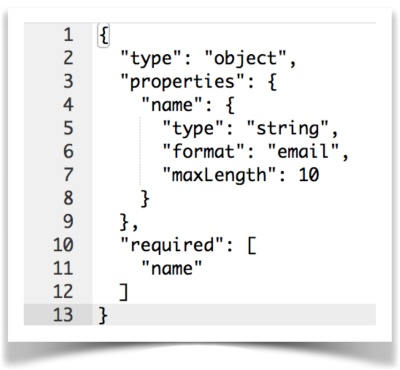
目的:生成json数据(数据类型和值、UI组件类型与校验、2者的结合)
参考项目:
https://github.com/jsonform/jsonform
https://github.com/jdorn/json-editor
https://github.com/yourtion/vue-json-ui-editor (json数据过于简单只存数据,语义化不好)
https://github.com/YMFE/json-schema-editor-visual (通过UI组件生成json格式的数据,antd)
针对elment组件:
https://github.com/GavinZhuLei/vue-form-making/blob/master/README.zh-CN.md
https://github.com/formschema/elementui
https://github.com/codetrial/element-form-builder/blob/develop/.github/preview.gif

https://github.com/xaboy/form-create
针对antd组件:
https://github.com/NgeKaworu/antd-form-gen
其他:
https://github.com/rjsf-team/react-jsonschema-form
https://github.com/json-schema-form/angular-schema-form
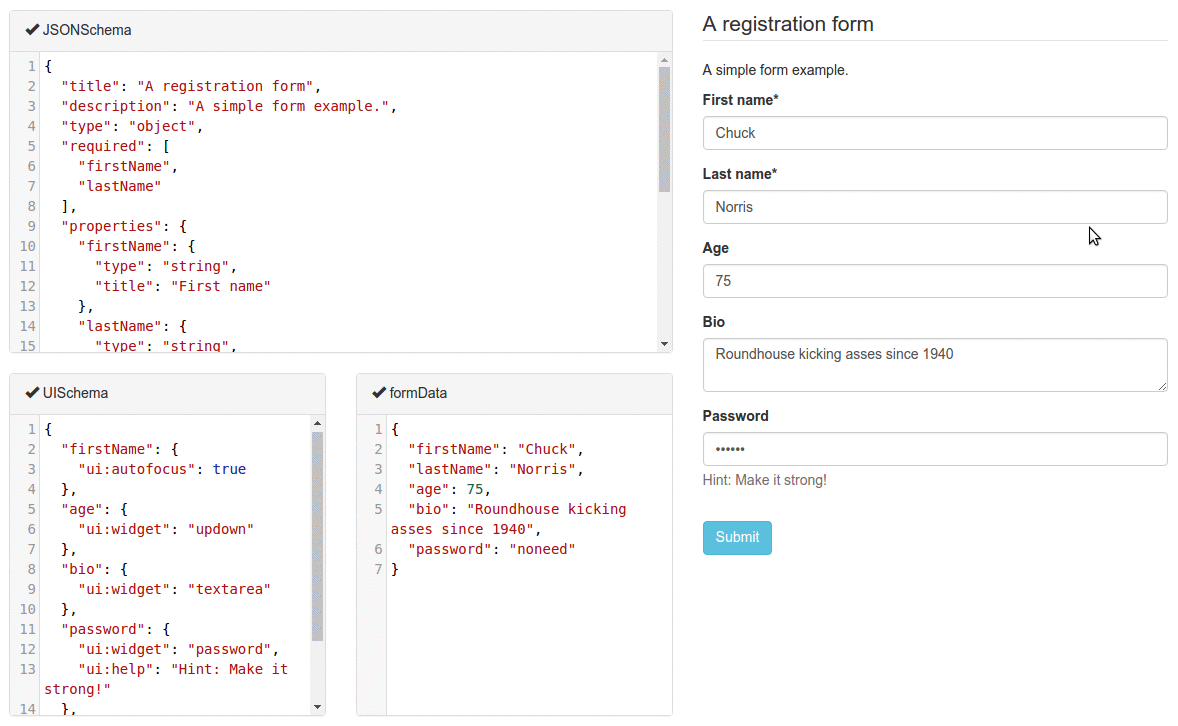
【demo】:
https://codepen.io/share-web/pen/ZEYyqzX?editors=0010
前端开发在线拖拽生成页面:
http://lowcode.magicalcoder.com/magicaldrag/index-page.html
其他汇总: https://www.cnblogs.com/camille666/p/drag_blockcomponent_generatepages.html
-end-
vue入门模板——只需一个html的更多相关文章
- 【百度地图API】发布静态图API啦!只需一个网址,即可展示定制百度地图!
原文:[百度地图API]发布静态图API啦!只需一个网址,即可展示定制百度地图! 摘要: 百度地图静态图API!您无须执行任何“特殊”操作便可在网页上显示此图片. 不需要 JavaScript.我们只 ...
- 「MacOS」将网站转换为应用程序,只需一个Unite
unite mac有着非常强大的功能,能够轻松的将网站转换为macOS上的应用程序,除了现代化的网页浏览功能以外,Unite for Mac下载还包括特定于macOS的功能,通知,TouchBar支持 ...
- 论文神器Latex30分钟快速入门教程-只需9步向学神看齐
小E说:工欲善其事,必先利其器.立志做个安静的美学霸的你,学会Latex,一定能使你的论文写作事半功倍. 1.LaTeX软件的安装和使用 方法A(自助):在MikTeX的官网下载免费的MikTeX编译 ...
- 有趣的Javascript:只需一个JS让万恶的IE5、IE6、IE7、IE8全都支持H5原生Canvas绘图(有演示demo)
该demo支持IE5以上任意内核的浏览器 查看演示demo:支持IE5以上版本的浏览器Canvas绘图demo 补充:chats.js和echarts等图表库也可以使用本方法兼容IE6以上浏览器 1. ...
- c# 高效分页只需一个dll实例
第一.首先下载WebUIControl.dll http://pan.baidu.com/s/1gdkilDh 第二.添加引用 三.应用实例-前台代码 <%@ Register Assembly ...
- laravel 中路由的快速设置(只需一个控制器名就ok) 不用具体到方法
routes/web.php 设置路由 Route::group(['middleware' => ['\iqiyi\Http\Middleware\VerifyCsrfToken::class ...
- 微信生成二维码 只需一个网址即刻 还有jquery生成二维码
<div class="orderDetails-info"> <img src="http://qr.topscan.com/api.php?text ...
- centos 下安装pdo_pgsql 只需一个命令_______yum install php56w-pgsql
[root@localhost ~]# yum install php56w-pgsql Loaded plugins: fastestmirror, langpacks Repository pgd ...
- vue 使用font-awesome 只需两步
npm 安装font-awesome 以及需要的所有依赖 cnpm install less less-loader css-loader style-loader file-loader font- ...
随机推荐
- Spring Boot方式的Dubbo项目
项目依赖 需要org.apache.dubbo.dubbo-dependencies-bom, 需要org.apache.dubbo.dubbo-spring-boot-starter, 当前版本有2 ...
- 三层架构BLL+DAL+Model & MVC & MVVM
三层架构 - 国内版 Binghttps://cn.bing.com/search?FORM=U227DF&PC=U227&q=%E4%B8%89%E5%B1%82%E6%9E%B6% ...
- C# winform判断窗体是否已打开
Form1 form; /// <summary> /// 开始检测 /// </summary> /// <param name="sender"& ...
- docker登录报错Error response from daemon: Get https://192.168.30.10/v1/users/: dial tcp 192.168.30.10:443: connect: connection refused
背景描述: 登录docker报错: [root@localhost sysconfig]# docker login 192.168.30.10 Username (newcs06): newcs06 ...
- [LeetCode] 349. Intersection of Two Arrays 两个数组相交
Given two arrays, write a function to compute their intersection. Example 1: Input: nums1 = [1,2,2,1 ...
- 使用命令行操控vmware--安装
在虚拟化出现之前,服务器的使用率很低,一般只有15%-20%,其余的资源处于闲置状态,但vmware出现之后,首先,可以充分的利用资源,从而达到节约成本的目的,其次,使得虚机便于维护.一般小型公司使用 ...
- 【视频开发】【计算机视觉】doppia编译之一:前言及安装CUDA
最近做一个"高清视频人流量检测"的项目,由于对实时性要求较高,我们需要较快的检测速度.在搜索茫茫"论"海后,我在"The Fastest Deform ...
- spring AOP注解实现
一.什么是AOP 引用一下维基百科的定义 面向切面的程序设计(Aspect-oriented programming,AOP,又译作面向方面的程序设计.剖面导向程序设计)是计算机科学中的一种程序设计思 ...
- Qt qml调试,qml性能分析和优化工具
QML语言为qt推出的用于界面编程的语言. 1)如何在qt creator中进行调试qml: 以Qt Creator 4.6.2为例: 在qt creator的debug模式下,可以直接在qml中打断 ...
- PHP反射API (转)
http://www.cnblogs.com/zyf-zhaoyafei/p/4922893.html 近期忙着写项目,没有学习什么特别新的东西,所以好长时间没有更新博客.我们的项目用的是lumen, ...