
matplotlib 常用操作
标准的Python中用列表(list)保存一组值,可以当作数组使用。但由于列表的元素可以是任何对象,因此列表中保存的是对象的指针。这样一来,为了保存一个简单的列表[1,2,3],就需
要有三个指针和三个整数对象。对于数值运算来说,这种结构显然比较浪费内存和 CPU 计算时间。
使用numpy的array模块可以解决这个问题。细节不在此赘述。这里主要记录一些matplotlib的基本使用方法
first plot#first plot with matplotlib
import matplotlib.pyplot as plt
plt.plot([1,3,2,4])
plt.show()in order to avoid pollution of global namespace, it is strongly recommended to never import like:
from import *
simple plotimport matplotlib as mpl
import matplotlib.pyplot as plt
import numpy as np
x = np.arange(0.0,6.0,0.1)
plt.plot(x, [xi**2 for xi in x],label = 'First',linewidth = 4,color = 'black')
plt.plot(x, [xi**2+2 for xi in x],label = 'second',color = 'red')
plt.plot(x, [xi**2+5 for xi in x],label = 'third')
plt.axis([0,7,-1,50])
plt.xlabel(r"$\alpha$",fontsize=20)
plt.ylabel(r'y')
plt.title('simple plot')
plt.legend(loc = 'upper left')
plt.grid(True)
plt.savefig('simple plot.pdf',dpi = 200)
print mpl.rcParams['figure.figsize'] #return 8.0,6.0
print mpl.rcParams['savefig.dpi'] #default to 100 the size of the pic will be 800*600
#print mpl.rcParams['interactive']
plt.show()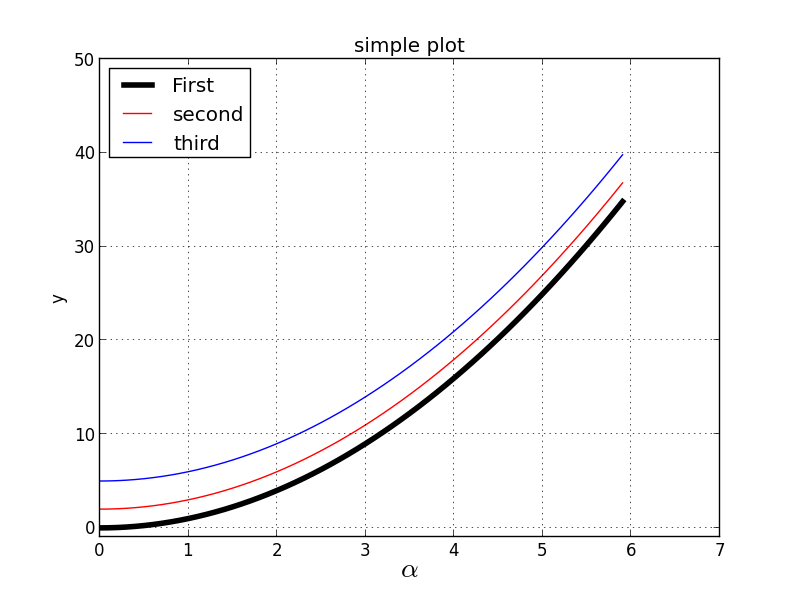
Python-3
Decorate plot with styles and typesimport matplotlib as mpl
import matplotlib.pyplot as plt
import numpy as np
x = np.arange(0.0,6.0,0.1)
plt.plot(x, [xi**2 for xi in x],label = 'First',linewidth = 4,color = 'black') #using color string to specify color
plt.plot(x, [xi**2+2 for xi in x],'r',label = 'second') #using abbreviation to specify color
plt.plot(x, [xi**2+5 for xi in x],color = (1,0,1,1),label = 'Third') #using color tuple to specify color
plt.plot(x, [xi**2+9 for xi in x],color = '#BCD2EE',label = 'Fourth') #using hex string to specify color
plt.xticks(np.arange(0.0,6.0,2.5))
plt.xlabel(r"$\alpha$",fontsize=20)
plt.ylabel(r'y')
plt.title('simple plot')
plt.legend(loc = 'upper left')
plt.grid(True)
plt.savefig('simple plot.pdf',dpi = 200)
print mpl.rcParams['figure.figsize'] #return 8.0,6.0
print mpl.rcParams['savefig.dpi'] #default to 100 the size of the pic will be 800*600
#print mpl.rcParams['interactive']
plt.show(
image
types of graph- 2

image
Bars

import matplotlib.pyplot as plt

import numpy as np

dict = {'A': 40, 'B': 70, 'C': 30, 'D': 85}

for i, key in enumerate(dict): plt.bar(i, dict[key]);

plt.xticks(np.arange(len(dict))+0.4, dict.keys());

plt.yticks(dict.values());

plt.grid(True)

plt.show()
image_1
Pies

import matplotlib.pyplot as plt

plt.figure(figsize=(10,10));

x = [4, 9, 21, 55, 30, 18]

labels = ['Swiss', 'Austria', 'Spain', 'Italy', 'France',

'Benelux']

explode = [0.2, 0.1, 0, 0, 0.1, 0]

plt.pie(x, labels=labels, explode=explode, autopct='%1.1f%%');

plt.show()
image_2
Scatter

import matplotlib.pyplot as plt

import numpy as np

x = np.random.randn(12,20)

y = np.random.randn(12,20)

mark = ['s','o','^','v','>','<','d','p','h','8','+','*']

for i in range(0,12):

    plt.scatter(x[i],y[i],marker = mark[i],color =(np.random.rand(1,3)),s=50,label = str(i+1))

plt.legend()

plt.show()
matplotlib 常用操作的更多相关文章
- matplotlib常用操作2
关于matplotlib学习还是强烈建议常去官方http://matplotlib.org/contents.html里查一查各种用法和toturial等. 下面是jupyter notebook代码 ...
- matplotlib常用操作
1.根据坐标点绘制: import numpy as np import matplotlib.pyplot as plt x = np.array([1,2,3,4,5,6,7,8]) y = np ...
- 二叉树的python可视化和常用操作代码
二叉树是一个重要的数据结构, 本文基于"二叉查找树"的python可视化 pybst 包, 做了一些改造, 可以支持更一般的"二叉树"可视化. 关于二叉树和二叉 ...
- 【三】用Markdown写blog的常用操作
本系列有五篇:分别是 [一]Ubuntu14.04+Jekyll+Github Pages搭建静态博客:主要是安装方面 [二]jekyll 的使用 :主要是jekyll的配置 [三]Markdown+ ...
- php模拟数据库常用操作效果
test.php <?php header("Content-type:text/html;charset='utf8'"); error_reporting(E_ALL); ...
- Mac OS X常用操作入门指南
前两天入手一个Macbook air,在装软件过程中摸索了一些基本操作,现就常用操作进行总结, 1关于触控板: 按下(不区分左右) =鼠标左键 control+按下 ...
- mysql常用操作语句
mysql常用操作语句 1.mysql -u root -p 2.mysql -h localhost -u root -p database_name 2.列出数据库: 1.show datab ...
- nodejs配置及cmd常用操作
一.cmd常用操作 1.返回根目录cd\ 2.返回上层目录cd .. 3.查找当前目录下的所有文件dir 4.查找下层目录cd window 二.nodejs配置 Node.js安装包及源码下载地址为 ...
- Oracle常用操作——创建表空间、临时表空间、创建表分区、创建索引、锁表处理
摘要:Oracle数据库的库表常用操作:创建与添加表空间.临时表空间.创建表分区.创建索引.锁表处理 1.表空间 ■ 详细查看表空间使用状况,包括总大小,使用空间,使用率,剩余空间 --详细查看表空 ...
随机推荐
- java基础(9)---静态方法和成员方法
一.方法: 方法的区别: 静态方法:有static方法 成员方法:没有static方法 方法的定义: 方法的调用:类.静态方法,对象.成员方法 一个MyClass类包含静态方法和成员方法: 静态方 ...
- c# DES 加密解密方法
#region 密钥 private static string key = "abcd1234"; //密钥(长度必须8位以上) #endregion #region DES加密 ...
- maven的使用和环境搭建
请在博客分类的未分类中找到这篇文章
- 数据库Count 语句详解
数据库查询相信很多人都不陌生,所有经常有人调侃程序员就是CRUD专员,这所谓的CRUD指的就是数据库的增删改查.在数据库的增删改查操作中,使用最频繁的就是查询操作.而在所有查询操作中,统计数量操作更是 ...
- Tomcat 部署多个web项目
1.若Tomcat的端口设置为10000,则http://localhost:10000访问的目录是 webapps 2.Service.xml中host内配置Context标签,path+docba ...
- BZOJ 4332: JSOI2012 分零食 FFT+分治
好题好题~ #include <bits/stdc++.h> #define N 50020 #define ll long long #define setIO(s) freopen(s ...
- 关于bootstrap的双层遮罩问题
在使用bootstrap的双层遮罩时 遇到这么2个问题 第一个是当关闭遮罩里面层遮罩时滚动条会向左溢出 第二个也是当关闭遮罩里面层遮罩时 在第一层遮罩的内容相当于固定住了 拖动滚动条也只能显示他固定住 ...
- flask入门脚本解释
创建一个最小的flask应用, 稍做编辑如下, 开启debug调试模式后, 服务器自动加载服务器的修改. 如何自己构建一个优雅的url呢 http方法介绍 http访问urls的方法有get, pos ...
- VIJOS PID221 / 烦人的幻灯片
暴力出奇迹,学长诚不欺我. PID221 / 烦人的幻灯片 2017-04-14 19:47:08 运行耗时:30 ms 运行内存:12292 KB 查看最后一次评测记录 题目描述 李教授于今天下午 ...
- 洛谷 P3367 并查集模板
#include<cstdio> using namespace std; int n,m,p; ]; int find(int x) { if(father[x]!=x) father[ ...