
Zuul【入门】
1、创建eureka-server注册中心工程,配置跟之前讲eureka文章中一样,这里不再赘述
1.1、端口8888
2、创建一个demo-client工程
2.1、demo-client启动类跟之前一样,其配置文件也一样,没有做太多配置,这里不再赘述,端口:7070,服务名:client-a。
2.2、编写一个测试接口:
import org.springframework.web.bind.annotation.GetMapping;

import org.springframework.web.bind.annotation.RestController;

@RestController

public class TestController {

    @GetMapping("/add")

    public Integer add(Integer a, Integer b) {

        return a + b;

    }

}
3、创建一个zuul-gateway工程
3.1、pom配置:
<parent>

   <groupId>org.springframework.boot</groupId>

   <artifactId>spring-boot-starter-parent</artifactId>

   <version>2.0.3.RELEASE</version>

</parent>

<!-- 管理依赖 -->

<dependencyManagement>

   <dependencies>

      <dependency>

         <groupId>org.springframework.cloud</groupId>

         <artifactId>spring-cloud-dependencies</artifactId>

         <version>Finchley.RELEASE</version>

         <type>pom</type>

         <scope>import</scope>

      </dependency>

   </dependencies>

</dependencyManagement>

<dependencies>

     <!-- springboot web -->

     <dependency>

        <groupId>org.springframework.boot</groupId>

        <artifactId>spring-boot-starter-web</artifactId>

     </dependency>

        <dependency>

            <groupId>org.springframework.cloud</groupId>

            <artifactId>spring-cloud-starter-netflix-zuul</artifactId>

        </dependency>

        <dependency>

            <groupId>org.springframework.cloud</groupId>

            <artifactId>spring-cloud-starter-netflix-eureka-client</artifactId>

        </dependency>

</dependencies>

<build>

        <plugins>

            <plugin>

                <groupId>org.springframework.boot</groupId>

                <artifactId>spring-boot-maven-plugin</artifactId>

            </plugin>

        </plugins>

</build>
3.2、工程启动类:
import org.springframework.boot.SpringApplication;

import org.springframework.boot.autoconfigure.SpringBootApplication;

import org.springframework.cloud.client.discovery.EnableDiscoveryClient;

import org.springframework.cloud.netflix.zuul.EnableZuulProxy;

@SpringBootApplication

@EnableDiscoveryClient

@EnableZuulProxy

public class ZuulServerApplication {

    public static void main(String[] args) {

        SpringApplication.run(ZuulServerApplication.class, args);

    }

}
3.3、配置文件:
spring:

  application:

    name: zuul-gateway

server:

  port: 5555 #指定网关服务端口

eureka:

  client:

    serviceUrl:

      defaultZone: http://${eureka.host:127.0.0.1}:${eureka.port:8888}/eureka/ #指定注册中心

  instance:

    prefer-ip-address: true

# 将所有/client开头的URL映射到client-a这个服务中

zuul:

  routes:

    client-a:

      path: /client/**

      serviceId: client-a
3、启动三个工程:eureka-server、zuul-gateway、demo-client
1、直接访问服务接口:localhost:7070/add?a=100&b=1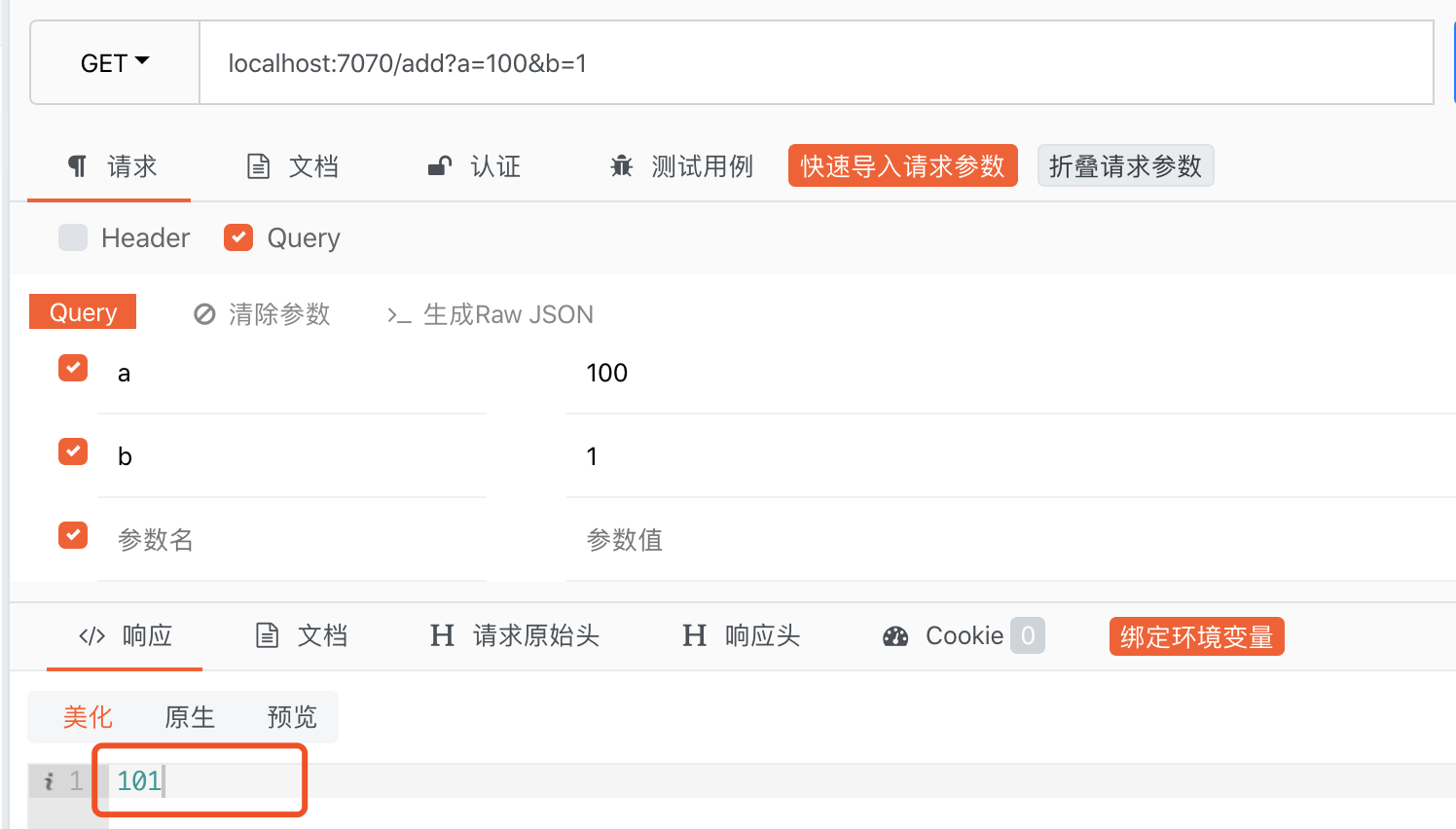
2、通过zuul网关访问接口:localhost:5555/client/add?a=100&b=100
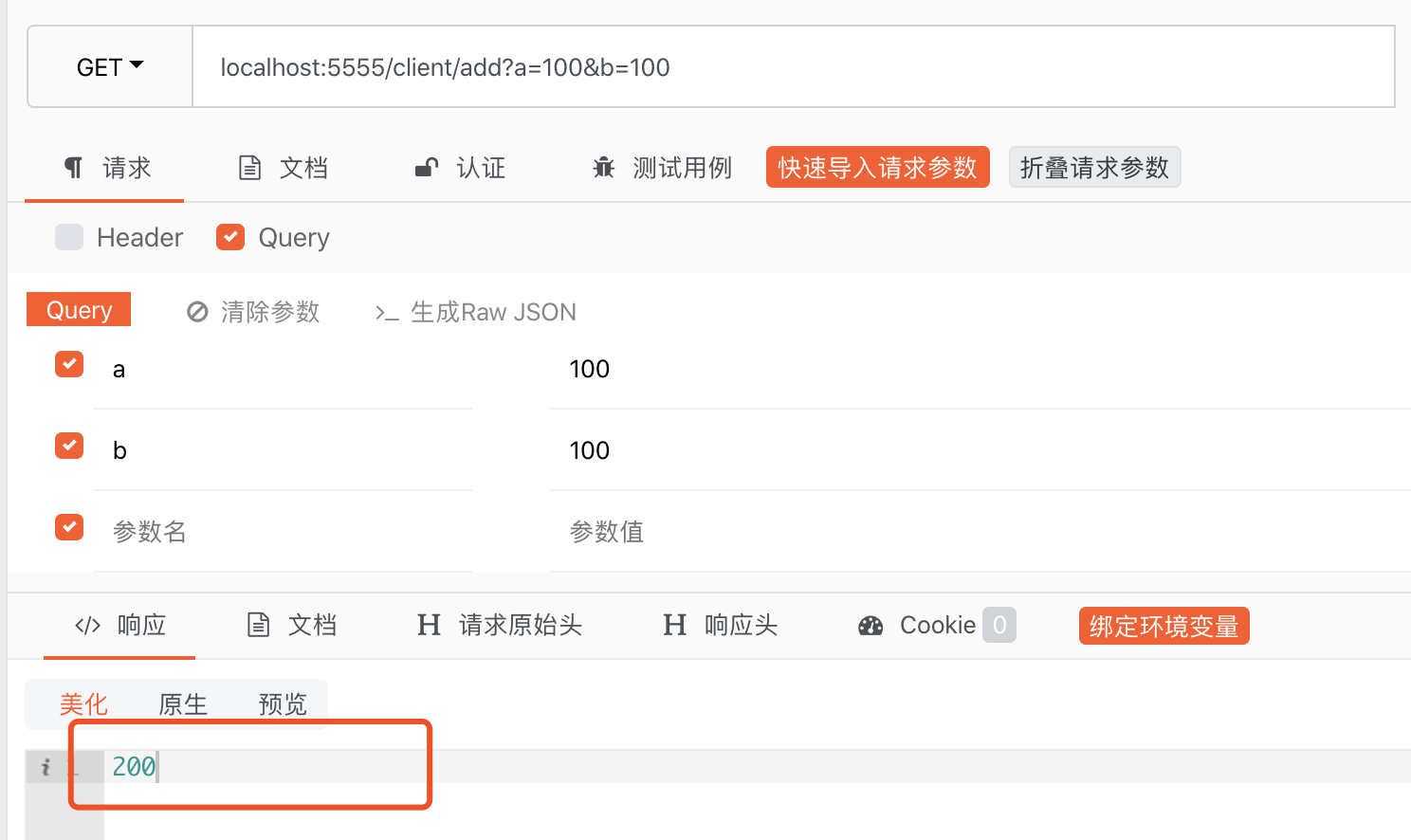
可以看到通过网关也能正常访问到demo-client服务中的接口,这是因为在网关项目配置文件中,指定了路由规则,当浏览器向网关发送请求的时候,它会去注册中心拉取服务列表,如果发现有指定的映射规则,就会按照我们配置的规则路由到对应的服务接口上。
Zuul【入门】的更多相关文章
- Spring Cloud 微服务笔记(七) Zuul入门
Zuul入门 Zuul是从设备和网站到后端应用程序所有请求的前门,为内部服务提供可配置的对外URL到服务的 映射关系,基于JVM的后端路由器.其具备一下功能: 1)认证与授权 2)压力控制 3)金丝雀 ...
- zuul入门(5)zuul 处理异常
Object accessToken = request.getParameter("accessToken"); if(accessToken==null) { // 设置zuu ...
- zuul入门(4)zuul的注解@EnableZuulServer和@EnableZuulProxy
@EnableZuulServer.@EnableZuulProxy两个注解 @EnableZuulProxy简单理解为@EnableZuulServer的增强版,当Zuul与Eureka.Ribbo ...
- zuul入门(2)zuul的过滤器分类和加载
一.Groovy编写的Filter 1.可以放到指定目录加载 创建一个pre类型的filter,在run方法中获取HttpServletRequest 然后答应header信息 在代码中加入groov ...
- zuul入门(3)开发zuul的过滤器
1.编写Zuul过滤器(Java&Groovy) 理解过滤器类型和请求生命周期后,我们来编写一个Zuul过滤器.编写Zuul的过滤器非常简单,我们只需继承抽象类ZuulFilter,然后实现几 ...
- zuul入门(1)zuul 的概念和原理
一.zuul是什么 zuul 是netflix开源的一个API Gateway 服务器, 本质上是一个web servlet应用. Zuul 在云平台上提供动态路由,监控,弹性,安全等边缘服务的框架. ...
- 第二章 微服务网关基础组件 - zuul入门
一.zuul简介 1.作用 zuul使用一系列的filter实现以下功能 认证和安全 - 对每一个resource进行身份认证 追踪和监控 - 实时观察后端微服务的TPS.响应时间,失败数量等准确的信 ...
- SpringCloud入门(七): Zuul 简介与使用
Zuul 简介 Zuul 微服务网关是为Spring Cloud Netflix提供动态路由,监控,弹性,安全等服务的框架.可以和Eureka.Ribbon.Hystrix等组件配合使用. Zuul ...
- 对于zuul服务网关框架资料整理
本次博客只是整理了一些 看过的博客.源码等 zuul入门(1)zuul 的概念和原理 https://www.cnblogs.com/lexiaofei/p/7080257.html 深入理解Zuul ...
- 八、springcloud之服务网关zuul(一)
一.Zuul简介 zuul 是netflix开源的一个API Gateway 服务器, 本质上是一个web servlet应用. Zuul是Netflix出品的一个基于JVM路由和服务端的负载均衡器. ...
随机推荐
- tecplot不能导入fluent多面体的解决办法
多面体网格在fluent当中计算完成,如果保存cas和dat文件,如果直接将cas和dat文件导入tecplot进行后处理,tecplot会提示多面体网格在fluent当中计算完成,如果保存cas和d ...
- Django连接MySQL(二)
1.首先我们需要创建好项目 2.安装MySQL数据库 3.setting中修改database设置 DATABASES = { 'default': { 'ENGINE': 'django.db.ba ...
- receipt
receipt - 必应词典 美[riˈsiːt]英[rɪ'siːt] n.收据:收入:接受:字据 v.开收据 网络收到:收条:发票 变形复数:receipts: 搭配give receipt:sig ...
- python 与开源Gis 书本知识点测试
# -*- coding: utf-8 -*- print(u"python与开源QGis课题研究组")#print("汉字") #++++++++++++++ ...
- 【Java/Json】Java对Json进行建模,分词,递归向下解析构建Json对象树
伸手党的福音 代码下载:https://files.cnblogs.com/files/xiandedanteng/JsonLexerBuilder20191202.rar 互联网上成型的对Json进 ...
- ArcPy python实例教程-条件平差-测量平差
ArcPy python实例教程-条件平差-测量平差 商务合作,科技咨询,版权转让:向日葵,135-4855__4328,xiexiaokui#qq.com 输入参数:条件方程的系数,观测值,常数项和 ...
- 泡泡一分钟:Topomap: Topological Mapping and Navigation Based on Visual SLAM Maps
Topomap: Topological Mapping and Navigation Based on Visual SLAM Maps Fabian Bl¨ochliger, Marius Feh ...
- 【DataBase】Hsqldb的简单使用
介绍 HSQLDB是一个开放源代码的JAVA数据库,其具有标准的SQL语法和JAVA接口,它可以自由使用和分发,非常简洁和快速的.具有Server模式,每个程序需要不同的命令来运行. HyperSQL ...
- 敏感信息直接在 nginx 通过环境变量设置
通常我们在维护PHP线上项目的时候,为了隔离配置和代码,会使用fastcgi_param的形式将环境变量定义在Nginx的配置文件中(Apache可以使用SetEnv指令).这样在PHP-FPM运行过 ...
- PAT 甲级 1073 Scientific Notation (20 分) (根据科学计数法写出数)
1073 Scientific Notation (20 分) Scientific notation is the way that scientists easily handle very ...