
ros ap 的无线中继
https://wiki.mikrotik.com/wiki/Manual:Interface/Wireless#Repeater
Wireless repeater will allow to receive the signal from the AP and repeat the signal using the same physical interface locally for connecting other clients. This will allow to extend the wireless service for the wireless clients. Wireless repeater function will configure the wireless interface to connect to the AP with station-bridge or station-pseudobridge option, create a virtual AP interface, create a bridge interface and add both (main and the virtual) interfaces to the bridge ports.
If your AP supports button-enabled WPS mode, you can use the automatic setup command:
/interface wireless setup-repeater wlan1
The setup-repeater does the following steps:
- searches for WPS AP with button pushed
- acquires SSID, key, channel from AP
- resets main master interface config (same as reset-configuration)
- removes all bridge ports that were added for virtual interfaces added to this master (so there are no dangling invalid bridge ports later)
- removes all virtual interfaces added to this master
- creates security profile with name "<interfacename>-<ssid>-repeater", if such security profile already exists does not create new, just updates settings
- configures master interface, interface mode is selected like this: if AP supports bridge mode, use station-bridge, else if AP supports WDS, use station-wds, else use station-pseudobridge
- creates virtual AP interface with same SSID and security profile as master
- if master interface is not in some bridge, creates new bridge interface and adds master interface to it
- adds virtual AP interface to the same bridge master interface is in.
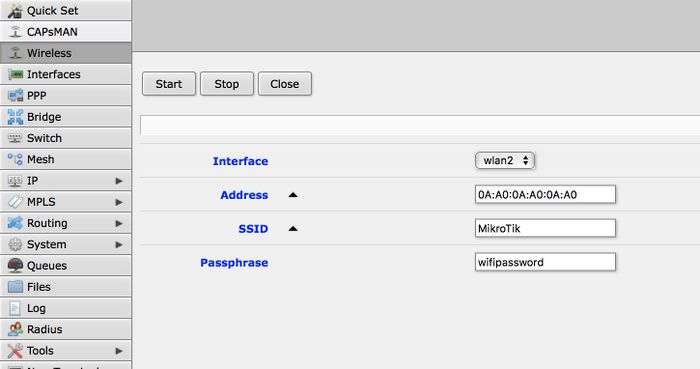
If your AP does not support WPS, it is possible to specify the settings manually, using these parameters:
- address - MAC address of AP to setup repeater for (optional)
- ssid - SSID of AP to setup repeater for (optional)
- passphrase - key to use for AP - if this IS specified, command will just scan for AP and create security profile based on info in beacon and with this passphrase. If this IS NOT specified, command will do WPS to find out passphrase.
The same options are available in the GUI:
ros ap 的无线中继的更多相关文章
- OpenWRT UCI命令实现无线中继
本文主要功能主要是利用OpenWRT系统uci命令实现无线中继,主要是利用uci程序修改/etc/congfig/目录下的配置文件.实现步骤如下主要分为以下几步: 1) 安装 relayd (opkg ...
- Openwrt无线中继设置并访问外网
Openwrt无线中继设置并访问外网 本篇博文参考来自:http://blog.csdn.net/pifangsione/article/details/13162023 配置目标 主路由器使用AP模 ...
- openwrt 无线中继
参考: https://wiki.openwrt.org/doc/recipes/relayclient 该方法可以实现中继AP,而不需要AP(WDS)模式.中继后,相当于该路由所有的LAN口以及AP ...
- 提升网速的路由器优化方法(UPnP、QoS、MTU、交换机模式、无线中继)
在上一篇<为什么房间的 Wi-Fi 信号这么差>中,猫哥从微波炉.相对论.人存原理出发,介绍了影响 Wi-Fi 信号强弱的几大因素,接下来猫哥再给大家介绍几种不用升级带宽套餐也能提升网速的 ...
- Android手机做无线中继路由器
为什么要拿手机做路由器?因为我现在每天要带着一个火柴盒大小的路由器(703n).它提供了一个f了q的无线网络,电脑,手机,平板等设备连接上这个无线网络之后之后就可以自由上twitter,看youtub ...
- 路由器桥接(WIFI无线中继)设置及摆放位置图解
路由器桥接(WIFI无线中继)设置及摆放位置图解 WIFI实在好用,但它的波覆盖面小.穿透力很差.我们安装时要考虑波的衍射特点,装在衍射效果最佳的位置(居中,室外可绕,避开密封墙).确实无法兼顾的地方 ...
- AC+AP组网无线WiFi网速超慢延迟卡顿问题解决
AP是什么? AP是Access Point的简称,即无线接入点,其作用是把局域网里通过双绞线传输的有线信号(即电信号)经过编译,转换成无线电信号传递给电脑.手机等无线终端,与此同时,又把这些无线终端 ...
- win7下利用笔记本无线网卡创建AP 组建无线局域网(可以连魔兽,TCP、UDP也没问题)
转自:http://blog.163.com/fghok_018/blog/static/122599670201072773924530/ 近一个月,宿舍的好多同学都买了笔记本电脑,当然,我也买了, ...
- openwrt无线中继教程
1.设置自己路由lan口的IP地址,网段不能跟上级路由的一样. 2.在无线标签下点击"扫描网络". 3.在新出现的界面中,会列出你附近的无线网络.点击你需要中继的网络右边的&quo ...
随机推荐
- python3.7环境安装
wget http://mirror.centos.org/centos/6/os/x86_64/Packages/libffi-devel-3.0.5-3.2.el6.x86_64.rpm rpm ...
- VS2019无法安装Android SDK 28的问题
在一台新电脑上安装VS2019,新建Xamarin.Android项目,反复提示要安装Android SDK Build Tools 28.0.3,在弹出的窗口里点击接受协议,却无法安装SDK. 直接 ...
- Notes:Unit Testing
UnitTesting shanzm 右键-->在新标签页中打开图片,即可查看原图,图片超乎你想像的大!
- 一、Hadoop入门概述
一.Hadoop是什么 Hadoop是一个由Apche基金会所开发的分布式系统基础架构. 主要解决海量数据的存储和海量数据的分析计算问题. 广义上来说,Hadoop通常是指一个更广泛的概念—Hadoo ...
- 分布式session的解决方案
1.Nginx的ip_hash,对应tomcat的session,由tomcat保存 缺点:一旦tomcat单点挂机,session消失 2.session在tomcat之间复制, 缺点:保存全局se ...
- oracle 查询角色具有的权限
select * from dba_tab_privs where GRANTEE='角色名';
- jmeter+jenkins配置过程
目录 前置条件 脚本规划 讲解非GUI方式运行脚本 在jenkins里面新建项目 在Jmeter的jtl结果文件转换成html页面 邮件.配置 前置条件 1.jmeter安装好并已配置好环境变量,可正 ...
- 05. redis事务
目录 Redis 事务 事务 1. 命令有序 2. 始终原子 开启使用事务 Redis事务中出现错误 1. EXEC前的错误 2. EXEC后的错误 为什么出错了不支持roll backs? Redi ...
- Java实现Redis的消息订阅和发布
1. 首先需要一个消息监听器类 package com.sogou.baike.testimport.testSubscribe; import redis.clients.jedis.JedisP ...
- WTL 9.0的变化 - atlcrack.h
atlcrack.h中是一些对消息映射的简化,9.0版本中只增加了一个WM_MOUSEWHEEL的响应,而且要求windows vista. #if (_WIN32_WINNT >= 0x060 ...