
ros ap 的无线中继
https://wiki.mikrotik.com/wiki/Manual:Interface/Wireless#Repeater
Wireless repeater will allow to receive the signal from the AP and repeat the signal using the same physical interface locally for connecting other clients. This will allow to extend the wireless service for the wireless clients. Wireless repeater function will configure the wireless interface to connect to the AP with station-bridge or station-pseudobridge option, create a virtual AP interface, create a bridge interface and add both (main and the virtual) interfaces to the bridge ports.
If your AP supports button-enabled WPS mode, you can use the automatic setup command:
/interface wireless setup-repeater wlan1
The setup-repeater does the following steps:
- searches for WPS AP with button pushed
- acquires SSID, key, channel from AP
- resets main master interface config (same as reset-configuration)
- removes all bridge ports that were added for virtual interfaces added to this master (so there are no dangling invalid bridge ports later)
- removes all virtual interfaces added to this master
- creates security profile with name "<interfacename>-<ssid>-repeater", if such security profile already exists does not create new, just updates settings
- configures master interface, interface mode is selected like this: if AP supports bridge mode, use station-bridge, else if AP supports WDS, use station-wds, else use station-pseudobridge
- creates virtual AP interface with same SSID and security profile as master
- if master interface is not in some bridge, creates new bridge interface and adds master interface to it
- adds virtual AP interface to the same bridge master interface is in.
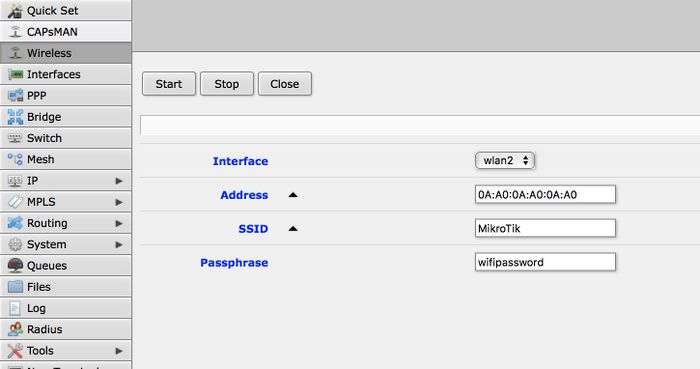
If your AP does not support WPS, it is possible to specify the settings manually, using these parameters:
- address - MAC address of AP to setup repeater for (optional)
- ssid - SSID of AP to setup repeater for (optional)
- passphrase - key to use for AP - if this IS specified, command will just scan for AP and create security profile based on info in beacon and with this passphrase. If this IS NOT specified, command will do WPS to find out passphrase.
The same options are available in the GUI:
ros ap 的无线中继的更多相关文章
- OpenWRT UCI命令实现无线中继
本文主要功能主要是利用OpenWRT系统uci命令实现无线中继,主要是利用uci程序修改/etc/congfig/目录下的配置文件.实现步骤如下主要分为以下几步: 1) 安装 relayd (opkg ...
- Openwrt无线中继设置并访问外网
Openwrt无线中继设置并访问外网 本篇博文参考来自:http://blog.csdn.net/pifangsione/article/details/13162023 配置目标 主路由器使用AP模 ...
- openwrt 无线中继
参考: https://wiki.openwrt.org/doc/recipes/relayclient 该方法可以实现中继AP,而不需要AP(WDS)模式.中继后,相当于该路由所有的LAN口以及AP ...
- 提升网速的路由器优化方法(UPnP、QoS、MTU、交换机模式、无线中继)
在上一篇<为什么房间的 Wi-Fi 信号这么差>中,猫哥从微波炉.相对论.人存原理出发,介绍了影响 Wi-Fi 信号强弱的几大因素,接下来猫哥再给大家介绍几种不用升级带宽套餐也能提升网速的 ...
- Android手机做无线中继路由器
为什么要拿手机做路由器?因为我现在每天要带着一个火柴盒大小的路由器(703n).它提供了一个f了q的无线网络,电脑,手机,平板等设备连接上这个无线网络之后之后就可以自由上twitter,看youtub ...
- 路由器桥接(WIFI无线中继)设置及摆放位置图解
路由器桥接(WIFI无线中继)设置及摆放位置图解 WIFI实在好用,但它的波覆盖面小.穿透力很差.我们安装时要考虑波的衍射特点,装在衍射效果最佳的位置(居中,室外可绕,避开密封墙).确实无法兼顾的地方 ...
- AC+AP组网无线WiFi网速超慢延迟卡顿问题解决
AP是什么? AP是Access Point的简称,即无线接入点,其作用是把局域网里通过双绞线传输的有线信号(即电信号)经过编译,转换成无线电信号传递给电脑.手机等无线终端,与此同时,又把这些无线终端 ...
- win7下利用笔记本无线网卡创建AP 组建无线局域网(可以连魔兽,TCP、UDP也没问题)
转自:http://blog.163.com/fghok_018/blog/static/122599670201072773924530/ 近一个月,宿舍的好多同学都买了笔记本电脑,当然,我也买了, ...
- openwrt无线中继教程
1.设置自己路由lan口的IP地址,网段不能跟上级路由的一样. 2.在无线标签下点击"扫描网络". 3.在新出现的界面中,会列出你附近的无线网络.点击你需要中继的网络右边的&quo ...
随机推荐
- R数据挖掘 第二篇:基于距离评估数据的相似性和相异性
聚类分析根据对象之间的相异程度,把对象分成多个簇,簇是数据对象的集合,聚类分析使得同一个簇中的对象相似,而与其他簇中的对象相异.相似性和相异性(dissimilarity)是根据数据对象的属性值评估的 ...
- How to get the free disk space in PostgreSQL (PostgreSQL获取磁盘空间)
Get the current free disk space in PostgreSQL PostgreSQL获取磁盘空间 from eshizhan Here has a simple way t ...
- .net Core 学习笔记(增加Nlog日志)
https://github.com/NLog/NLog.Web/wiki/Getting-started-with-ASP.NET-Core-2 (日志下载) https://github.com ...
- IdentityService4学习笔记之Authorization Code
前文 本文所有内容来自官方文档,如果有写不明白的地方请下方留言或查看官方文档. 今天介绍Authorization Code模式,适用于保密类型的客户端,保密类型客户端可以理解为在服务器端生成页面(比 ...
- 关于ipad设备滚动条无法滚动的解决办法
天做一个功能在ipad设备上滚动条无法滚动,于是百度了下,在需要产生滚动的div上面加入以下css(-webkit-overflow-scrolling:touch,overfolw:scroll), ...
- 脱离Office约束,C#结合Mpxj组件完美解析MSProject(.mpp)文件
using System; using System.Collections.Generic; using System.Linq; using System.Text; using System.T ...
- Java自学-I/O 关闭流的方式
关闭流的方式 所有的流,无论是输入流还是输出流,使用完毕之后,都应该关闭. 如果不关闭,会产生对资源占用的浪费. 当量比较大的时候,会影响到业务的正常开展. 步骤 1 : 在try中关闭 在try的作 ...
- Hexo主题开发
序章 想要一个自己的知识管理系统,用了 Hexo ,但是没有发现自己心仪的主题,就自己做了一个.本文记录了制作的全过程.本人编码功底和前端知识并不是特别雄厚,希望能由此文引出各路大神的兴趣,以后制作出 ...
- MySQL Backup--使用mysqldump依次备份所有数据库
某些场景下需要将数据库分开备份,有些场景又需要将所有数据库合在一起备份,特此整理此备份脚本 #!/bin/bash ##======================================== ...
- Java枚举的用法和原理深入
转载请注明原文地址:https://www.cnblogs.com/ygj0930/p/10843644.html 一:枚举的用法 1.定义和组织常量 在JDK1.5之前,我们定义常量都是:publi ...