
iOS常用加密之RSA加密解密
前言:
iOS常用的加密有很多种,前两天在工作中遇到了RSA加密,现在把代吗分享出来。
RSA基本原理
RSA使用"秘匙对"对数据进行加密解密.在加密解密数据前,需要先生成公钥(public key)和私钥(private key).
- 公钥(public key): 用于加密数据. 用于公开, 一般存放在数据提供方, 例如iOS客户端.
- 私钥(private key): 用于解密数据. 必须保密, 私钥泄露会造成安全问题
第一步:公钥、私钥的生成
iOS开发者可直接在Mac终端生成,命令如下,生成公钥der文件的时候需要填写国家地区等基本信息,也可直接忽略不填。生成私p12文件的时候需要填写密码,这个必填而且要记住,后面会用得着。
// 生成1024位私钥
openssl genrsa -out private_key.pem 1024
// 根据私钥生成CSR文件
openssl req -new -key private_key.pem -out rsaCertReq.csr
// 根据私钥和CSR文件生成crt文件
openssl x509 -req -days 3650 -in rsaCertReq.csr -signkey private_key.pem -out rsaCert.crt
// 为IOS端生成公钥der文件
openssl x509 -outform der -in rsaCert.crt -out public_key.der
// 将私钥导出为这p12文件
openssl pkcs12 -export -out private_key.p12 -inkey private_key.pem -in rsaCert.crt
第二步:加密相关的代码
在加密加密的时候需要定义公有变量公钥和私钥
    SecKeyRef _publicKey;

    SecKeyRef _privateKey;
加密相关的代码
 #pragma mark - 加密相关

 //用本地证书加载公钥

 - (void)loadPublicKeyWithPath:(NSString *)derFilePath

 {

     NSData *derData = [[NSData alloc] initWithContentsOfFile:derFilePath];

     if (derData.length > )

     {

         [self loadPublicKeyWithData:derData];

     }

     else

     {

         NSLog(@"load public key fail with path: %@", derFilePath);

     }

 }

 //加载公钥方法

 - (void)loadPublicKeyWithData:(NSData *)derData

 {

     SecCertificateRef myCertificate = SecCertificateCreateWithData(kCFAllocatorDefault, (__bridge CFDataRef)derData);

     SecPolicyRef myPolicy = SecPolicyCreateBasicX509();

     SecTrustRef myTrust;

     OSStatus status = SecTrustCreateWithCertificates(myCertificate,myPolicy,&myTrust);

     SecTrustResultType trustResult;

     if (status == noErr) {

         status = SecTrustEvaluate(myTrust, &trustResult);

     }

     SecKeyRef securityKey = SecTrustCopyPublicKey(myTrust);  CFRelease(myCertificate);  CFRelease(myPolicy);  CFRelease(myTrust);

     _publicKey = securityKey;

 }

 //将文本内容加密

 - (NSString *)rsaEncryptText:(NSString *)text

 {

     NSData *encryptedData = [self rsaEncryptData:[text dataUsingEncoding:NSUTF8StringEncoding]];

     NSString *base64EncryptedString = [encryptedData base64EncodedStringWithOptions:];

     return base64EncryptedString;

 }

 //分段再加密数据

 - (NSData *)rsaEncryptData:(NSData *)data

 {

     SecKeyRef key = _publicKey;

     size_t cipherBufferSize = SecKeyGetBlockSize(key);

     uint8_t *cipherBuffer = malloc(cipherBufferSize * sizeof(uint8_t));

     size_t blockSize = cipherBufferSize - ;

     size_t blockCount = (size_t)ceil([data length] / (double)blockSize);

     NSMutableData *encryptedData = [[NSMutableData alloc] init] ;

     for (int i = ; i < blockCount; i++)

     {

         size_t bufferSize = MIN(blockSize,[data length] - i * blockSize);

         NSData *buffer = [data subdataWithRange:NSMakeRange(i * blockSize, bufferSize)];

         OSStatus status = SecKeyEncrypt(key, kSecPaddingPKCS1,(const uint8_t *)[buffer bytes],[buffer length],cipherBuffer,&cipherBufferSize);

         if (status == noErr)

         {

             NSData *encryptedBytes = [[NSData alloc] initWithBytes:(const void *)cipherBuffer length: cipherBufferSize];

             [encryptedData appendData:encryptedBytes];

         }

         else

         {

             if (cipherBuffer) {

                 free(cipherBuffer);

             }      return nil;

         }

     }

     if (cipherBuffer)

     {

         free(cipherBuffer);

     }

     return encryptedData;

 }
第三步:解密相关代码
#pragma mark - 解密相关

- (void)loadPrivateKeyWithPath:(NSString *)p12FilePath password:(NSString *)p12Password

{

    NSData *data = [NSData dataWithContentsOfFile:p12FilePath];

    if (data.length > )

    {

        [self loadPrivateKeyWithData:data password:p12Password];

}

    else

    {    NSLog(@"load private key fail with path: %@", p12FilePath);

}

}

//生成私钥

- (void)loadPrivateKeyWithData:(NSData *)p12Data password:(NSString *)p12Password

{

    SecKeyRef privateKeyRef = NULL;

    NSMutableDictionary * options = [[NSMutableDictionary alloc] init];

    [options setObject:p12Password forKey:(__bridge id)kSecImportExportPassphrase];  CFArrayRef items = CFArrayCreate(NULL, , , NULL);

    OSStatus securityError = SecPKCS12Import((__bridge CFDataRef)p12Data,

                                             (__bridge CFDictionaryRef)options,

                                             &items);  if (securityError == noErr && CFArrayGetCount(items) > ) {    CFDictionaryRef identityDict = CFArrayGetValueAtIndex(items, );

        SecIdentityRef identityApp = (SecIdentityRef)CFDictionaryGetValue(identityDict,

                                                                          kSecImportItemIdentity);

        securityError = SecIdentityCopyPrivateKey(identityApp, &privateKeyRef);    if (securityError != noErr) {

            privateKeyRef = NULL;

        }

    }

    _privateKey = privateKeyRef;

    CFRelease(items);

}

//调用下面方法进行解密,最后返回一个字符串

- (NSString *)rsaDecryptText:(NSString *)text

{

    NSData *data = [[NSData alloc] initWithBase64EncodedString:text options:];

    NSData *decryptData = [self rsaDecryptData:data];

    NSString *result = [[NSString alloc] initWithData:decryptData encoding:NSUTF8StringEncoding];

    return result;

}

//用私钥解密的方法,被上面方法调用

- (NSData *)rsaDecryptData:(NSData *)data

{

    SecKeyRef key = _privateKey;

    size_t cipherLen = [data length];

    void *cipher = malloc(cipherLen);

    [data getBytes:cipher length:cipherLen];

    size_t plainLen = SecKeyGetBlockSize(key) - ;

    void *plain = malloc(plainLen);

    OSStatus status = SecKeyDecrypt(key, kSecPaddingPKCS1, cipher, cipherLen, plain, &plainLen);

    if (status != noErr)

    {

        return nil;

    }

    NSData *decryptedData = [[NSData alloc] initWithBytes:(const void *)plain length:plainLen];

    return decryptedData;

}
第四步:RSA加密解密的应用
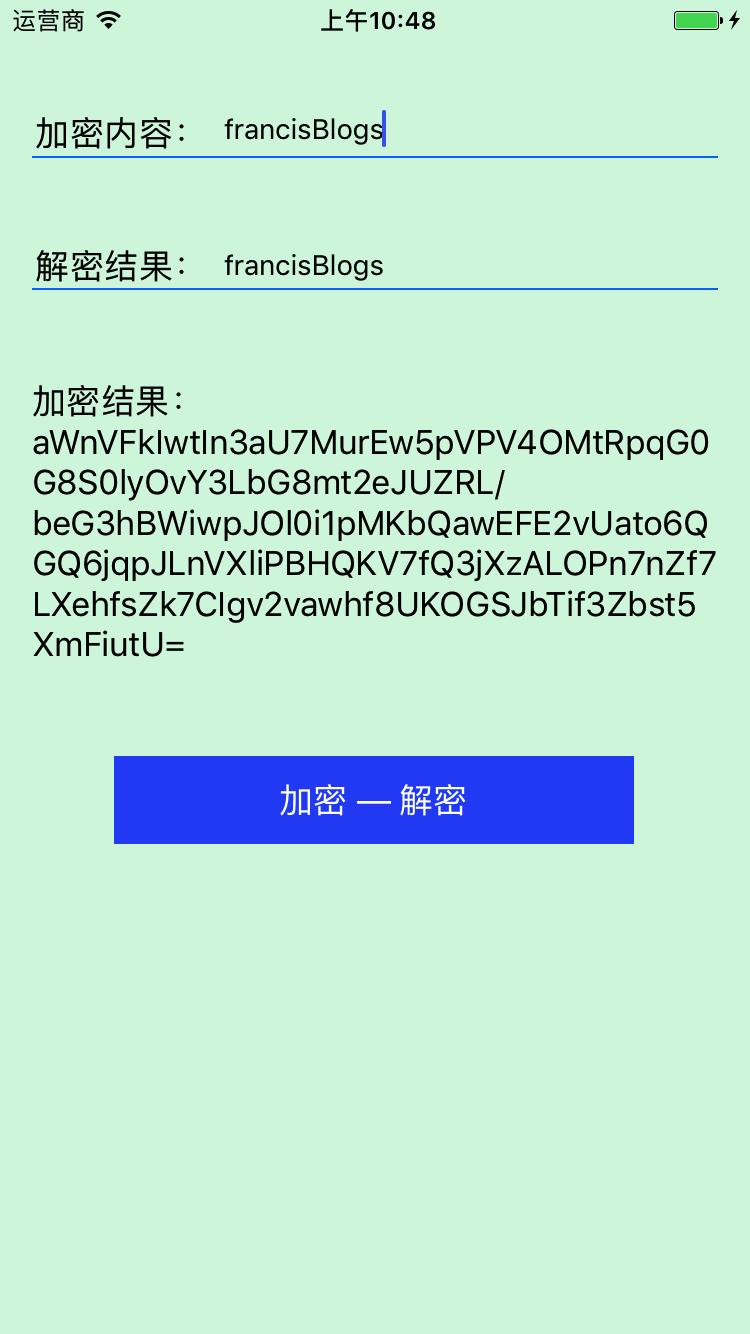
在加密活解密之前一定要闲加载证书,然后再调用加密方法,直接上代码
 - (IBAction)decryptionBtnClick:(id)sender {

     NSString *path = [[NSBundle mainBundle] pathForResource:@"public_key" ofType:@"der"];

     [self loadPublicKeyWithPath:path];

     path = [[NSBundle mainBundle] pathForResource:@"private_key" ofType:@"p12"];

     [self loadPrivateKeyWithPath:path password:@"bestnet"];

     NSString *encryptStr = self.encryptTextFeild.text;

     if (encryptStr.length > )

     {

         NSString *miwen = [self rsaEncryptText:encryptStr];

         self.miWenLabel.text = [NSString stringWithFormat:@"加密结果:%@", miwen];

         if (miwen.length > )

         {

             self.decryptionTextFeild.text = [self rsaDecryptText:miwen];

         }

     }

 }
效果图
iOS常用加密之RSA加密解密的更多相关文章
- iOS动态部署之RSA加密传输Patch补丁
概要:这一篇博客主要说明下iOS客户端动态部署方案中,patch(补丁)是如何比较安全的加载到客户端中. 在整个过程中,需要使用RSA来加密(你可以选择其它的非对称加密算法),MD5来做校验(同样,你 ...
- 【加密】RSA加密之实现
private void btn_RSA_Click(object sender, EventArgs e) { //第一种方法调用 this.textBox1.Text = RSAEncrypt(& ...
- 【加密】RSA加密之算法
RSA公钥加密算法是1977年由Ron Rivest.Adi Shamirh和LenAdleman在(美国麻省理工学院)开发的. RSA算法是一种非对称密码算法,所谓非对称,就是指该算法需要一对密钥, ...
- Java MD5加密与RSA加密
区别: MD5加密: 加密时通过原字符串加密成另一串字符串 解密时需要原加密字符串进行重新加密比较两次加密结果是否一致 T=RSA加密: 加密时通过原字符串生成密钥对(公钥+私钥) 解密时通过公钥和私 ...
- MD5加密和RSA加密
1.MD5加密 MD5(单向散列算法)的全称是Message-Digest Algorithm 5(信息-摘要算法),MD5算法的使用不需要支付任何版权费用. MD5的功能: ①.输入任意长 ...
- iOS and JAVA 的 RSA 加密解密 (转载整理 )
参考原文地址:http://www.cnblogs.com/makemelike/articles/3802518.html (至于RSA的基本原理,大家可以看 阮一峰的网络日志 的 RSA算法原理( ...
- android md5加密与rsa加解密实现代码
import java.io.UnsupportedEncodingException;import java.security.MessageDigest;import java.security. ...
- iOS,一行代码进行RSA、DES 、AES、MD5加密、解密
本文为投稿文章,作者:Flying_Einstein(简书) 加密的Demo,欢迎下载 JAVA端的加密解密,读者可以看我同事的这篇文章:http://www.jianshu.com/p/98569e ...
- RSA加密原理使用方式签名验证
RSA加密原理使用方式签名验证 加密是网络传输中非常重要的一环,它保证了信息的安全性,让他人无法通过抓包来获取通讯的信息也无法通过伪造信息而实现对系统的入侵.其中最为常用的信息传递加密方式就是RS ...
随机推荐
- SSH自动登录config文件配置
title: SSH自动登录config文件配置 comments: false date: 2019-08-19 19:29:13 description: 更方便的 ssh 操作??? categ ...
- vue-搜索功能-实时监听搜索框的输入,N毫秒请求一次数据
<template> <div class="search-box"> <input class="box" :placehold ...
- luffyapi项目 --短信认证的基本操作
一.开通腾讯云短信 SDK 文档 :https://cloud.tencent.com/document/product/382/11672 1.官网注册实名账号:https://cloud.tenc ...
- kali 下安装 vmtools
网上的教程都是默认路径下的,kali是定制版本的,路径不同,所以首先要找到media下安装包的路径,然后进入该路下,将安装包复制到想要的路径下,并解压缩到想要的路径下,剩下的就跟网上的差不多了,即找到 ...
- SecureCRT文件和文件夹显示不同颜色(像linux中那样效果)
如何设置secureCRT使用的他可以像linux文件和文件夹显示不同的颜色呢 原先显示效果如下: 效果图 配置
- Mockplus、Axure、墨刀软件对比
Mockplus 优点:基础版免费使用,操作简单,上手快,交互简单(只需拖曳就可以),功能多样,组件资源丰富,预览方式和导出类型多样,支持团队协作. 缺点:不支持手势交互. Axure 优点:操作变化 ...
- windows上部署hadoop(单机版)
在window系统开发程序时,远程linux服务器上的hadoop速度很慢,影响开发效率,能不能在本地搭建hadoop环境的?答案肯定的,且看下文如何在window上部署hadoop: (源文地址:h ...
- Python:日期表达的转换(day of year & year month day)
我们常用的日期格式是“年月日”型的,即year-month-day,比如今天是2019年9月14日,2019-09-14. 然而,有些地方,比如遥感图像下载的命名里面,为了数据表示方便,常常是doy( ...
- python接口自动化三(登录绕开验证码及发帖)
前言 有些登录的接口会有验证码:短信验证码,图形验证码等,这种登录的话验证码参数可以从后台获取的(或者查数据库最直接). 获取不到也没关系,可以通过添加cookie的方式绕过验证码. 但是这里需要明确 ...
- vue2.0关于添加属性后视图不能更新的问题
属性赋值和this.$set 和vue.$set方法我不行 可以用 this.$delete来进行删除后在设置都可以了