
spring-boot 定时任务案例
1.运行环境
开发工具:intellij idea
JDK版本:1.8
项目管理工具:Maven 4.0.0
2.Maven Plugin管理
pom.xml配置代码:
 <?xml version="1.0" encoding="UTF-8"?>

 <project xmlns="http://maven.apache.org/POM/4.0.0"

          xmlns:xsi="http://www.w3.org/2001/XMLSchema-instance"

          xsi:schemaLocation="http://maven.apache.org/POM/4.0.0 http://maven.apache.org/xsd/maven-4.0.0.xsd">

     <modelVersion>4.0.0</modelVersion>

     <groupId>spring-boot-scheduler</groupId>

     <artifactId>spring-boot-scheduler</artifactId>

     <version>1.0-SNAPSHOT</version>

     <!-- Spring Boot 启动父依赖 -->

     <parent>

         <groupId>org.springframework.boot</groupId>

         <artifactId>spring-boot-starter-parent</artifactId>

         <version>1.5.6.RELEASE</version>

     </parent>

     <dependencies>

         <!-- Spring Boot web依赖 -->

         <dependency>

             <groupId>org.springframework.boot</groupId>

             <artifactId>spring-boot-starter-web</artifactId>

         </dependency>

         <!-- Spring Boot test依赖 -->

         <dependency>

             <groupId>org.springframework.boot</groupId>

             <artifactId>spring-boot-starter-test</artifactId>

             <scope>test</scope>

         </dependency>

     </dependencies>

 </project>
3.Application启动类编写
通过@EnableScheduling激活上下文中的所有定时任务;如果我们没有这个标注,所有@Scheduled标注都不会执行。
 package com.goku.demo;

 import org.springframework.boot.SpringApplication;

 import org.springframework.boot.autoconfigure.SpringBootApplication;

 import org.springframework.boot.web.servlet.ServletComponentScan;

 import org.springframework.scheduling.annotation.EnableScheduling;

 /**

  * Created by nbfujx on 2017/11/20.

  */

 // Spring Boot 应用的标识

 @SpringBootApplication

 @ServletComponentScan

 @EnableScheduling

 public class DemoApplication {

     public static void main(String[] args) {

         // 程序启动入口

         // 启动嵌入式的 Tomcat 并初始化 Spring 环境及其各 Spring 组件

         SpringApplication.run(DemoApplication.class,args);

     }

 }
4.Scheduled Task创建
通过@Scheduled标注表示这个方法是需要定时执行的任务。
 package com.goku.demo.scheduler;

 import org.slf4j.Logger;

 import org.slf4j.LoggerFactory;

 import org.springframework.scheduling.annotation.Scheduled;

 import org.springframework.stereotype.Component;

 /**

  * Created by nbfujx on 2017/12/6.

  */

 @Component

 public class ExampleScheduler {

     private final Logger logger = LoggerFactory.getLogger(getClass());

     @Scheduled(cron = "*/5 * * * * * ")

     public void loginfo() {

        this.logger.info("this is one");

     }

     @Scheduled(fixedRate = 5000)

     public void loginfo2() {

         this.logger.info("this is two");

     }

     @Scheduled(fixedDelay = 5000)

     public void loginfo3() {

         this.logger.info("this is three");

     }

 }
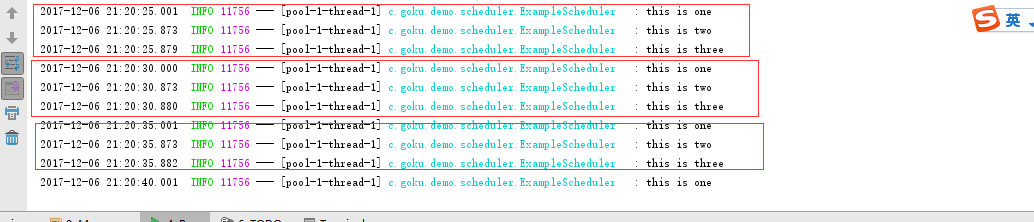
- fixedRate = 5000表示每隔5000ms,Spring scheduling会调用一次该方法,不论该方法的执行时间是多少
- fixedDelay = 5000表示当方法执行完毕5000ms后,Spring scheduling会再次调用该方法
- cron = "*/5 * * * * * ?"提供了一种通用的定时任务表达式,这里表示每隔5秒执行一次,更加详细的信息可以参考cron表达式。
5.查看运行情况
6.GITHUB地址
https://github.com/nbfujx/springBoot-learn-demo/tree/master/spring-boot-scheduler
spring-boot 定时任务案例的更多相关文章
- Spring Boot定时任务应用实践
在Spring Boot中实现定时任务功能,可以通过Spring自带的定时任务调度,也可以通过集成经典开源组件Quartz实现任务调度. 一.Spring定时器 1.cron表达式方式 使用自带的定时 ...
- spring boot.定时任务问题记录(TaskScheduler/ScheduledExecutorService异常)
一.背景 spring boot的定时任务非常简单,只需要在启动类中加上@EnableScheduling注解,然后在对应的方法上配置@Scheduled就可以了,系统会自动处理并按照Schedule ...
- (14)Spring Boot定时任务的使用【从零开始学Spring Boot】
本文介绍在 Spring Boot 中如何使用定时任务,使用非常简单,就不做过多说明了. com.kfit.base.scheduling.SchedulingConfig: package com. ...
- Spring Boot 定时任务单线程和多线程
Spring Boot 的定时任务: 第一种:把参数配置到.properties文件中: 代码: package com.accord.task; import java.text.SimpleDat ...
- Spring Boot (十一): Spring Boot 定时任务
在实际的项目开发工作中,我们经常会遇到需要做一些定时任务的工作,那么,在 Spring Boot 中是如何实现的呢? 1. 添加依赖 在 pom.xml 文件中只需引入 spring-boot-sta ...
- Spring Boot 定时任务 @Scheduled
项目开发中经常需要执行一些定时任务,比如在每天凌晨,需要从 implala 数据库拉取产品功能活跃数据,分析处理后存入到 MySQL 数据库中.类似这样的需求还有许多,那么怎么去实现定时任务呢,有以下 ...
- Spring Boot定时任务运行一段时间后自动关闭的解决办法
用Spring Boot默认支持的 Scheduler来运行定时任务,有时在服务器运行一段时间后会自动关闭.原因:Schedule默认是单线程运行定时任务的,即使是多个不同的定时任务,默认也是单线程运 ...
- Spring Boot 入门案例与配置说明
一.Spring Boot简介 官网地址:http://spring.io/projects/spring-boot Spring Boot可以轻松创建可以运行的独立的,生产级的基于Spring的应用 ...
- spring boot 小案例
1. SpringBoot 1.1. 概要 在传统的SSM框架应用过程中,存在大量的配置文件,及相关的配置项,例如: 1. DispatcherServlet 2. CharacterEncoding ...
- Spring Boot 定时任务 Quartz 使用教程
Quartz是一个完全由java编写的开源作业调度框架,他使用非常简单.本章主要讲解 Quartz在Spring Boot 中的使用. 快速集成 Quartz 介绍 Quartz 几个主要技术点 Qu ...
随机推荐
- java 图片裁剪代码
package com.actionsoft.apps.addons.invoice.pc.test; import java.awt.image.BufferedImage;import java. ...
- jsc2019_qualD Classified
题目大意 给你一个有n个点的完全图 求一种方案是的给边染色后任何一点不能沿一种颜色的边走奇数条边回到这个点 要求颜色数最少 分析 考场上输出格式打错见祖宗... 我们每次找一个最大二分图将其染一个新颜 ...
- Python中import的使用方法
源文出处: "import"的本质参照: Python中import机制 python导入自定义模块和包
- Oracle-数据表对象
表一般指的是一个关系表,也可以生成对象表以及临时表.齐总,对象表是通过用户定义的数据类型生成的,临时表用于存储专用于某个事务或会话的临时数据 字符类型: 定长:char (1-2000字节) 变长:v ...
- 批量执行SQL脚本
新建文件夹all_sql,并将需要执行的sql脚本放入其中. 新建bat脚本,执行即可,ORACLE 也可改Mysql,按需:如下 ::echo off :: @echo off echo 开始执行数 ...
- 在Python中操作文件之truncate()方法的使用教程
在Python中操作文件之truncate()方法的使用教程 这篇文章主要介绍了在Python中操作文件之truncate()方法的使用教程,是Python入门学习中的基础知识,需要的朋友可以参考下 ...
- 洛谷T89643 escape
题目描述 题目链接:https://www.luogu.org/problem/T89643 由于 Kiana 实在是太忙了,所以今天的题里面没有 Kiana. 某一天学校里有 n 节课,出题人希望逃 ...
- 求bit中1的个数有几种做法
原文 求bit中1的个数有几种做法: - x & (x - 1) - Hamming weight的经典求法,基于树状累加:http://en.wikipedia.org/wiki/Hammi ...
- 从0 开始手写一个 RPC 框架,轻松搞定!
Java技术栈 www.javastack.cn 优秀的Java技术公众号 来源:juejin.im/post/5c4481a4f265da613438aec3 之前在 RPC框架底层到底什么原理得知 ...
- P4929 【模板】舞蹈链(DLX)
题目背景 本题是舞蹈链模板——精确覆盖问题 题目描述 给定一个N行M列的矩阵,矩阵中每个元素要么是1,要么是0 你需要在矩阵中挑选出若干行,使得对于矩阵的每一列j,在你挑选的这些行中,有且仅有一行的第 ...