
实现 laravel 的artisan
laravel 的 artisan 命令行太好用了,换个框架没有这个功能,于是自己学习实现一些,直接上代码
新建目录
-artisan
--bin
--src
进入artisan composer init
composer require symfony/console
#!/usr/bin/env php
<?php

use Symfony\Component\Console\Application;
use Symfony\Component\Console\Input\InputInterface;
use Symfony\Component\Console\Output\OutputInterface;

require_once __DIR__.'/../vendor/autoload.php';

$app = new Application('artisan','1.1.1');

$app->register('artisan')->setCode(function(InputInterface $input, OutputInterface $output){
    $output->writeln('artisan start');
});

$app->run();

exit();

以上是简单的实现
#!/usr/bin/env php
<?php

use Symfony\Component\Console\Application;
use Symfony\Component\Console\Input\InputInterface;
use Symfony\Component\Console\Output\OutputInterface;
use Symfony\Component\Console\Input\InputArgument;

require_once __DIR__ . '/../vendor/autoload.php';

$app = new Application('artisan', '1.1.1');

$app->register('artisan')
    ->setDescription('myself artisan description')
    ->setCode(
        function (InputInterface $input, OutputInterface $output) {
            $name = $input->getArgument('name');
            $output->writeln("hello {$name}");
        }
    )->addArgument('name', InputArgument::REQUIRED, 'please input your name');

$app->run();

exit();

这里演示了如何接收参数
#!/usr/bin/env php
<?php

use Symfony\Component\Console\Application;
use Symfony\Component\Console\Input\InputInterface;
use Symfony\Component\Console\Output\OutputInterface;
use Symfony\Component\Console\Input\InputArgument;
use Symfony\Component\Console\Input\InputOption;

require_once __DIR__ . '/../vendor/autoload.php';

$app = new Application('artisan', '1.1.1');

$app->register('artisan')
    ->setDescription('myself artisan description')
    ->setCode(
        function (InputInterface $input, OutputInterface $output) {
            $string = $input->getOption('string');
            $name = $input->getArgument('name');
            if($string == 'lower'){
                $name = strtolower($name);
            }
            if($string == 'upper'){
                $name = strtoupper($name);
            }
            $output->writeln("hello {$name}");
        }
    )->addArgument('name', InputArgument::REQUIRED, 'please input your name')
    ->addOption('string',null,InputOption::VALUE_OPTIONAL,'转换字符串大小','lower')
;

$app->run();

exit();

这里演示了如何给命令行添加选项 ./bin/artisan.php artisan ffff --string='upper'   echo  FFFF
$output->writeln("<info>hello {$name}</info>");
$output->writeln("<error>hello {$name}</error>");
$output->writeln("<comment>hello {$name}</comment>");
$output->writeln("hello {$name}");

可以给它们加上颜色

接下来将命令行拆分为文件
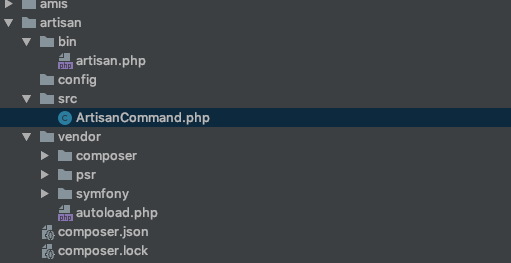
bin/artisan.php
ArtisanCommand.php
#!/usr/bin/env php
<?php

use Symfony\Component\Console\Application;
use Artisan\ArtisanCommand;
require_once __DIR__ . '/../vendor/autoload.php';

$app = new Application('artisan', '1.1.1');

$app->add(new ArtisanCommand());

$app->run();

exit();

ArtisanCommand.php
<?php
namespace Artisan;

use Symfony\Component\Console\Application;
use Symfony\Component\Console\Input\InputInterface;
use Symfony\Component\Console\Output\OutputInterface;
use Symfony\Component\Console\Input\InputArgument;
use Symfony\Component\Console\Input\InputOption;
use Symfony\Component\Console\Command\Command;

class ArtisanCommand extends Command{
    public function configure()
    {
        $this->setName('artisan');
        $this->setDescription('myself artisan description')
        ->addArgument('name', InputArgument::REQUIRED, 'please input your name')
        ->addOption('string',null,InputOption::VALUE_OPTIONAL,'转换字符串大小','lower');
    }

    public function execute(InputInterface $input, OutputInterface $output)
    {
        $string = $input->getOption('string');
        $name = $input->getArgument('name');
        if($string == 'lower'){
            $name = strtolower($name);
        }
        if($string == 'upper'){
            $name = strtoupper($name);
        }
        $output->writeln("<info>hello {$name}</info>");
        $output->writeln("<error>hello {$name}</error>");
        $output->writeln("<comment>hello {$name}</comment>");
        $output->writeln("hello {$name}");
    }
}
composer.json
{
    "name": "baidu/artisan",
    "authors": [
        {
            "name": "gaobingbing",
            "email": "v_gaobingbing01@baidu.com"
        }
    ],
    "require": {
        "symfony/console": "^4.3"
    },
    "autoload":  {
        "psr-4": {
            "Artisan\\": "src"
        }
    }
}

至此大功告成,还有其他功能可以去看Symfony文档
实现 laravel 的artisan的更多相关文章
- 使用laravel 的artisan快速创建表
参考:使用laravel 的artisan快速创建表 字段类型参考链接: 结构生成器 版本: Laravel 4.2 1. 创建migrate 文件 php artisan migrate:make ...
- Laravel 的Artisan 命令学习
Laravel 的Artisan 命令学习 Artisan 是 Laravel 提供的 CLI(命令行接口),它提供了非常多实用的命令来帮助我们开发 Laravel 应用.前面我们已使用过 Artis ...
- 源码解读 Laravel PHP artisan config:cache
来源 https://laravel-china.org/articles/5101/source-code-reading-laravel-php-artisan-configcache 源码在哪 ...
- Laravel 之Artisan
简介: Artisan是Laravel中自带的命令行工具的名称: 由强大的Symfony Console组件驱动的: 提供了一些对应用开发有帮助的命令: 查看所有可用的Artisan的命令 php a ...
- (1) laravel php artisan list make
php artisan list make Laravel Framework 5.4.36 Usage: command [options] [arguments] Options: -h, --h ...
- Laravel使用artisan快速实现表单的登陆注册
1. 开发环境 macOS Mojave 10.14.6 XAMPP 5.6.38 Laravel 5.2 2. 在终端,先进入到项目根目录并执行执行命令 php artisan make:auth ...
- laravel 使用artisan命令新增数据库字段
php artisan make:migration create_comments_table <?php use Illuminate\Database\Schema\Blueprint; ...
- laravel php artisan migrate 数据迁移时出现的[HY000][1045]错误
(zz找了块一个小时才发现)主要的错误在于.env文件和database.php的配置不匹配. 1.找到.env文件 2.更改数据库表账密 3.改database.php的数据库账密 4.完成
- laravel中artisan的用法
如:
随机推荐
- jar启动名称示例
nohup java -jar -Dspring.profiles.active=20dev -XX:+PrintGCDetails -XX:+PrintGCTimeStamps -XX:+Print ...
- grunt-contrib-jshint js代码检查
grunt-contrib-jshint:用于javascript代码检查(并会给出建议),发布js代码前执行jshint任务, 可以避免出现一些低级语法问题jshint拥有非常丰富的配置,可以自由控 ...
- Word2Vec小心得
今天终于想明白了分层softmax的作用: 哈夫曼树的作用是什么??用平均最小的长度编码!编码是为了解码成信息! 神经概率语言模型:有映射层,隐藏层,输出层,假设隐藏层是300维,输出层是和单词的数量 ...
- .net post 字符串含有+号的时候,加号会变成空格 处理方法
value= value.Replace("+", "%2B"); 替换加号
- 一种sqlor的拆分
原脚本declare @Phone nvarchar(50)declare @CompanyNO nvarchar(50)set @Phone='13914124223'set @CompanyNO= ...
- redis string类型设置过期时间后 再进行set操作,会清除过期时间
版权声明:本文为博主原创文章,遵循 CC 4.0 BY-SA 版权协议,转载请附上原文出处链接和本声明.本文链接:https://blog.csdn.net/qq_41756437/article/d ...
- Linux系统下使用 mail 发送邮件
邮件常常是Linux下监控报警手段之一.Linux下的mail命令可以方便,快速的完成发送邮件.下面以CentOS为例 1.安装: [app@127-0-0-1 ~]# mail -bash: mai ...
- META标签的设置
㈠定义及用法 ⑴<meta> 元素可提供有关页面的元信息(meta-information),比如针对搜索引擎和更新频度的描述和关键词. ⑵<meta> 标签位于文档的头部,不 ...
- Oracle 表锁定
--锁表查询SQL SELECT object_name, machine, s.sid, s.serial# FROM gv$locked_object l, dba_objects o, gv$s ...
- 【转载】多网卡的7种bond模式原理
多网卡的7种bond模式原理 Linux 多网卡绑定 网卡绑定mode共有七种(0~6) bond0.bond1.bond2.bond3.bond4.bond5.bond6 常用的有三种 mode=0 ...