
图解vue生命周期
学习vue时搞清楚生命周期可以帮助你知道什么时候在什么地方执行该执行的方法,话不多说上图:
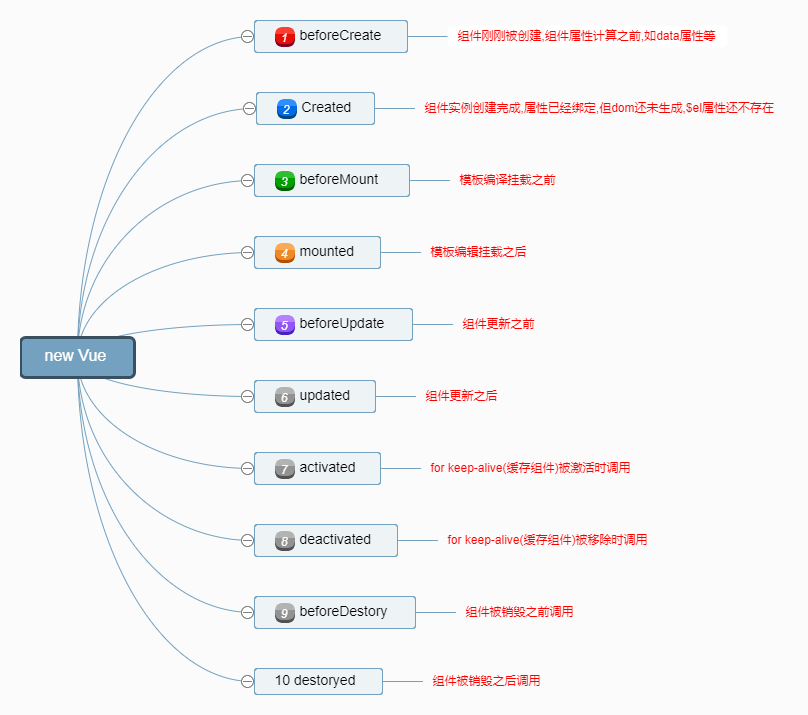
复制下面代码可以在控制台更详细展示各个钩子的状态
<!DOCTYPE html>

<html>

<head>

    <title></title>

    <script type="text/javascript" src="https://cdn.jsdelivr.net/vue/2.1.3/vue.js"></script>

</head>

<body>

<div id="app">

     <p>{{ message }}</p>

</div>

<script type="text/javascript">

  var app = new Vue({

      el: '#app',

      data: {

          message : "小李同学就是我"

      },

       beforeCreate: function () {

                console.group('beforeCreate 组件刚刚被创建,组件属性计算前状态===============》');

               console.log("%c%s", "color:red" , "el     : " + this.$el); //undefined

               console.log("%c%s", "color:red","data   : " + this.$data); //undefined

               console.log("%c%s", "color:red","message: " + this.message)

        },

        created: function () {

            console.group('created 组件创建完毕,属性已经绑定但dom还未生成的状态===============》');

            console.log("%c%s", "color:red","el     : " + this.$el); //undefined

               console.log("%c%s", "color:red","data   : " + this.$data); //已被初始化

               console.log("%c%s", "color:red","message: " + this.message); //已被初始化

        },

        beforeMount: function () {

            console.group('beforeMount 模板挂载前状态===============》');

            console.log("%c%s", "color:red","el     : " + (this.$el)); //已被初始化

            console.log(this.$el);

               console.log("%c%s", "color:red","data   : " + this.$data); //已被初始化

               console.log("%c%s", "color:red","message: " + this.message); //已被初始化

        },

        mounted: function () {

            console.group('mounted 模板挂载结束状态===============》');

            console.log("%c%s", "color:red","el     : " + this.$el); //已被初始化

            console.log(this.$el);

               console.log("%c%s", "color:red","data   : " + this.$data); //已被初始化

               console.log("%c%s", "color:red","message: " + this.message); //已被初始化

        },

        beforeUpdate: function () {

            console.group('beforeUpdate 更新前状态===============》');

            console.log("%c%s", "color:red","el     : " + this.$el);

            console.log(this.$el);

               console.log("%c%s", "color:red","data   : " + this.$data);

               console.log("%c%s", "color:red","message: " + this.message);

        },

        updated: function () {

            console.group('updated 更新完成状态===============》');

            console.log("%c%s", "color:red","el     : " + this.$el);

            console.log(this.$el);

               console.log("%c%s", "color:red","data   : " + this.$data);

               console.log("%c%s", "color:red","message: " + this.message);

        },

        beforeDestroy: function () {

            console.group('beforeDestroy 销毁前状态===============》');

            console.log("%c%s", "color:red","el     : " + this.$el);

            console.log(this.$el);

               console.log("%c%s", "color:red","data   : " + this.$data);

               console.log("%c%s", "color:red","message: " + this.message);

        },

        destroyed: function () {

            console.group('destroyed 销毁完成状态===============》');

            console.log("%c%s", "color:red","el     : " + this.$el);

            console.log(this.$el);

               console.log("%c%s", "color:red","data   : " + this.$data);

               console.log("%c%s", "color:red","message: " + this.message)

        }

    })

</script>

</body>

</html>
图解vue生命周期的更多相关文章
- Vue学习之--------Vue生命周期beforeCreate、created、beforeMount、mounted、beforeDestroy 。。。(图解详细过程)(2022/7/17)
文章目录 1.Vue生命周期 1.1 概念 1.2 图解 2.钩子函数的用法说明 2.1 beforeCreate()和created()的详细讲述 2.1.1 方法说明 2.1.2 代码实例 2.1 ...
- vue生命周期的介绍
<!DOCTYPE html> <html> <head> <meta charset="UTF-8"> <title> ...
- vue 生命周期
一 vue的生命周期如下图所示(很清晰) 二 vue生命周期的栗子 注意触发vue的created事件以后,this便指向vue实例,这点很重要 <!DOCTYPE html> <h ...
- 详解vue生命周期
vue生命周期 @(vue)[生命周期] 前言 在使用vue一个多礼拜后,感觉现在还停留在初级阶段,虽然知道怎么和后端做数据交互,但是对于mounted这个挂载还不是很清楚的.放大之,对vue的生命周 ...
- 关于vue生命周期
官网给出的实例的生命周期图如下: beforeCreate(页面创建前),created(页面创建后),beforeMount(页面载入前),mounted(页面载入后),beforeUpdate(页 ...
- vue生命周期的理解
我从官网上下载了一张vue生命周期的图,接下来实际分析一波vue到底执行了什么东西. 1.我们在使用vue时必不可少的操作就是 var vm = new Vue({}),这样我们就创建了一个vue的实 ...
- Vue生命周期,面试常见问题
一.对于MVVM的理解? MVVM 是 Model-View-ViewModel 的缩写.Model代表数据模型,也可以在Model中定义数据修改和操作的业务逻辑.View 代表UI 组件,它负责将数 ...
- 【Vue笔记】-- 详解vue生命周期
针对于Vue的生命周期进行详细的说明,方面加深对各个方法的引用. 引言: 前几天重新回顾vue官网时,看到vue的生命周期,想着自己用vue开发了快一年了,就总结总结vue知识,再次加深自己对vue的 ...
- 面试题之(vue生命周期)
在面试的时候,vue生命周期被考察的很频繁. 什么是vue生命周期呢? Vue实例有一个完整的生命周期,也就是从开始创建.初始化数据.编译模板.挂载Dom.渲染→更新→渲染.卸载等一系列过程,我们称这 ...
随机推荐
- 3.sass的数据类型与函数
数据类型 在sass里有数字.字符串.列表.颜色等类型 在cmd里 输入 sass -i 就会进入到交互模式,输入的计算可以马上得到结果 type-of()可以用来得到数据类型,如: type-of( ...
- .NET使用存储过程实现对数据库的增删改查
一.整体思路 先建立存储过程,再通过.net 调用存储过程,来实现对表的增删改查. 二.新建数据库及存储过程 打开SqlServer2008,新建数据库orm1,及表Student. 数据库和表建立好 ...
- MySQL视图,触发器,事务,存储过程,函数
create triggr triafterinsertcmdlog after insert on cmd_log FOR EACH ROW trigger_body .#NEW : 代表新的记录 ...
- perl-5.14.0在新版gcc中编译不通过解决办法
1 由于在新版本中GCC把C99中的标准库分成了libc和libm两个部分,libm中包含一些数学库等,如果要用到libm时,必须加上-lm选项 在解压Configure之后,再在Makefi ...
- Oracle绑定变量优缺点
参考:http://f.dataguru.cn/thread-208881-1-1.html 参考:http://blog.sina.com.cn/s/blog_4d9ece9a0100caw8.ht ...
- Python Tkinter模块 Grid(grid)布局管理器参数详解
在使用Tkinter模块编写图像界面时,经常用到pack()和grid()进行布局管理,pack()参数较少,使用方便,是最简单的布局,但是当控件数量较多时,可能需要使用grid()进行布局(不要在同 ...
- Spring之Bean的基本概念
转自http://blog.csdn.net/chenssy/article/details/8222744 Spring其实就是一个大型的工厂,而Spring容器中的Bean就是该工厂的产品.对于 ...
- Python可视化库Matplotlib的使用
一.导入数据 import pandas as pd unrate = pd.read_csv('unrate.csv') unrate['DATE'] = pd.to_datetime(unrate ...
- 第十三章:Python の 网络编程进阶(二)
本課主題 SQLAlchemy - Core SQLAlchemy - ORM Paramiko 介紹和操作 上下文操作应用 初探堡垒机 SQLAlchemy - Core 连接 URL 通过 cre ...
- C#串口发送数据
使用指定的端口名.波特率.奇偶校验位.数据位和停止位初始化 SerialPort 类的新实例 SerialPort serialPort = new SerialPort("COM3&quo ...