
初入WebService
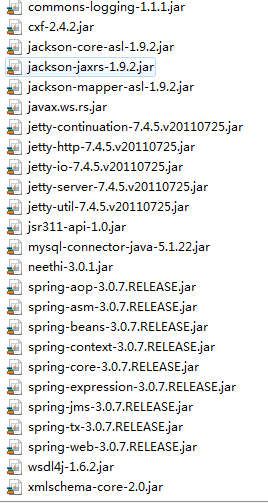
- 搭建webservice需要用到的jar
applicationContext.xml配置文件
<?xml version="1.0" encoding="UTF-8"?>

<beans xmlns="http://www.springframework.org/schema/beans"

	xmlns:xsi="http://www.w3.org/2001/XMLSchema-instance" xmlns:aop="http://www.springframework.org/schema/aop"

	xmlns:cxf="http://cxf.apache.org/core" xmlns:jaxws="http://cxf.apache.org/jaxws"

	xmlns:jaxrs="http://cxf.apache.org/jaxrs"

	xsi:schemaLocation="

	http://www.springframework.org/schema/beans http://www.springframework.org/schema/beans/spring-beans-2.5.xsd

	http://cxf.apache.org/jaxws http://cxf.apache.org/schemas/jaxws.xsd

	http://cxf.apache.org/jaxrs http://cxf.apache.org/schemas/jaxrs.xsd

	http://www.springframework.org/schema/aop http://www.springframework.org/schema/aop/spring-aop.xsd">

	<jaxrs:server id="employeeServiceServer" address="/employeeservice">

		<jaxrs:serviceBeans>

			<ref bean="employeeService" />

		</jaxrs:serviceBeans>

		<jaxrs:providers>

			<bean class="org.codehaus.jackson.jaxrs.JacksonJsonProvider" />

		</jaxrs:providers>

	</jaxrs:server>

	<bean id="employeeService" class="service.EmployeeService" />

</beans>- Web.xml配置
<?xml version="1.0" encoding="UTF-8"?>

<web-app xmlns:xsi="http://www.w3.org/2001/XMLSchema-instance" xmlns="http://xmlns.jcp.org/xml/ns/javaee" xsi:schemaLocation="http://xmlns.jcp.org/xml/ns/javaee http://xmlns.jcp.org/xml/ns/javaee/web-app_3_1.xsd" id="WebApp_ID" version="3.1">

  <display-name>employee-service</display-name>

<context-param>

	<param-name>contextConfigLocation</param-name>

	<param-value>/WEB-INF/applicationContext.xml</param-value>

</context-param>

<listener>

<listener-class>org.springframework.web.context.ContextLoaderListener</listener-class>

</listener>

    <servlet>

     	<servlet-name>CXFServlet</servlet-name>

        <servlet-class>org.apache.cxf.transport.servlet.CXFServlet</servlet-class>

    </servlet>

	<servlet-mapping>

        <servlet-name>CXFServlet</servlet-name>

        <url-pattern>/services/*</url-pattern>

    </servlet-mapping>

  <welcome-file-list>

    <welcome-file>index.html</welcome-file>

    <welcome-file>index.htm</welcome-file>

    <welcome-file>index.jsp</welcome-file>

    <welcome-file>default.html</welcome-file>

    <welcome-file>default.htm</welcome-file>

    <welcome-file>default.jsp</welcome-file>

  </welcome-file-list>

</web-app> - model/employee.java
package model;

import java.io.Serializable;

public class Employee implements Serializable

{

    /**

	 *

	 */

	private static final long serialVersionUID = 5954986571237608774L;

	private String id;

    private String code;

    private String name;

    public String getId()

    {

        return id;

    }

    public void setId(String id)

    {

        this.id = id;

    }

    public String getCode()

    {

        return code;

    }

    public void setCode(String code)

    {

        this.code = code;

    }

    public String getName()

    {

        return name;

    }

    public void setName(String name)

    {

        this.name = name;

    }

	@Override

	public String toString() {

		return "Employee [code=" + code + ", id=" + id + ", name=" + name + "]";

	}

}
service/employeeservice.java
package service;

import java.util.ArrayList;

import java.util.List;

import javax.ws.rs.Consumes;

import javax.ws.rs.GET;

import javax.ws.rs.Path;

import javax.ws.rs.Produces;

import model.Employee;

public class  EmployeeService {

	@GET

    @Path("/employees")

    @Consumes("application/json")

    @Produces("application/json")

	public List<Employee> findallEmployee(){

		return initData();

	}

	public List<Employee> initData(){

		List<Employee> list = new ArrayList<Employee>();

		for(int i=0;i<10;i++){

			Employee emp = new Employee();

			emp.setId("id"+i);

			emp.setName("员工"+i);

			emp.setCode("code"+i);

			list.add(emp);

		}

		return list;

	}

	public static void main(String[] args) {

		EmployeeService a = new EmployeeService();

		for(Employee e:a.findallEmployee()){

			System.out.println(e);

		}

	}

}
部署项目,打开浏览器输入地址http://ip:port/项目名称/services/employeeservice/employees
初入WebService的更多相关文章
- Scala初入
何为Scala物 Scala为基于JVM虚拟机中的面向对象与函数式编程思想并且完全兼容Java的混合编程语言,可以是Scala与Java是同根同源的,既然Scala与JAVA都是基于JVM之上的编程语 ...
- 初学HTML5、初入前端
学习HTML5是一个漫长的过程,当中会遇到很多技术与心态上的变化.刚开始学习,我们不能发力过猛,需要一个相对稳定的状态去面对.多关注一些自己感兴趣的网站和技术知识,建立自己的信心与好奇心,为以后的学习 ...
- 0x00linux32位汇编初入--前期准备
0x00汇编初入--前期准备 一.汇编工具 在linux平台下常用的编译器为as,连接器为ld,使用的文本编辑器为vim,汇编语法为att 以下是一些工具: addr2line 把地址转换为文件名和行 ...
- 初入职场的建议--摘自GameRes
又开始一年一度的校招了,最近跑了几个学校演讲,发现很多话用短短的一堂职业规划课讲还远远不够,因为那堂课仅仅可能帮大家多思考怎样找到一份合适的工作,并没有提醒大家怎样在工作中发展自己的职业. 见过这么多 ...
- 【Xbox one S】开箱&开机&初入坑心得
再来一发水贴,先上产品标准照镇贴: 前言 身为一个资深单机游戏玩家,常年混迹在PC平台,但内心深处一直对主机有种迷之向往,感觉那才是单机游戏的正处之地,坐沙发上拿着手柄对着电视跌宕起伏才是正确的游戏姿 ...
- Git初入
Git记录 使用git 也有一段时间了, git的入门级了解也就不再多说, 但平常使用中, 仍然会遇到很多问题, 在此记录一二. 在查资料的过程中, 发现了两个比较好的资料: 特别是第二个, 相当详细 ...
- SuperMap iClient for JavaScript初入
SuperMap iClient for JavaScript初入 介绍SuperMap for Js的简单使用. 推荐先看下这篇文档:SuperMap iClient for JavaScript ...
- 初入前端框架bootstrap--Web前端
Bootstraps是一种简洁.直观.强悍的前端开发框架,它让web开发更迅速.简单.对于初入Bootstrap的小白,高效进入主题很重要,能为我们节省很多时间,下面我将对使用Bootstrap开发前 ...
- 初入pygame——贪吃蛇
一.问题利用pygame进行游戏的编写,做一些简单的游戏比如贪吃蛇,连连看等,后期做完会把代码托管. 二.解决 1.环境配置 python提供一个pygame的库来进行游戏的编写.首先是安装pygam ...
随机推荐
- vector 利用swap 函数进行内存的释放 vector<int>().swap
首先,vector与deque不同,其内存占用空间只会增长,不会减小.比如你首先分配了10,000个字节,然后erase掉后面9,999个,则虽然有效元素只有一个,但是内存占用仍为10,000个.所有 ...
- 修改host可以上的一些网站
打开路径 C:\Windows\System32\drivers\etc 博客园 223.6.248.220 www.cnblogs.com github 192.30.253.112 github. ...
- BGP协议
BGP属于自治系统间路由协议.BGP的主要目标是为处于不同AS中的路由器之间进行路由信息通信提供保障.BGP既不是纯粹的矢量距离协议,也不是纯粹的链路状态协议,通常被称为通路向量路由协议.这是因为BG ...
- TCP/IP 第二章
1, 以太网的封装格式.其中MTU的最小值为46字节,所以,ARP和RARP需要添加18字节的PAD.CRC是检验和.(循环冗余检验) 2,SLIP:(串行线路ip) 首尾一个end字符加以区分数据. ...
- caffe源码 卷积层
通俗易懂理解卷积 图示理解神经网络的卷积 input: 3 * 5 * 5 (c * h * w) pading: 1 步长: 2 卷积核: 2 * 3 * 3 * 3 ( n * c * k * k ...
- 对python编程的初步理解
一直以来零零散散有听过python,这周终于下定决心学python了.在网上了买个套视频教程,内容分周次学习,有详细的讲解.本人觉得非常好.这里谈谈一下第一周的学习的笔记.望路过的大神给予指正,不胜感 ...
- spring boot 快速生成demo工程 官网生成
最近一直在弄springboot的项目,居然最近才知道快速生成springBoot工程,原来可以这么简单, 而且官网还提供了生成java或是web项目,需要jpa,模板等服务,直接一键集成.话不多说, ...
- webpack2使用ch10-处理图片(png jpg svg 等) 限制图片 压缩图片
1 目录展示 安装依赖 "file-loader": "^0.11.1", "image-webpack-loader": "^3 ...
- sqlserver 使用脚本创建Sql Server代理作业
use master GO /* --开启sql server代理 sp_configure 'show advanced options', 1; GO RECONFIGURE; GO sp_con ...
- Jquery.Uploadify实现批量上传显示进度条 取消 上传后缩略图显示 可删除
<%@ Page Language="C#" AutoEventWireup="true" CodeFile="UpLoad.aspx.cs&q ...