
OWIN 自宿主模式WebApi项目,WebApi层作为单独类库供OWIN调用
OWIN是Open Web Server Interface for .NET的首字母缩写,他的定义如下:
为什么我们需要OWIN
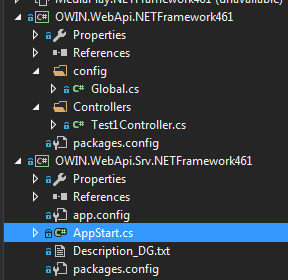
OWIN.WebApi WebApi层
OWIN.WebApi.Sv WebApi服务层,将要作为启动项!
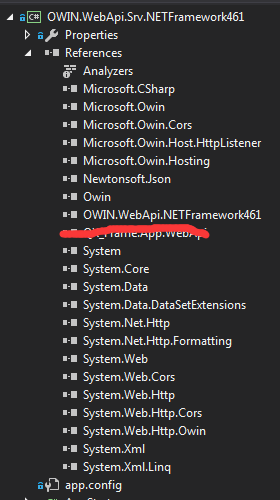
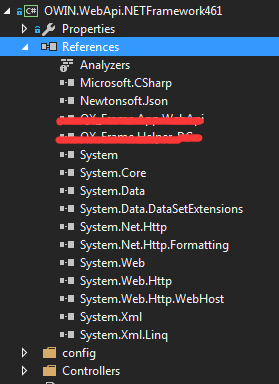
 using System.Web.Http;
 using System.Web.Http.Dispatcher;
 using System;
 using System.Collections.Concurrent;
 using System.Collections.Generic;
 using System.Linq;
 using System.Net;
 using System.Net.Http;
 using System.Web.Http.Controllers;

 namespace OWIN.WebApi.config
 {
     public class WebApiApplication : System.Web.HttpApplication
     {
         protected void Application_Start()
         {
             //ignore the xml return it`s setting let json return only
             GlobalConfiguration.Configuration.Formatters.JsonFormatter.SerializerSettings.ReferenceLoopHandling = Newtonsoft.Json.ReferenceLoopHandling.Ignore;
             GlobalConfiguration.Configuration.Formatters.Remove(GlobalConfiguration.Configuration.Formatters.XmlFormatter);

             GlobalConfiguration.Configuration.Services.Replace(typeof(IHttpControllerSelector),
             new WebApiControllerSelector(GlobalConfiguration.Configuration));
         }
     }
     /// <summary>
     /// the WebApiControllerSelector
     /// author:qixiao
     /// time:2017-1-31 19:24:32
     /// </summary>
     public class WebApiControllerSelector : DefaultHttpControllerSelector
     {
         private const string NamespaceRouteVariableName = "Namespace";
         private readonly HttpConfiguration _configuration;
         private readonly Lazy<ConcurrentDictionary<string, Type>> _apiControllerCache;

         public WebApiControllerSelector(HttpConfiguration configuration)
             : base(configuration)
         {
             _configuration = configuration;
             _apiControllerCache = new Lazy<ConcurrentDictionary<string, Type>>(
                 new Func<ConcurrentDictionary<string, Type>>(InitializeApiControllerCache));
         }

         private ConcurrentDictionary<string, Type> InitializeApiControllerCache()
         {
             IAssembliesResolver assembliesResolver = this._configuration.Services.GetAssembliesResolver();
             var types = this._configuration.Services.GetHttpControllerTypeResolver()
                 .GetControllerTypes(assembliesResolver).ToDictionary(t => t.FullName, t => t);

             return new ConcurrentDictionary<string, Type>(types);
         }

         public IEnumerable<string> GetControllerFullName(HttpRequestMessage request, string controllerName)
         {
             object namespaceName;
             var data = request.GetRouteData();
             IEnumerable<string> keys = _apiControllerCache.Value.ToDictionary<KeyValuePair<string, Type>, string, Type>(t => t.Key,
                     t => t.Value, StringComparer.CurrentCultureIgnoreCase).Keys.ToList();

             if (!data.Values.TryGetValue(NamespaceRouteVariableName, out namespaceName))
             {
                 return from k in keys
                        where k.EndsWith(string.Format(".{0}{1}", controllerName,
                        DefaultHttpControllerSelector.ControllerSuffix), StringComparison.CurrentCultureIgnoreCase)
                        select k;
             }

             string[] namespaces = (string[])namespaceName;
             return from n in namespaces
                    join k in keys on string.Format("{0}.{1}{2}", n, controllerName,
                    DefaultHttpControllerSelector.ControllerSuffix).ToLower() equals k.ToLower()
                    select k;
         }

         public override HttpControllerDescriptor SelectController(HttpRequestMessage request)
         {
             Type type;
             if (request == null)
             {
                 throw new ArgumentNullException("request");
             }
             string controllerName = this.GetControllerName(request);
             if (string.IsNullOrEmpty(controllerName))
             {
                 throw new HttpResponseException(request.CreateErrorResponse(HttpStatusCode.NotFound,
                     string.Format("No route providing a controller name was found to match request URI '{0}'", new object[] { request.RequestUri })));
             }
             IEnumerable<string> fullNames = GetControllerFullName(request, controllerName);
             )
             {
                 throw new HttpResponseException(request.CreateErrorResponse(HttpStatusCode.NotFound,
                         string.Format("No route providing a controller name was found to match request URI '{0}'", new object[] { request.RequestUri })));
             }

             if (this._apiControllerCache.Value.TryGetValue(fullNames.First(), out type))
             {
                 return new HttpControllerDescriptor(_configuration, controllerName, type);
             }
             throw new HttpResponseException(request.CreateErrorResponse(HttpStatusCode.NotFound,
                 string.Format("No route providing a controller name was found to match request URI '{0}'", new object[] { request.RequestUri })));
         }
     }
 }
4、在OWIN.WebApi.Srv层里面新建AppStart.cs类,并且写如下代码:
 using Microsoft.Owin.Hosting;
 using System;
 using Owin;
 using System.Web.Http;
 using System.Web.Http.Dispatcher;
 using QX_Frame.App.WebApi.Extends;
 using System.Web.Http.Cors;

 namespace OWIN.WebApi.Srv
 {
     class AppStart
     {
         static void Main(string[] args)
         {
             //string baseAddress = "http://localhost:3999/";    //localhost visit
             string baseAddress = "http://+:3999/";              //all internet environment visit
             try
             {
                 WebApp.Start<StartUp>(url: baseAddress);
                 Console.WriteLine("BaseIpAddress is " + baseAddress);
                 Console.WriteLine("\nApplication Started !");
             }
             catch (Exception ex)
             {
                 Console.WriteLine(ex.ToString());
             }

             for (;;)
             {
                 Console.ReadLine();
             }
         }
     }
     //the start up configuration
     class StartUp
     {
         public void Configuration(IAppBuilder appBuilder)
         {
             HttpConfiguration config = new HttpConfiguration();

             // Web API configuration and services
             //跨域配置 //need reference from nuget
             config.EnableCors(new EnableCorsAttribute("*", "*", "*"));
             //enabing attribute routing
             config.MapHttpAttributeRoutes();
             // Web API Convention-based routing.
             config.Routes.MapHttpRoute(
                 name: "DefaultApi",
                 routeTemplate: "api/{controller}/{id}",
                 defaults: new { id = RouteParameter.Optional },
                 namespaces: new string[] { "OWIN.WebApi" }
             );
             config.Services.Replace(typeof(IHttpControllerSelector), new OWIN.WebApi.config.WebApiControllerSelector(config));

             //if config the global filter input there need not write the attributes
             //config.Filters.Add(new App.Web.Filters.ExceptionAttribute_DG());

             //new ClassRegisters(); //register ioc menbers

             appBuilder.UseWebApi(config);
         }
     }
 }
里面对地址进行了配置,当然可以根据需求自行配置,显示信息也进行了适当的展示,需要说明的一点是,我这里进行了跨域的配置,没有配置或者是不需要的请注释掉并忽略!
这里需要注意的是第53行,这里引用的是刚才的OWIN.WebApi层的Global.cs里面的类,请对照上述两段代码进行查找。
 using QX_Frame.App.WebApi;
 using QX_Frame.Helper_DG;
 using System.Web.Http;

 namespace OWIN.WebApi
 {
     /*
      * author:qixiao
      * time:2017-2-27 10:32:57
      **/
     public class Test1Controller:ApiController
     {
         //access http://localhost:3999/api/Test1  get method
         public IHttpActionResult GetTest()
         {
             //throw new Exception_DG("login id , pwd", "argumets can not be null", 11111, 2222);
             return Json(new { IsSuccess = true, Msg = "this is get method" });
         }
         //access http://localhost:3999/api/Test1  post method
         public IHttpActionResult PostTest(dynamic queryData)
         {
             return Json(new { IsSuccess = true, Msg = "this is post method",Data=queryData });
         }
         //access http://localhost:3999/api/Test1  put method
         public IHttpActionResult PutTest()
         {
             return Json(new { IsSuccess = true, Msg = "this is put method" });
         }
         //access http://localhost:3999/api/Test1  delete method
         public IHttpActionResult DeleteTest()
         {
             return Json(new { IsSuccess = true, Msg = "this is delete method" });
         }
     }
 }
这里我是用的是RESTFull风格的WebApi控制器接口。
然后我们可以进行试运行:

服务启动成功!

测试通过,我们可以尽情地探索后续开发步骤!
OWIN 自宿主模式WebApi项目,WebApi层作为单独类库供OWIN调用的更多相关文章
- webapi从入门到放弃(一)OWIN 自寄宿模式
1.创建web空项目 2.创建完如图 3.安装如下程序包Microsoft.AspNet.WebApi.Core (5.2.4)Microsoft.Owin.Host.SystemWeb (4.0. ...
- .Net Core3.0 WebApi 项目框架搭建 五:仓储模式
.Net Core3.0 WebApi 项目框架搭建:目录 理论介绍 仓储(Respository)是存在于工作单元和数据库之间单独分离出来的一层,是对数据访问的封装.其优点: 1)业务层不需要知道它 ...
- .Net Core3.0 WebApi 项目框架搭建 五: 轻量型ORM+异步泛型仓储
.Net Core3.0 WebApi 项目框架搭建:目录 SqlSugar介绍 SqlSugar是国人开发者开发的一款基于.NET的ORM框架,是可以运行在.NET 4.+ & .NET C ...
- Restful WebApi项目开发实践
前言 踩过了一段时间的坑,现总结一下,与大家分享,愿与大家一起讨论. Restful WebApi特点 WebApi相较于Asp.Net MVC/WebForm开发的特点就是前后端完全分离,后端使用W ...
- Asp.net WebApi 项目示例(增删改查)
1.WebApi是什么 ASP.NET Web API 是一种框架,用于轻松构建可以由多种客户端(包括浏览器和移动设备)访问的 HTTP 服务.ASP.NET Web API 是一种用于在 .NET ...
- Angularjs,WebAPI 搭建一个简易权限管理系统 —— WebAPI项目主体结构(四)
目录 前言 Angularjs名词与概念 Angularjs 基本功能演示 系统业务与实现 WebAPI项目主体结构 Angularjs 前端主体结构 5.0 WebAPI项目主体结构 5.1 总体结 ...
- SNF快速开发平台MVC-EasyUI3.9之-WebApi和MVC-controller层接收的json字符串的取值方法和调用后台服务方法
最近项目组很多人问我,从前台页面传到后台controller控制层或者WebApi 时如何取值和运算操作. 今天就都大家一个在框架内一个取值技巧 前台JS调用代码: 1.下面是选中一行数据后右键点击时 ...
- c#搭建webapi项目
一.添加WebApi项目 二.nuget下载WebApi所需的类库引用 install-package Microsoft.AspNet.WebApi install-package Micr ...
- .Net Core3.0 WebApi 项目框架搭建:目录
一.目录 .Net Core3.0 WebApi 项目框架搭建 一:实现简单的Resful Api .Net Core3.0 WebApi 项目框架搭建 二:API 文档神器 Swagger .Net ...
随机推荐
- UVa/数组和字符串习题集
UVa-272. Description: TEX is a typesetting language developed by Donald Knuth. It takes source text ...
- Mybatis(一) mybatis入门
学习了hibernate这个持久层框架之后,在来学习Mybatis简直是无压力,因为Mybatis入门门栏很低,如果学习过了hibernate的话,对于Mybatis的学习很简单了,如果没学习过hib ...
- jquery如何设置html众标签中的值
$("img").attr("src",some_url);//jquery设置img标签中的src值 $("#user").val(&qu ...
- Azure IoT 技术研究系列4-Azure IoT Hub的配额及缩放级别
上两篇博文中,我们介绍了将设备注册到Azure IoT Hub,设备到云.云到设备之间的通信: Azure IoT 技术研究系列2-设备注册到Azure IoT Hub Azure IoT 技术研究系 ...
- jmeter执行case结果插入DB数据优化
访问初始实现路径:jmeter执行case结果插入DB生成报表和备份记录 借前面实现导入DB数据先说明之前数据的缺点: 第一,若需要依赖接口的数据,会把依赖接口的case统计进去造成数据统计错误.第二 ...
- java多线程-消费者和生产者模式
/* * 多线程-消费者和生产者模式 * 在实现消费者生产者模式的时候必须要具备两个前提,一是,必须访问的是一个共享资源,二是必须要有线程锁,且锁的是同一个对象 * */ /*资源类中定义了name( ...
- phpcms添加视频
phpcms添加视频分为三种情况,一种是在首页播放,一种是在列表页播放,另一种是在内容页播放.其中在首页播放和在列表页播放的区别就是catid值是固定的还是取得当前catid的区别.而在首页和列表页播 ...
- php curl 访问 https站点
$uri = "https://your_website"; $ch = curl_init (); $data=I('post.'); curl_setopt ( $ch, CU ...
- python字符串实战
haproxy配置文件 思路:读一行,写一行 global log 127.0.0.1 local2 daemon maxconn 256 log 127.0.0.1 local2 info defa ...
- Java程序i学习中各阶段的建议
第一部分:对于尚未做过Java工作的同学,包括一些在校生以及刚准备转行Java的同学. 一.Java基础 首先去找一个Java的基础教程学一下,这里可以推荐一个地址,或者你也可以参照这个地址上去找相应 ...