
我的第一个python web开发框架(17)——产品管理
这是后台管理系统最后一个功能,产品管理,它的接口与页面功能与上一章差不多。

获取产品列表接口
 @get('/api/product/')

 def callback():

     """

     获取列表数据

     """

     # 设置查询条件

     wheres = ''

     # 产品分类id

     product_class_id = convert_helper.to_int0(web_helper.get_query('product_class_id', '', is_check_null=False))

     if product_class_id > 0:

         wheres = 'where product_class_id=' + str(product_class_id)

     # 页面索引

     page_number = convert_helper.to_int1(web_helper.get_query('page', '', is_check_null=False))

     # 页面显示记录数量

     page_size = convert_helper.to_int0(web_helper.get_query('rows', '', is_check_null=False))

     # 排序字段

     sidx = web_helper.get_query('sidx', '', is_check_null=False)

     # 顺序还是倒序排序

     sord = web_helper.get_query('sord', '', is_check_null=False)

     # 初始化排序字段

     order_by = 'id desc'

     if sidx:

         order_by = sidx + ' ' + sord

     #############################################################

     # 初始化输出格式(前端使用jqgrid列表,需要指定输出格式)

     data = {

         'records': 0,

         'total': 0,

         'page': 1,

         'rows': [],

     }

     #############################################################

     # 执行sql,获取指定条件的记录总数量

     sql = 'select count(1) as records from product %(wheres)s' % {'wheres': wheres}

     result = db_helper.read(sql)

     # 如果查询失败或不存在指定条件记录,则直接返回初始值

     if not result or result[0]['records'] == 0:

         return data

     # 保存总记录数量

     data['records'] = result[0].get('records', 0)

     #############################################################

     ### 设置分页索引与页面大小 ###

     # 设置分页大小

     if page_size is None or page_size <= 0:

         page_size = 10

     # 计算总页数

     if data['records'] % page_size == 0:

         page_total = data['records'] // page_size

     else:

         page_total = data['records'] // page_size + 1

     # 记录总页面数量

     data['total'] = page_total

     # 判断提交的页码是否超出范围

     if page_number < 1 or page_number > page_total:

         page_number = page_total

     # 记录当前页面索引值

     data['page'] = page_number

     # 计算当前页面要显示的记录起始位置

     record_number = (page_number - 1) * page_size

     # 设置查询分页条件

     paging = ' limit ' + str(page_size) + ' offset ' + str(record_number)

     ### 设置排序 ###

     if not order_by:

         order_by = 'id desc'

     #############################################################

     # 组合sql查询语句

     sql = "select * from product %(wheres)s order by %(orderby)s %(paging)s" % \

            {'wheres': wheres, 'orderby': order_by, 'paging': paging}

     # 读取记录

     result = db_helper.read(sql)

     if result:

         # 存储记录

         data['rows'] = result

     if data:

         # 直接输出json

         return web_helper.return_raise(json.dumps(data, cls=json_helper.CJsonEncoder))

     else:

         return web_helper.return_msg(-1, "查询失败")
这个接口多了按产品分类id查询的条件,如果少了这个的话,直接将产品分类字段替换为产品字段变量就可以了。
大家可以看到这里的代码好像有点复杂。是的,这里要进行分页查询进行了分页处理,所以代码有点多,不过写了很详细的注释,只要你对python的基本语法、字典的处理理解,然后对之前工具函数那里按要求重写过测试用例,那么对阅读这段代码是没有什么大问题的。
下面再重新帮大家熟悉一下前面讲述过的工具函数
product_class_id = convert_helper.to_int0(web_helper.get_query('product_class_id', '产品分类id', is_check_null=False))
这是获取客户端(HTML)用AJAX提交上来的产品分类id接收处理,如果你认真看过前面工具函数内容的话,看到web_helper.get_query()这个函数应该会很熟悉,它就是获取GET方式提交值的接收函数,第一个参数是要接收的变量名称,第二个参数是这个变量的中文说明,第三个是在接收参数时,是否做非空判断,当前设置为这不是必填项。默认它为True,当为True时,如果客户端没有提交这个参数值,则系统自动会返回“xxx 不允许为空”,这个xxx就是第二个参数,也就是当前变量的中文说明,还有其他参数大家可以打看web_helper.py查看。
convert_helper.to_int0()这个函数,在前面工具函数第一篇中讲到的函数,它会将接收到的参数字符串转为int类型值,如果这个参数小于0时,会自动使用默认值0代替。
sql = 'select count(1) as records from product %(wheres)s' % {'wheres': wheres}
使用习惯ORM的朋友可能会不太习惯直接写sql语句,本系列第一部分主要面向没有什么基础的朋友,所以尽量不封装各种类和函数,这样大家直接看到内容会更容易理解。第二部分会教大家自己简单封装一个ORM,到时重构后重复代码就会减少一大半。
上面这行是获取当前查询有多少条记录的sql语句,熟悉python字符串替换的朋友应该会很熟悉,它会将字符串%后面的字典内容替代字符串中对应的键值,如果wheres值为空时,则替换空值,即将%(wheres)s这个键值替换掉。
python的字符串替换有多种方式,而这里使用字典方式来替换会让代码可读性更高,而且字典中各个值的位置不需要按固定方式摆放,不容易出错。
获取指定id的记录实体
 @get('/api/product/<id:int>/')

 def callback(id):

     """

     获取指定记录

     """

     sql = """select * from product where id = %s""" % (id,)

     # 读取记录

     result = db_helper.read(sql)

     if result:

         # 直接输出json

         return web_helper.return_msg(0, '成功', result[0])

     else:

         return web_helper.return_msg(-1, "查询失败")
这段代码比较简单,第6行使用的就是%s替换字符串方式,后面的元组(id,) 好像python3以后元组里不加逗号替换也没有问题,python2是一定要加的。
添加产品与修改产品接口
 @post('/api/product/')

 def callback():

     """

     新增记录

     """

     name = web_helper.get_form('name', '产品名称')

     code = web_helper.get_form('code', '产品编码')

     product_class_id = convert_helper.to_int0(web_helper.get_form('product_class_id', '产品分类'))

     standard = web_helper.get_form('standard', '产品规格')

     quality_guarantee_period = web_helper.get_form('quality_guarantee_period', '保质期')

     place_of_origin = web_helper.get_form('place_of_origin', '产地')

     front_cover_img = web_helper.get_form('front_cover_img', '封面图片')

     content = web_helper.get_form('content', '产品描述', is_check_special_char=False)

     # 防sql注入攻击处理

     content = string_helper.filter_str(content, "'")

     # 防xss攻击处理

     content = string_helper.clear_xss(content)

     is_enable = convert_helper.to_int0(web_helper.get_form('is_enable', '是否启用'))

     # 添加记录(使用returning这个函数能返回指定的字段值,这里要求返回新添加记录的自增id值)

     sql = """insert into product (name, code, product_class_id, standard, quality_guarantee_period,

                 place_of_origin, front_cover_img, content, is_enable)

               values (%s, %s, %s, %s, %s, %s, %s, %s, %s) returning id"""

     vars = (name, code, product_class_id, standard, quality_guarantee_period, place_of_origin, front_cover_img, content, is_enable)

     # 写入数据库

     result = db_helper.write(sql, vars)

     # 判断是否提交成功

     if result and result[0].get('id'):

         return web_helper.return_msg(0, '成功')

     else:

         return web_helper.return_msg(-1, "提交失败")

 @put('/api/product/<id:int>/')

 def callback(id):

     """

     修改记录

     """

     name = web_helper.get_form('name', '产品名称')

     code = web_helper.get_form('code', '产品编码')

     product_class_id = convert_helper.to_int0(web_helper.get_form('product_class_id', '产品分类'))

     standard = web_helper.get_form('standard', '产品规格')

     quality_guarantee_period = web_helper.get_form('quality_guarantee_period', '保质期')

     place_of_origin = web_helper.get_form('place_of_origin', '产地')

     front_cover_img = web_helper.get_form('front_cover_img', '封面图片')

     content = web_helper.get_form('content', '产品描述', is_check_special_char=False)

     # 防sql注入攻击处理

     content = string_helper.filter_str(content, "'")

     # 防xss攻击处理

     content = string_helper.clear_xss(content)

     is_enable = convert_helper.to_int0(web_helper.get_form('is_enable', '是否启用'))

     # 编辑记录

     sql = """

           update product

             set name=%s, code=%s, product_class_id=%s, standard=%s, quality_guarantee_period=%s,

                 place_of_origin=%s, front_cover_img=%s, content=%s, is_enable=%s

           where id=%s returning id"""

     vars = (name, code, product_class_id, standard, quality_guarantee_period, place_of_origin, front_cover_img, content,

             is_enable, id)

     # 写入数据库

     result = db_helper.write(sql, vars)

     # 判断是否提交成功

     if result and result[0].get('id'):

         return web_helper.return_msg(0, '成功')

     else:

         return web_helper.return_msg(-1, "提交失败")
使用非get方式提交时,即使用post、put、delete等方式提交参数时,需要使用web_helper.get_form()函数来接收,这一点大家要注意,不然就会获取不到客户端提交的参数值
    # 添加记录(使用returning这个函数能返回指定的字段值,这里要求返回新添加记录的自增id值)

    sql = """insert into product (name, code, product_class_id, standard, quality_guarantee_period,

                place_of_origin, front_cover_img, content, is_enable)

              values (%s, %s, %s, %s, %s, %s, %s, %s, %s) returning id"""

    vars = (name, code, product_class_id, standard, quality_guarantee_period, place_of_origin, front_cover_img, content, is_enable)

    # 写入数据库

    result = db_helper.write(sql, vars)
新增记录时,容易出错的地方是参数中的%s与字段数量不匹配,这里大家要注意一下。另外,在insert语句的后尾最好加上returning id或returning * 返回新增记录值或整个记录实体,方便用来判断是否插入成功,如果返回这些内容的话,比较难判断数据库记录是否添加成功了
    # 编辑记录

    sql = """

          update product

            set name=%s, code=%s, product_class_id=%s, standard=%s, quality_guarantee_period=%s,

                place_of_origin=%s, front_cover_img=%s, content=%s, is_enable=%s

          where id=%s returning id"""

    vars = (name, code, product_class_id, standard, quality_guarantee_period, place_of_origin, front_cover_img, content,

            is_enable, id)

    # 写入数据库

    result = db_helper.write(sql, vars)
更新记录时,参数元组中记录要将记录的id值放进来,不然也会出现sql执行异常的问题,这个也是容易出错的地方。
删除记录接口
 @delete('/api/product/<id:int>/')

 def callback(id):

     """

     删除指定记录

     """

     # 编辑记录

     sql = """delete from product where id=%s returning id"""

     vars = (id,)

     # 写入数据库

     result = db_helper.write(sql, vars)

     # 判断是否提交成功

     if result:

         return web_helper.return_msg(0, '成功')

     else:

         return web_helper.return_msg(-1, "删除失败")
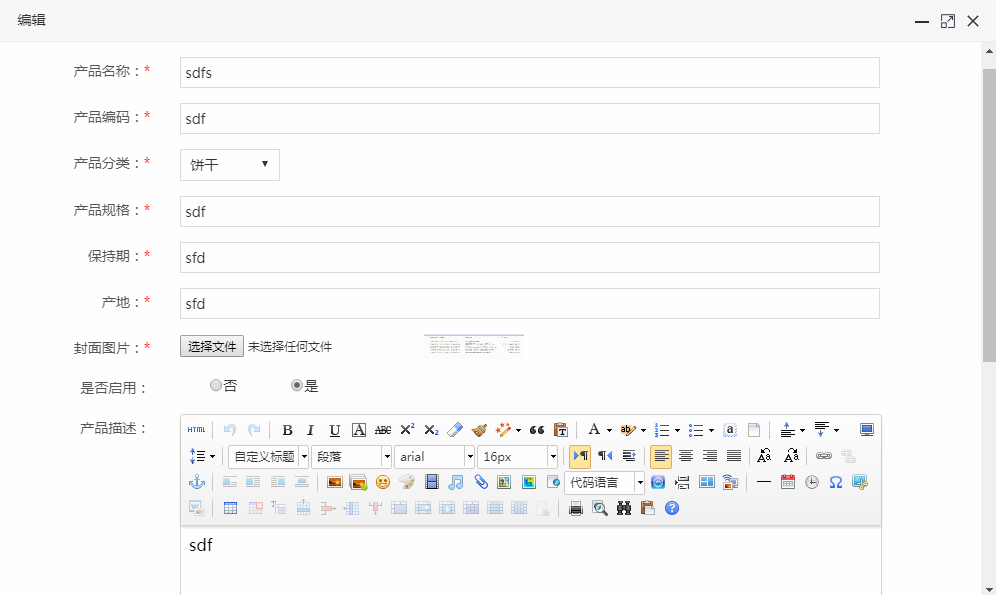
前端代码大家自己可以比较一下上一章,看看有什么不同
非常感谢Sunshine-X 的提醒,在产品编辑页面的js中,添加了保存成功后jqgrid表格刷新代码(本人前端比较菜)
后面附上完整的项目代码
版权声明:本文原创发表于 博客园,作者为 AllEmpty 本文欢迎转载,但未经作者同意必须保留此段声明,且在文章页面明显位置给出原文连接,否则视为侵权。
python开发QQ群:669058475(本群已满)、733466321(可以加2群) 作者博客:http://www.cnblogs.com/EmptyFS/
我的第一个python web开发框架(17)——产品管理的更多相关文章
- 我的第一个python web开发框架(41)——总结
我的第一个python web开发框架系列博文从17年6.7月份开始写(存了近十章稿留到9月份才开始发布),到今天结束,一年多时间,想想真不容易啊. 整个过程断断续续,中间有段时间由于工作繁忙停了好长 ...
- 我的第一个python web开发框架(14)——后台管理系统登录功能
接下来正式进入网站的功能开发.要完成后台管理系统登录功能,通过查看登录页面,我们可以了解到,我们需要编写验证码图片获取接口和登录处理接口,然后在登录页面的HTML上编写AJAX. 在进行接口开发之前, ...
- 我的第一个python web开发框架(1)——前言
由于之前经验不是很丰富,写的C#系统太过复杂,所以一直想重写,但学的越多越觉得自己懂的越少,越觉的底气不足.所以一直不敢动手,在内心深处对自己讲,要静下心来认真学习,继续沉淀沉淀.这两年多以来找各种机 ...
- 我的第一个python web开发框架(3)——怎么开始?
小白与小美公司经过几次接触商谈,好不容易将外包签订了下来,准备开始大干一场.不过小白由于没有太多的项目经验,学过python懂得python的基本语法,在公司跟着大家做过简单功能,另外还会一些HTML ...
- 我的第一个python web开发框架(22)——一个安全小事故
在周末的一个早上,小白还在做着美梦,就收到了小美的连环追魂call,电话一直响个不停. 小白打着哈欠拿起电话:早上好美女. 小美:出事了出事了,我们公司网站一早访问是一片空白,什么内容都没有了,你赶急 ...
- 我的第一个python web开发框架(18)——前台页面与接口整合
由于我们前后台系统没有分开,所以前台页面调用接口时,可以直接使用后台管理系统已经完成的接口,不过后台管理系统接口的访问加上了登录验证,所以需要将前台要用到的接口进行处理,让它们设置到白名单当中 我们打 ...
- 我的第一个python web开发框架(27)——定制ORM(三)
在上一章中,我们已经创建好ORM的基类了,接下来要做的就是将基类的常用方法一一实现. 首先我们来看看之前项目中,最常见的获取指定主键的记录实体 @get('/api/product/<id:in ...
- 我的第一个python web开发框架(31)——定制ORM(七)
几个复杂的ORM方式都已介绍完了,剩下一些常用的删除.获取记录数量.统计合计数.获取最大值.获取最小值等方法我就不一一详细介绍了,直接给出代码大家自行查看. #!/usr/bin/env python ...
- 我的第一个python web开发框架(6)——第一个Hello World
小白中午听完老菜讲的那些话后一直在思考,可想来想去还是一头雾水,晕晕呼呼的一知半解,到最后还是想不明白,心想:老大讲的太高深了,只能听懂一半半,看来只能先记下来,将明白的先做,不明白的等以后遇到再学. ...
随机推荐
- UWP上可用的GB2312编码
大概是在WP8的时候,网上有一个WP8可用的GB2312编码的解决方法,就是那个DBCSCodePage. 但是由于UAP开始,微软删掉了GetManifestResourceStream,所以这东西 ...
- ASP.NET Web API 2中的错误处理
前几天在webapi项目中遇到一个问题:Controller构造函数中抛出异常时全局过滤器捕获不到,于是网搜一把写下这篇博客作为总结. HttpResponseException 通常在WebAPI的 ...
- MySQL基础函数
MySQL数据库提供了很多函数包括: 数学函数: 字符串函数: 日期和时间函数: 条件判断函数: 系统信息函数: 加密函数: 格式化函数: 一.数学函数 数学函数主要用于处理数字,包括整型.浮点数等. ...
- Oracle学习笔记之存储过程
...
- FastDFS 简介
FastDFS开源的分布式文件系统,功能包括:文件存储,文件同步,文件访问(文件上传,文件下载等),解决了大容量存储和负载均衡的问题,特别适合以文件为载体的在线服务,如服务网站,视频网站等 FastD ...
- 【20171025早】alert(1) to win 练习
本人黑绝楼,自称老黑,男,25岁,曾经在BAT工作过两年,但是一直都是底层人员,整天做重复性工作,甚敢无趣,曾和工作十年之久的同事聊天,发现对方回首过往,生活是寡淡如水,只有机械性工作.旋即老黑毅然决 ...
- 正则表达式&常用JS校验
符号 含义 ^ 以什么开头 $ 以什么结束 * 任意个(包括0个) + 至少一个 ? 没有或一个 {a,b} a-b个 {a} 正好a个 {a,} 至少a个 | 或 . 任意字符 [] 方括号内的任意 ...
- 如何内网搭建NuGet服务器
NuGet 是.NET程序员熟知的给.NET项目自动配置安装library的工具,它可以直接安装开源社区中的各个公用组件,可以说是非常方便.不过,有些时候,公司内部的公用的基础类库,各个项目都有引用, ...
- 教你用SVG画出一条龙
先看demo,九十七度 其实使用svg画出这条龙很简单,关键不在于怎么使用svg,而在于你的美术功底,哈哈. 好吧,当然基础是不能忽略的,先看下这条龙的代码: <svg id="lon ...
- iOS之创建一个常驻线程
// 当创建一个线程,并且希望它一直存在时,但往往我们创建的线程都是执行完成之后也就停止了,不能再次利用,那么如何创建一个线程可以让他可以再次工作呢,这个时候就需要使用到RunLoop了.下面的是我写 ...