
[C#]使用GroupJoin将两个关联的集合进行分组
本文为原创文章、源代码为原创代码,如转载/复制,请在网页/代码处明显位置标明原文名称、作者及网址,谢谢!
本文使用的开发环境是VS2017及dotNet4.0,写此随笔的目的是给自己及新开发人员作为参考,
对于Join的用法说明如下:
语法:
public static IEnumerable<TResult> Join<TOuter, TInner, TKey, TResult>(

    this IEnumerable<TOuter> outer,

    IEnumerable<TInner> inner,

    Func<TOuter, TKey> outerKeySelector,

    Func<TInner, TKey> innerKeySelector,

    Func<TOuter, TInner, TResult> resultSelector

)
参数说明:
outer

Type: System.Collections.Generic.IEnumerable<TOuter>

要联接的第一个序列。

inner

Type: System.Collections.Generic.IEnumerable<TInner>

要与第一个序列联接的序列。

outerKeySelector

Type: System.Func<TOuter, TKey>

用于从第一个序列的每个元素提取联接键的函数。

innerKeySelector

Type: System.Func<TInner, TKey>

用于从第二个序列的每个元素提取联接键的函数。

resultSelector

Type: System.Func<TOuter, TInner, TResult>

用于从两个匹配元素创建结果元素的函数。

返回值

Type: System.Collections.Generic.IEnumerable<TResult>

IEnumerable<T> ,其类型的元素 TResult 通过对两个序列执行内部联接获得的。
参数类型:
TOuter

第一个序列中的元素的类型。

TInner

第二个序列中的元素的类型。

TKey

键选择器函数返回的键的类型。

TResult

结果元素的类型。
参考链接如下:
https://msdn.microsoft.com/zh-cn/library/bb534675.aspx
https://docs.microsoft.com/zh-cn/dotnet/api/system.linq.enumerable.join?f1url=https%3A%2F%2Fmsdn.microsoft.com%2Fquery%2Fdev15.query%3FappId%3DDev15IDEF1%26l%3DZH-CN%26k%3Dk(System.Linq.Enumerable.Join%60%604);k(TargetFrameworkMoniker-.NETFramework,Version%3Dv4.0);k(DevLang-csharp)%26rd%3Dtrue&view=netframework-4.7.1
例程:
using System;

using System.Collections.Generic;

using System.Linq;

namespace ConsoleApp33

{

    class Program

    {

        static void Main(string[] args)

        {

            GroupJoinEx();

        }

        static void GroupJoinEx()

        {

            Person p1 = new Person() { Name = "ABC", Age =  };

            Person p2 = new Person() { Name = "EFG", Age =  };

            Person p3 = new Person() { Name = "LMN", Age =  };

            Person p4 = new Person() { Name = "XYZ", Age =  };

            List<Person> pList = new List<Person> { p1, p2, p3, p4 };

            Department d1 = new Department() { Name = "A1", Employee = p1 };

            Department d2 = new Department() { Name = "A2", Employee = p2 };

            Department d3 = new Department() { Name = "A3", Employee = p1 };

            Department d4 = new Department() { Name = "B1", Employee = p3 };

            Department d5 = new Department() { Name = "B2", Employee = p4 };

            Department d6 = new Department() { Name = "B3", Employee = p4 };

            List<Department> dList = new List<Department> { d1, d2, d3, d4, d5, d6 };

            var result = pList.Join(dList,

                person => person,

                department => department.Employee,

                (person, department) => new

                {

                    Person = person,

                    Department = department

                });

            foreach(var item1 in result)

            {

                Console.Write($"Name:{item1.Person} & Department:{item1.Department} ");

                Console.WriteLine();

            }

        }

    }

    class Person

    {

        public string Name { set; get; }

        public int Age { set; get; }

        public override string ToString()

        {

            return $"{Name},{Age}";

        }

    }

    class Department

    {

        public string Name { set; get; }

        public Person Employee { set; get; }

        public override string ToString()

        {

            return $"{Name}";

        }

    }

}
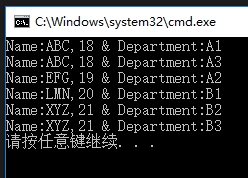
输出结果:
对于GroupJoin的用法说明如下:
语法:
public static IEnumerable<TResult> GroupJoin<TOuter, TInner, TKey, TResult>(

    this IEnumerable<TOuter> outer,

    IEnumerable<TInner> inner,

    Func<TOuter, TKey> outerKeySelector,

    Func<TInner, TKey> innerKeySelector,

    Func<TOuter, IEnumerable<TInner>, TResult> resultSelector

)
参数说明:
outer

Type: System.Collections.Generic.IEnumerable<TOuter>

要联接的第一个序列。

inner

Type: System.Collections.Generic.IEnumerable<TInner>

要与第一个序列联接的序列。

outerKeySelector

Type: System.Func<TOuter, TKey>

用于从第一个序列的每个元素提取联接键的函数。

innerKeySelector

Type: System.Func<TInner, TKey>

用于从第二个序列的每个元素提取联接键的函数。

resultSelector

Type: System.Func<TOuter, IEnumerable<TInner>, TResult>

用于从第一个序列的元素和第二个序列的匹配元素集合中创建结果元素的函数。

返回值

Type: System.Collections.Generic.IEnumerable<TResult>

IEnumerable<T> ,其中包含类型的元素 TResult 通过对两个序列执行分组的联接获得的。
参数类型:
TOuter

第一个序列中的元素的类型。

TInner

第二个序列中的元素的类型。

TKey

键选择器函数返回的键的类型。

TResult

结果元素的类型。
参考链接如下:
https://msdn.microsoft.com/zh-cn/library/bb534297.aspx
https://docs.microsoft.com/zh-cn/dotnet/api/system.linq.enumerable.groupjoin?f1url=https%3A%2F%2Fmsdn.microsoft.com%2Fquery%2Fdev15.query%3FappId%3DDev15IDEF1%26l%3DZH-CN%26k%3Dk(System.Linq.Enumerable.GroupJoin%60%604);k(TargetFrameworkMoniker-.NETFramework,Version%3Dv4.0);k(DevLang-csharp)%26rd%3Dtrue&view=netframework-4.7.1
例程:
using System;

using System.Collections.Generic;

using System.Linq;

namespace ConsoleApp33

{

    class Program

    {

        static void Main(string[] args)

        {

            GroupJoinEx();

        }

        static void GroupJoinEx()

        {

            Person p1 = new Person() { Name = "ABC", Age =  };

            Person p2 = new Person() { Name = "EFG", Age =  };

            Person p3 = new Person() { Name = "LMN", Age =  };

            Person p4 = new Person() { Name = "XYZ", Age =  };

            List<Person> pList = new List<Person> { p1, p2, p3, p4 };

            Department d1 = new Department() { Name = "A1", Employee = p1 };

            Department d2 = new Department() { Name = "A2", Employee = p2 };

            Department d3 = new Department() { Name = "A3", Employee = p1 };

            Department d4 = new Department() { Name = "B1", Employee = p3 };

            Department d5 = new Department() { Name = "B2", Employee = p4 };

            Department d6 = new Department() { Name = "B3", Employee = p4 };

            List<Department> dList = new List<Department> { d1, d2, d3, d4, d5, d6 };

            var result = pList.GroupJoin(dList,

                person => person,

                department => department.Employee,

                (person, departments) => new

                {

                    Person = person,

                    Department = departments.Select(d => d)

                });

            foreach(var item1 in result)

            {

                Console.Write($"Name:{item1.Person} & ");

                foreach(var item2 in item1.Department)

                {

                    if(item1.Department.First() == item2)

                        Console.Write($"Department:{item2} ");

                    else

                        Console.Write($"{item2} ");

                }

                Console.WriteLine();

            }

        }

    }

    class Person

    {

        public string Name { set; get; }

        public int Age { set; get; }

        public override string ToString()

        {

            return $"{Name},{Age}";

        }

    }

    class Department

    {

        public string Name { set; get; }

        public Person Employee { set; get; }

        public override string ToString()

        {

            return $"{Name}";

        }

    }

}
输出结果:
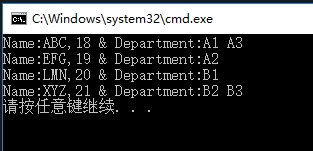
以上代码仅在Join与GroupJoin最后一个参数有区别,可以参见红色字体部分,
并从以上结果来看,Join与GroupJoin的区别一个在于:Join仅仅是将两个结合进行关联,而GroupJoin则会进行分组。
[C#]使用GroupJoin将两个关联的集合进行分组的更多相关文章
- Oracle中如何实现Mysql的两表关联update操作
在看<MySQL 5.1参考手册>的时候,发现MySQL提供了一种两表关联update操作.原文如下: UPDATE items,month SET items.price=month.p ...
- select两个关联的下拉列表
今天用到两个关联的select,整理一下代码,仅供参考 如下: <html> <head> <meta charset="UTF-8"> < ...
- Python selenium 一个节点两个关联input
HTML代码: 一个节点两个关联input 多出现于密码框 先需要模拟点击进入第一个input,才能激活第二个input. 代码: driver.find_element_by_name('Text ...
- oracle 两表关联查询
oracle 两表关联查询 CreationTime--2018年7月4日17点27分 Author:Marydon 情景描述 查询学生表student,sname,sex,age信息及所在班级c ...
- Oracle两表关联,只取B表的第一条记录
背景: A表.B表两表关联,关联出来的结果里B表有不止一条,需求是只要B表结果中的某一条(按某字段排序) 首先想到了直接写个带排序的子查询去匹配外围的值,从这个结果集中只要第一条,但是经过验证发现, ...
- MyBatis 中两表关联查询MYSQL (14)
MyBatis 中两表关联查询MYSQL 1.创建数据库表语句 2.插入测试数据 3.pom文件内容 <?xml version="1.0" encoding="U ...
- Oracle-left join两表关联只取B表匹配到的第一条记录【over partition by(分组后对组内数据排序)】
背景: A表.B表两表关联,关联出来的结果里B表有不止一条,需求是只要B表结果中的某一条(按某字段排序) 经过百度,发现 row_number() over(partition by a order ...
- PHP明细之间的关联和having进行分组,不推荐这样做,只是做为偷懒的办法
-- 只求和wrt的数据,其它数据保持不变!SELECT A.return_id,A.relevant_id,A.order_id,A.deliver_order_id,A.product_id,A. ...
- Android ORMLite ForeignCollection关联外部集合
<Android ORMLite ForeignCollection关联外部集合> Android ORMLite ForeignCollection关联外部集合的功能,适合层 ...
随机推荐
- Windows Server 2008通过计划任务定时执行bat文件
前段时间在Windows Server 2008安装了一套基于MySQL数据库的软件,处于数据安全的考虑,希望每天能够自动进行数据库备份.我在别人脚本的基础上自己写了一个数据库备份的bat脚本,双击该 ...
- formData 无需form异步上传多个图片
上周帮其它公司套一下一个web端微信投票系统的后台接口,遇到了一个图片以及视频上传报名的小问题,网上实现方式有很多但都不是ui上面的效果,于是自己动手改造了一个.先来看看效果图 流程很简单,就是点击每 ...
- 博客志第一天——判断一个整数N是否是完全平方数?
关注博客园很久,今天是第一次写博客.先附上一个C题目:写一个函数判断一个整数是否为完全平方数,同时是否该数的各位数至少两个相同的数字 #include <stdio.h> #include ...
- 通过 ODBC 访问数据库获取数据集
Step1:(window 中完成): 控制面板/管理工具/ODBC 数据源/用户 Step2:(window 中完成): 添加/SQL Server Step3:(window 中完成): 自己定义 ...
- spark join操作解读
本文主要介绍spark join相关操作,Java描述. 讲述三个方法spark join,left-outer-join,right-outer-join 我们以实例来进行说明.我的实现步骤记录如下 ...
- mysql开启慢查询日志以及查看(转载自网络)
转载自http://database.51cto.com/art/201309/410314_1.htm
- coursera无法观看视频解决方法
coursera无法观看视频解决方法 Coursera是国外的一款非常有名的公开课网站,值得大家一起学习,奈何"长城"太厚,经常被和谐,一些视频打不开,最近找到不用FQ的方法,共享 ...
- Solitaire
Solitaire Time Limit: 2000/1000 MS (Java/Others) Memory Limit: 65536/32768 K (Java/Others) Total Sub ...
- 爆炸快求1~n有多少素数
这个求一千亿以内的素数大约用6780ms #include <stdio.h> #include <iostream> #include <string.h> #i ...
- CREATE DATABASE RoomReservation
要从我的模型开始构建我的RoomReservation数据库对象,我将创建表对象. 要在SQL Server中创建表,我需要使用CREATE TABLE语句. 使用CREATE TABLE语句,我将能 ...