
C# winform 程序开发知识点总结(干货)
1、数据库连接及操作
在说数据库操作之前,先说一下数据库连接操作字符串的获取
首先,点击服务器资源管理器,接下来选中数据连接右键点击添加连接,填入你要连接的服务器名称,点击单选框使用SQL Server 身份验证,填入用户名和密码,然后选择你要链接的数据库名称,点击测试连接,弹出连接成功,然后点击确定,此时,数据库已经连接成功。在服务器资源管理器下的数据连接下就可以看到你刚才链接的数据库,选中右键属性你就可以看见连接字符串
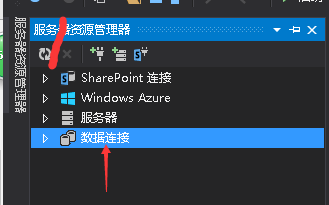
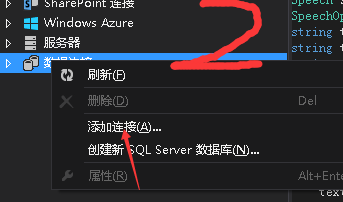
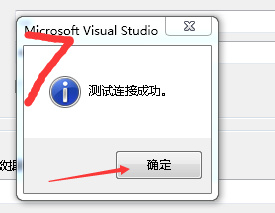
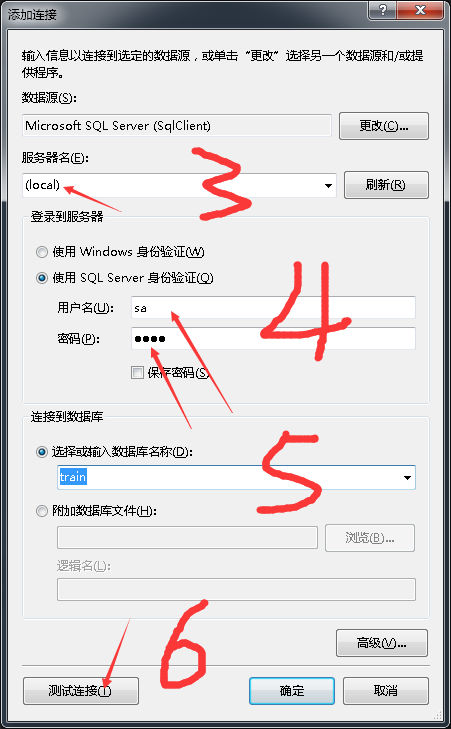
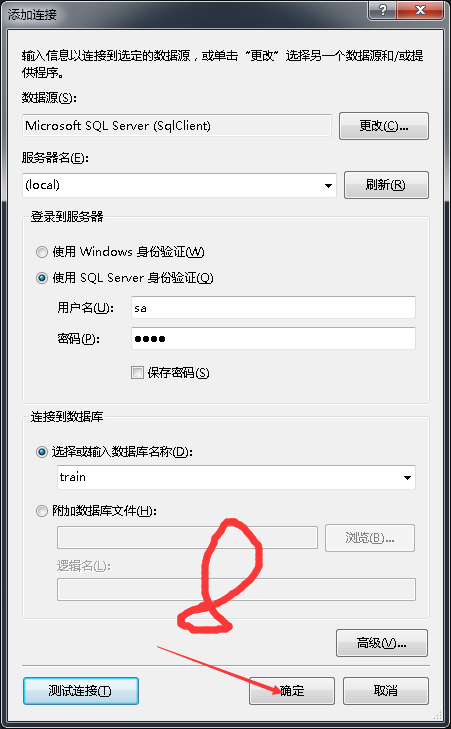

在获取到数据库连接字符串时,在App.config配置文件中可以写关于连接数据库的连接字符串,在这里配置好,在程序中直接通过代码调用连接字符串就行,直接上代码
   <connectionStrings>

     <add name="connStr" connectionString="Data Source=(local);Initial Catalog=train;User ID=sa;Password=1234" />

     <add name="train.Properties.Settings.trainConnectionString" connectionString="Data Source=(local);Initial Catalog=train;Persist Security Info=True;User ID=sa"

       providerName="System.Data.SqlClient" />

   </connectionStrings>
在数据库连接时通过获取App.confi文件中的连接字符串连接数据库,代码如下
    /// <summary>

    /// 数据库连接

    /// </summary>

    public class SqlConnect

    {

       /// <summary>

       /// 连接字符串获取

       /// </summary>

        private static string connectString = ConfigurationManager.ConnectionStrings["connStr"].ConnectionString;

        /// <summary>

        /// 建立数据库连接

        /// </summary>

        /// <returns></returns>

        public static SqlConnection getConn()

        {

            SqlConnection con = new SqlConnection(connectString);

            //Console.WriteLine("连接成功");

            return con;

        }

    }
接下来说一说数据库增删查改相关的操作
通过c#操作数据库增加一条数据和java的思路逻辑差不多,只不过在在传值赋值的过程中采用的方式不一样,Java中sql语句用问号赋值传值,而c#是通过@加变量名传值,通过
AddWithValue方法赋值。是不是听得云里雾里的,给大家附上一段代码,就可以懂我说的
         /// <summary>

         /// 插入站点

         /// </summary>

         /// <param name="stationName"></param>站点名称

         /// <param name="stationEnName"></param>站点英文名

         /// <param name="stationLng"></param>站点经度

         /// <param name="stationLat"></param>站点纬度

         /// <param name="stopTime"></param>停留时间

         /// <param name="distance"></param>距离

         /// <param name="lastStation"></param>上一站点名称

         /// <param name="belongStation"></param>在本线路中的隶属站次

         public void insertStation(String stationName, String stationEnName, double stationLng, double stationLat, int stopTime, double distance, String lastStation,int belongStation)

         {

             SqlConnection con = SqlConnect.getConn();

             try

             {

                 String InsertStr = "insert into WorkingLine (StationName,StationEnName,StationLng,StationLat,StationStopTime,StationDistance,LastStationName,SubjectStation) values (@STATIONNAME,@STATIONENNAME,@STATIONLNG,@STATIONLAT,@STATIONSTOPTIME,@STATIONDISTANCE,@LASTSTATIONNAME,@SUBJECTSTATION)";

                 SqlCommand command = con.CreateCommand();// 绑定SqlConnection对象

                 command.CommandText = InsertStr;

                 con.Open();

                 command.Parameters.AddWithValue("@STATIONNAME", stationName);

                 command.Parameters.AddWithValue("@STATIONENNAME", stationEnName); ;

                 command.Parameters.AddWithValue("@STATIONLNG", stationLng);

                 command.Parameters.AddWithValue("@STATIONLAT", stationLat);

                 command.Parameters.AddWithValue("@STATIONSTOPTIME", stopTime);

                 command.Parameters.AddWithValue("@STATIONDISTANCE", distance);

                 command.Parameters.AddWithValue("@LASTSTATIONNAME", lastStation);

                 command.Parameters.AddWithValue("@SUBJECTSTATION", belongStation);

                 command.ExecuteNonQuery();

             }

             catch (Exception ex)

             {

                 Console.WriteLine(ex.Message);

                 Console.WriteLine("添加站点失败");

             }

             finally

             {

                 con.Close();

             }

         }
删除,修改一条数据相对来说没有那么复杂,直接上代码
          /// <summary>

         /// 删除站点

         /// </summary>

         /// <param name="name"></param>站点名称

         public void deleteSta(String name) {

             SqlConnection con = SqlConnect.getConn();

             try

             {

                 String deleteStr = "delete from WorkingLine where StationName=@STATIONNAME";

                 SqlCommand command = con.CreateCommand();// 绑定SqlConnection对象

                 command.CommandText = deleteStr;

                 con.Open();

                 command.Parameters.AddWithValue("@STATIONNAME", name);

                 command.ExecuteNonQuery();

             }

             catch (Exception ex)

             {

                 Console.WriteLine(ex.Message);

                 Console.WriteLine("删除站点失败");

             }

             finally

             {

                 con.Close();

             }

         }

         /// <summary>

         /// 修改某一站距上一站的距离

         /// </summary>

         /// <param name="stationname"></param>站名

         /// <param name="distance"></param>距离

         public void UpdateDistance(String stationname,double distance) {

             SqlConnection con = SqlConnect.getConn();

             try

             {

                 String updateDisStr = "update WorkingLine set StationDistance =@DISTANCE where StationName =@STATIONNAME";

                 SqlCommand commmand = con.CreateCommand();// 绑定SqlConnection对象

                 commmand.CommandText = updateDisStr;

                 commmand.Parameters.AddWithValue("@DISTANCE", distance);

                 commmand.Parameters.AddWithValue("@STATIONNAME", stationname);

                 con.Open();

                 commmand.ExecuteNonQuery();//执行命令

             }

             catch (Exception ex)

             {

                 Console.WriteLine(ex.Message);

                 Console.WriteLine("修改距离失败");

             }

             finally

             {

                 con.Close();

             }

         }
对于查询数据来说,我们普遍的操作就是用泛型List<E>来接收查询的数据,看代码就明白了
         /// <summary>

         /// 查询列车运行线路信息,为DateGridView绑定数据源

         /// </summary>

         /// <returns></returns>

         public List<DateView> SelectGridViewStation()

         {

             SqlDataReader reader = null;

             DateView view = null;

             List<DateView> list = new List<DateView>();

             SqlConnection con = SqlConnect.getConn();

             try

             {

                 String selectGVStr = "select StationName,StationEnName,StationStopTime,StationLng,StationLat,StationDistance from WorkingLine order by SubjectStation asc";

                 SqlCommand command = con.CreateCommand();// 绑定SqlConnection对象

                 command.CommandText = selectGVStr;

                 con.Open();

                 reader = command.ExecuteReader();

                 while (reader.Read())

                 {

                     view = new DateView()

                     {

                         StationName = reader.GetString(),

                         StationEnName = reader.GetString(),

                         stopTime=reader.GetInt32(),

                         lng=reader.GetDouble(),

                         lat = reader.GetDouble(),

                         distance=reader.GetDouble()

                     };

                     list.Add(view);

                 }

             }

             catch (Exception ex)

             {

                 Console.WriteLine(ex.Message);

                 Console.WriteLine("查询线路信息失败");

             }

             finally

             {

                 reader.Close();

                 con.Close();

             }

             return list;

         }
现在拿到数据了,我们怎么显示在对应的界面上呢!在winfrom窗体程序中,我习惯了用DataGridView控件,只需要为其绑定数据源就好了,我说的数据源是通过代码去实现的,请看
2、DataGridView操作
DataGridView控件默认选中第一行数据,如果不想让其选中,只需一步:dataGridView1.Rows[1].Selected = false;
选取DataGridView控件中某一行某一列的值:dataGridView1.Rows[m ].Cells[n].Value.ToString();其中m,n分别表示行和列
C# winform 程序开发知识点总结(干货)的更多相关文章
- WinForm程序开发
WinForm程序开发------------------------------主要页面----------------------------------BaseForm.cs 基类,用于派 ...
- winform总结5> winform程序开发注意事项
1.全局异常捕获 Application.SetUnhandledExceptionMode(UnhandledExceptionMode.CatchException); //处理UI线程异常 Ap ...
- winForm 程序开发界面参数传递
1. using System; using System.Collections.Generic; using System.ComponentModel; using System.Data; u ...
- Web应用程序开发知识点回顾
asp.net 1.<%@ Page Language="C#"AutoEventWireup="true" CodeFile="Home.as ...
- WinForm界面开发之布局控件"WeifenLuo.WinFormsUI.Docking"的使用
WinForm界面开发之布局控件"WeifenLuo.WinFormsUI.Docking"的使用 转自:http://www.cnblogs.com/wuhuacong/arch ...
- C#软件winform程序安装包制作及卸载程序制作
使用vs2010 winform程序开发的软件的人比较多,程序的开发是为了在不同的人不同的机器使用,为了使不同的机器能使用该软件就需要在制作程序安装包,安装包里必须包含该软件运行所选的所有环境,下面就 ...
- 使用Microsoft.ExceptionMessageBox.dll捕获WinForm程序中异常信息并弹窗显示
WinForm程序开发中,在开发模式下对于异常的处理一般都是通过调试的方式来查找异常发生的未知与原因. 下面以“除数为0”的情况来具体说明. Button按钮事件如下: private void bu ...
- 微信小程序开发学习资料
作者:初雪链接:https://www.zhihu.com/question/50907897/answer/128494332来源:知乎著作权归作者所有.商业转载请联系作者获得授权,非商业转载请注明 ...
- WinForm程序打包工具InnoSetup使用说明图文教程
WinForm程序打包工具InnoSetup使用说明图文教程 WinForm程序开发测试好了,如果将Debug/Release里面的文件发给客户使用,会让客户觉得你不够专业,但是使用VS自带的打包工具 ...
随机推荐
- XamlReader动态使用xaml
xamlload先在xaml做出一个grid,命名xgrid <Page x:Class="xamlload.MainPage" xmlns="http://sch ...
- sharepoint 创建个人网站
One of the SharePoint 2013 puzzle pieces which got some major improvements are My Sites, User Profil ...
- js-自定义事件
1.自定义事件 开发人员自己定义的事件,是除了系统以外的事件. 可以供其他开发人员使用,有利于多人写作开发,可扩展js的原有事件. 需要:事件绑定器.事件触发器 2.自定义事件三要素 ①:对象.事件名 ...
- tomcat启动报错Several ports (8080, 8009) required by Tomcat v6.0
tomcat启动报错 如下图: 问题:8080.8009端口已经被占用. 解决办法: 1.在命令提示符下,输入netstat -aon | findstr 8080 2.继续输入taskkill -F ...
- Memcached理解
一.Memcached简介: 1. Memcached是一个自由开源的,高性能的,分布式内存对象缓存系统. 2. Memcached是一种基于内存的key-value存储,用来存储小块的任意数据(字符 ...
- java使用for循环做猜数字游戏
package org.llh.test;import java.util.Random;import java.util.Scanner;/** * 猜数字游戏 * * @author llh * ...
- 对抗栈帧地址随机化/ASLR的两种思路和一些技巧
栈帧地址随机化是地址空间布局随机化(Address space layout randomization,ASLR)的一种,它实现了栈帧起始地址一定程度上的随机化,令攻击者难以猜测需要攻击位置的地址. ...
- poj 2486 Apple Tree(树形DP 状态方程有点难想)
Apple Tree Time Limit: 1000MS Memory Limit: 65536K Total Submissions: 9808 Accepted: 3260 Descri ...
- 最最简单的CentOs6在线源搭建
非常实用的在线源搭建,只要4步骤 1.点击进入http://mirrors.aliyun.com/repo/epel-6.repo ,这是阿里云的源 2.复制所有的代码 ctrl+a,ctrl+c ...
- 正常启动HBase顺序
先启动hadoop集群start-all.sh 在master节点会启动SecondaryNameNode,NameNode,ResourceManager 在slave节点会启动NodeManage ...