
WPF 验证没有通过无法保存数据(非常好)+ 虚似数据库
Introduction
Implementing multiple validation rules on a single control is bit difficult but not impossible. Every form has one or more controls which required to be validation on different set of logic. Since this is a very basic dependency of code that every developer has to do, this tip is dedicated only to this.
It would be an easy task if we have set of multiple validation like required, numeric, minimum character length, folder exists, numeric range rule and we just apply one or more than one rule just by putting comma or | between the rules in our XAML file. To elaborate more, the issue lets see a situation.
Assume one textbox control value needs to be validated with the below conditions:
- It has to be a required field.
- It has to be a numeric field.
- It should be between ranges of 1 to 100.
Or:
- It has to be a required Field
- Input value should have minimum 3 characters.
Or:
- It has to be a required field.
- Input value should be a valid directory.
Now one way is to create a class and club all rules into one and then use that one rule, but isn't it is a time consuming job and difficult to manage at the later stage of project? Imagine how many combination of rules we will have to make and if there is any logic change, we need to go back and manage each rule with the new changes.
Background
Continue to my validation segment, previously I wrote a tip where I highlighted how to implement maximum length validation on controls, now I moved to other validation but with addition of how to implement multiple validation on the same control.
Using the Code
Would it be nice to have our XAML allow assigning these rules with some kind of separator and then XAML parser would handle this list of rules on the control.
Well yes, this is possible and I will show you in the below steps how we can achieve this.
Single Validation
 Collapse | Copy Code
<TextBox x:Name="titleBox" MaxLength="100" Grid.Column="1" Margin="0,11,0,0" HorizontalAlignment="Stretch">
<Binding
Path="Book.Title"
ValidatesOnDataErrors="True"
UpdateSourceTrigger="PropertyChanged">
<Binding.ValidationRules>
<rules:RequiredRule />
</Binding.ValidationRules>
</Binding>
</TextBox>
Multiple Validation
Collapse | Copy Code<TextBox Text="{binding:RuleBinding Path=Book.Pages,
ValidationList=RequiredRule|NumericRule|RangeRule, MinValueRange=0, MaxValueRange=999, UpdateSourceTrigger=PropertyChanged, ValidatesOnDataErrors=True , Mode=TwoWay}"
Grid.Column="1" Grid.Row="6" HorizontalAlignment="Stretch"/>
First, we will introduce our two generic classes which would allow us to bind these multiple rules and then these rules would be set at run time.
Collapse | Copy Code[MarkupExtensionReturnType(typeof(object))]
public abstract class BindingDecoratorBase : MarkupExtension
{
/// <summary>
/// The decorated binding class.
///
private Binding binding = new Binding(); public override object ProvideValue(IServiceProvider provider)
{
//create a binding and associate it with the target
return binding.ProvideValue(provider);
} protected virtual bool TryGetTargetItems(IServiceProvider provider, out DependencyObject target, out DependencyProperty dp)
{
}
}
Now our second class would be RuleBinding Class which will be inherited from our 1st class BindingDecoratorBase class. This class has an override of ProvideValue() method. In this method, we call the below RegisterRule() method:
Collapse | Copy Codepublic override object ProvideValue(IServiceProvider provider)
{ //In case multiple rules are bound then it would come like "Required|Numeric
var validationRules = ValidationList.Split(new string[] { "|", }, StringSplitOptions.RemoveEmptyEntries); foreach (var rule in validationRules)
{
RegisterRule(rule);
} //delegate binding creation etc. to the base class
object val = base.ProvideValue(provider);
return val;
} .... private void RegisterRule(string ruleName)
{
ValidationRule rule;
switch (ruleName)
{
case "RequiredRule":
{
rule = new RequiredRule();
Binding.ValidationRules.Add(rule);
break;
}
case "RangeRule":
{
rule = new MinNumericRule()
{ MinValue = MinValueRange, MaxValue = MaxValueRange};
Binding.ValidationRules.Add(rule);
break;
}
case "NumericRule":
{
rule = new NumericRule();
Binding.ValidationRules.Add(rule);
break;
}
case "NumericNotEmpty":
{
rule = new NumericNotEmptyRule();
Binding.ValidationRules.Add(rule);
break;
}
case "FolderExistRule":
{
rule = new FolderExistRule();
Binding.ValidationRules.Add(rule);
break;
}
case "MinLengthRule":
{
rule = new MinLengthRule();
Binding.ValidationRules.Add(rule);
break;
}
}
}
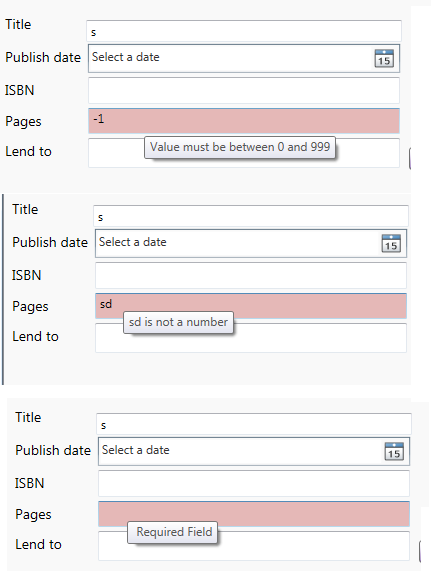
That's it, very simple implementation but very helpful and effective, when you would run this project you would find that tooltips are changing based on error for the same control.
Points of Interest
Working on WPF is fun and doing things in a simple way in WPF is like cherry on the cake. It is always important that we write code in a simple way so that it can be managed by other people in your absence.
Validation plays a very important role and eliminates possibilities of all those silly errors which are enough to annoy an end user. Every minute spent to create basic structure of validation is worth it and this leads a project to an exception free successful project and saves lots of productivity.
Hope you enjoyed reading this tip.
License
This article, along with any associated source code and files, is licensed under The Code Project Open License (CPOL)
WPF 验证没有通过无法保存数据(非常好)+ 虚似数据库的更多相关文章
- WPF MVVM(Caliburn.Micro) 数据验证
书接前文 前文中仅是WPF验证中的一种,我们暂且称之为View端的验证(因为其验证规是写在Xaml文件中的). 还有一种我们称之为Model端验证,Model通过继承IDataErrorInfo接口来 ...
- WPF中退出时显示是否保存数据提示
一.通过窗体中的按钮实现退出时数据保存提示 Xaml: <Grid> <TextBlock HorizontalAlignment="Left" Margin=& ...
- WPF XML序列化保存数据 支持Datagrid 显示/编辑/添加/删除数据
XML序列化保存数据 using System; using System.Collections.Generic; using System.Linq; using System.Text; usi ...
- 理解和使用WPF 验证机制
博客 学院 下载 更多 写博客 发布Chat 登录注册 理解和使用WPF 验证机制 原创 2013年06月20日 11:15:37 7404 首先建立一个demo用以学习和实验WPF Data Val ...
- Docker最全教程——数据库容器化之持久保存数据(十一)
上一节我们讲述了SQL Server容器化实践(注意,SQL Server现在也支持跨平台),本节将讲述如何持久保存数据,并且接下来将逐步讲解其他数据库(MySql.Redis.Mongodb等等)的 ...
- hibernate4无法保存数据
hibernate4无法保存数据 author: hiu 以后都发文章我都备注一下作者了,hiu就是我了 红色字体更新日期:2014-07-08 初次使用hibernate4,使用getCurrent ...
- WPF获得PNG图片外观Path数据
原文:WPF获得PNG图片外观Path数据 WPF开发界面的时候,用的最多的就是自定义控件模板,开发人员需要根据UI的设计,做出符合要求的自定义控件.但是在一些特殊情况下,UI的设计可能 ...
- 02-EF Core笔记之保存数据
EF Core通过ChangeTracker跟踪需要写入数据库的更改,当需要保存数据时,调用DbContext的SaveChanges方法完成保存. 基本的添加.更新.删除操作示例如下: using ...
- EasyUI使用JSON保存数据
目前来说,使用JSON保存数据比较方便,前台可以不用Test.aspx 页面,可以直接用Html页面,使用.aspx页面的弊端就不在这里熬述. 具体步骤如下: 1.新建一个Html页面,命名为Test ...
随机推荐
- JavaScript学习日志(六):事件
这篇随笔,深恶痛绝,敲到快结束的时候,凌晨00:19,突然闪退,也不知道是Mac的原因还是chrome的原因,重新打开的时候,以为自动保存有效果,心想没关系,结果他么的只保存了四分之一,WTF?!!! ...
- mysql中int(10)与int(11)有什么区别吗?
先来看下面的图片 声明字段是int类型的那一刻起,int就是占四个字节,一个字节8位,也就是4*8=32,可以表示的数字个数是2的32次方(2^32 = 4 294 967 296个数字). 4 29 ...
- 结对编程1---基于Flask的四则运算题目生成器
项目代码地址 / WEB应用地址 / 合作伙伴iFurySt博文链接 需求分析 本次程序是基于原有的控制台四则运算器的基础上,改成WEB的形式,同时还增加了一些新的功能.同时因为交互方式的改变,代码也 ...
- 201521123033《Java程序设计》第1周学习总结
1. 本周学习总结 (1)了解了JVM,JRE,JDK (2)配置java环境变量 (3)编译一些简单的java代码 2. 书面作业 为什么java程序可以跨平台运行?执行java程序的步骤是什么?( ...
- 懒人小工具:自动生成Model,Insert,Select,Delete以及导出Excel的方法
在开发的过程中,我们为了节约时间,往往会将大量重复机械的代码封装,考虑代码的复用性,这样我们可以节约很多时间来做别的事情.最近跳槽到一节webform开发的公司,主要是开发自己公司用的ERP.开始因为 ...
- kettle工具实现报表导出的初步搭建
1.下载kettle 国外网站:http://kettle.pentaho.org/需要FQ,下载慢 2.下载完成启动(windows)-->spoon.bat 3.进入界面,两个主要的tab页 ...
- MongoDB 所支持的数据类型 创建和删除集合 创建和删除数据库
数据类型 MongoDB 支持如下数据类型: String:字符串.存储数据常用的数据类型.在 MongoDB 中,UTF-8 编码的字符串才是合法的. Integer:整型数值.用于存储数值.根据你 ...
- vim/network/ssh
一.编辑器--vim vi编辑器是Linux和Unix上最基本的文本编辑器,工作在字符模式下.由于不需要图形界面,vi是效率很高的文本编辑器.尽管在Linux上也有很多图形界面的编辑器可用,但vi在系 ...
- JS(三)
上周介绍了JS中两个比较重要的东西,循环和函数,这周再给大家介绍一下BOM和DOM 一.BOM 1.首先来说一下什么是BOM,BOM即浏览器对象模型,说白一点就是与浏览器进行的交互的对象模型. 2.B ...
- thinkphp5.0无限极分类及格式化输出
首先我们来看数据表 从上图中可以发现,中国下有贵州,北京两个子节点,而北京有天安门一个子节点,纽约的子节点是"纽约的子类". 从pid为0看出,中国和纽约是顶级节点. 因为贵州的p ...