
用$.getJSON() 和$.post()获取第三方数据做页面 ——惠品折页面(1)
用$.getJSON() 和$.post()获取第三方数据做页面
首页 index.html 页面
需要jquery 和 template-web js文件 可以直接在官网下载

中间导航条的固定
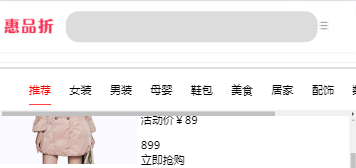
可以在导航添加一个动态class值 class值 的css样式 position :fixed ;
<!DOCTYPE html>

<html lang="en">

<head>

    <meta charset="UTF-8">

    <link rel="stylesheet" href="index.css">

    <title>惠品折首页</title>

</head>

<body>

        <header>

            <div id="top">

                        <img src="http://m.huipinzhe.com/static/img/logo.jpg" alt="logo">

                        <input type="text">

                        <a href="category.html" target="_self"><img src="./images/menu.png" alt="search"></a>

            </div>

        </header>

        <img id="banner" src="http://huipinzhe-img-03.b0.upaiyun.com/banner1009/梁荷750.png" alt="">

        <img id="banner1"  src="./images/banner.png" alt="">

        <div id="mainMenuBarAnchor"></div>

        <div id="mainMenuBar">

            <ul id="ul">

            </ul>

        </div>

        <div id="bottom">

                <a href="index.html"><img src="data:images/home.png" alt=""></a>

                <a href="specialList.html"><img src="data:images/juan.png" alt=""></a>

                <a href="find.html"><img src="data:images/miao.png" alt=""></a>

                <a><img src="data:images/my.png" alt="">  </a>

            </div>

        <section id="container"><section>

        <script id="goods" type="text/html">

            {{each rows good }}

                {{if good.itemType=="TIANMAO"}}

                    <div class="good">

                        <img src="  {{good.image}}">

                        <div>

                            <p><span>天猫</span>{{good.title}}</p>

                            <p class="zi">活动价¥{{good.phoneActivityPrice}} </p>

                            <p class="tu"><div>{{good.originPrice}}</div><div>立即抢购</div></p>

                        </div>

                   </div>

                {{else if  good.itemType=="TAOBAO"}}

                    <div class="good">

                        <img src="  {{good.image}}">

                        <div>

                            <p><span>淘宝</span>{{good.title}}</p>

                            <p class="zi">活动价¥{{good.phoneActivityPrice}} </p>

                            <p class="tu"><div>{{good.originPrice}}</div><div>立即抢购</div></p>

                        </div>

                    </div>

                {{/if}}

        {{/each}}

        </script>

    <script src="jquery.js"></script>

    <script src="template-web.js"></script>

    <script src="index.js"></script>

</body>

</html>
首页css 样式 index.css
*{

    box-sizing: border-box;

}

html{

    height: 100%;

}

body{

    height: 100%;

    margin:;

    padding:;

    background-color: gainsboro;

}

header{

    background-color: white;

    height: 8%;

    position: fixed;

    top:;

    left:;

    right:;

    box-shadow:  0 0 10px  gainsboro;

    z-index:;

}

#top{

    display: flex;

    align-items: center;

    height: 100%;

    /* background-color: red; */

    position: relative;

}

#top >img:nth-child(1){

     width: 140px;

    margin-left: 20px;

}

#bottom{

    position: fixed;

    bottom: 0px;

    z-index:;

    width: 100%;

    height: 8%;

    background-color: white;

    display: flex;

    justify-content: space-around;

}

#bottom>a{

    display: inline-block;

    height: 100%;

}

#bottom>a>img{

    display: inline-block;

    height: 100%;

}

#top>input{

    margin-left: 30px;

    border-color:  gainsboro;

    background-color: gainsboro;

    height: 60%;

    width:70%;

    border:none;

    border-radius: 35px;

}

#top>img:nth-child(3){

    width:80px;

    height: 80%;

    position: absolute;

    right: 10px;

}

#banner{

    /* display: block; */

    margin-top: 13% ;

    width: 100%;

    margin-bottom: 15px;

}

#banner1{

    /* margin-top: 13%; */

    width: 100%;

}

#ul>li:first-child{

    color:red;

    border-bottom: 2px solid red;

}

#ul >li{

    list-style: none;

    display:inline-block;

    color:black;

    margin-left:50px;

    font-size:30px;

    font-weight:;

    line-height: 80px;

}

#mainMenuBar{

    width:100%;

    white-space:nowrap ;

    overflow-x: scroll;

    background-color: white;

    z-index:;

}

.stick {

    border-top: 8px solid   gainsboro;

    margin-top: 13.5% ;

    position:fixed;

    top:;

}

#container{

    height: 100%;

    width:100%;

    overflow: scroll;

}

.good{

    width:100%;

    font-size: 30px;

    background-color: white;

    padding-top:15px;

    margin-bottom: 30px;

}

.good >img{

    width: 40%;

    display: inline-block;

}

.good>div{

    display: inline-block;

    width: 55%;

}
首页js文件 index.js
$.getJSON('http://m.huipinzhe.com/h5/home/gethomepage',function(data){

    console.log(data);

    $('#banner').attr('src',data.data.HomeModelList[0].rows[0].image);

    var labels=data.data.labels;

    console.log(labels);

    for(var i=0;i<labels.length;i++){

        $('#ul').append('<li class="'+labels[i].id+'">'+labels[i].label+'</li>');

    }

    $(document).ready(function() {

        var $window = $(window),

         $mainMenuBar = $('#mainMenuBar'),

            $mainMenuBarAnchor = $('#mainMenuBarAnchor');

        $window.scroll(function() {

            var window_top = $window.scrollTop();

            var div_top = $mainMenuBarAnchor.offset().top;

            if (window_top > div_top) {

                $mainMenuBar.addClass('stick');

                $mainMenuBarAnchor.height($mainMenuBar.height());

            } else {

                $mainMenuBar.removeClass('stick');

                $mainMenuBarAnchor.height(0);

            }

        });

    });

    //初始值

    //商品列表初始

    clickTurn(-1);

    //导航鼠标的点击事件

    $('#ul>li').click(function(){

        $(this).css({

            color:'red',

            'border-bottom': '2px solid red',

        }).siblings().css({

            color:'black',

            'border-bottom':'none',

        });

        var labelId=$(this).attr('class');

        //清空container中的内容 添加新的内容

        // $('#container').empty();

        clickTurn(labelId);

    });

});

/* 推荐商品列表 */

function clickTurn(labelId){

    var page=0;

    var isFinsh;

    function getDataByPageNumber(){

        isFinsh=false;

        page++;

        if(page>12){

            alert('已经加载完毕');

            return;

        }

        $.post('http://m.huipinzhe.com/h5/home/gethomepage',{labelId : labelId ,pageNum : page},function(data){

            console.log(data.data.onlineData);

          var data=data.data.onlineData;

              var html=template('goods',data);

              $('#container').html(html);

            isFinsh=true;

          });

    }

    getDataByPageNumber();

    $('#container').scroll(function(event){

        console.log("滚动");

        if(event.target.scrollTop+event.target.clientHeight>event.target.scrollHeight-10){

            console.log('获取下一页数据');

            if(isFinsh){

                getDataByPageNumber();

            }

        }

    });

}
用$.getJSON() 和$.post()获取第三方数据做页面 ——惠品折页面(1)的更多相关文章
- [ 转 ]jquery的ajax和getJson跨域获取json数据
目前浏览器端跨域访问常用的两种方法有两种: 1.通过jQuery的ajax进行跨域,这其实是采用的jsonp的方式来实现的. jsonp是英文json with padding的缩写.它允许在服务器端 ...
- jquery的ajax和getJson跨域获取json数据
目前浏览器端跨域访问常用的两种方法有两种: 1.通过jQuery的ajax进行跨域,这其实是采用的jsonp的方式来实现的. jsonp是英文json with padding的缩写.它允许在服务器端 ...
- 【CSS系列】获取实时数据做进度
<!DOCTYPE html> <html lang="en"> <head> <meta charset="UTF-8&quo ...
- ASP.NET框架获取数据字典数据做成树的格式
private List<TreeEntity> treeList = new List<TreeEntity>();//创建一个树的List集合 public ActionR ...
- jq:get获取json数据并以表格形式生成到页面
<!DOCTYPE html> <html> <head> <meta charset="utf-8"> <title> ...
- 使用$.getJSON("xx.json" ,function(data){ console.logy(data); })在本地获取 json数据
使用 $.getJSON() 在本地获取 json数据 默认在谷歌,火狐等其他浏览器,不允许在本地获取服务器数据 所以不能在本地中使用 但是可以IE 11 中又可以使用,所以,测试时建议在IE浏览器 ...
- 使用JSONP,jQuery的ajax跨域获取json数据
网上找了很多资料,写的不错,推荐下: 1.深入浅出JSONP--解决ajax跨域问题 (http://www.cnblogs.com/chopper/archive/2012/03/24/240394 ...
- JQuery 获取json数据$.getJSON方法的实例代码
这篇文章介绍了JQuery 获取json数据$.getJSON方法的实例代码,有需要的朋友可以参考一下 前台: function SelectProject() { var a = new Array ...
- $.getJSON获取json数据失败
首先简单介绍下 $.ajax $.get $.post $.getJSON 的区别和用法 $.ajax中有一个type属性,专门用来指定是get请求还是post请求的分别对应的就是$.get和$ ...
随机推荐
- jsp fmt标签详解
详见:http://blog.yemou.net/article/query/info/tytfjhfascvhzxcyt326 JSTL标签提供了对国际化(I18N)的支持,它可以根据发出请求的客户 ...
- 教学服务系统设计之PHP后台设计
项目简介 本项目是与@nameoverflow同学合作.该同学负责vue 前端的设计,我负责php后台的接口实现.本文将主要记录php后台. 本项目的Github地址:https://github.c ...
- socket和抓包工具wireshark
socket和抓包工具wireshark 最近在学习Python代码中的socket和抓包工具wireshark,故又将socket等概念又学习了一遍,温故而知新: Python代码如下: serve ...
- PHP面向对象知识点
public private protected __construct() __destruct() __set() __get() extends(继承) :: (重载) abstract cla ...
- 201521123091 《Java程序设计》第2周学习总结
Java 第二周总结 第二周的作业. 一个简陋的目录 1.本章学习总结 2.Java Q&A 3.使用码云管理Java代码 4.PTA实验 5.小任务 1.本章学习总结 基本数据类型 Stri ...
- 展示博客(Beta阶段)
展示博客 0x00 团队成员 成员 博客地址 简介 黄建英 http://www.cnblogs.com/smilehjy/ beta阶段的新成员,负责前端界面调整 谢晓萍 http://www.cn ...
- 团队作业9--beta版本测试报告及发布说明
Beta版本测试报告 1.bug的分类 a.修复的bug 部分用户无法获取位置 e. 这个bug的确应该修复,但是没有时间在这个版本修复,延迟到下一个版本修复. 前端无法查看用户签到信息 2.场景测试 ...
- 团队作业8——第二次项目冲刺(Beta阶段) 5.19
Day1--5.19 1.展开站立式会议(拍摄者:武健男): 会议内容:(1)新成员自我介绍,使大家能更快熟悉并一起合作. (2)由于我们之前的项目经理去了别的小组,所以我们投票选取新成员林乔桦作为我 ...
- java课设 五子棋代码编写(团队)
1. 团队课程设计博客链接 http://www.cnblogs.com/yzb123/p/7063424.html 2.个人责模块或任务说明 1.主函数编写,设置图形界面 2,设置功能按钮 3.使用 ...
- 201521123095 《Java程序设计》第10周学习总结
1. 本周学习总结 1.1 以你喜欢的方式(思维导图或其他)归纳总结异常与多线程相关内容. 2. 书面作业 本次PTA作业题集异常.多线程 Q1.finally 题目4-2 1.1 截图你的提交结果( ...