
第三十五篇-AppBarLayout的使用
效果图:

添加appbarlayout到xml文件中,然后在toolbar下面添加一个imageview并设置居中放置,我放置的是上面那个安卓的图标。

根据之前学过的toolbar那一节,结合viewpaper和toolbar设置三个页面,这时,运行程序,可能发现那三个页面并没有显示出来,NetedScollView这是个可滚动的页面,单击它,在右侧勾选fillViewport。在运行程序就可以显示页面了。
page1

page2

page3
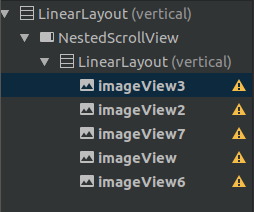
附上代码
main.java
package com.example.aimee.appbarlayouttest;

import android.support.annotation.Nullable;

import android.support.design.widget.TabLayout;

import android.support.v4.app.Fragment;

import android.support.v4.app.FragmentManager;

import android.support.v4.app.FragmentPagerAdapter;

import android.support.v4.view.ViewPager;

import android.support.v7.app.AppCompatActivity;

import android.os.Bundle;

import java.util.ArrayList;

import java.util.List;

public class MainActivity extends AppCompatActivity {

    TabLayout tabLayout;

    ViewPager viewPager;

    List<Fragment>fragments;

    String[] title={"新闻","财经","娱乐"};

    @Override

    protected void onCreate(Bundle savedInstanceState) {

        super.onCreate(savedInstanceState);

        setContentView(R.layout.activity_main);

        tabLayout=findViewById(R.id.tabs);

        viewPager=findViewById(R.id.viewpaper);

        fragments=new ArrayList<>();

        fragments.add(new MyFragment1());

        fragments.add(new MyFragment2());

        fragments.add(new MyFragment3());

        MyAdpter myAdpter=new MyAdpter(getSupportFragmentManager(),fragments);

        viewPager.setAdapter(myAdpter);

        tabLayout.setupWithViewPager(viewPager);

    }

    private class MyAdpter extends FragmentPagerAdapter{

        private List<Fragment>fragments;

        public MyAdpter(FragmentManager fm,List<Fragment>fragments) {

            super(fm);

            this.fragments=fragments;

        }

        @Override

        public Fragment getItem(int position) {

            return fragments.get(position);

        }

        @Override

        public int getCount() {

            return fragments.size();

        }

        @Nullable

        @Override

        public CharSequence getPageTitle(int position) {

            return title[position];

        }

    }

}
MyFragment1.java
package com.example.aimee.appbarlayouttest;

import android.os.Bundle;

import android.support.annotation.NonNull;

import android.support.annotation.Nullable;

import android.support.v4.app.Fragment;

import android.view.LayoutInflater;

import android.view.View;

import android.view.ViewGroup;

public class MyFragment1 extends Fragment {

    @Nullable

    @Override

    public View onCreateView(@NonNull LayoutInflater inflater, @Nullable ViewGroup container, @Nullable Bundle savedInstanceState) {

        View view1=inflater.inflate(R.layout.layout_page1,container,false);

        return view1;

    }

}
MyFragment2.java
package com.example.aimee.appbarlayouttest;

import android.os.Bundle;

import android.support.annotation.NonNull;

import android.support.annotation.Nullable;

import android.support.v4.app.Fragment;

import android.view.LayoutInflater;

import android.view.View;

import android.view.ViewGroup;

public class MyFragment2 extends Fragment {

    @Nullable

    @Override

    public View onCreateView(@NonNull LayoutInflater inflater, @Nullable ViewGroup container, @Nullable Bundle savedInstanceState) {

        View view1=inflater.inflate(R.layout.layout_page2,container,false);

        return view1;

    }

}
MyFragment3.java
package com.example.aimee.appbarlayouttest;

import android.os.Bundle;

import android.support.annotation.NonNull;

import android.support.annotation.Nullable;

import android.support.v4.app.Fragment;

import android.view.LayoutInflater;

import android.view.View;

import android.view.ViewGroup;

public class MyFragment3 extends Fragment {

    @Nullable

    @Override

    public View onCreateView(@NonNull LayoutInflater inflater, @Nullable ViewGroup container, @Nullable Bundle savedInstanceState) {

        View view1=inflater.inflate(R.layout.layout_page3,container,false);

        return view1;

    }

}
main.xml
<?xml version="1.0" encoding="utf-8"?>

<android.support.design.widget.CoordinatorLayout xmlns:android="http://schemas.android.com/apk/res/android"

    xmlns:tools="http://schemas.android.com/tools"

    xmlns:app="http://schemas.android.com/apk/res-auto"

    android:layout_width="match_parent"

    android:layout_height="match_parent">

    <android.support.design.widget.AppBarLayout

        android:id="@+id/appbar"

        android:layout_height="wrap_content"

        android:layout_width="match_parent">

        <android.support.v7.widget.Toolbar

            android:gravity="center"

            android:layout_height="?attr/actionBarSize"

            android:layout_width="match_parent"

            app:layout_scrollFlags="scroll|enterAlways">

            <ImageView

                android:src="@mipmap/ic_launcher"

                android:layout_width="match_parent"

                android:layout_height="wrap_content" />

        </android.support.v7.widget.Toolbar>

        <android.support.design.widget.TabLayout

            android:id="@+id/tabs"

            android:layout_width="match_parent"

            android:layout_height="wrap_content"

            app:layout_scrollFlags="scroll|enterAlways"

            app:tabMode="scrollable">

            <android.support.design.widget.TabItem

                android:layout_height="wrap_content"

                android:layout_width="wrap_content"

                android:text="Tab1" />

            <android.support.design.widget.TabItem

                android:layout_height="wrap_content"

                android:layout_width="wrap_content"

                android:text="Tab2" />

            <android.support.design.widget.TabItem

                android:layout_height="wrap_content"

                android:layout_width="wrap_content"

                android:text="Tab3" />

        </android.support.design.widget.TabLayout>

    </android.support.design.widget.AppBarLayout>

    <android.support.v4.widget.NestedScrollView

        android:layout_width="match_parent"

        android:layout_height="match_parent"

        android:fillViewport="true"

        app:layout_behavior="android.support.design.widget.AppBarLayout$ScrollingViewBehavior">

        <android.support.constraint.ConstraintLayout

            android:layout_width="match_parent"

            android:layout_height="match_parent"

            tools:context=".MainActivity">

            <android.support.v4.view.ViewPager

                android:id="@+id/viewpaper"

                android:layout_width="match_parent"

                android:layout_height="0dp" />

        </android.support.constraint.ConstraintLayout>

    </android.support.v4.widget.NestedScrollView>

</android.support.design.widget.CoordinatorLayout>
layout_page1.xml
<?xml version="1.0" encoding="utf-8"?>

<LinearLayout xmlns:android="http://schemas.android.com/apk/res/android"

    android:layout_width="match_parent"

    android:layout_height="match_parent"

    android:gravity="center"

    android:orientation="vertical">

    <TextView

        android:id="@+id/textView2"

        android:layout_width="wrap_content"

        android:layout_height="wrap_content"

        android:text="TextView" />

</LinearLayout>
layout_page2.xml
<?xml version="1.0" encoding="utf-8"?>

<LinearLayout xmlns:android="http://schemas.android.com/apk/res/android"

    android:layout_width="match_parent"

    android:layout_height="match_parent"

    android:orientation="vertical">

    <Button

        android:id="@+id/button"

        android:layout_width="match_parent"

        android:layout_height="wrap_content"

        android:text="Button" />

    <Button

        android:id="@+id/button2"

        android:layout_width="match_parent"

        android:layout_height="wrap_content"

        android:text="Button" />

</LinearLayout>
layout_page3.xml
<?xml version="1.0" encoding="utf-8"?>

<LinearLayout xmlns:android="http://schemas.android.com/apk/res/android"

    xmlns:app="http://schemas.android.com/apk/res-auto"

    android:layout_width="match_parent"

    android:gravity="center"

    android:layout_height="match_parent"

    android:orientation="vertical">

    <android.support.v4.widget.NestedScrollView

        android:layout_width="match_parent"

        android:layout_height="match_parent"

        android:fillViewport="true">

        <LinearLayout

            android:layout_width="match_parent"

            android:layout_height="wrap_content"

            android:orientation="vertical" >

            <ImageView

                android:scaleType="fitXY"

                android:id="@+id/imageView3"

                android:layout_width="match_parent"

                android:layout_height="wrap_content"

                app:srcCompat="@drawable/a3" />

            <ImageView

                android:scaleType="fitXY"

                android:id="@+id/imageView2"

                android:layout_width="match_parent"

                android:layout_height="wrap_content"

                app:srcCompat="@drawable/a1" />

            <ImageView

                android:scaleType="fitXY"

                android:id="@+id/imageView7"

                android:layout_width="match_parent"

                android:layout_height="wrap_content"

                app:srcCompat="@drawable/a2" />

            <ImageView

                android:scaleType="fitXY"

                android:id="@+id/imageView"

                android:layout_width="match_parent"

                android:layout_height="wrap_content"

                app:srcCompat="@drawable/a5" />

            <ImageView

                android:scaleType="fitXY"

                android:id="@+id/imageView6"

                android:layout_width="match_parent"

                android:layout_height="wrap_content"

                app:srcCompat="@drawable/a4" />

        </LinearLayout>

    </android.support.v4.widget.NestedScrollView>

</LinearLayout>
注:图片放在drawable下面。
第三十五篇-AppBarLayout的使用的更多相关文章
- Android UI开发第三十五篇——AppCompat实现Action Bar
每一位Android开发者对Action Bar这种设计都不陌生了,毕竟它已经发布了至少两年了.Android团队发布Action Bar设计规范时同时放出了ActionBar的Api来支持这种设计. ...
- Python之路(第三十五篇) 并发编程:操作系统的发展史、操作系统的作用
一.操作系统发展史 第一阶段:手工操作 —— 真空管和穿孔卡片 第一代之前人类是想用机械取代人力,第一代计算机的产生是计算机由机械时代进入电子时代的标志,从Babbage失败之后一直到第二次世界大 ...
- 第三十五篇 类的内置属性(attr属性),包装和授权,__getattr__
双下划线开头的attr方法,都是类内置的方法. 一. 如果没有在类里定义这三个方法,调用的时候就调用类内置的默认的方法 class Too: pass # 类没有定义这三个属性,就用系统默认的方法 t ...
- 第三十五篇 入门机器学习——Juptyer Notebook中的常用快捷键
1.运行当前Cell:Ctrl + Enter 2.运行当前Cell并在其下方插入一个新的Cell:Alt + Enter 3.运行当前Cell并选中其下方的Cell:Shift + ...
- C++第三十五篇 -- 写第一个驱动开发程序
VS2017+WDK+VMware12+Win10环境配置完毕,接下来写第一个驱动程序. 1.新建一个KMDF的程序. 2.配置项目属性. 3.编译项目.一般这里应该成功,我一台电脑成功了,另一台电脑 ...
- 第三十五篇:vue3,(组合式api的初步理解)
好家伙, 来一波核心概念:数据劫持是响应式的核心 1.由set up开始 (1)vue3中的一个新的配置项,值为一个函数. (2)组件中所用的到的:数据,方法,计算属性均要配置在set up中. (3 ...
- Android UI开发第三十九篇——Tab界面实现汇总及比较
Tab布局是iOS的经典布局,Android应用中也有大量应用,前面也写过Android中TAb的实现,<Android UI开发第十八篇——ActivityGroup实现tab功能>.这 ...
- JAVA之旅(三十五)——完结篇,终于把JAVA写完了,真感概呐!
JAVA之旅(三十五)--完结篇,终于把JAVA写完了,真感概呐! 这篇博文只是用来水经验的,写这个系列是因为我自己的java本身也不是特别好,所以重温了一下,但是手比较痒于是就写出了这三十多篇博客了 ...
- 《手把手教你》系列技巧篇(三十五)-java+ selenium自动化测试-单选和多选按钮操作-下篇(详解教程)
1.简介 今天这一篇宏哥主要是讲解一下,如何使用list容器来遍历多选按钮.大致两部分内容:一部分是宏哥在本地弄的一个小demo,另一部分,宏哥是利用JQueryUI网站里的多选按钮进行实战. 2.d ...
随机推荐
- 用织梦建站如何去掉a这个目录,还有内容页的a
1.另外建一个站点,将物理路径直接指向a即可. 2.去掉文章页生成的带a的路径: 只需要这一句话: function='str_replace("/a","" ...
- SQL Server与SQL Server Express的区别
SQL Server Express 2005(以下简称 SQLExpress) 是由微软公司开发的 SQL Server 2005(以下简称 SQL2005)的缩减版,这个版本是免费的,它继承了 S ...
- SQL Server中的完全连接(full join)
一.建库和建表 create database scort use scort create table emp ( empno int primary key, ename ), sal int, ...
- AMD直奔5nm!这一步棋下得妙
AMD今年将推出采用7nm工艺的第二代EPYC霄龙.第三代Ryzen锐龙处理器,其中后者已经在CES 2019上公开首秀,性能追评i9-9900K,功耗则低得多. 虽然被称为“女友”的GlobalFo ...
- 会话session
因为因特网HTTP协议的特性,每一次来自于用户浏览器的请求(request)都是无状态的.独立的.通俗地说,就是无法保存用户状态,后台服务器根本就不知道当前请求和以前及以后请求是否来自同一用户.对于静 ...
- 使用脚本调用maven命令后脚本直接退出问题
在带有maven命令的bat脚本执行的时候,执行完一个mvn 目标后会自动退出,pause命令也无效. 原因:mvn本身是一个bat命令,因此在exit退出的时候,整个脚本进程将退出,加入call命令 ...
- 22Java之JDBCTemplate总结
写在前面:这里总结4种方式来操作数据库(SE阶段) 一.JDBC JDBC有关的类:都在java.sql 和 javax.sql 包下. 1.数据准备 ...
- 搭建YUM仓库
概述 YUM 主要用于自动安装.升级 rpm 软件包,它能自动查找并解决 rpm 包之间的依赖关系.要功的使用 YUM 工具安装更新软件或系统,就需要有一个包含各种 rpm 软件包的 reposito ...
- JVM深入理解<一>
以下文章来自与: http://www.jianshu.com/p/fabad9250b1b 一.什么是JVM? JVM是Java Virtual Machine(Java虚拟机)的缩写,是通过在实际 ...
- 将xml文件由格式化变为压缩字符串
标签:去除xml文件的空格 有些时候解析xml文件,要求读取的字符串必须是压缩后的xml文件,不能有多余的空格.考虑到在<>标签内包含空格和大于号的情况,写了以下的转换方式. 传入的是压缩 ...