
Day15 Python基础之logging模块(十三)
参考源:http://www.cnblogs.com/yuanchenqi/articles/5732581.html
logging模块 (****重点***)
一 (简单应用)
import logging

logging.debug('debug message')

logging.info('info message')

logging.warning('warning message')

logging.error('error message')

logging.critical('critical message')
输出:
WARNING:root:warning message
ERROR:root:error message
CRITICAL:root:critical message
可见,默认情况下Python的logging模块将日志打印到了标准输出中,且只显示了大于等于WARNING级别的日志,这说明默认的日志级别设置为WARNING(日志级别等级CRITICAL > ERROR > WARNING > INFO > DEBUG > NOTSET),默认的日志格式为日志级别:Logger名称:用户输出消息。
二 灵活配置日志级别,日志格式,输出位置(只能屏幕或文件输出二选一)

import logging

logging.basicConfig(level=logging.DEBUG,

                    format='%(asctime)s %(filename)s[line:%(lineno)d] %(levelname)s %(message)s',

                    datefmt='%a, %d %b %Y %H:%M:%S',

                    filename='/tmp/test.log',

                    filemode='w')

logging.debug('debug message')

logging.info('info message')

logging.warning('warning message')

logging.error('error message')

logging.critical('critical message')
查看输出:
cat /tmp/test.log
Mon, 05 May 2014 16:29:53 test_logging.py[line:9] DEBUG debug message
Mon, 05 May 2014 16:29:53 test_logging.py[line:10] INFO info message
Mon, 05 May 2014 16:29:53 test_logging.py[line:11] WARNING warning message
Mon, 05 May 2014 16:29:53 test_logging.py[line:12] ERROR error message
Mon, 05 May 2014 16:29:53 test_logging.py[line:13] CRITICAL critical message
可见在logging.basicConfig()函数中可通过具体参数来更改logging模块默认行为,可用参数有
filename:用指定的文件名创建FiledHandler(后边会具体讲解handler的概念),这样日志会被存储在指定的文件中。
filemode:文件打开方式,在指定了filename时使用这个参数,默认值为“a”还可指定为“w”。
format:指定handler使用的日志显示格式。
datefmt:指定日期时间格式。
level:设置rootlogger(后边会讲解具体概念)的日志级别
stream:用指定的stream创建StreamHandler。可以指定输出到sys.stderr,sys.stdout或者文件(f=open('test.log','w')),默认为sys.stderr。若同时列出了filename和stream两个参数,则stream参数会被忽略。
format参数中可能用到的格式化串:
%(name)s Logger的名字
%(levelno)s 数字形式的日志级别
%(levelname)s 文本形式的日志级别
%(pathname)s 调用日志输出函数的模块的完整路径名,可能没有
%(filename)s 调用日志输出函数的模块的文件名
%(module)s 调用日志输出函数的模块名
%(funcName)s 调用日志输出函数的函数名
%(lineno)d 调用日志输出函数的语句所在的代码行
%(created)f 当前时间,用UNIX标准的表示时间的浮 点数表示
%(relativeCreated)d 输出日志信息时的,自Logger创建以 来的毫秒数
%(asctime)s 字符串形式的当前时间。默认格式是 “2003-07-08 16:49:45,896”。逗号后面的是毫秒
%(thread)d 线程ID。可能没有
%(threadName)s 线程名。可能没有
%(process)d 进程ID。可能没有
%(message)s用户输出的消息
三 logger对象(实现屏幕和文件同时输出的功能)
上述几个例子中我们了解到了logging.debug()、logging.info()、logging.warning()、logging.error()、logging.critical()(分别用以记录不同级别的日志信息),logging.basicConfig()(用默认日志格式(Formatter)为日志系统建立一个默认的流处理器(StreamHandler),设置基础配置(如日志级别等)并加到root logger(根Logger)中)这几个logging模块级别的函数,另外还有一个模块级别的函数是logging.getLogger([name])(返回一个logger对象,如果没有指定名字将返回root logger)
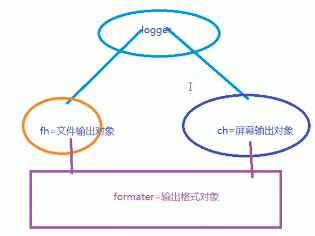
 import logging

 #日志函数logger对象

 logger=logging.getLogger()

 #设置文件输出方式和屏幕输出方式对象,并设置输出格式

 fh=logging.FileHandler('test.log')

 ch=logging.StreamHandler()

 formatter=logging.Formatter('%(asctime)s - %(name)s - %(levelname)s - %(message)s')

 fh.setFormatter(formatter)

 ch.setFormatter(formatter)

 #日志函数对象把文件和屏幕输出对象加入自己

 logger.addHandler(fh)

 logger.addHandler(ch)

 logger.debug('logger debug message')

 logger.info('logger info message')

 logger.warning('logger warning message')

 logger.error('logger error message')

 logger.critical('logger critical message')

 输出结果:

 2018-06-14 15:52:36,657 - root - WARNING - logger warning message

 2018-06-14 15:52:36,657 - root - ERROR - logger error message

 2018-06-14 15:52:36,657 - root - CRITICAL - logger critical message
logger对象
从这个输出可以看出logger = logging.getLogger()返回的Logger名为root。这里没有用logger.setLevel(logging.Debug)显示的为logger设置日志级别,所以使用默认的日志级别WARNIING,故结果只输出了大于等于WARNIING级别的信息。
 import logging

 #日志函数logger对象(两个)

 logger1=logging.getLogger()

 logger2=logging.getLogger()

 #配置logger对象的日志级别

 logger1.setLevel(logging.DEBUG)

 logger2.setLevel(logging.INFO)

 #设置文件输出方式和屏幕输出方式对象,并设置输出格式

 fh=logging.FileHandler('test.log')

 ch=logging.StreamHandler()

 formatter=logging.Formatter('%(asctime)s - %(name)s - %(levelname)s - %(message)s')

 fh.setFormatter(formatter)

 ch.setFormatter(formatter)

 #日志函数对象把文件和屏幕输出对象加入自己

 logger1.addHandler(fh)

 logger1.addHandler(ch)

 logger2.addHandler(fh)

 logger2.addHandler(ch)

 logger1.debug('logger debug message')

 logger1.info('logger info message')

 logger1.warning('logger warning message')

 logger1.error('logger error message')

 logger1.critical('logger critical message')

 logger2.debug('logger debug message')

 logger2.info('logger info message')

 logger2.warning('logger warning message')

 logger2.error('logger error message')

 logger2.critical('logger critical message')

 输出结果:

 2018-06-14 16:10:38,441 - root - INFO - logger info message

 2018-06-14 16:10:38,442 - root - WARNING - logger warning message

 2018-06-14 16:10:38,442 - root - ERROR - logger error message

 2018-06-14 16:10:38,442 - root - CRITICAL - logger critical message

 2018-06-14 16:10:38,442 - root - INFO - logger info message

 2018-06-14 16:10:38,442 - root - WARNING - logger warning message

 2018-06-14 16:10:38,442 - root - ERROR - logger error message

 2018-06-14 16:10:38,442 - root - CRITICAL - logger critical message
两个logger对象
这里有两个个问题:
<1>我们明明通过logger1.setLevel(logging.DEBUG)将logger1的日志级别设置为了DEBUG,为何显示的时候没有显示出DEBUG级别的日志信息,而是从INFO级别的日志开始显示呢?
原来logger1和logger2对应的是同一个Logger实例,只要logging.getLogger(name)中名称参数name相同则返回的Logger实例就是同一个,且仅有一个,也即name与Logger实例一一对应。在logger2实例中通过logger2.setLevel(logging.INFO)设置mylogger的日志级别为logging.INFO,所以最后logger1的输出遵从了后来设置的日志级别。
<2>为什么logger1、logger2对应的每个输出分别显示两次?
这是因为我们通过logger = logging.getLogger()显示的创建了root Logger,而logger1 = logging.getLogger('mylogger')创建了root Logger的孩子(root.)mylogger,logger2同样。而孩子,孙子,重孙……既会将消息分发给他的handler进行处理也会传递给所有的祖先Logger处理。
 import os

 import time

 import logging

 from config import settings    #这里有问题

 def get_logger(card_num, struct_time):

     if struct_time.tm_mday < 23:

         file_name = "%s_%s_%d" %(struct_time.tm_year, struct_time.tm_mon, 22)

     else:

         file_name = "%s_%s_%d" %(struct_time.tm_year, struct_time.tm_mon+1, 22)

     file_handler = logging.FileHandler(

         os.path.join(settings.USER_DIR_FOLDER, card_num, 'record', file_name),

         encoding='utf-8'

     )

     fmt = logging.Formatter(fmt="%(asctime)s :  %(message)s")

     file_handler.setFormatter(fmt)

     logger1 = logging.Logger('user_logger', level=logging.INFO)

     logger1.addHandler(file_handler)

     return logger1

 调用:

 logger=get_logger()

 logger.info('信息')
ATM应用
Day15 Python基础之logging模块(十三)的更多相关文章
- Python自建logging模块
本章将介绍Python内建模块:日志模块,更多内容请从参考:Python学习指南 简单使用 最开始,我们用最短的代码体验一下logging的基本功能. import logging logger = ...
- 十八. Python基础(18)常用模块
十八. Python基础(18)常用模块 1 ● 常用模块及其用途 collections模块: 一些扩展的数据类型→Counter, deque, defaultdict, namedtuple, ...
- python基础,函数,面向对象,模块练习
---恢复内容开始--- python基础,函数,面向对象,模块练习 1,简述python中基本数据类型中表示False的数据有哪些? # [] {} () None 0 2,位和字节的关系? # ...
- python基础31[常用模块介绍]
python基础31[常用模块介绍] python除了关键字(keywords)和内置的类型和函数(builtins),更多的功能是通过libraries(即modules)来提供的. 常用的li ...
- Python日志输出——logging模块
Python日志输出——logging模块 标签: loggingpythonimportmodulelog4j 2012-03-06 00:18 31605人阅读 评论(8) 收藏 举报 分类: P ...
- Python实战之logging模块使用详解
用Python写代码的时候,在想看的地方写个print xx 就能在控制台上显示打印信息,这样子就能知道它是什么了,但是当我需要看大量的地方或者在一个文件中查看的时候,这时候print就不大方便了,所 ...
- Python基础-包与模块
Python基础-包与模块 写在前面 如非特别说明,下文均基于Python3 摘要 为重用以及更好的维护代码,Python使用了模块与包:一个Python文件就是一个模块,包是组织模块的特殊目录(包含 ...
- Python中的logging模块就这么用
Python中的logging模块就这么用 1.日志日志一共分成5个等级,从低到高分别是:DEBUG INFO WARNING ERROR CRITICALDEBUG:详细的信息,通常只出现在诊断问题 ...
- python中日志logging模块的性能及多进程详解
python中日志logging模块的性能及多进程详解 使用Python来写后台任务时,时常需要使用输出日志来记录程序运行的状态,并在发生错误时将错误的详细信息保存下来,以别调试和分析.Python的 ...
随机推荐
- JaveScript 中的正则表达式
1.语法: var expression = /pattern/flags ; pattern: 任何简单或复杂的正则表达式. flags: 可以是 g,i,m 或它们的组合. ...
- MyBatis:参数传递 [转]
一.单个参数: public List<XXBean> getXXBeanList(String xxCode); <select id="getXXXBeanList&q ...
- Python 中的Duck Typing
在学习Python的时候发现了鸭 子类型这个术语,听起来好像很有意思一样,所以把它记下来. 鸭子类型(Duck Typing)的名字来源于"鸭子测试": "当看到一只鸟走 ...
- 好系统重装助手教你清理win7系统中DNS缓存
在我们使用电脑的过程中,有时候一个经常用的网页突然打不开了,遇到这种情况,清理一下DNS缓存就可以解决了.如何清理DNS缓存?小编这就给大家说一种最简单的方法. 1.组合键:win+R,输入cmd,点 ...
- IntelliJ IDEA 创建Spring+SpringMVC+hibernate+maven项目
第一步: 新建maven管理的web项目, 具体步骤参考:http://www.cnblogs.com/gczmn/p/8693734.html 第二步: 创建项目结构, 完整项目结构如下: 第三步: ...
- 17秋 软件工程 团队第五次作业 Alpha
题目:团队作业--Alpha冲刺 17秋 软件工程 团队第五次作业 Alpha 12次Scrum 第一次Scrum 第二次Scrum 第三次Scrum 第四次Scrum 第五次Scrum 第六次Scr ...
- sboot mybatis
https://www.cnblogs.com/lspz/p/6723603.html spring.datasource.url=jdbc:mysql://10.46.52.205:3306/tes ...
- Python selenium ActionChains 基本操作
ActionChains类继承自object类,但是需要为其传入一个driver对象,即ActionChains(driver) 此类常用于模拟鼠标键盘操作,其API列表如下: perform() ...
- TensorFlow 学习资料
感谢几位大神的笔记: https://blog.csdn.net/column/details/13300.html?&page=3 https://blog.csdn.net/u014595 ...
- 自然语言处理之jieba分词
在处理英文文本时,由于英文文本天生自带分词效果,可以直接通过词之间的空格来分词(但是有些人名.地名等需要考虑作为一个整体,比如New York).而对于中文还有其他类似形式的语言,我们需要根据来特殊处 ...