
rabbitMQ模式
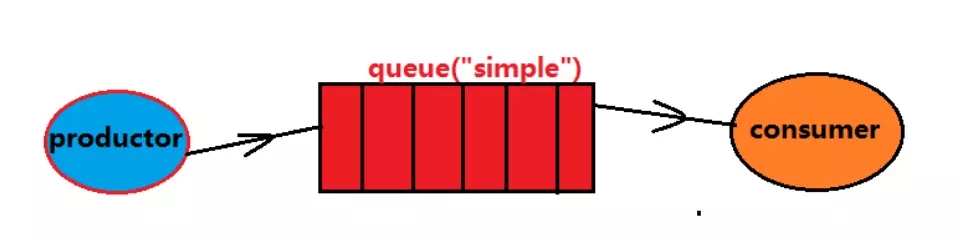
消费者监听队列,如果队列中有消息,就消费掉,消息被拿走后,自动从队列删除
(隐患,消息可能没有被消费者正确处理,已经消失了,无法恢复)
应用场景:聊天室
案例:
1>.首先准备依赖
<dependency>
     <groupId>org.springframework.boot</groupId>
     <artifactId>spring-boot-starter-amqp</artifactId>
</dependency>
2>.写一个test类
public class SimpleTest {
   //模拟生产者将消息放入队列
   @Test
   public void send() throws Exception{
       /*1 创建连接工厂
        * 2 配置共创config
        * 3 获取连接
        * 4获取信道
        * 5 从信道声明queue
        * 6 发送消息
        * 7 释放资源
        */
       ConnectionFactory factory=new ConnectionFactory();
       factory.setHost("106.23.34.56");
       factory.setPort(5672);
       factory.setVirtualHost("/tb");
       factory.setUsername("admin");
       factory.setPassword("123456");
       //从工厂获取连接
       Connection conn=factory.newConnection();
       //从连接获取信道
       Channel chan=conn.createChannel();
       //利用channel声明第一个队列
       chan.queueDeclare("simple", false, false, false, null);
       //queue String类型,表示声明的queue对列的名字
       //durable Boolean类型,表示是否持久化
       //exclusive Boolean类型:当前声明的queue是否专注;true当前连接创建的
       //任何channle都可以连接这个queue,false,新的channel不可使用
       //autoDelete Boolean类型:在最后连接使用完成后,是否删除队列,false
       //arguments Map类型,其他声明参数
       //发送消息
       String msg="helloworld,nihaoa";
       chan.basicPublish("", "simple", null, msg.getBytes());
       //exchange String类型,交换机名称,简单模式使用默认交换""
       //routingkey String类型,当前的消息绑定的routingkey,简单模式下,与队列同名即可
       //props BasicProperties类型,消息的属性字段对象,例如BasicProperties
       //可以设置一个deliveryMode的值0 持久化,1 表示不持久化,durable配合使用
       //body byte[] :消息字符串的byte数组
   }
   //模拟消费端
   @Test
   public void receive() throws Exception{
ConnectionFactory factory=new ConnectionFactory();
factory.setHost("106.23.34.56");
factory.setPort(5672);
factory.setVirtualHost("/tb");
factory.setUsername("admin");
factory.setPassword("123456");
//从工厂获取连接Connection conn=factory.newConnection();//从连接获取信道Channel chan=conn.createChannel();chan.queueDeclare("simple", false, false, false, null);//创建一个消费者QueueingConsumer consumer= new QueueingConsumer(chan);chan.basicConsume("simple", consumer);//监听队列while(true){//获取下一个delivery,delivery从队列获取消息Delivery delivery = consumer.nextDelivery();String msg=new String(delivery.getBody());System.out.println(msg);}}}
2.work模式
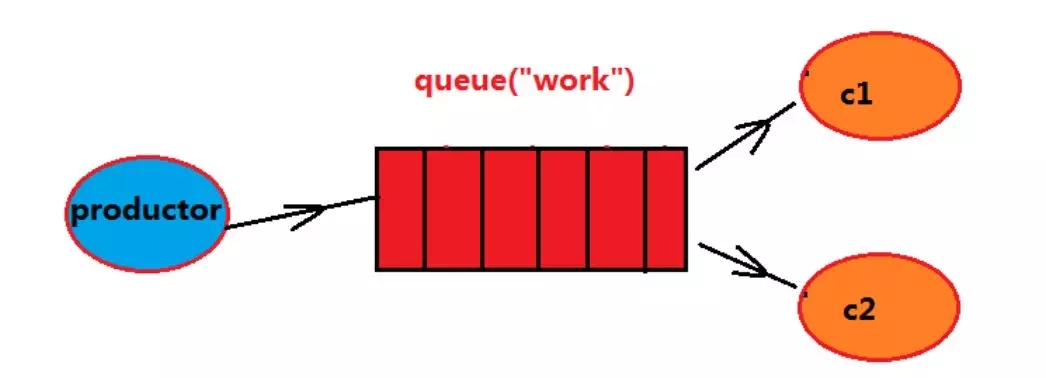
生产者将消息放入队列
多个消费者同时监听同一个队列,消息如何被消费?
C1,C2共同争抢当前消息队列的内容,谁先拿到消息,谁来负责消费
应用场景:红包;大型项目中的资源调度过程(直接由最空闲的系统争抢到资源处理任务)
案例:
1>首先写一个工具类
public class ConnectionUtil {

 public static Connection getConn(){
   try{
     ConnectionFactory factory=new ConnectionFactory();
     factory.setHost("106.33.44.179");
     factory.setPort(5672);
     factory.setVirtualHost("/tb");
     factory.setUsername("admin");
     factory.setPassword("123456");

     //从工厂获取连接
     Connection conn=factory.newConnection();
     return conn;
   }catch(Exception e){
     System.out.println(e.getMessage());
     return null;
   }

 }
}
2>写test类
public class WorkTest {
 @Test
 public void send() throws Exception{
   //获取连接
   Connection conn = ConnectionUtil.getConn();
   Channel chan = conn.createChannel();
   //声明队列
   chan.queueDeclare("work", false, false, false, null);
   for(int i=0;i<100;i++){
     String msg="1712,hello:"+i+"message";
     chan.basicPublish("", "work", null, msg.getBytes());
     System.out.println("第"+i+"条信息已经发送");
   }
   chan.close();
   conn.close();
 }
 @Test
 public void receive1() throws Exception{
   //获取连接,获取信道
   Connection conn = ConnectionUtil.getConn();
   Channel chan = conn.createChannel();
   chan.queueDeclare("work", false, false, false, null);
   //同一时刻服务器只发送一条消息给同一消费者,消费者空闲,才发送一条
   chan.basicQos(1);
   //定义消费者
   QueueingConsumer consumer=new QueueingConsumer(chan);
   //绑定队列和消费者的关系
   //queue
   //autoAck:消息被消费后,是否自动确认回执,如果false,不自动需要手动在
   //完成消息消费后进行回执确认,channel.ack,channel.nack
   //callback
   //chan.basicConsume(queue, autoAck, callback)
   chan.basicConsume("work", false, consumer);
   //监听
   while(true){
     Delivery delivery=consumer.nextDelivery();
     byte[] result = delivery.getBody();
     String msg=new String(result);
     System.out.println("接受到:"+msg);
     Thread.sleep(50);
     //返回服务器,回执
     chan.basicAck(delivery.getEnvelope().getDeliveryTag(), false);
   }
 }
 @Test
 public void receive2() throws Exception{
   //获取连接,获取信道
   Connection conn = ConnectionUtil.getConn();
   Channel chan = conn.createChannel();
   chan.queueDeclare("work", false, false, false, null);
   //同一时刻服务器只发送一条消息给同一消费者,消费者空闲,才发送一条
   chan.basicQos(1);
   //定义消费者
   QueueingConsumer consumer=new QueueingConsumer(chan);
   //绑定队列和消费者的关系
   //queue
   //autoAck:消息被消费后,是否自动确认回执,如果false,不自动需要手动在
   //完成消息消费后进行回执确认,channel.ack,channel.nack
   //callback
   //chan.basicConsume(queue, autoAck, callback)
   chan.basicConsume("work", false, consumer);
   //监听
   while(true){
     Delivery delivery=consumer.nextDelivery();
     byte[] result = delivery.getBody();
     String msg=new String(result);
     System.out.println("接受到:"+msg);
     Thread.sleep(150);
     //返回服务器,回执
     chan.basicAck(delivery.getEnvelope().getDeliveryTag(), false);
   }
 }

}
3 publish/fanout发布订阅
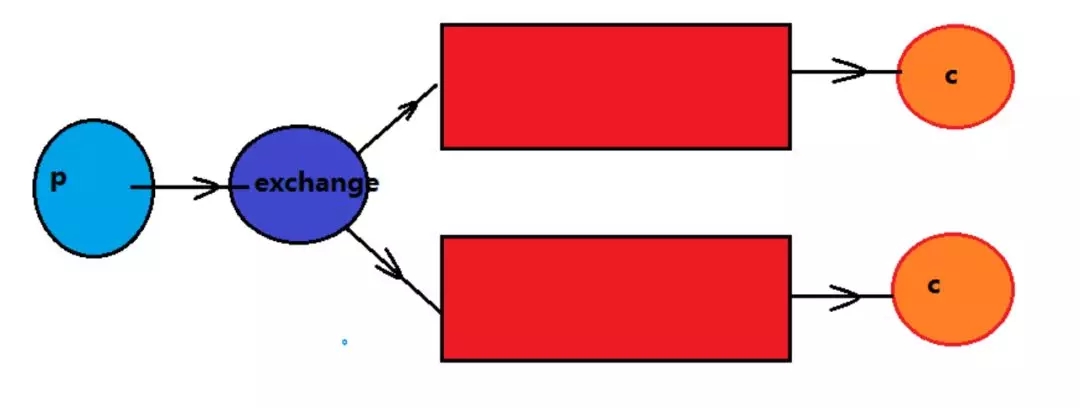
生产者将消息交给交换机
有交换机根据发布订阅的模式设定将消息同步到所有的绑定队列中;
后端的消费者都能拿到消息
应用场景:邮件群发,群聊天,广告
案例:
public class FanoutTest {
 //交换机,有类型,发布订阅:fanout
 //路由模式:direct
 //主题模式:topic
 @Test
 public void send() throws Exception {
   //获取连接
   Connection conn = ConnectionUtil.getConn();
   Channel chan = conn.createChannel();
   //声明交换机
   //参数意义,1 交换机名称,2 类型:fanout,direct,topic
   chan.exchangeDeclare("fanoutEx", "fanout");
   //发送消息
   for(int i=0;i<100;i++){
     String msg="1712 hello:"+i+"msg";
     chan.basicPublish("fanoutEx", "", null, msg.getBytes());
     System.out.println("第"+i+"条信息已经发送");
   }
 }

 @Test
 public void receiv01() throws Exception{
   //获取连接
   Connection conn = ConnectionUtil.getConn();
   Channel chan = conn.createChannel();
   //生命队列
   chan.queueDeclare("fanout01", false, false, false, null);
   //声明交换机
   chan.exchangeDeclare("fanoutEx", "fanout");
   //绑定队列到交换机
   //参数 1 队列名称,2 交换机名称 3 路由key
   chan.queueBind("fanout01", "fanoutEx", "");
   chan.basicQos(1);
   //定义消费者
   QueueingConsumer consumer=new QueueingConsumer(chan);
   //消费者与队列绑定
   chan.basicConsume("fanout01",false, consumer);
   while(true){
     Delivery delivery= consumer.nextDelivery();
     System.out.println("一号消费者接收到"+
     new String(delivery.getBody()));
     chan.basicAck(delivery.getEnvelope().
         getDeliveryTag(), false);
   }
 }
 @Test
 public void receiv02() throws Exception{
   //获取连接
   Connection conn = ConnectionUtil.getConn();
   Channel chan = conn.createChannel();
   //生命队列
   chan.queueDeclare("fanout02", false, false, false, null);
   //声明交换机
   chan.exchangeDeclare("fanoutEx", "fanout");
   //绑定队列到交换机
   //参数 1 队列名称,2 交换机名称 3 路由key
   chan.queueBind("fanout02", "fanoutEx", "");
   chan.basicQos(1);
   //定义消费者
   QueueingConsumer consumer=new QueueingConsumer(chan);
   //消费者与队列绑定
   chan.basicConsume("fanout02",false, consumer);
   while(true){
     Delivery delivery= consumer.nextDelivery();
     System.out.println("二号消费者接收到"+new String(delivery.getBody()));
     chan.basicAck(delivery.getEnvelope().getDeliveryTag(), false);
   }
 }
}
4 routing路由模式
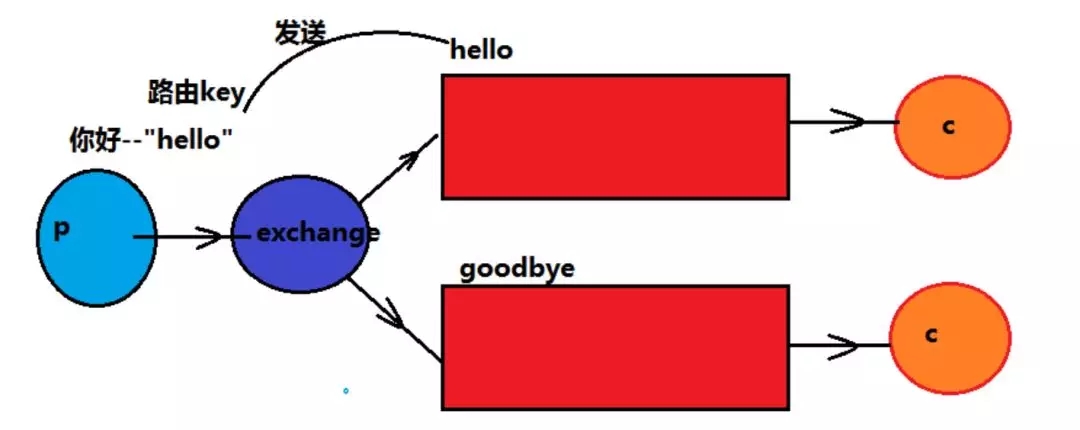
生产者发送消息到交换机,同时绑定一个路由Key,交换机根据路由key对下游绑定的队列进行路
由key的判断,满足路由key的队列才会接收到消息,消费者消费消息
应用场景: 项目中的error报错
案例:
public class RoutingTopicTest {

 @Test
 public void routingSend() throws Exception{
   //获取连接
   Connection conn = ConnectionUtil.getConn();
   Channel chan = conn.createChannel();
   //声明交换机
   //参数意义,1 交换机名称,2 类型:fanout,direct,topic
   chan.exchangeDeclare("directEx", "direct");
   //发送消息
   String msg="路由模式的消息";
   chan.basicPublish("directEx", "jt1713",
       null, msg.getBytes());
 }
 @Test
 public void routingRec01() throws Exception{
   System.out.println("一号消费者等待接收消息");
   //获取连接
   Connection conn = ConnectionUtil.getConn();
   Channel chan = conn.createChannel();
   //声明队列
   chan.queueDeclare("direct01", false, false, false, null);
   //声明交换机
   chan.exchangeDeclare("directEx", "direct");
   //绑定队列到交换机
   //参数 1 队列名称,2 交换机名称 3 路由key
   chan.queueBind("direct01", "directEx", "jt1712");
   chan.basicQos(1);
   //定义消费者
   QueueingConsumer consumer=new QueueingConsumer(chan);
   //消费者与队列绑定
   chan.basicConsume("direct01",false, consumer);
   while(true){
     Delivery delivery= consumer.nextDelivery();
     System.out.println("一号消费者接收到"+
     new String(delivery.getBody()));
     chan.basicAck(delivery.getEnvelope().
         getDeliveryTag(), false);
   }
 }
 @Test
 public void routingRec02() throws Exception{
   System.out.println("二号消费者等待接收消息");
   //获取连接
   Connection conn = ConnectionUtil.getConn();
   Channel chan = conn.createChannel();
   //声明队列
   chan.queueDeclare("direct02", false, false, false, null);
   //声明交换机
   chan.exchangeDeclare("directEx", "direct");
   //绑定队列到交换机
   //参数 1 队列名称,2 交换机名称 3 路由key
   chan.queueBind("direct02", "directEx", "jt1711");
   chan.basicQos(1);
   //定义消费者
   QueueingConsumer consumer=new QueueingConsumer(chan);
   //消费者与队列绑定
   chan.basicConsume("direct02",false, consumer);
   while(true){
     Delivery delivery= consumer.nextDelivery();
     System.out.println("二号消费者接收到"+
     new String(delivery.getBody()));
     chan.basicAck(delivery.getEnvelope().
         getDeliveryTag(), false);
   }
 }
}
5 topic主题模式
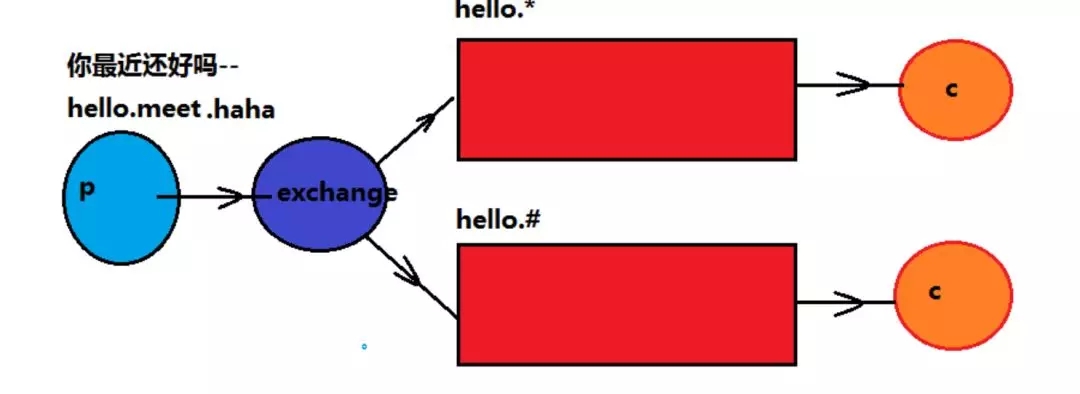
*号代表单个词语
#代表多个词语
其他的内容与routing路由模式一致
案例:
public class RoutingTopicTest {


 @Test
 public void routingRec02() throws Exception{
   System.out.println("二号消费者等待接收消息");
   //获取连接
   Connection conn = ConnectionUtil.getConn();
   Channel chan = conn.createChannel();
   //声明队列
   chan.queueDeclare("direct02", false, false, false, null);
   //声明交换机
   chan.exchangeDeclare("directEx", "direct");
   //绑定队列到交换机
   //参数 1 队列名称,2 交换机名称 3 路由key
   chan.queueBind("direct02", "directEx", "jt1711");
   chan.basicQos(1);
   //定义消费者
   QueueingConsumer consumer=new QueueingConsumer(chan);
   //消费者与队列绑定
   chan.basicConsume("direct02",false, consumer);
   while(true){
     Delivery delivery= consumer.nextDelivery();
     System.out.println("二号消费者接收到"+
     new String(delivery.getBody()));
     chan.basicAck(delivery.getEnvelope().
         getDeliveryTag(), false);
   }
 }

 @Test
 public void topicSend() throws Exception{
   //获取连接
   Connection conn = ConnectionUtil.getConn();
   Channel chan = conn.createChannel();
   //声明交换机
   //参数意义,1 交换机名称,2 类型:fanout,direct,topic
   chan.exchangeDeclare("topicEx", "topic");
   //发送消息
   String msg="主题模式的消息";
   chan.basicPublish("topicEx", "jt1712.add.update",
       null, msg.getBytes());
 }
 @Test
 public void topicRec01() throws Exception{
   System.out.println("一号消费者等待接收消息");
   //获取连接
   Connection conn = ConnectionUtil.getConn();
   Channel chan = conn.createChannel();
   //声明队列
   chan.queueDeclare("topic01", false, false, false, null);
   //声明交换机
   chan.exchangeDeclare("topicEx", "topic");
   //绑定队列到交换机
   //参数 1 队列名称,2 交换机名称 3 路由key
   chan.queueBind("topic01", "topicEx", "jt1712");
   chan.basicQos(1);
   //定义消费者
   QueueingConsumer consumer=new QueueingConsumer(chan);
   //消费者与队列绑定
   chan.basicConsume("topic01",false, consumer);
   while(true){
     Delivery delivery= consumer.nextDelivery();
     System.out.println("一号消费者接收到"+
     new String(delivery.getBody()));
     chan.basicAck(delivery.getEnvelope().
         getDeliveryTag(), false);
   }
 }
 @Test
 public void topicRec02() throws Exception{
   System.out.println("二号消费者等待接收消息");
   //获取连接
   Connection conn = ConnectionUtil.getConn();
   Channel chan = conn.createChannel();
   //声明队列
   chan.queueDeclare("topic02", false, false, false, null);
   //声明交换机
   chan.exchangeDeclare("topicEx", "topic");
   //绑定队列到交换机
   //参数 1 队列名称,2 交换机名称 3 路由key
   chan.queueBind("topic02", "topicEx", "jt1712.#");
   chan.basicQos(1);
   //定义消费者
   QueueingConsumer consumer=new QueueingConsumer(chan);
   //消费者与队列绑定
   chan.basicConsume("topic02",false, consumer);
   while(true){
     Delivery delivery= consumer.nextDelivery();
     System.out.println("二号消费者接收到"+
     new String(delivery.getBody()));
     chan.basicAck(delivery.getEnvelope().
         getDeliveryTag(), false);
   }
 }
}
rabbitMQ模式的更多相关文章
- RabbitMQ入门-Topic模式
上篇<RabbitMQ入门-Routing直连模式>我们介绍了可以定向发送消息,并可以根据自定义规则派发消息.看起来,这个Routing模式已经算灵活的了,但是,这还不够,我们还有更加多样 ...
- RabbitMQ基本操作
更加详细的 链接https://www.cnblogs.com/dwlsxj/p/RabbitMQ.html RabbitMQ基础知识 一.背景 RabbitMQ是一个由erlang开发的AMQP(A ...
- 队列模式&主题模式
# RabbitMQ 消息中间件 **Advanced Message Queuing Protocol (高级消息队列协议** The Advanced Message Queuing Protoc ...
- RabbitMQ图解
一.MQ对比 二.RabbitMQ模式 三.队列模式 四.公平分发 五.主题模式
- RabbitMQ之集群搭建
1.RabbitMQ集群模式RabbitMQ集群中节点包括内存节点(RAM).磁盘节点(Disk,消息持久化),集群中至少有一个Disk节点. 2.普通模式(默认) 对于普通模式,集群中 ...
- 28、springboot整合RabbitMQ(2)
1.监听 1.1.监听队列 如订单系统和库存系统 订单系统下订单之后将消息存放在消息队列中 库存系统需要时刻进行监听消息队列的内容,有新的订单就需要进行库存相关的操作 此时模拟监听消息队列中的Bo ...
- SpringBoot与消息(RabbitMQ)
1. JMS和AMQP JMS(Java Message Service): ActiveMQ是JMS实现; AMQP(Advanced Message Queuing Protocol) 兼容JMS ...
- CentOS7安装rabbitmq集群(二进制)
一.RabbiMQ简介 RabbiMQ是用Erang开发的,集群非常方便,因为Erlang天生就是一门分布式语言,但其本身并不支持负载均衡. RabbiMQ模式 RabbitMQ模式大概分为以下三种: ...
- Java RabbitMQ配置和使用,基于SpringBoot
package rabbitmq.demo; import com.rabbitmq.client.AMQP; import org.junit.Test; import org.junit.runn ...
随机推荐
- MySQL:测试题
一,表关系的练习测试 请创建如下表关系,并建立相关约束 一,创建表结构数据: 创建的话肯定先创建没有关联的表,老师,课程(关联老师),年级,班级(关联年级),学生(关联班级), 班级任职表 (关联老师 ...
- 基于FineUIMVC的代码生成器(传统三层)v1.0
三层我就不说了,主要是看框架思路可扩展.以前用FineUI开源版写过一版,修修改改自己用了,没有特意的整理,FineUIMVC开发还是比较快,移植了一下两天就弄完了,算是一个对新手有用的工具,先放出第 ...
- 机器学习中数据清洗&预处理
数据预处理是建立机器学习模型的第一步,对最终结果有决定性的作用:如果你的数据集没有完成数据清洗和预处理,那么你的模型很可能也不会有效 第一步,导入数据 进行学习的第一步,我们需要将数据导入程序以进行下 ...
- Android View 的事件分发原理解析
作为一名 Android 开发者,每天接触最多的就是 View 了.Android View 虽然不是四大组件,但其并不比四大组件的地位低.而 View 的核心知识点事件分发机制则是不少刚入门同学的拦 ...
- Perl的命令行参数和ARGV
程序名:$0 $0表示当前正在运行的Perl脚本名.有3种情况: 如果执行方式为perl x.pl,则$0的值为x.pl而非perl命令本身 如果执行方式为./x.pl,则$0的值为./x.pl 如果 ...
- Python爬虫的N种姿势
问题的由来 前几天,在微信公众号(Python爬虫及算法)上有个人问了笔者一个问题,如何利用爬虫来实现如下的需求,需要爬取的网页如下(网址为:https://www.wikidata.org/w/ ...
- 第一册:lesson sixty one.
原文: A bad cold. A:Where is Jim? B:He is in bed. A:What's the matter with him? B:He fells ill. A:He l ...
- 使用Topshelf开发Windows服务、log4net记录日志
开发windows服务,除了在vs里新建服务项目外(之前有写过具体开发方法,可点击查看),还可以使用Topshelf. 不过使用topshelf需要.netframework 4.5.2版本,在vs2 ...
- 数据库部分(MySql)_2
分组查询 分组查询通常和聚合函数结合使用,查询条件中每个XXX就以XXX为分组的条件: 格式:每个A的平均B select avg(B) from 表名 group by A; having 在whe ...
- webapi接口发布出错 OwinStartupAttribute
解决办法:在 webconfig 中 <appSettings> <add key="owin:AutomaticAppStartup" value=" ...