
excel 中怎么让两列姓名相同排序(转)
如图,A列B列不动,C列和D列行值不变,以A列姓名为主让C列姓名和A列相同姓名的对齐(行),D行跟着C行不变。
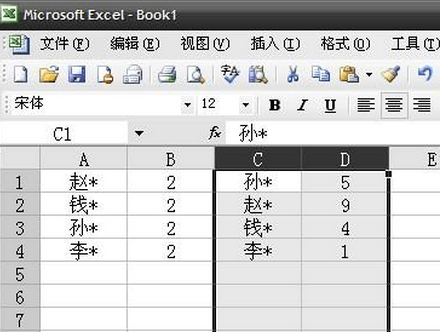
在E1输入公式=MATCH(C1,A:A,0)然后下拉,接著选中C,D,E列,以E列为标准升序排列即可
转自:https://wenku.baidu.com/view/b7f6198058fb770bf68a5559.html
pandas实现方法:
 #! /usr/bin/env python

 #-*- coding:utf8 -*-

 import pandas as pd

 from pandas import DataFrame

 import  numpy as np

 pd.set_option('display.height',10000)

 pd.set_option('display.max_rows',5000)

 pd.set_option('display.max_columns',5000)

 pd.set_option('display.width',10000)

 df = pd.read_excel(r"F:\test.xlsx")

 col_n = ['C','D']

 col_A = ['A','B']

 CD = pd.DataFrame(df,columns = col_n)

 AB = pd.DataFrame(df,columns = col_A)

 # print(CD)

 # print(AB)

 fi =pd.merge(AB,CD,left_on='A',right_on='C',how='left')

 print(fi)

 zn=fi[fi.isnull().values==True]

 print(zn.fillna(0))
改进版
 #! /usr/bin/env python

 #-*- coding:utf8 -*-

 import pandas as pd

 from locale import *

 from pandas import DataFrame

 import  numpy as np

 writer = pd.ExcelWriter('output.xlsx')

 pd.set_option('display.height',10000)

 pd.set_option('display.max_rows',5000)

 pd.set_option('display.max_columns',5000)

 pd.set_option('display.width',10000)

 df = pd.read_excel(r"F:\test.xlsx", thousands=',')

 print(df.info())

 # df = pd.read_excel(r"F:\test.xlsx")

 col_A = ['A','B']

 col_n = ['C','D']

 print(df)

 AB = pd.DataFrame(df,columns = col_A)

 CD = pd.DataFrame(df,columns = col_n)

 fi =pd.merge(AB,CD,left_on='A',right_on='C',how='left')

 # fi['E']=fi.apply(lambda x: (x['D'] - x['B'])/x['D']*100, axis=1).round(2)

 # fi['E']=fi.apply(lambda x: format((x['D'] - x['B'])/x['D'],'.2%'), axis=1)

 # fi['E']=(fi.D-fi.B)

 # fi['F']=((fi.D-fi.B)/fi.D*100)

 fi=fi.assign(E=fi.B-fi.D,F=((fi.B-fi.D)/fi.B)*100).round(2)

 # fi=fi.assign(E=fi.B-fi.D,F=((fi.B-fi.D)/fi.B))

 def number_to_flag(number):

     if number > 0:

         return '↑'

     elif number == 0:

         return '='

     else:

         return '↓'

 fi =fi.sort_values(by=['F'],ascending=False) #升序

 fi['G'] =fi['F'].map(number_to_flag)

 fi['E'] = fi['E'].astype('str').str.replace("-","")

 fi['F'] = fi['F'].astype('str').str.replace("-","")

 fi['F'] = fi.F + '%'

 fi=fi.dropna(axis=0)

 fi=fi[ ~ fi['F'].str.contains('0.0') ]

 fi['E'] = fi['E'].astype('float64')

 print(fi)

 print(fi.dtypes)

 fi.to_excel(writer)

 writer.save()
最终版
 #! /usr/bin/env python

 #-*- coding:utf8 -*-

 import sys

 reload(sys)

 sys.setdefaultencoding('gbk')

 from locale import *

 from pandas import DataFrame

 import pandas as pd

 import  numpy as np

 writer = pd.ExcelWriter('output.xlsx')

 pd.set_option('display.height',10000)

 pd.set_option('display.max_rows',5000)

 pd.set_option('display.max_columns',5000)

 pd.set_option('display.width',10000)

 df = pd.read_excel(r"F:\test.xlsx")

 pd.options.display.float_format = '{:,}'.format

 print(df.info())

 # df = pd.read_excel(r"F:\test.xlsx")

 col_A = ['A','B']

 col_n = ['C','D']

 AB = pd.DataFrame(df,columns = col_A)

 CD = pd.DataFrame(df,columns = col_n)

 fi =pd.merge(AB,CD,left_on='A',right_on='C',how='left')

 # fi['E']=fi.apply(lambda x: (x['D'] - x['B'])/x['D']*100, axis=1).round(2)

 # fi['E']=fi.apply(lambda x: format((x['D'] - x['B'])/x['D'],'.2%'), axis=1)

 # fi['E']=(fi.D-fi.B)

 # fi['F']=((fi.D-fi.B)/fi.D*100)

 fi=fi.assign(E=fi.B-fi.D,F=((fi.B-fi.D)/fi.B)*100).round(2)

 # fi=fi.assign(E=fi.B-fi.D,F=((fi.B-fi.D)/fi.B))

 def number_to_flag(number):

     if number > 0:

         return '↓'

     elif number == 0:

         return '='

     else:

         return '↑'

 fi =fi.sort_values(by=['F'],ascending=False) #升序

 fi['G'] =fi['F'].map(number_to_flag)

 fi['E'] = fi['E'].astype('str').str.replace("-","")

 fi['F'] = fi['F'].astype('str').str.replace("-","")

 fi['F'] = fi.F + '%'

 fi=fi.dropna(axis=0)

 fi=fi[ ~ fi['F'].str.contains('0.0') ]

 fi['E'] = fi['E'].astype('float64')

 fi['B'] = fi['B'].astype('float64')

 print(fi)

 # print(fi.dtypes)

 fi.to_excel(writer)

 writer.save()

 # fi.to_html('files.html',escape=False,index=False,sparsify=True,border=1,index_names=False,header=True)
excel 中怎么让两列姓名相同排序(转)的更多相关文章
- excel 快速比对两列数据差异
excel 快速比对两列数据差异 CreateTime--2018年5月31日11:19:35 Author:Marydon 1.情景展示 找出两列数据的差异 2.具体操作 方式一:使用条件格式 ...
- 在EXCEL中如何让一列数字变成文本格式?就是想让单元格的左上角变一个绿绿的?
如何在EXCEL中如何让一列数字变成文本格式?就是想让单元格的左上角变一个绿绿的? 解决方案:将整列单元格格式设为文本,然后,选中该列,数据--分列--完成 详细步骤: (1)选中1行或者1列,再单击 ...
- excel中快捷计算单一列中的所有的值
excel中快捷计算单一列中的所有的值 比如B列中所有的值 =SUM(B1:B100) 计算B列第一行到第100行的值 又学了一招 如果想统计B列所有的值 可以用 =SUM(B:B)
- excel中在某一列上的所有单元格的前后增加
excel中在某一列上的所有单元格的前后增加数字汉字字符等东西的函数这样写 “东西”&哪一列&“东西” 例如 “1111”&E1&“3333”
- 使用Eclipse在Excel中找出两张表中相同证件号而姓名或工号却出现不同的的项
1:首先把Excel中的文本复制到txt中,复制如下: A表: 证件号 工号 姓名 310110xxxx220130004 101 傅家宜3101 ...
- freeMarker中list的两列展示
前台界面中我使用freeMarker的机会有很多,自然也就会接触下<List>标签,我想大家应该都不陌生.<#list attrList as attr>${a.name}&l ...
- EXCELL中怎么将两列数据对比,找出相同的和不同的数据?
假设你要从B列中找出A列里没有的数据,那你就在C1单元格里输入“=IF(ISNA(VLOOKUP(B1,A:A,1,0)),"F","T")”显示T就表示有,F ...
- Excel两行交换及两列交换,快速互换相邻表格数据的方法
经常使用办公软件的人可能有遇到过需要将Excel相邻两行数据相互交换的情况,需要怎么弄才最方便呢?您还是像大家通常所做的那样先在Excel文件相应位置插入一个新的空白行然后在复制粘贴数据然后删除原来那 ...
- Excel中如何在两个工作表中查找重复数据
有时我们可能会在两种工作表中查找重复记录,当数据记录很多时,就必须通过简单的方法来实现.下面小编就与大家一起分享一下查看重复记录数据的方法,希望对大家有所帮助. 方法/步骤 为了讲解的需要,小编特 ...
随机推荐
- 【转】MySQL用户管理及SQL语句详解
[转]MySQL用户管理及SQL语句详解 1.1 MySQL用户管理 1.1.1 用户的定义 用户名+主机域 mysql> select user,host,password from mysq ...
- 反卷积(deconvolution)
deconvolution讲解论文链接:https://arxiv.org/abs/1609.07009 关于conv和deconvoluton的另一个讲解链接:http://deeplearning ...
- sublime修改侧边栏字体
安装了sublime的material主题后,侧边栏的字体特别小,设置方法如下: 安装插件 用上面的插件打开 Material-Theme.sublime-theme 如下 { "class ...
- boost.python入门教程 ----python 嵌入c++
Python语言简介 Python是一种脚本语言.以开放的开发接口和独特的语法著称.尽管Python在国内引起注意只有几年的时间,但实际上Python出现于上世纪90年代(据www.python.or ...
- 【转】辽宁北斗TV直播源
原帖地址:http://bbs.asiatvro.com/thread-1156600-1-1.html 感谢 Qarclub 辽宁卫视,http://lnhlslive.hongshiyun.com ...
- python操作三大主流数据库(3)python操作mysql③python操作mysql的orm工具sqlaichemy安装配置和使用
python操作mysql③python操作mysql的orm工具sqlaichemy安装配置和使用 手册地址: http://docs.sqlalchemy.org/en/rel_1_1/orm/i ...
- python序列(列表,元组,字典)的增删改查
列表 操作 列表 方法 示例 增加 list.append(obj) 增加元素到末尾 eg. >>> list1=['hello','world','how','are','you' ...
- python学习第42、43天 HTML\CSS
前端是什么? 帮助不了解后端程序的客户轻松使用程序的工具,可以提升工作效率,提供各种各样的体验. 通用的前端大致会使用三种语言,用在三个不同的方面对前端进行架构和优化,这里也只介绍这三种 web前端常 ...
- 前端 ----jQuery操作表单
05-使用jQuery操作input的value值 表单控件是我们的重中之重,因为一旦牵扯到数据交互,离不开form表单的使用,比如用户的注册登录功能等 那么通过上节知识点我们了解到,我们在使用j ...
- 【原创】大叔经验分享(35)lzo格式支持
建表语句 CREATE EXTERNAL TABLE `my_lzo_table`(`something` string)ROW FORMAT DELIMITED FIELDS TERMINATED ...