
Running ASP.NET Core applications on Windows Subsystem for Linux
Setting up Linux on Windows 10
First thing is to enable Windows Subsystem for Linux. It doesn’t install Linux but gets Windows ready for it. Linux support is Windows feature and it must be activated from Windows Features dialog.
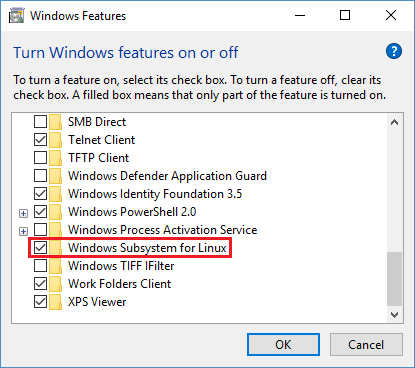
After installing the feature Windows needs restart.
As Windows is ready to host Linux now it’s time to install one. Windows 10 Fall Creators Update supports more than one Linux. I opened Store app and installer Ubuntu Linux from there.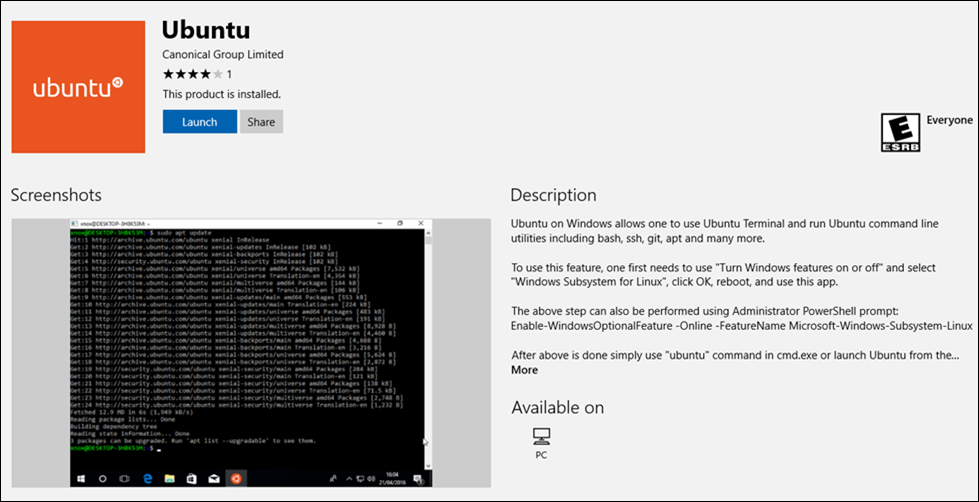
It takes time to get things up and running as after installation there are some configuring needed. User is asked for username and password and everything else is done by Linux from this point. Just wait until it gets done.
Running Linux on Windows
After installing Linux it is possible to use Windows 10 search to run it.
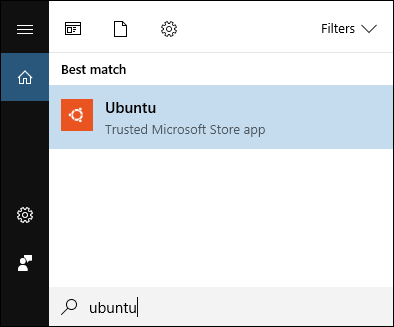
Those who need to run it frequently can also pin Ubuntu to taskbar or start menu.
Installing .NET Core
As I installed Ubuntu Linux then .NET Core installation commands here are for Ubuntu 16 that came from Windows Store.
curl https://packages.microsoft.com/keys/microsoft.asc | gpg --dearmor > microsoft.gpg

sudo mv microsoft.gpg /etc/apt/trusted.gpg.d/microsoft.gpg

sudo sh -c 'echo "deb [arch=amd64] https://packages.microsoft.com/repos/microsoft-ubuntu-xenial-prod xenial main" > /etc/apt/sources.list.d/dotnetdev.list'

sudo apt-get update

sudo apt-get install dotnet-sdk-2.0.2
It takes some minutes to get .NET Core installed as after installation it also initializes things.
Running application from local disk
Linux on Windows uses its own file system and disks on machine are visible through mounting. The following screenshot shows how I moved to project folder on test machine and ran ASP.NET Core application. It’s the same folder where I build application on Visual Studio.
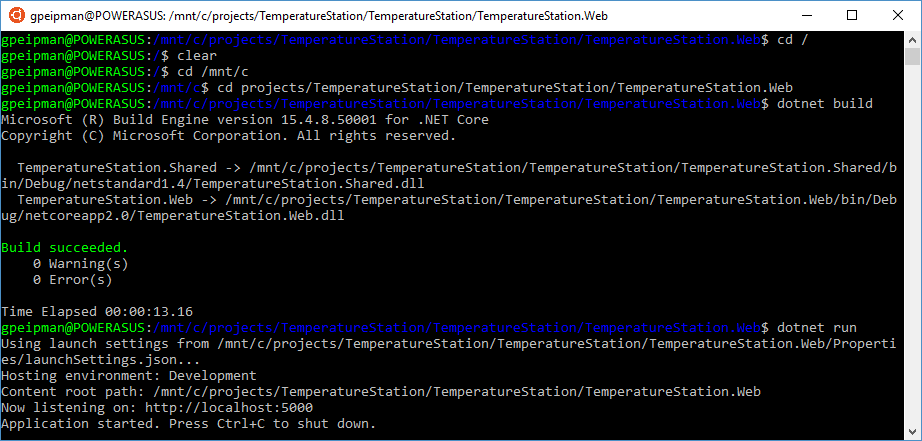
And here is the web front-end of my TemperatureStation solution served by Linux on Windows.
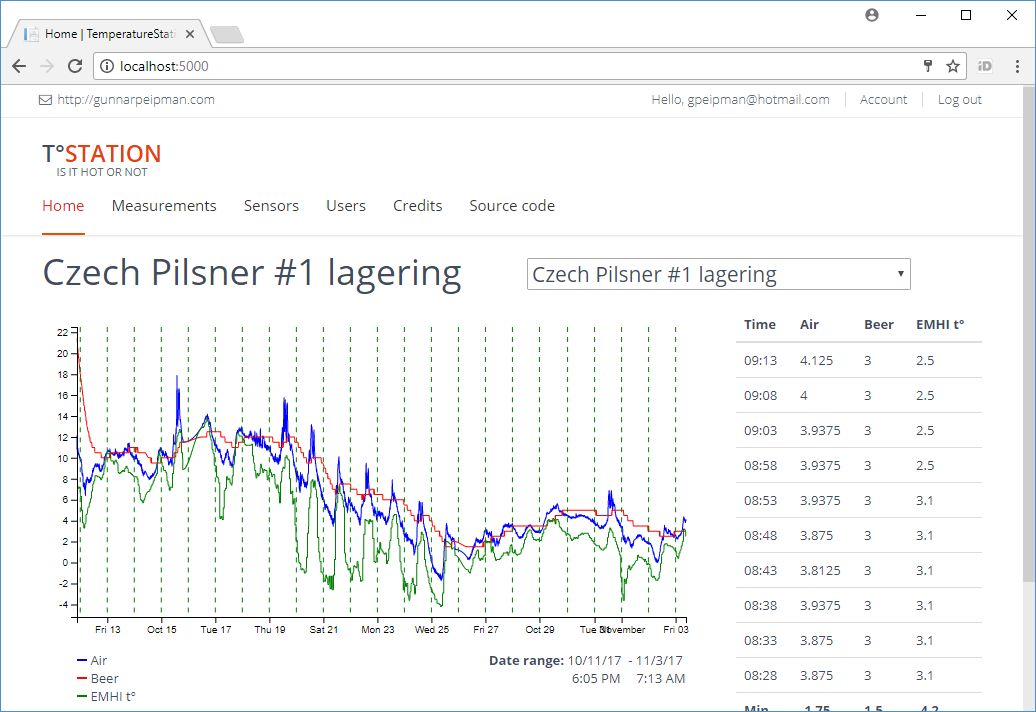
NB! I have experienced some issues this far. Sometimes after running ASP.NET Core web application on Ubuntu it’s not possible to close terminal. When closing it from Task Manager then on next run terminal window opens but nothing happens there. In case of any issues please report problems to Windows team using Feedback app.
Wrapping up
Windows subsystem for Linux is easy to enable and install. It makes Linux available on Windows without hardware level virtualization and there’s no need to install Hyper-V or some other virtualization platform. When building multi-platform apps it is handy to have Linux environment available to test and try application quickly. Although I faced few issues when working with .NET Core on Linux this way these issues were not show stoppers and I got my tasks done. Those who build multi-platform apps should give a Linux on Windows a good try.
Running ASP.NET Core applications on Windows Subsystem for Linux的更多相关文章
- [转]Publishing and Running ASP.NET Core Applications with IIS
本文转自:https://weblog.west-wind.com/posts/2016/Jun/06/Publishing-and-Running-ASPNET-Core-Applications- ...
- Asp.Net Core 自动适应Windows服务、Linux服务、手动启动时的内容路径的扩展方法
public static IWebHostBuilder UseContentRootAsEnv(this IWebHostBuilder hostBuilder) { bool IsWindows ...
- 发布到ASP.NET CORE项目到 Windows server 2012
原文: https://github.com/zeusro/MarkdownBlog/blob/master/2018/2018-01-17-01.md 发布到ASP.NET CORE项目到 Wind ...
- ASP.NET Boilerplate 学习 AspNet Core2 浏览器缓存使用 c#基础,单线程,跨线程访问和线程带参数 wpf 禁用启用webbroswer右键菜单 EF Core 2.0使用MsSql/MySql实现DB First和Code First ASP.NET Core部署到Windows IIS QRCode.js:使用 JavaScript 生成
ASP.NET Boilerplate 学习 1.在http://www.aspnetboilerplate.com/Templates 网站下载ABP模版 2.解压后打开解决方案,解决方案目录: ...
- ASP.NET Core 新建项目(Windows) - ASP.NET Core 基础教程 - 简单教程,简单编程
原文:ASP.NET Core 新建项目(Windows) - ASP.NET Core 基础教程 - 简单教程,简单编程 ASP.NET Core 新建项目(Windows) 对于任何语言和框架,都 ...
- asp.net core 托管到windows服务,并用iis做反向代理
使用NSSM把.Net Core部署至 Windows 服务 为什么部署至Windows Services 在很多情况下,很少会把.Net Core项目部署至Windows服务中,特别是Asp.n ...
- WSL(Windows Subsystem for Linux)--Pico Process Overview
[转载] Windows Subsystem for Linux -- Pico Process Overview Overview This post discusses pico processe ...
- Build SSH for Development on Windows Subsystem for Linux
It seems that Windows Subsystem for Linux (WSL) is getting much more mature than the time when it fi ...
- Windows10上开启WSL2(Windows Subsystem for Linux 2)及Docker Desktop For Windows
什么是WSL2 WSL2(Windows Subsystem for Linux 2)是适用于Linux的Windows子系统体系结构的一个新版本,它支持适用于Linux的Windows子系统在Win ...
随机推荐
- odoo学习总结
odoo10总结 1.odoo中的向导应用. .py文件 # -*- coding: utf-8 -*-f ...
- 算法相关——Java排序算法之插入排序(四)
0. 前言 本系列文章将介绍一些常用的排序算法.排序是一个非常常见的应用场景,也是开发岗位面试必问的一道面试题,有人说,如果一个企业招聘开发人员的题目中没有排序算法题,那说明这个企业不是一个" ...
- [翻译] C# 8.0 新特性
原文: Building C# 8.0 [译注:原文主标题如此,但内容大部分为新特性介绍,所以意译标题为 "C# 8.0 新特性"] C# 的下一个主要版本是 8.0.我们已经为它 ...
- 失物找寻APP软件需求规格说明书——第三次团队作业
⭐对于软件需求规格说明书的理解 在没写这份软件需求规格说明书的时候我们组成员都不是很理解它的必要性,当然,写完之后才知道它的作用. 软件需求说明书的存在是为了使用户和软件开发者双方对该软件的初始规定有 ...
- 关于VS2017 添加 EF的MVC控制器报错的解决方法
1. 错误描述 :no database provider has been configured fot this DbContext. 此类错误是上下文的注册造成的.解决方式在DBContext中 ...
- 十二、存token获取token刷新token发送header头
//测试token //获取token function setToken(data){ var storage = window.localStorage; if(!storage){ alert( ...
- C++ 通过ostringstream 实现任意类型转string
#include <iostream> #include <string> using namespace std; int main() { ; double b = 65. ...
- 割顶树 BZOJ1123 BLO
无向图中,求去掉点x[1,n]后每个联通块的大小. 考虑tarjan求bcc的dfs树,对于每个点u及其儿子v,若low[v]<prv[u],则v对u的父亲联通块有贡献,否则对u的子树有贡献.每 ...
- codeforces#687 B. Remainders Game
题意:给出n个数,和一个数p,问你在知道 x%ai 的情况下,能不能确定x%p的值 结论:当n个数的最小公倍数是p的倍数时,可以确定 代码: #include <bits/stdc++.h&g ...
- poj 1486 纸张与数字匹配(二分图+割边处理)
题目来源:http://poj.org/problem?id=1486 题意: 算出所有独一无二的字母与数字的组合,使二分图完全匹配 我以为所有点都要独一无二匹配时输出匹配方法 题解: 先得到一个完全 ...