
Running ASP.NET Core applications on Windows Subsystem for Linux
Setting up Linux on Windows 10
First thing is to enable Windows Subsystem for Linux. It doesn’t install Linux but gets Windows ready for it. Linux support is Windows feature and it must be activated from Windows Features dialog.
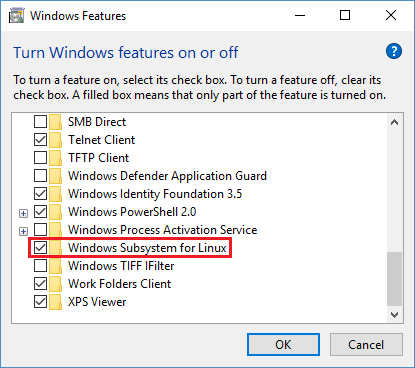
After installing the feature Windows needs restart.
As Windows is ready to host Linux now it’s time to install one. Windows 10 Fall Creators Update supports more than one Linux. I opened Store app and installer Ubuntu Linux from there.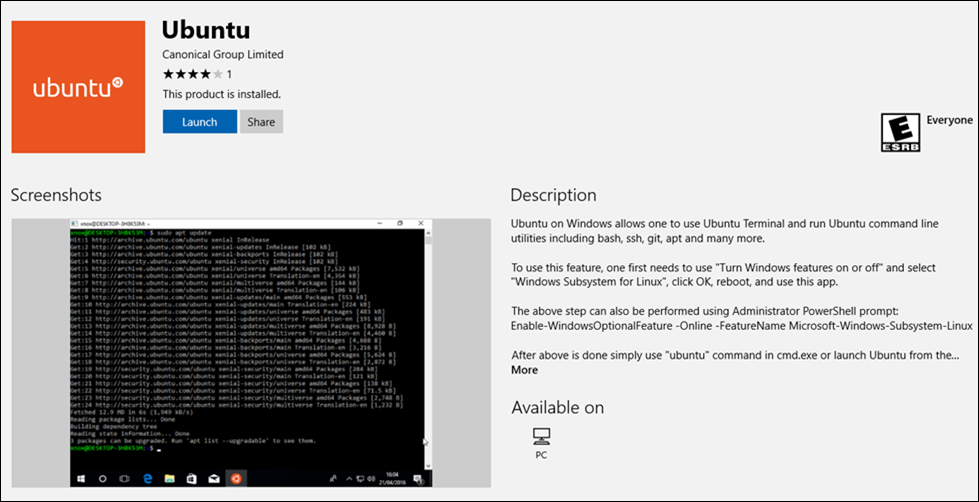
It takes time to get things up and running as after installation there are some configuring needed. User is asked for username and password and everything else is done by Linux from this point. Just wait until it gets done.
Running Linux on Windows
After installing Linux it is possible to use Windows 10 search to run it.
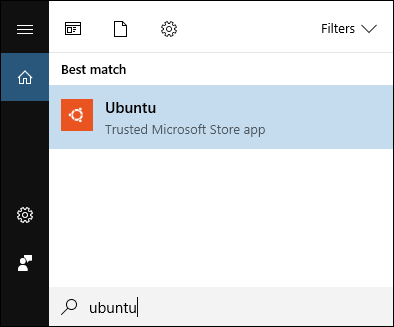
Those who need to run it frequently can also pin Ubuntu to taskbar or start menu.
Installing .NET Core
As I installed Ubuntu Linux then .NET Core installation commands here are for Ubuntu 16 that came from Windows Store.
curl https://packages.microsoft.com/keys/microsoft.asc | gpg --dearmor > microsoft.gpg

sudo mv microsoft.gpg /etc/apt/trusted.gpg.d/microsoft.gpg

sudo sh -c 'echo "deb [arch=amd64] https://packages.microsoft.com/repos/microsoft-ubuntu-xenial-prod xenial main" > /etc/apt/sources.list.d/dotnetdev.list'

sudo apt-get update

sudo apt-get install dotnet-sdk-2.0.2
It takes some minutes to get .NET Core installed as after installation it also initializes things.
Running application from local disk
Linux on Windows uses its own file system and disks on machine are visible through mounting. The following screenshot shows how I moved to project folder on test machine and ran ASP.NET Core application. It’s the same folder where I build application on Visual Studio.
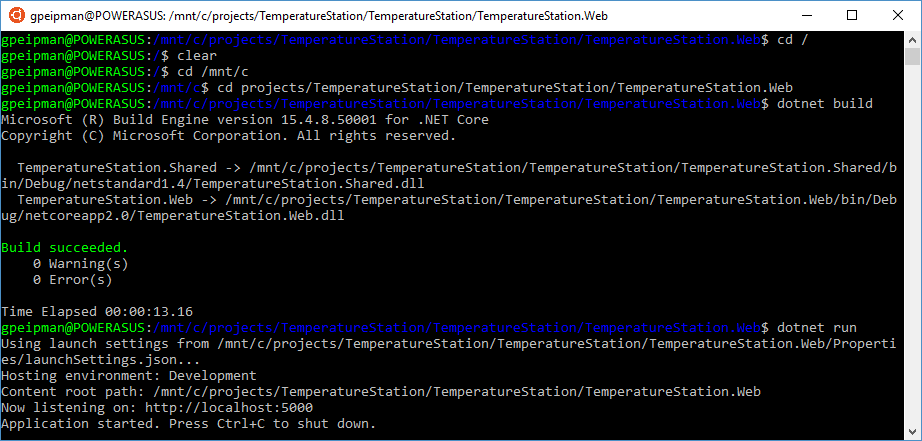
And here is the web front-end of my TemperatureStation solution served by Linux on Windows.
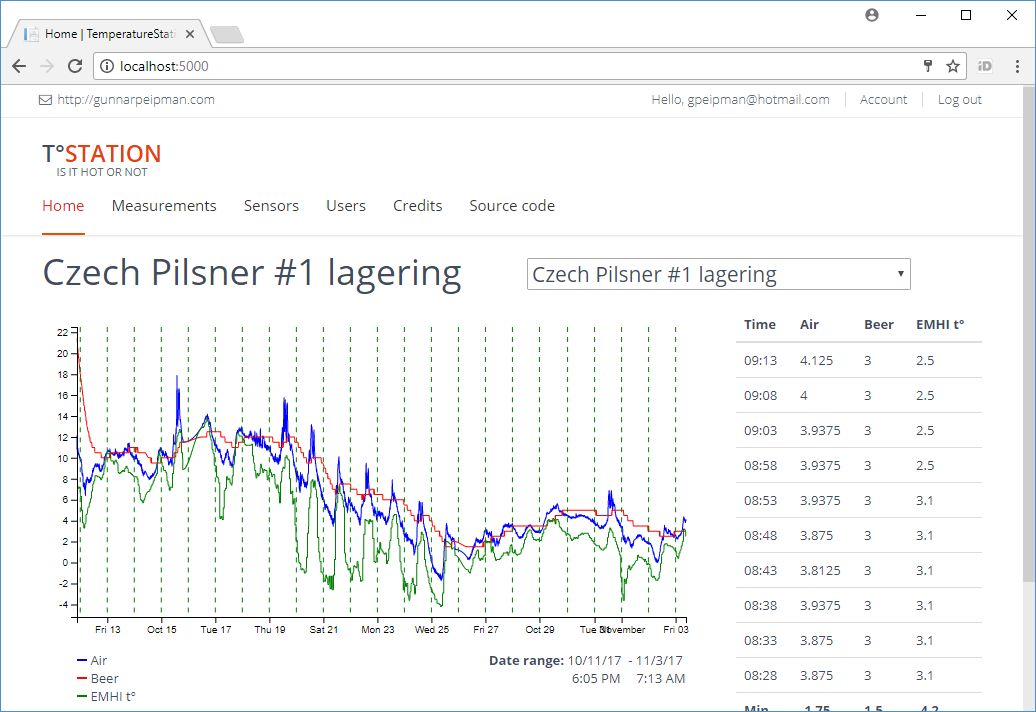
NB! I have experienced some issues this far. Sometimes after running ASP.NET Core web application on Ubuntu it’s not possible to close terminal. When closing it from Task Manager then on next run terminal window opens but nothing happens there. In case of any issues please report problems to Windows team using Feedback app.
Wrapping up
Windows subsystem for Linux is easy to enable and install. It makes Linux available on Windows without hardware level virtualization and there’s no need to install Hyper-V or some other virtualization platform. When building multi-platform apps it is handy to have Linux environment available to test and try application quickly. Although I faced few issues when working with .NET Core on Linux this way these issues were not show stoppers and I got my tasks done. Those who build multi-platform apps should give a Linux on Windows a good try.
Running ASP.NET Core applications on Windows Subsystem for Linux的更多相关文章
- [转]Publishing and Running ASP.NET Core Applications with IIS
本文转自:https://weblog.west-wind.com/posts/2016/Jun/06/Publishing-and-Running-ASPNET-Core-Applications- ...
- Asp.Net Core 自动适应Windows服务、Linux服务、手动启动时的内容路径的扩展方法
public static IWebHostBuilder UseContentRootAsEnv(this IWebHostBuilder hostBuilder) { bool IsWindows ...
- 发布到ASP.NET CORE项目到 Windows server 2012
原文: https://github.com/zeusro/MarkdownBlog/blob/master/2018/2018-01-17-01.md 发布到ASP.NET CORE项目到 Wind ...
- ASP.NET Boilerplate 学习 AspNet Core2 浏览器缓存使用 c#基础,单线程,跨线程访问和线程带参数 wpf 禁用启用webbroswer右键菜单 EF Core 2.0使用MsSql/MySql实现DB First和Code First ASP.NET Core部署到Windows IIS QRCode.js:使用 JavaScript 生成
ASP.NET Boilerplate 学习 1.在http://www.aspnetboilerplate.com/Templates 网站下载ABP模版 2.解压后打开解决方案,解决方案目录: ...
- ASP.NET Core 新建项目(Windows) - ASP.NET Core 基础教程 - 简单教程,简单编程
原文:ASP.NET Core 新建项目(Windows) - ASP.NET Core 基础教程 - 简单教程,简单编程 ASP.NET Core 新建项目(Windows) 对于任何语言和框架,都 ...
- asp.net core 托管到windows服务,并用iis做反向代理
使用NSSM把.Net Core部署至 Windows 服务 为什么部署至Windows Services 在很多情况下,很少会把.Net Core项目部署至Windows服务中,特别是Asp.n ...
- WSL(Windows Subsystem for Linux)--Pico Process Overview
[转载] Windows Subsystem for Linux -- Pico Process Overview Overview This post discusses pico processe ...
- Build SSH for Development on Windows Subsystem for Linux
It seems that Windows Subsystem for Linux (WSL) is getting much more mature than the time when it fi ...
- Windows10上开启WSL2(Windows Subsystem for Linux 2)及Docker Desktop For Windows
什么是WSL2 WSL2(Windows Subsystem for Linux 2)是适用于Linux的Windows子系统体系结构的一个新版本,它支持适用于Linux的Windows子系统在Win ...
随机推荐
- 操作循环的关键字switch,break,return的应用及区别
break 使用break结束循环 break可以终止循环 和 switch语句的运行; break用于结束一个循环,即跳出循环体,执行循环体之后的代码: switch 使用continue提前结束 ...
- linux进程控制开发实例
fork.c #include <sys/types.h> #include <unistd.h> #include <stdio.h> #include < ...
- java eclipse jdk 关系
java 经常用到多个jdk版本 1.7 1.8.... 兼容时几个位置 处理 eclipse.ini (A处) #-vm#C:\Program Files\Java\jdk1.7.0_79\bi ...
- 关于NETCORE中使用特性Serializable找不到引用的解决方法
升级到netcore后,serializable特性不在命名空间System下了,需要nuget依赖包System.Runtime.Serialization.Formatters
- vue better-scroll用法
滚动位置固定:在vue中通过路由切换页面时组件会自动滚动到顶部,需要监听滚动行为才能让滚动位置固定,better-scroll解决了这个问题. 常用效果:移动端很常见的效果,当滑动右边部分的时候,左边 ...
- Appium-处理系统弹窗
前言: 最近在搞appium自动化,iOS的系统弹窗是大家都会遇到的,本文来总结处理这种弹窗的用法. 环境: MacOS:10.13.4 Appium-desktop:1.6.1 Xcode:9.3. ...
- C. Painting the Fence
链接 [https://codeforces.com/contest/1132/problem/C] 题意 就是有个n长的栅栏,然后每个油漆工可以染的区域不同 给你q让你选出q-2个人使得被染色的栅栏 ...
- iOS数据存储-钥匙串存储
2017.11.20 14:41* 字数 227 阅读 678评论 0喜欢 0 钥匙串介绍 1. 表示设备唯一号的标识,在IOS7中要么被禁止使用,要么重新安装程序后两次获取的标识符不一样. 2. ...
- 正则表达式验证input文本框
方便以后的查找,直接copy代码在这里了. eg: //公司邮箱验证 if ($("#Email").val() != "") { var myreg = /^ ...
- Nagios 系统监控
Nagios 系统监控 Nagios 是一款免费的开源 IT 基础设施监控系统,功能强大,灵活性强,能有效监控 Windows.Linux.VMware 和 Unix 主机状态,交换机.路由器等网络设 ...