
vue全家桶实现笔记本功能
一个通过vue实现的练手小项目,数据保存和导出通过node进行处理
成品截图:

安装vue-cli,webpack:
cnpm install webpack -g

cnpm install vue-cli -g
通过vue-cli搭建项目:
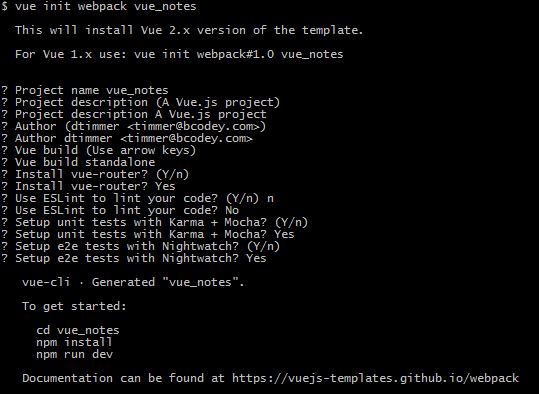
需要使用vuex管理数据,添加store文件夹,最终目录结构:
----vue_notes
|--components
|--router
|--store
编辑入口文件 main.js
//引入Vue

import Vue from 'vue'

//引入vuere-source,该组件为网络请求组件

import VueResource from "vue-resource"

//引入store,vuex对象

import store from './store'

//引入入口页面

import App from './App'

//使用vue-resource中间件挂载网络请求组件

Vue.use(VueResource);

/* 实例化vue项目 */

new Vue({

    el: '#app',

    store,

    ...App

})
vuex出口文件 store/index.js
import Vue from 'vue'

import Vuex from 'vuex'

import mutations from './mutations'

import actions from './actions'

import getters from './getters'

//添加vuex中间件

Vue.use(Vuex);

//使用数据结构

const state = {

    isAllList: true,

    notes: [],

    activeNote: {},

}

export default new Vuex.Store({

    state,

    mutations,

    actions,

    getters,

})
vuex方法声明 /store/mutation-types.js
//修改日记列表状态,是否查看全部

export const changeListStatus = "changeListStatus";

//新增日记

export const addNote = "addNote";

//编辑当前日记

export const editNote = "editNote";

//删除所选日记

export const deleteNote = "deleteNote";

//切换收藏状态

export const toggleFavorite = "toggleFavorite";

//切换当前日记

export const setActiveNote = "setActiveNote";

//初始化日记数据

export const initNotes = 'initNotes';

//编辑当前日记标题

export const eidtNoteTitle = 'eidtNoteTitle';
store/mutations.js 声明方法
import * as types from './mutation-types'

export default {

    [types.changeListStatus](state, bool) {

        state.isAllList = bool;

    },

    [types.addNote](state) {

        const newNote = {

            text: 'New note',

            title: 'New',

            favorite: !state.isAllList,

            _rm: Math.random(),

        }

        state.notes.push(newNote);

        state.activeNote = newNote;

    },

    [types.editNote](state, text) {

        state.activeNote.text = text;

    },

    [types.deleteNote](state) {

        let rm = state.activeNote['_rm'];

        let index = state.notes.findIndex(function(v, i) {

            if(rm == v['_rm']) return true;

            return false;

        });

        if(index >= 0) state.notes.splice(index, 1);

        state.activeNote = state.notes[0] || {};

    },

    [types.toggleFavorite](state) {

        state.activeNote['favorite'] = !state.activeNote['favorite']

    },

    [types.setActiveNote](state, note) {

        state.activeNote = note;

    },

    [types.initNotes](state, notes) {

        for(let i of notes.notes) {

            if(i._rm === notes.activeNote._rm) {

                notes.activeNote = i;

                break;

            }

        }

        state.isAllList = notes.isAllList;

        state.notes = notes.notes;

        state.activeNote = notes.activeNote;

        window.state = state;

    },

    [types.eidtNoteTitle](state, title) {

        state.activeNote.title = title;

    }

}
/store/actions.js 声明异步方法
import * as types from './mutation-types'

export default {

    [types.changeListStatus]({ commit }, { bool }) {

        commit('changeListStatus', bool);

    },

    [types.addNote]({ commit }) {

        commit('addNote');

    },

    [types.editNote]({ commit }, { text }) {

        commit('editNote', text);

    },

    [types.deleteNote]({ commit }) {

        commit('deleteNote');

    },

    [types.toggleFavorite]({ commit }) {

        commit('toggleFavorite');

    },

    [types.setActiveNote]({ commit }, { note }) {

        commit('setActiveNote', note);

    },

    [types.initNotes]({ commit }, { notes }) {

        commit('initNotes', notes);

    },

    [types.eidtNoteTitle]({ commit }, { title }) {

        commit('eidtNoteTitle', title);

    }

}
/store/getters.js 声明获取数据方法
export default {

    favoriteNotes: state => {

        return state.notes.filter((v, i) => v['favorite']);

    }

}
App.vue 外层组件
<template>

    <div id="app">

        <toolbar></toolbar>

        <notes-list></notes-list>

        <notes-editor></notes-editor>

    </div>

</template>

<script>

    import Vue from 'vue'

    import { mapActions, mapState } from 'vuex'

    import Toolbar from "./components/Toolbar.vue";

    import NotesList from "./components/NotesList.vue";

    import NotesEditor from "./components/NotesEditor.vue";

    export default {

        name: 'app',

        components: {

            Toolbar,

            NotesList,

            NotesEditor

        },

        computed: {

//引入vuex状态生成对应计算属性

            ...mapState({

                isAllList: state => state.isAllList,

                notes: state => state.notes,

                activeNote: state => state.activeNote,

            })

        },

//钩子方法,创建dom之前抓取数据进行初始化

        beforeCreate() {

            this.$http.get('/test.action').then(function(res) {

                return res.json();

            }).then((data) => this.initNotes({notes: data}));

        },

        methods: {

//引入vuex initNotes方法

            ...mapActions(['initNotes']),

            save() {

                this.$http.post('/save.action', this.$store.state).then((res) => res.json()).then((data) => console.log(data));

            }

        },

//监听数据变化,如果出现变化,重新保存到后台

        watch: {

            'isAllList': function() {

                return this.save;

            },

            'notes': function() {

                return this.save;

            },

            'activeNote': {

                handler: function() {

                    return this.save;

                },

                deep: true

            },

        }

    }

</script>
Toolbar.vue 操作日记按钮组件
<template>

    <div id="toolbar">

        <i class="glyphicon glyphicon-plus" @click="addNote"></i>

        <i class="glyphicon glyphicon-star" :class="{starred: activeNote['favorite']}" @click="toggleFavorite"></i>

        <i class="glyphicon glyphicon-remove" @click="deleteNote"></i>

        <i class="glyphicon glyphicon-save" @click="down"></i>

    </div>

</template>

<script>

    import { mapState, mapActions } from "Vuex";

     export default {

        computed: {

            ...mapState({

                activeNote: state => state.activeNote,

            })

        },

        methods: {

            ...mapActions({

                addNote: 'addNote',

                toggleFavorite: 'toggleFavorite',

                deleteNote: 'deleteNote'

            }),

            down() {

                window.open('/down.action', '_blank');

            }

        }

    }

</script>
NodeList.vue 日记列表组件
<template>

    <div id="notes-list">

        <div id="list-header">

            <h2>Notes | coligo</h2>

            <div class="btn-group btn-group-justified" role="group">

                <div class="btn-group" role="group">

                    <button type="button" class="btn btn-default" :class="{active:isAllList}" @click="changeStatus('isAll')"> All Notes </button>

                </div>

                <div class="btn-group" role="group">

                    <button type="button" class="btn btn-default" :class="{active:!isAllList}" @click="changeStatus('isFavorite')"> Favorites </button>

                </div>

            </div>

        </div>

        <div id="container">

            <div class="list-group">

                <a class="list-group-item" href="javascript:;" v-for="(v,k) in list" :class="{active: v['_rm']==activeNote['_rm']}" @click="setActiveNote({note:v})">

                    <h4 class="list-group-item-heading">{{ v['title'].length>10 ? v['title'].substring(0,10) + "..." : v['title'] }}</h4>

                </a>

            </div>

        </div>

    </div>

</template>

<script>

    import { mapState, mapGetters, mapActions } from "Vuex";

    export default {

        data() {

            return {

                list: [],

            }

        },

        computed: {

            ...mapState({

                isAllList: state => state.isAllList,

                notes: state => state.notes,

                activeNote: state => state.activeNote,

            }),

            ...mapGetters({

                favoriteNotes: 'favoriteNotes',

            }),

        },

        methods: {

            ...mapActions({

                setActiveNote: 'setActiveNote',

                changeListStatus: 'changeListStatus',

            }),

            changeStatus(s) {

                if(s == 'isAll') {

                    this.changeListStatus({ bool: true });

                } else if(s == 'isFavorite') {

                    this.changeListStatus({ bool: false });

                }

            },

            changeList() {

                if(this.isAllList) {

                    this.$data.list = this.notes;

                } else {

                    this.$data.list = this.favoriteNotes;

                }

            },

        },

        watch: {

            notes: function() {

                this.changeList();

            },

            isAllList: function() {

                this.changeList();

            },

        },

        mounted: function() {

//数据更新重新更新this.$data中数据再执行dom更新

            this.$nextTick(function() {

                this.$data.list = this.notes;

            });

        }

    }

</script>

<style>

</style>
NotesEditor 编辑框组件
<template>

    <div id="note-editor">

        <input type="text" v-model="textTitle" @change="eidtNoteTitle({title: textTitle})" />

        <textarea class="form-control" v-model="textVal" @change="editNote({text: textVal})"></textarea>

    </div>

</template>

<script>

    import { mapState, mapActions } from "Vuex";

    export default {

        data() {

            return {

                textVal: "",

                textTitle: ""

            }

        },

        computed: {

            ...mapState({

                activeNote: state => state.activeNote,

            })

        },

        methods: {

            ...mapActions({

                editNote: 'editNote',

                eidtNoteTitle: 'eidtNoteTitle'

            }),

        },

        watch: {

            activeNote: function() {

                this.$data.textVal = this.activeNote['text'];

                this.$data.textTitle = this.activeNote['title'];

            },

        }

    }

</script>
服务端功能,服务端文件build/dev-server.js
//引入文件操作模块

var fs = require('fs');

//post解码模块

var bodyParser = require('body-parser');

// 创建 application/x-www-form-urlencoded 编码解析

var urlencodedParser = bodyParser.urlencoded({ extended: false });

//使用中间件解码

app.use(bodyParser.json());

app.use(urlencodedParser);

//查询数据

app.all('/test.action', function(req, res) {

    fs.readFile('./static/data/data.json', 'utf-8', function(err, data) {

        res.json(JSON.parse(data));

    })

})

//保存数据

app.all('/save.action', function(req, res) {

    fs.writeFile('./static/data/data.json', JSON.stringify(req.body, null, '\t'), function(err) {

        if(err) {

            console.log(err);

            res.json({satus: 400});

        } else {

            res.json({satus: 200});

        }

    })

})

//保存功能,将json文件读取解析为txt文件,然后发送到前端下载

app.all('/down.action', function(req, res) {

    fs.readFile('./static/data/data.json', 'utf-8', function(err, data) {

        if(err) {

            res.json({status: 500});

        } else {

            let string = [];

            let jsonData = JSON.parse(data);

            for(let i of jsonData.notes) {

                string.push(`##${i.title}##\r\n${i.text}`)

            }

            fs.writeFile('./static/data/down.txt', string.join(`\r\n******************************************************\r\n`), function(err) {

                if(err) {

                    res.json({status: 500});

                } else {

                    res.download('./static/data/down.txt', 'notes.txt');

                }

            })

        }

    })

})
代码已上传至github
vue全家桶实现笔记本功能的更多相关文章
- 使用vue全家桶制作博客网站
前面的话 笔者在做一个完整的博客上线项目,包括前台.后台.后端接口和服务器配置.本文将详细介绍使用vue全家桶制作的博客网站 概述 该项目是基于vue全家桶(vue.vue-router.vuex.v ...
- 转载: 使用vue全家桶制作博客网站 HTML5 移动网站制作的好教程
使用vue全家桶制作博客网站 前面的话 笔者在做一个完整的博客上线项目,包括前台.后台.后端接口和服务器配置.本文将详细介绍使用vue全家桶制作的博客网站 概述 该项目是基于vue全家桶(vue. ...
- Vue全家桶介绍
一直不清楚全家桶是什么玩意,上网搜了一下,才知道就是平时项目中使用的几个依赖包,下面分享一下 Vue 全家桶介绍 Vue有著名的全家桶系列,包含了vue-router(http://router.vu ...
- 一个简单的假vue全家桶(vue+vue-router+require)
首先说明我觉得这是一个比较好理解的vue全家桶(虽然是假的),模块化也是用require来做的,而且如果后期有必要压缩我也会用gulp来做 1.依赖个个本地模块,require只是用来载入page,这 ...
- Vue 全家桶 + Electron 开发的一个跨三端的应用
代码地址如下:http://www.demodashi.com/demo/11738.html GitHub Repo:vue-objccn Follow: halfrost · GitHub 利用 ...
- 升级vue全家桶过程记录
背景 如果你使用了element-ui的el-tabs组件,并且想要单独升级element-ui至2.10.0,你会发现,使用了el-tabs组件的页面只要打开就卡死.原因是element-ui~2. ...
- [在线+源码]vue全家桶+Typescript开发一款习惯养成APP
# vue-ts-daily 基于Vue.js的2.5.13版本和TypeScript编写的模仿原生应用的WebApp. [源码地址](https://github.com/xiaomuzhu/vue ...
- Vue全家桶高仿小米商城
大家好,我是河畔一角,时隔半年再次给大家带来一门重量级的实战课程:<Vue全家桶高仿小米商城>,现在很多公司都在参与到商城的构建体系当中,因此掌握一套商城的标准开发体系非常重要:商城的开始 ...
- 【实战】Vue全家桶(vue + axios + vue-router + vuex)搭建移动端H5项目
使用Vue全家桶开发移动端页面. 本博文默认已安装node.js. github链接 一.准备工作 安装vue npm install vue 安装脚手架vue-cli npm install -g ...
随机推荐
- Lodash 常用API中文参考
lodash和underscore都是现在非常流行的两个javascript库,提供了一套函数式编程的实用功能. 而lodash本身最初也是underscore的一个fork,因为和其他(Unders ...
- python基础之协程函数、列表表达式、生成器表达式
一.协程函数 协程函数的定义?如果在一个函数内部yield的使用方式是表达式形式的话,如x=yield,那么该函数称为协程函数 协程函数补充: def init(func): def wrapper( ...
- kubernetes实战(五):k8s持久化安装Redis Sentinel
1.PV创建 在nfs或者其他类型后端存储创建pv,首先创建共享目录 [root@nfs ~]# cat /etc/exports /k8s/redis-sentinel/ *(rw,sync,no_ ...
- linux 下创建虚拟环境 python
virtualenv是一个可以在同一计算机中隔离多个python版本的工具.有时,两个不同的项目可能需要不同版本的python,如 python2.7 / python3.6 ,但是如果都装到一起,经 ...
- 15.Git面试题
1.git常见命令作用 git init 在哪一目录下,就会在该目录下生成.git目录. 注意:git init命令会把当前目录当作库. git status 查看本地库的状态 git add . 将 ...
- JS模块化方案
- JAVA 对象内存结构
JAVA对象内存结构 HotSpot虚拟机中,对象在内存中存储的布局可以分为三块区域:对象头(Header).实例数据(Instance Data)和对齐填充(Padding). 对象头 markWo ...
- Jquery EasyUI插件
属性 属性是定义在 jQuery.fn.{plugin}.defaults.比如,dialog 的属性是定义在 jQuery.fn.dialog.defaults. 事件 事件(回调函数)也是定义在 ...
- EOS 的网站及资料doc
https://github.com/EOSIO/Documentation/blob/master/zh-CN/Roadmap.md https://bytemaster.github.io/bit ...
- Hadoop 编写WordCount
本文发表于本人博客. 前面几次讲了关于Hadoop的环境搭建.HDFS操作,今天接着继续.本来Hadoop源码中就有一个例子WordCount,但是今天我们来自己实现一个加深对这个Mapper.Red ...