
WPF实现拖拽功能
技术点:WPF的Behaviors实现了对象的行为附加,Microsoft.Expression.Interactions程序集中包含了若干Behaviors,其中MouseDragElementBehavior可以实现对象拖拽行为的附加,从而实现对象的拖拽功能。
代码如下:
<Window

        xmlns="http://schemas.microsoft.com/winfx/2006/xaml/presentation"

        xmlns:x="http://schemas.microsoft.com/winfx/2006/xaml"

        xmlns:d="http://schemas.microsoft.com/expression/blend/2008"

        xmlns:mc="http://schemas.openxmlformats.org/markup-compatibility/2006"

        xmlns:local="clr-namespace:WpfApp6"

        xmlns:i="http://schemas.microsoft.com/expression/2010/interactivity" xmlns:ei="http://schemas.microsoft.com/expression/2010/interactions" x:Class="WpfApp6.MainWindow"

        mc:Ignorable="d"

        Title="MainWindow" Height="350" Width="525">

    <Grid>

        <Label Content="拖我" HorizontalAlignment="Left" Margin="138.762,47.137,0,0" VerticalAlignment="Top">

            <i:Interaction.Behaviors>

                <ei:MouseDragElementBehavior/>

            </i:Interaction.Behaviors>

        </Label>

        <Label Content="拖我" HorizontalAlignment="Left" Margin="252.741,89.735,0,0" VerticalAlignment="Top">

            <i:Interaction.Behaviors>

                <ei:MouseDragElementBehavior/>

            </i:Interaction.Behaviors>

        </Label>

        <Border BorderBrush="Black" BorderThickness="1" HorizontalAlignment="Left" Height="22.862" Margin="59.322,159.513,0,0" VerticalAlignment="Top" Width="100">

            <i:Interaction.Behaviors>

                <ei:MouseDragElementBehavior/>

            </i:Interaction.Behaviors>

        </Border>

        <Grid HorizontalAlignment="Left" Height="42.434" Margin="219.356,159.513,0,0" VerticalAlignment="Top" Width="111.513" Background="Black">

            <i:Interaction.Behaviors>

                <ei:MouseDragElementBehavior/>

            </i:Interaction.Behaviors>

        </Grid>

        <Grid HorizontalAlignment="Left" Height="42.434" Margin="372.481,159.513,0,0" VerticalAlignment="Top" Width="111.513" Background="Black">

            <i:Interaction.Behaviors>

                <ei:MouseDragElementBehavior/>

            </i:Interaction.Behaviors>

            <Button Content="Button拖不了" HorizontalAlignment="Left" VerticalAlignment="Top" Width="91.709" Foreground="Black" Margin="9.804,13.194,0,0" Background="White">

            </Button>

        </Grid>

    </Grid>

</Window>
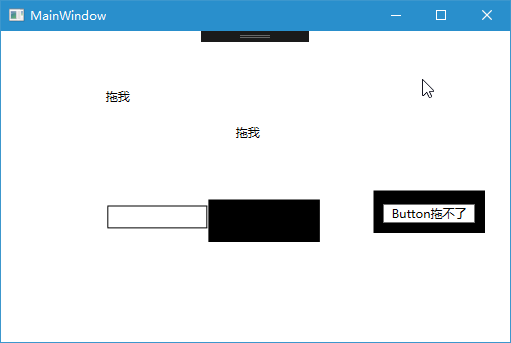
运行效果:
【代码】
WPF实现拖拽功能的更多相关文章
- WPF简单拖拽功能实现
1.拖放操作有两个方面:源和目标. 2.拖放操作通过以下三个步骤进行: ①用户单击元素,并保持鼠标键为按下状态,启动拖放操作. ②用户将鼠标移到其它元素上.如果该元素可接受正在拖动的内容的类型,鼠标指 ...
- C# WPF可拖拽的TabControl
微信公众号:Dotnet9,网站:Dotnet9,问题或建议:请网站留言, 如果对您有所帮助:欢迎赞赏. C# WPF可拖拽的TabControl 阅读导航 本文背景 代码实现 本文参考 源码 1. ...
- RCP:拖拽功能的实现 Drag and Drop
SWT中的拖拽是使用的org.eclipse.swt.dnd. 有三个需要密切注意的类: 1.DragSource 2.DropTarget 3.Transfer DragSource封装了需要被拖拽 ...
- js实现登陆页面的拖拽功能
<!DOCTYPE html><html> <head> <meta charset="UTF-8"> <title>登 ...
- duilib中控件拖拽功能的实现方法(附源码)
转载请说明原出处,谢谢~~:http://blog.csdn.net/zhuhongshu/article/details/41144283 duilib库中原本没有显示的对控件增加拖拽的功能,而实际 ...
- React Editor 应用编辑器(1) - 拖拽功能剖析
这是可视化编辑器 Gaea-Editor 的第一篇连载分析文章,希望我能在有限的篇幅讲清楚制作这个网页编辑器的动机,以及可能带来的美好使用前景(画大饼).它会具有如下几个特征: 运行在网页 文档流布局 ...
- DIV 实现可拖拽 功能(留档)
//可拖拽 功能 $.fn.extend({ //用法:$(element).jqDrag(); //element需要具备定位属性,需要手动调整层叠样式,这里只是修改鼠标拖动效果 ...
- 使用NGUI实现拖拽功能(拼图小游戏)
上一次用UGUI实现了拼图小游戏,这次,我们来用NGUI来实现 实现原理 NGUI中提供了拖拽的基类UIDragDropItem,所以我们要做的就是在要拖拽的图片上加一个继承于该类的脚本,并实现其中的 ...
- 使用UGUI实现拖拽功能(拼图小游戏)
实现方式 1.引入UGUI自带的事件系统 UnityEngine.EventSystems 2.为我们的类添加接口 IBeginDragHandler, IDragHandler, IEndDragH ...
随机推荐
- rsync- sersync -inotify
Rsync简介 Rsync是一款优秀的.快速的.多功能的本地或远程数据镜像同步备份工具.适用于unix/linux/windows等多种平台 从软件的名称Rsync(Remote Rynhroniza ...
- Permission Denial: opening provider 隐藏的android:exported属性的含义
Permission Denial: opening provider 隐藏的android:exported属性的含义 2013-03-07 13:17 227人阅读 评论(0) 收藏 举报 场景: ...
- python 使用set对列表去重后,保持原来列表的顺序排列
testlist = ['cc', 'bbbb', 'afa', 'sss', 'bbbb', 'cc', 'shafa'] set2list = list(set(testlist)) print ...
- Oracle 11g简体中文版的安装过程及图解
1.下载Oracle 11g 地址 http://download.oracle.com/otn/nt/oracle11g/win32_11gR1_database_1013.zip 基本安装 解压缩 ...
- Java并发案例01---多线程之死锁
多线程之死锁案例一 package example; /** * 模拟死锁 * @author maple * */ public class DeadLock { public int flag = ...
- [运维笔记] Nginx编译安装
yum -y install pcre-devel.x86_64 yum -y install openssl openssl-devel.x86_64 useradd www -s /sbin/no ...
- [Python 多线程] Timer定时器/延迟执行、Event事件 (七)
Timer继承子Thread类,是Thread的子类,也是线程类,具有线程的能力和特征.这个类用来定义多久执行一个函数. 它的实例是能够延迟执行目标函数的线程,在真正执行目标函数之前,都可以cance ...
- Owin+ASP.NET Identity浅析系列(三)框架结构分析
在今天,读书有时是件“麻烦”事.它需要你付出时间,付出精力,还要付出一份心境.--仅以<Owin+ASP.NET Identity浅析系列>来祭奠那逝去的…… 前两篇博客仅仅说了下功能如何 ...
- 【原创】纯CSS画黄金梅丽号!
代码如下 <!DOCTYPE html> <!-- saved from url=(0055)http://jadyoap.bj.bcebos.com/ife%2FcssCatAni ...
- ethereumjs/merkle-patricia-tree-2-API
SecureTrie src/secure.js:10-15 Extends Trie 扩展前缀树 You can create a secure Trie where the keys are au ...