
利用Spring AOP和自定义注解实现日志功能
Spring AOP的主要功能相信大家都知道,日志记录、权限校验等等。
用法就是定义一个切入点(Pointcut),定义一个通知(Advice),然后设置通知在该切入点上执行的方式(前置、后置、环绕等)。
只不过一直没想过切入点还可以是注解。
下面直接进入节奏
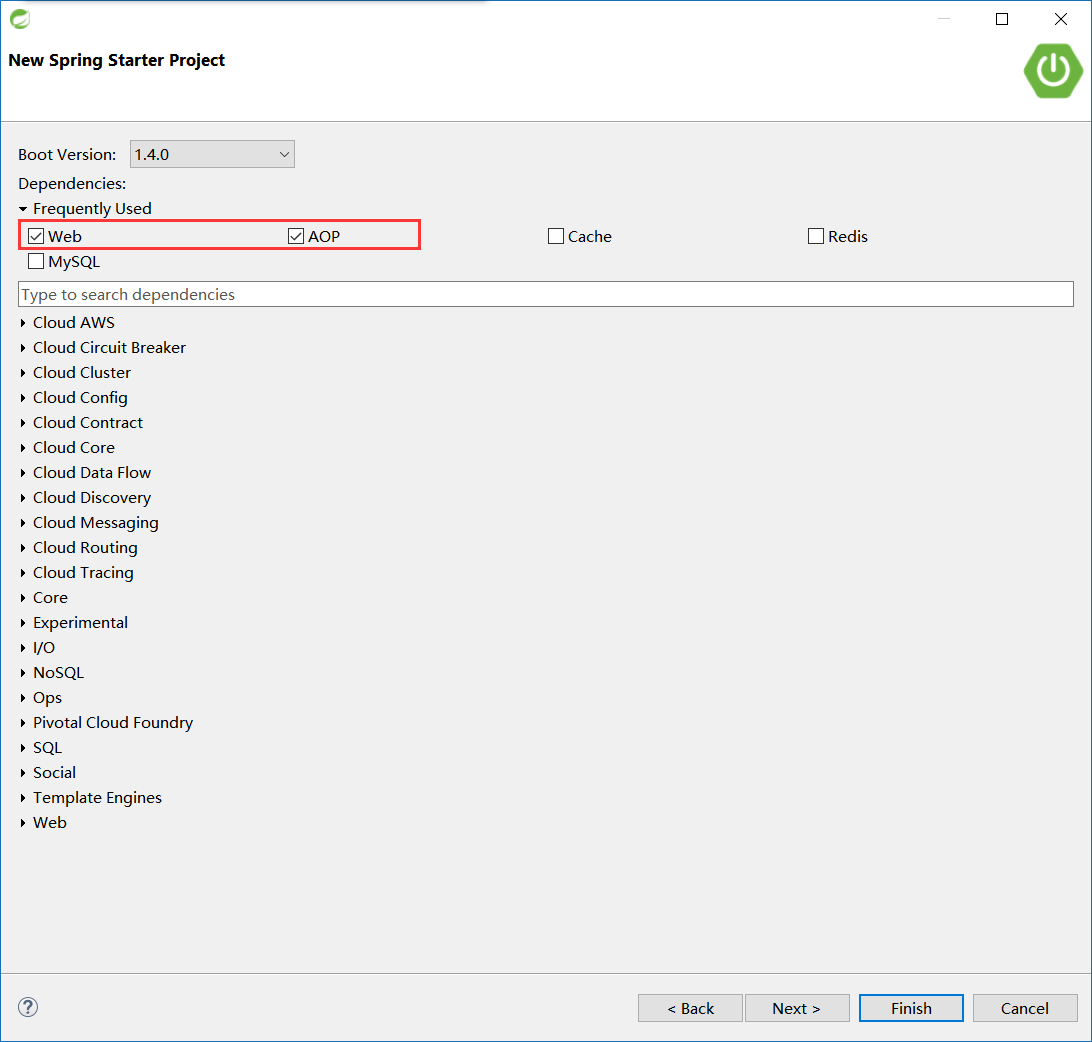
1、打开STS,新建一个Spring Starter Project。如果不清楚STS是什么,可以参考我的 Spring Tools Suite (STS) 简介,几分钟的事。
Starter模块选择web、aop,其实我还选了一个Devtools模块,不过对这个示例来说没有区别。

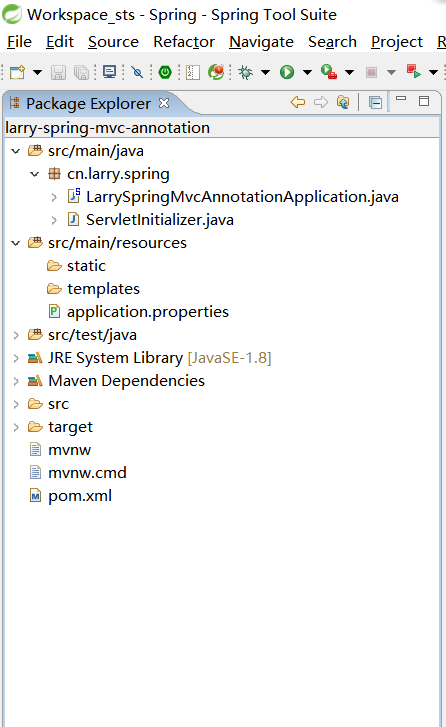
新建完成后,外观是这样的:
2、新建一个注解 cn.larry.spring.annotation.Log:
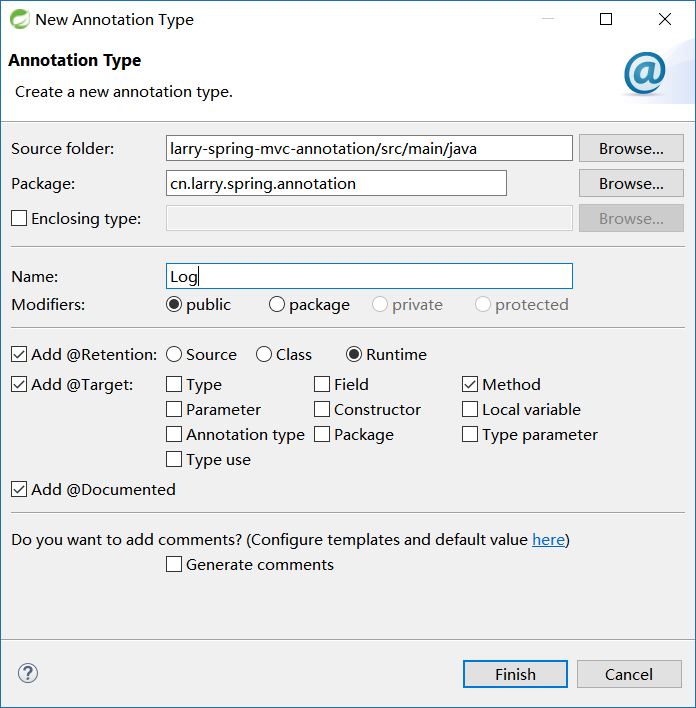
注意:STS有新建注解的选项(没注意过Eclipse有没有~~),可以直接选择保留策略和目标。当然也可以新建好空白注解之后添加。
新建的注解内容如下:
package cn.larry.spring.annotation;

import static java.lang.annotation.ElementType.METHOD;

import static java.lang.annotation.RetentionPolicy.RUNTIME;

import java.lang.annotation.Documented;

import java.lang.annotation.Retention;

import java.lang.annotation.Target;

@Documented

@Retention(RUNTIME)

@Target(METHOD)

public @interface Log {

}
由于只是案例示范,这里只添加一个注解参数 value 即可。如下:
package cn.larry.spring.annotation;

import static java.lang.annotation.ElementType.METHOD;

import static java.lang.annotation.RetentionPolicy.RUNTIME;

import java.lang.annotation.Documented;

import java.lang.annotation.Retention;

import java.lang.annotation.Target;

@Documented

@Retention(RUNTIME)

@Target(METHOD)

public @interface Log {

    String value() default "我是日志注解";

}
3、接下来就该AOP登场啦,新建一个类 cn.larry.spring.aspect.LogAspect。并添加@Component和@Aspect注解 -- 这是因为@Aspect只能作用在bean上。如下:
package cn.larry.spring.aspect;

import org.aspectj.lang.annotation.Aspect;

import org.springframework.stereotype.Component;

@Component

@Aspect

public class LogAspect {

}
然后定义一个Pointcut,如下:
@Pointcut("@annotation(cn.larry.spring.annotation.Log)")

private void cut() { }
再定义一个Advice,如下:
@Around("cut()")

public void advice(ProceedingJoinPoint joinPoint){

    System.out.println("环绕通知之开始");

    try {

        joinPoint.proceed();

    } catch (Throwable e) {

        e.printStackTrace();

    }

    System.out.println("环绕通知之结束");

}
至此,一个简单的Aspect就创建完毕。
注:本来我想直接使用 新建Aspect,不过提示本项目不是一个Aspect项目,遂放弃。想了一下,大概是因为Spring仅借用了注解的缘故。
下面就是该Aspect的使用了。
4、新建一个Service,并添加一个run方法(方法名随意),然后在该方法上使用注解@Log:
package cn.larry.spring.service;

import org.springframework.stereotype.Service;

import cn.larry.spring.annotation.Log;

@Service

public class DemoService {

    @Log

    public void run(){

        System.out.println("----我是cn.larry.spring.service.DemoService.run()----");

    }

}
5、有了方法,还需要调用,所以新建一个Controller,注入Service,并调用其方法:
package cn.larry.spring.web.controller;

import org.springframework.beans.factory.annotation.Autowired;

import org.springframework.web.bind.annotation.RequestMapping;

import org.springframework.web.bind.annotation.RestController;

import cn.larry.spring.service.DemoService;

@RestController

@RequestMapping("/aop")

public class AopController {

    @Autowired

    private DemoService demoService;

    @RequestMapping

    public String run(){

        demoService.run();

        return "Controller completed!";

    }

}
至此,一个简单的示例就完成了,以Spring Boot App启动,然后访问 http://localhost:8080/aop 即可。控制台内容如下:
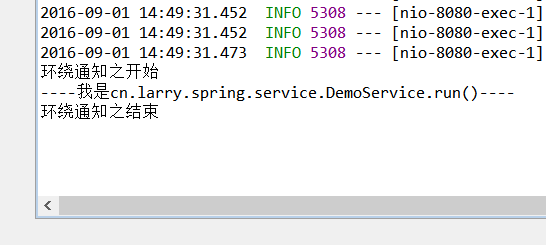
当然,这是最简单的示例,实际需求通常比这个复杂,不过不外乎获取注解的参数,然后根据参数内容进行操作。甚至可以获取被注解的方法,再获取该方法的参数,然后根据参数再进行不同的操作。
如有意,欢迎探讨。
补充:
@AspectJ 是用被注解的Java类来声明切面的一种方式(另一种方式就是xml设置),但是Spring只是借用它的注解,本质还是Spring的东西。原文如下:
@AspectJ refers to a style of declaring aspects as regular Java classes annotated with annotations.

The @AspectJ style was introduced by the AspectJ project as part of the AspectJ 5 release.

Spring interprets the same annotations as AspectJ 5, using a library supplied by AspectJ for pointcut parsing and matching.

The AOP runtime is still pure Spring AOP though, and there is no dependency on the AspectJ compiler or weaver.
利用Spring AOP和自定义注解实现日志功能的更多相关文章
- 运用Spring Aop,一个注解实现日志记录
运用Spring Aop,一个注解实现日志记录 1. 介绍 我们都知道Spring框架的两大特性分别是 IOC (控制反转)和 AOP (面向切面),这个是每一个Spring学习视频里面一开始都会提到 ...
- 我使用Spring AOP实现了用户操作日志功能
我使用Spring AOP实现了用户操作日志功能 今天答辩完了,复盘了一下系统,发现还是有一些东西值得拿出来和大家分享一下. 需求分析 系统需要对用户的操作进行记录,方便未来溯源 首先想到的就是在每个 ...
- spring AOP 和自定义注解进行身份验证
一个SSH的项目(springmvc+hibernate),需要提供接口给app使用.首先考虑的就是权限问题,app要遵循极简模式,部分内容无需验证,用过滤器不能解决某些无需验证的方法 所以最终选择用 ...
- 利用spring AOP实现每个请求的日志输出
前提条件: 除了spring相关jar包外,还需要引入aspectj包. <dependency> <groupId>org.aspectj</groupId> & ...
- Spring aop 拦截自定义注解+分组验证参数
import com.hsq.common.enums.ResponseState;import com.hsq.common.response.ResponseVO;import org.aspec ...
- 利用Spring AOP自定义注解解决日志和签名校验
转载:http://www.cnblogs.com/shipengzhi/articles/2716004.html 一.需解决的问题 部分API有签名参数(signature),Passport首先 ...
- (转)利用Spring AOP自定义注解解决日志和签名校验
一.需解决的问题 部分API有签名参数(signature),Passport首先对签名进行校验,校验通过才会执行实现方法. 第一种实现方式(Origin):在需要签名校验的接口里写校验的代码,例如: ...
- 化繁就简,如何利用Spring AOP快速实现系统日志
1.引言 有关Spring AOP的概念就不细讲了,网上这样的文章一大堆,要讲我也不会比别人讲得更好,所以就不啰嗦了. 为什么要用Spring AOP呢?少写代码.专注自身业务逻辑实现(关注本身的业务 ...
- Spring Boot实现自定义注解
在Spring Boot项目中可以使用AOP实现自定义注解,从而实现统一.侵入性小的自定义功能. 实现自定义注解的过程也比较简单,只需要3步,下面实现一个统一打印日志的自定义注解: 1. 引入AOP依 ...
随机推荐
- Ext.net控件调整后台事件、方法论
一.以ext.net的button为例调用后台事件: 前台代码: <ext:Button ID="Button1" runat="server" Text ...
- Ruby的DevKit名词解释
为了加快运行速度,Ruby下好多扩展包都是用C语言写的二进制包,如果我们要安装就要重新编译,DevKit包主要就是将编译用的工具链打包,解决了众多依赖问题,方便了群众. 但是,在实际安装中,可能还会遇 ...
- OOM问题定位方法
1. 背景 线上内存OOM问题是最难定位的问题,最常见的原因: (1)本身资源不够 (2)申请的太多 (3)资源耗尽 某服务器上部署了Java服务,出现OutOfMemoryError,请问有可能是什 ...
- Viso Professional 2013版本激活(office 系列产品 -- visio 2013 / project 2013 破解工具 - KMSpico)
背景: 环境是 win7, 64 bit 装了 visio 2013 , 可以却不能用它来画图,在网上找了一些破解工具,大都不能解决问题.网上不靠谱的广告型文章太多了,比较头痛. 所幸,终于找到正确的 ...
- sed匹配两种重要思想
1,sed匹配两种重要思想 屏蔽思想:遮住不想要的 挑出思想:遮住所有,挑出想要的. 2,实例 屏蔽思想: [root@lanny ~]# sed -n '2p' file.txt |sed -r ' ...
- 转:python常用运维脚本实例
python常用运维脚本实例 转载 file是一个类,使用file('file_name', 'r+')这种方式打开文件,返回一个file对象,以写模式打开文件不存在则会被创建.但是更推荐使用内置函 ...
- python切片 []取值操作符
切片1.什么叫切片数组,元组等含有多个元素的集合,取其中的一段元素的操作,叫做切片 2.取前10个元素 l = list(range(100)) l3 = l[:10] print(l3) 运行结果: ...
- Punycode转中文
package cn.cnnic.ops.udf; public class GetChineseFromPunycode { static int TMIN = 1; static int TMAX ...
- js 记录
(function(win,doc) { })(window,document)
- 【C++程序员学 python】python 之helloworld
我学习C语言之后才学的C++,所以这里写一个简单的helloworld程序. #coding:utf-8 def main(): print "hello world" if __ ...