
asp.net webapi 自托管插件式服务
webapi问世已久,稀里糊涂的人哪它都当mvc来使,毕竟已mvc使用级别的经验就可以应对webapi。
webapi和mvc在asp.net5时代合体了,这告诉我们,其实 它俩还是有区别的,要不现在也不会取两个名字,但是由于本人归纳总结能力较差,各种不同也无法一一列出了。
在webapi中 HelpPage是个突出而又实用的东西,它尼玛会把我们code中的注释生成xml,然后以web页面的方式把接口文档展示出来,这尼玛无形就下岗一批文案了,以社会责任感角度来讲,ms的这个HelpPage挺不地道的,但我表示就喜欢这样的东西。。
步骤也很简单:
1、negut 搜 helppage ,认准Id是Microsoft.AspNet.WebApi.HelpPage就Install它;
2、新建一个xml文件,在项目属性-生成中 xml文档文件路径指向它 勾选;
3、引入生成的HelpPage中HelpPageConfig.cs中,此代码“config.SetDocumentationProvider(new XmlDocumentationProvider(HttpContext.Current.Server.MapPath("~/App_Data/ApiDocument.xml")));”,修改xml路径 然后解注释;
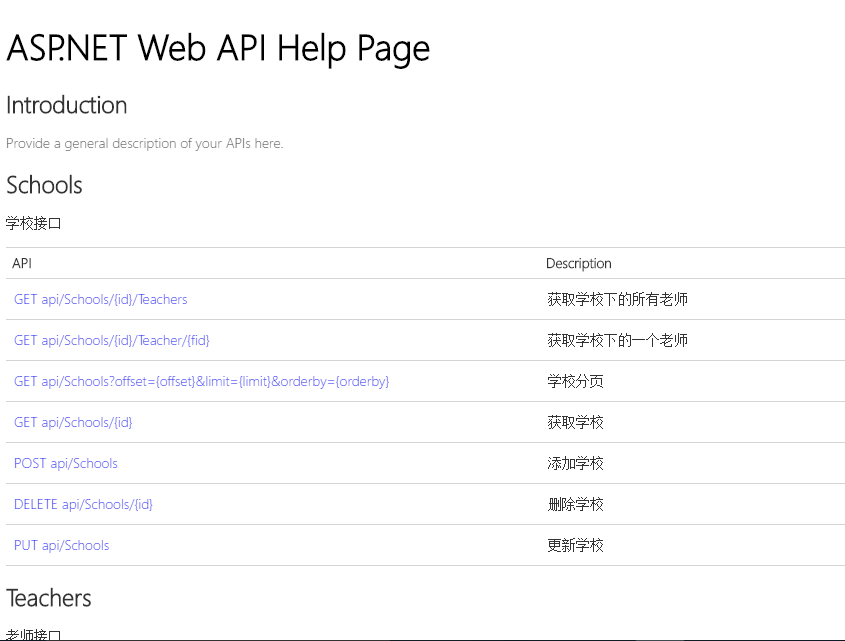
4、最后一生成就会发现你写的并没有卵用的注释被一坨一坨塞入了那个xml文件当中,当访问help/index 就会看到配图如下:
(附详细参考一份:http://www.asp.net/web-api/overview/getting-started-with-aspnet-web-api/creating-api-help-pages)
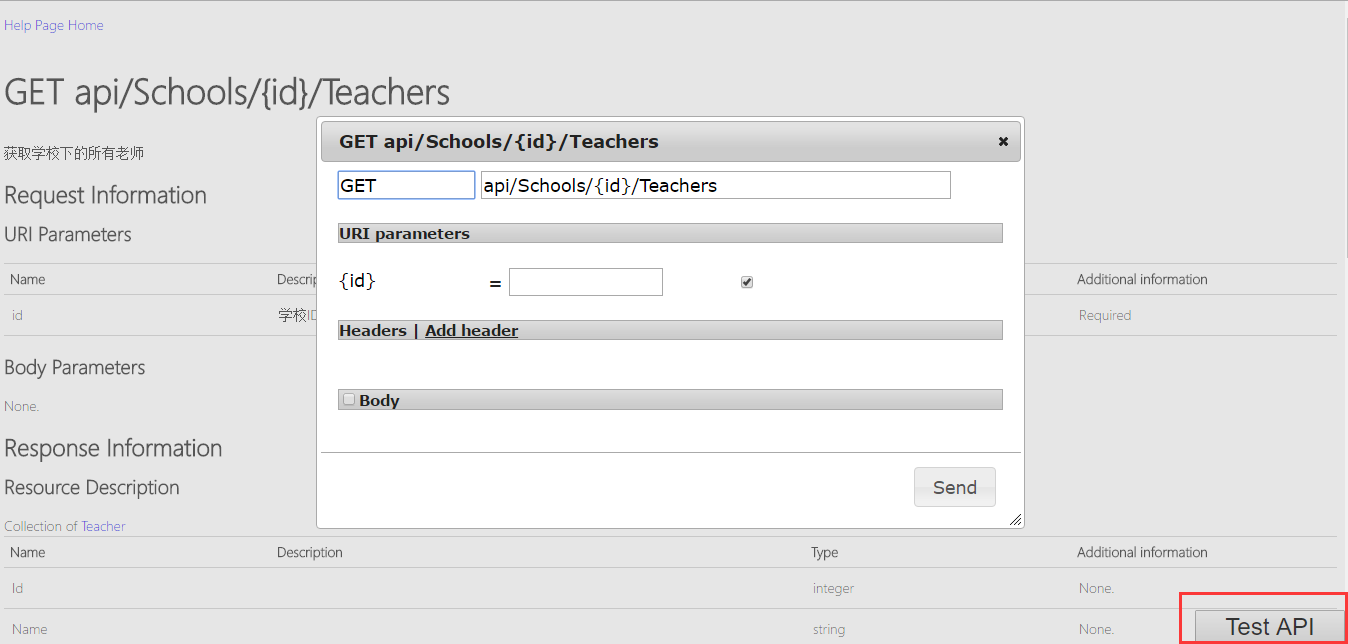
5、Negut认准Id:WebApiTestClient,Install它,你会发现多了一个js、一个cs、两个cshtml文件,都是TestClient开头的,别处用的时候不要忘了靠它。
Api.cshtml文件中加入两行代码
@Html.DisplayForModel("TestClientDialogs")

@section Scripts{

    <link href="~/Areas/HelpPage/TestClient.css" rel="stylesheet" />

    @Html.DisplayForModel("TestClientReferences")

}
点入某一个接口以后,戳那个Test Api,你的项目就可以进行接口测试了。此刻你会更坚定自己身为码农的存在,我们并不是coder,我们不生产代码,我们只是代码的搬运工。
(附详细参考一份:https://blogs.msdn.microsoft.com/yaohuang1/2012/12/02/adding-a-simple-test-client-to-asp-net-web-api-help-page/)
微幅扯淡之后,言入主题,毕竟文章精髓的要藏在后面。
从文章标题来看,就可以分成两个部分,webapi可以寄宿iis、console、winform、winservice等,插件开发大家也不陌生,所以精髓的部分也言简意赅了,这也是很无奈的事情啊。
1、使用Self Host自托管方式,negut-Id:Microsoft.AspNet.WebApi.SelfHost
1.1 首先准备一个contrller和model,代码很简单
public class Product

    {

        public int Id { get; set; }

        public string Name { get; set; }

        public string Category { get; set; }

        public decimal Price { get; set; }

    }

public class ProductsController : ApiController

    {

        Product[] products = new Product[]

        {

            new Product { Id = 1, Name = "Tomato Soup", Category = "Groceries", Price = 1 },

            new Product { Id = 2, Name = "Yo-yo", Category = "Toys", Price = 3.75M },

            new Product { Id = 3, Name = "Hammer", Category = "Hardware", Price = 16.99M }

        };

        public IEnumerable<Product> GetAllProducts()

        {

            return products;

        }

        public Product GetProductById(int id)

        {

            var product = products.FirstOrDefault((p) => p.Id == id);

            if (product == null)

            {

                throw new HttpResponseException(HttpStatusCode.NotFound);

            }

            return product;

        }

        public IEnumerable<Product> GetProductsByCategory(string category)

        {

            return products.Where(p => string.Equals(p.Category, category,

                    StringComparison.OrdinalIgnoreCase));

        }

    }
1.2 寄宿于console,监听port,配置route,启动service,一目了然
 class Program

    {

        static void Main(string[] args)

        {

            Console.WriteLine("请输入监听端口");

            string port = Console.ReadLine();

            var config = new HttpSelfHostConfiguration(string.Format("http://localhost:{0}", port ?? "8080"));

            config.Routes.MapHttpRoute(

                "API Default", "api/{controller}/{id}",

                new { id = RouteParameter.Optional });

            using (HttpSelfHostServer server = new HttpSelfHostServer(config))

            {

                server.OpenAsync().Wait();

                Console.WriteLine("Press ESC to quit.");

                while (

               !Console.ReadKey().Key.Equals(ConsoleKey.Escape))

                { }

            }

        }

    }
1.3 用winservice来承载webapi服务
首先: Install-Package Microsoft.AspNet.WebApi.OwinSelfHost (提到Asp.Net Owin一句话可形容,Asp.Net5跨平台,此逼功不可没啊)
新建好winserver项目后就可以新建一个Owin的启动类别,在其当中构建webapi的配置
public class Startup

    {

        public void Configuration(IAppBuilder appBuilder)

        {

            // Configure Web API for self-host.

            HttpConfiguration config = new HttpConfiguration();

            config.Routes.MapHttpRoute(

                name: "DefaultApi",

                routeTemplate: "api/{controller}/{id}",

                defaults: new { id = RouteParameter.Optional }

            );

            //config.Services.Replace(typeof(IAssembliesResolver), new PluginsResolver());

            appBuilder.UseWebApi(config);

        }

    }
在service中启动,over。
private IDisposable _apiserver = null;

        protected override void OnStart(string[] args)

        {

            //Services URI

            string serveruri = string.Format("http://localhost:{0}/", System.Configuration.ConfigurationManager.AppSettings["port"]);

            // Start OWIN host

            _apiserver = WebApp.Start<Startup>(url: serveruri);

            base.OnStart(args);

        }

        protected override void OnStop()

        {

            if (_apiserver != null)

            {

                _apiserver.Dispose();

            }

            base.OnStop();

        }
2、插件式服务,看似逼格很高,其实只是标题党,画龙点睛的代码到了...
重写DefaultAssembliesResolver的GetAssemblies,反射加载指定文件下的dll中的controller,在WebApiConifg添加其实现
public class PluginsResolver : DefaultAssembliesResolver

    {

        public override ICollection<Assembly> GetAssemblies()

        {

            //动态加载dll中的Controller,类似于插件服务,在WebApiConifg中添加配置

            // config.Services.Replace(typeof(IAssembliesResolver), new PluginsResolver());

            List<Assembly> assemblies = new List<Assembly>(base.GetAssemblies());

            string directoryPath = Path.Combine(System.AppDomain.CurrentDomain.BaseDirectory, "dynamic_services");

            string[] files = Directory.GetFiles(directoryPath);

            foreach (var fileName in files)

            {

                assemblies.Add(Assembly.LoadFrom(Path.Combine(directoryPath, fileName)));

            }

            return assemblies;

        }

    }
需要什么接口服务直接写好dll仍进dynamic_services文件夹下就有了。
asp.net webapi 自托管插件式服务的更多相关文章
- asp.net webapi 自托管插件式服务(转)
asp.net webapi 自托管插件式服务 webapi问世已久,稀里糊涂的人哪它都当mvc来使,毕竟已mvc使用级别的经验就可以应对webapi. webapi和mvc在asp.net5时代 ...
- 从零开始实现ASP.NET Core MVC的插件式开发(六) - 如何加载插件引用
标题:从零开始实现ASP.NET Core MVC的插件式开发(六) - 如何加载插件引用. 作者:Lamond Lu 地址:https://www.cnblogs.com/lwqlun/p/1171 ...
- 从零开始实现ASP.NET Core MVC的插件式开发(八) - Razor视图相关问题及解决方案
标题:从零开始实现ASP.NET Core MVC的插件式开发(八) - Razor视图相关问题及解决方案 作者:Lamond Lu 地址:https://www.cnblogs.com/lwqlun ...
- 从零开始实现ASP.NET Core MVC的插件式开发(一) - 使用ApplicationPart动态加载控制器和视图
标题:从零开始实现ASP.NET Core MVC的插件式开发(一) - 使用Application Part动态加载控制器和视图 作者:Lamond Lu 地址:http://www.cnblogs ...
- 从零开始实现ASP.NET Core MVC的插件式开发(二) - 如何创建项目模板
标题:从零开始实现ASP.NET Core MVC的插件式开发(二) - 如何创建项目模板 作者:Lamond Lu 地址:https://www.cnblogs.com/lwqlun/p/11155 ...
- 从零开始实现ASP.NET Core MVC的插件式开发(三) - 如何在运行时启用组件
标题:从零开始实现ASP.NET Core MVC的插件式开发(三) - 如何在运行时启用组件 作者:Lamond Lu 地址:https://www.cnblogs.com/lwqlun/p/112 ...
- 从零开始实现ASP.NET Core MVC的插件式开发(四) - 插件安装
标题:从零开始实现ASP.NET Core MVC的插件式开发(四) - 插件安装 作者:Lamond Lu 地址:https://www.cnblogs.com/lwqlun/p/11260750. ...
- 从零开始实现ASP.NET Core MVC的插件式开发(五) - 插件的删除和升级
标题:从零开始实现ASP.NET Core MVC的插件式开发(五) - 使用AssemblyLoadContext实现插件的升级和删除 作者:Lamond Lu 地址:https://www.cnb ...
- 从零开始实现ASP.NET Core MVC的插件式开发(七) - 近期问题汇总及部分解决方案
标题:从零开始实现ASP.NET Core MVC的插件式开发(七) - 问题汇总及部分解决方案 作者:Lamond Lu 地址:https://www.cnblogs.com/lwqlun/p/12 ...
随机推荐
- Rails Guide -- Ruby on Rake(未详细阅读)
一个软件task管理和build 自动化的工具. 它允许用户指定tasks和describe dependencies, 也可以在一个namespace中group tasks. 使用Ruby语言写的 ...
- 分享6款优秀的 AR/VR 开源库
今天,为大家推荐几款优秀的 AR/VR 开源库,希望能对大家有所帮助~ 1.AR.js AR.js 是一款应用于 Web 的高效增强现实(AR)库,基于 three.js + jsartoolkit5 ...
- 1003: [ZJOI2006]物流运输 最短路+dp
https://www.lydsy.com/JudgeOnline/problem.php?id=1003 数据范围很小,怎么瞎搞都行,n方dp,然后跑出最短路暴力转移,需要注意的是不能使用的可能有多 ...
- hdu3951巴什博弈变型
参考博客:http://blog.csdn.net/sun897949163/article/details/50609070 特判一下m=1的情况,然后m!=1时,无论对手取多少,我只要取的让这条链 ...
- Vue跨路由触发事件,Vue监听sessionStorage
近来,在做公司的聊天系统,引用的是极光的api.项目需求实时监听别人发过来的消息,进行渲染到页面,还有历史记录也要渲染,历史记录和实时聊天记录返回的结构体还不一样,看到需求的我欲哭无泪,首先登录是在首 ...
- 牛客网——A找一找
链接:https://www.nowcoder.net/acm/contest/71/A来源:牛客网 题目描述 给定n个正整数,请找出其中有多少个数x满足:在这n个数中存在数y=kx,其中k为大于1的 ...
- 物理内存不够用,临时增大Linux交换分区的方法
当系统的物理内存不够用的时候,就需要将物理内存中的一部分空间释放出来,以供当前运行的程序使用.那些被释放的空间可能来自一些很长时间没有什么 操作的程序,这些被释放的空间被临时保存到Swap空间中,等到 ...
- EPANET头文件解读系列1——TEXT.H
定义在TEXT.H文件中的字符常量都以小写开头,然后紧跟一个下划线,再接着就全是大写字母 /***************************************************** ...
- bzoj1176
题解: 和上一题差不多 就加上一个初始值 代码: #include<bits/stdc++.h> ; using namespace std; int n,m,cnt,s,sum[N],a ...
- delphi文件操作的总结
csfinal90我的:收件箱资源博客空间设置|帮助|退出 首页 业界 移动 云计算 研发 论坛 博客 下载 更多 windzb的专栏 目录视图 摘要视图 订阅 IT俱乐部创始人杜鸿飞专访 ...