
OpenCV学习笔记——图像平滑处理
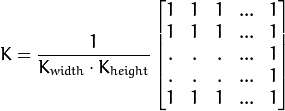
1、blur 归一化滤波器
Blurs an image using the normalized box filter.
C++: void blur(InputArray src, OutputArray dst, Size ksize, Point anchor=Point(-1,-1), int borderType=BORDER_DEFAULT )
Parameters:
src – input image; it can have any number of channels, which are processed independently,but the depth should be CV_8U, CV_16U, CV_16S, CV_32F or CV_64F. 输入图像
dst – output image of the same size and type as src. 输出图像
ksize – blurring kernel size. 定义内核大小 ( Size(w,h) ,w像素宽度,h像素高度 )
anchor – anchor point; default value Point(-1,-1) means that the anchor is at the kernel center. 指定锚点位置(被平滑点), 如果是负值,取核的中心为锚点。
borderType – border mode used to extrapolate pixels outside of the image.
2、GaussianBlur 高斯滤波器
Blurs an image using a Gaussian filter.
C++: void GaussianBlur(InputArray src, OutputArray dst, Size ksize, double sigmaX, double sigmaY=0, int borderType=BORDER_DEFAULT )
Parameters:
src – input image; the image can have any number of channels, which are processed independently, but the depth should be CV_8U, CV_16U, CV_16S, CV_32F or CV_64F. 输入图像
dst – output image of the same size and type as src. 输出图像
ksize – Gaussian kernel size. ksize.width and ksize.height can differ but they both must be positive and odd. Or, they can be zero’s and then they are computed from sigma* . 定义内核的大小(需要考虑的邻域范围)。  和
和  必须是正奇数,否则将使用
  和
和  参数来计算内核大小。
sigmaX – Gaussian kernel standard deviation in X direction. x 方向标准方差, 如果是  则 使用内核大小计算得到。
sigmaY – Gaussian kernel standard deviation in Y direction; if sigmaY is zero, it is set to be equal to sigmaX, if both sigmas are zeros, they are computed from ksize.width and ksize.height , respectively (see getGaussianKernel() for details); to fully control the result regardless of possible future modifications of all this semantics, it is recommended to specify all of ksize, sigmaX, and sigmaY. y 方向标准方差, 如果是 则 使用内核大小计算得到。
borderType – pixel extrapolation method (see borderInterpolate() for details).
3、medianBlur 中值滤波器
Blurs an image using the median filter.
C++: void medianBlur(InputArray src, OutputArray dst, int ksize)
Parameters:
src – input 1-, 3-, or 4-channel image; when ksize is 3 or 5, the image depth should be CV_8U, CV_16U, or CV_32F, for larger aperture sizes, it can only be CV_8U.
dst – destination array of the same size and type as src.
ksize – aperture linear size; it must be odd and greater than 1, for example: 3, 5, 7 ... 内核大小 (只需一个值,因为我们使用正方形窗口),比1大的奇数
4、bilateralFilter 双边滤波器
Applies the bilateral filter to an image.
C++: void bilateralFilter(InputArray src, OutputArray dst, int d, double sigmaColor, double sigmaSpace, int borderType=BORDER_DEFAULT )
Parameters:
src – Source 8-bit or floating-point, 1-channel or 3-channel image.
dst – Destination image of the same size and type as src .
d – Diameter of each pixel neighborhood that is used during filtering. If it is non-positive, it is computed from sigmaSpace . 像素的邻域直径
sigmaColor – Filter sigma in the color space. A larger value of the parameter means that farther colors within the pixel neighborhood (see sigmaSpace ) will be mixed together, resulting in larger areas of semi-equal color. 颜色空间的标准方差
sigmaSpace – Filter sigma in the coordinate space. A larger value of the parameter means that farther pixels will influence each other as long as their colors are close enough (see sigmaColor ). When d>0 , it specifies the neighborhood size regardless of sigmaSpace. Otherwise, d is proportional to sigmaSpace . 坐标空间的标准方差(像素单位)
OpenCV学习笔记——图像平滑处理的更多相关文章
- OpenCV学习笔记3
OpenCV学习笔记3 图像平滑(低通滤波) 使用低通滤波器可以达到图像模糊的目的.这对与去除噪音很有帮助.其实就是去除图像中的高频成分(比如:噪音,边界).所以边界也会被模糊一点.(当然,也有一些模 ...
- opencv学习笔记(七)SVM+HOG
opencv学习笔记(七)SVM+HOG 一.简介 方向梯度直方图(Histogram of Oriented Gradient,HOG)特征是一种在计算机视觉和图像处理中用来进行物体检测的特征描述子 ...
- opencv学习笔记(六)直方图比较图片相似度
opencv学习笔记(六)直方图比较图片相似度 opencv提供了API来比较图片的相似程度,使我们很简单的就能对2个图片进行比较,这就是直方图的比较,直方图英文是histogram, 原理就是就是将 ...
- opencv学习笔记(五)镜像对称
opencv学习笔记(五)镜像对称 设图像的宽度为width,长度为height.(x,y)为变换后的坐标,(x0,y0)为原图像的坐标. 水平镜像变换: 代码实现: #include <ios ...
- opencv学习笔记(四)投影
opencv学习笔记(四)投影 任选了一张图片用于测试,图片如下所示: #include <cv.h> #include <highgui.h> using namespace ...
- opencv学习笔记(三)基本数据类型
opencv学习笔记(三)基本数据类型 类:DataType 将C++数据类型转换为对应的opencv数据类型 OpenCV原始数据类型的特征模版.OpenCV的原始数据类型包括unsigned ch ...
- opencv学习笔记(二)寻找轮廓
opencv学习笔记(二)寻找轮廓 opencv中使用findContours函数来查找轮廓,这个函数的原型为: void findContours(InputOutputArray image, O ...
- opencv学习笔记(一)IplImage, CvMat, Mat 的关系
opencv学习笔记(一)IplImage, CvMat, Mat 的关系 opencv中常见的与图像操作有关的数据容器有Mat,cvMat和IplImage,这三种类型都可以代表和显示图像,但是,M ...
- paper 93:OpenCV学习笔记大集锦
整理了我所了解的有关OpenCV的学习笔记.原理分析.使用例程等相关的博文.排序不分先后,随机整理的.如果有好的资源,也欢迎介绍和分享. 1:OpenCV学习笔记 作者:CSDN数量:55篇博文网址: ...
随机推荐
- IntelliJ IDEA(2018)安装和破解。
一.下载并安装, IntelliJ IDEA的官网:https://www.jetbrains.com 二.破解. 百度下载一个 JetbrainsCrack-2.6.2.jar ...
- 移植触摸屏驱动到linux3.4.2
1. 修改drivers/input/touchscreen/下的Makefile #obj-$(CONFIG_TOUCHSCREEN_S3C2410) += s3c2410_ts.o obj-$(C ...
- DMZ靶场渗透
0x00 目标站点www.test.ichunqiu 0x01 尝试登陆系统 -尝试弱密码登陆 结果:forbidden!!! -尝试万能账号密码登陆 1‘ or 1=1--+ 和 1‘ or 1=1 ...
- 前端框架---jQuery---一分钟下载使用
这里通过自己手动的方式“做”一个jQuery来使用,需要5步 1. 访问 https://jquery.com 2. 点击download 3. 拉到最下方,点击 JQuery CDN 4. 得到所有 ...
- R语言学习笔记(二十一五):如何如何提升R语言运算的性能以及速度
在R中获得快速运行代码的方法 使用向量化运算 R语言的并行计算可以用parallel和foreach包 加快R运行速度还可以使用cmpfun()函数即字节码编译器 再者就是在R中调用C或C++ 同时还 ...
- python2.7入门---多线程
多线程类似于同时执行多个不同程序,多线程运行有如下优点: 使用线程可以把占据长时间的程序中的任务放到后台去处理. 用户界面可以更加吸引人,这样比如用户点击了一个按钮去触发某些事件的处理,可以弹 ...
- WPF自定义命令
WPF的自定义命令实现过程包括三个部分,定义命令.定义命令源.命令调用,代码实现如下: public partial class MainWindow : Window { public MainWi ...
- 20155317 《Java程序设计》实验五网络编程与安全实验报告
20155317 <Java程序设计>实验五网络编程与安全实验报告 遇到问题 在刚开始启动客户端或者服务端时,出现了一系列的错误情况,总是提示异常信息 后来经过询问同学,反应将端口号修改一 ...
- 第9周 实现PWD命令
第9周 实现PWD命令 码云链接:https://gitee.com/bestiisjava2017/laura5332/blob/master/%E4%BF%A1%E6%81%AF%E5%AE%89 ...
- 系统分析与设计——WordCount
成果: https://gitee.com/ZMLJZ/codes/0k19q4upgmrfde265l7vx36 作业要求: 根据WordCount的需求描述,先编程实现,再编写单元测试,最后撰写博 ...