
JavaScript 跨域:window.postMessage 实现跨域通信
JavaScript 跨域方式实现方式有很多,之前,一篇文章中提到了 JSONP 形式实现跨域。本文将介绍 HTML5 新增的 api 实现跨域:window.postMessage 。
 1 otherWindow.postMessage(message, targetOrigin);

 2

 3 otherWindow

 4 其他窗口的一个引用,比如iframe的contentWindow属性、执行window.open返回的窗口对象、或者是命名过或数值索引的window.frames。

 5

 6 message

 7 将要发送到其他 window的数据。将会被结构化克隆算法序列化。这意味着你可不受什么限制的安全传送数据对象给目标窗口而无需自己序列化。

 8

 9 targetOrigin

10 该参数可设置为 *,将无域名限制。也可指定特定的域名,比如:http://www.jj.com

11

12 https://developer.mozilla.org/zh-CN/docs/Web/API/Window/postMessage
本文还是以 iframe 为例,一个 html 页面中套有一个 iframe 文档,不过,iframe 文档 src 属性与 html 页面不同域,因此,两者之间便形成跨域。
index.html _http://localhost:3127/index.htm
<!DOCTYPE html >

<html >

<head>

    <title></title>

</head>

<body >

   <input type="text"  id="val"/>

    <input type="button" id="btn" value="测试" /><br/>

    <iframe src="http://localhost:10528/index.html" > </iframe>

    <script type="text/javascript">

        window.onload = function () {
            // 首先,给按钮绑定 click 事件

            if (window.addEventListener)

                document.getElementById('btn').addEventListener('click', sendMsg, false);

            else

                document.getElementById('btn').attachEvent("onclick", sendMsg);

        };


        // 获取 iframe 标签,利用 postMessage 跨域通信,值为 input text 标签值

        function sendMsg() {

         document.getElementsByTagName('iframe')[0].contentWindow.postMessage(document.getElementById('val').value,"*");

        }

    </script>

</body>

</html>
index.html (iframe) _http://localhost:10528/index.html
<!DOCTYPE html >

<html xmlns="http://www.w3.org/1999/xhtml">

<head>

    <title></title>

</head>

<body >

   <b>我是另一个跨中 iframe 文档</b>

    <script type="text/javascript">

        // 给 iframe 文档绑定 message 事件

        window.onload = function () {

            if (window.addEventListener)

                window.addEventListener('message', getMessage, false);

            else

                window.attachEvent("onmessage", getMessage);

        };


       // iframe 触发 message 事件时,调用 getMessage 函数

        function getMessage(event) {

            console.dir(event);

            alert(event.data);

        }

    </script>

</body>

</html>
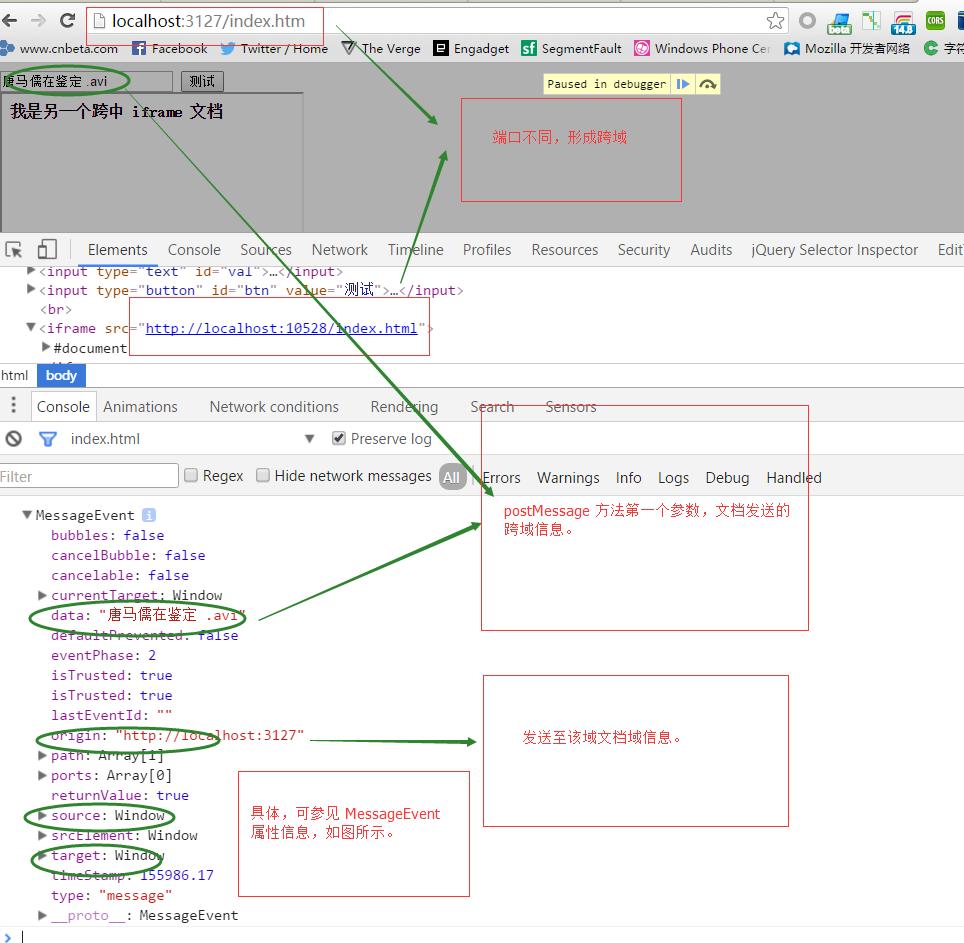
参考文档:https://developer.mozilla.org/zh-CN/docs/Web/API/Window/postMessage
JavaScript 跨域:window.postMessage 实现跨域通信的更多相关文章
- 解决Iframe跨域高度自适应,利用window.postMessage()实现跨域消息传递页面高度(JavaScript)
在iframe跨域引用高度自适应这块写的js方式都试了不管用,最终使用的是window.postMessage() 跨域获取高度 传递信息 1.首先,在主页面上使用iframe引入子页面:也就是A.h ...
- 使用window.postMessage实现跨域通信
JavaScript由于同源策略的限制,跨域通信一直是棘手的问题.当然解决方案也有很多: document.domain+iframe的设置,应用于主域相同而子域不同: 利用iframe和locati ...
- 利用HTML5的window.postMessage实现跨域通信
详见: http://blog.yemou.net/article/query/info/tytfjhfascvhzxcytp77 HTML5的window.postMessage简述 postM ...
- window.postMessage()实现跨域消息传递
window.postMessage() 方法可以安全地实现跨源通信.通常,对于两个不同页面的脚本,只有当执行它们的页面位于具有相同的协议(通常为https), 端口号(443为https的默认值), ...
- window.postMessage实现网页间通信
window.postMessage() 方法可以安全地实现跨域通信.通常,对于两个不同页面的脚本,只有当执行它们的页面位于具有相同的协议(通常为https),端口号(443为https的默认值),以 ...
- js实现跨域(jsonp, iframe+window.name, iframe+window.domain, iframe+window.postMessage)
一.浏览器同源策略 首先我们需要了解一下浏览器的同源策略,关于同源策略可以仔细看看知乎上的一个解释.传送门 总之:同协议,domain(或ip),同端口视为同一个域,一个域内的脚本仅仅具有本域内的权限 ...
- (二)文档请求不同源之window.postMessage跨域
一.基本原理 HTML5为了解决跨域,引入了跨文档通信API(Cross-document messaging).这个API为window对象新增了一个window.postMessage方法,允许跨 ...
- 跨域通信--Window.postMessage()
一.跨源通信概述 源:协议.端口号(https默认值433).主机域名(document.domain) 作用:向目标窗口派发MessageEvent消息(四个属性) 兼容参考 MessageEven ...
- HTML5之worker开启JS多线程模式及window.postMessage跨域
worker概述 worker基本使用 window下的postMessage worker多线程的应用 一.worker概述 web worker实际上是开启js异步执行的一种方式.在html5之前 ...
随机推荐
- Java 循环语句之多重循环
循环体中包含循环语句的结构称为多重循环.三种循环语句可以自身嵌套,也可以相互嵌套,最常见的就是二重循环.在二重循环中,外层循环每执行一次,内层循环要执行一圈. 如下所示: 例如:使用 * 打印长方形: ...
- Arduino报错
avrdude: stk500_recv(): programmer is not respondingavrdude: stk500_getsync() attempt 1 of 10: not i ...
- Eclipse将android项目打包jar文件
Eclipse+android打包jar文件 蔡建良 2016-3-12 以Android-SlideExpandableListView开源框架为例,将源码Library打包成jar文件并包含R.c ...
- WPF的控件Binding的ElementName/RelativeSource具体用法
<TextBlock Name="_txtSickBedNo" FontStyle="Normal" Foreground="Black&quo ...
- hdu 1969(二分)
题意:给了你n个蛋糕,然后分给m+1个人,问每个人所能得到的最大体积的蛋糕,每个人的蛋糕必须是属于同一块蛋糕的! 分析:浮点型二分,二分最后的结果即可,这里要注意圆周率的精度问题! #include& ...
- struct 与 typedef struct
1. 基本解释 typedef为C语言的关键字,作用是为一种数据类型定义一个新名字.这里的数据类型包括内部数据类型(int,char等)和自定义的数据类型(struct等). 在编程中使用typede ...
- 淘宝API开发(三)
自动登录到淘宝定时获取订单: C#控制台程序 第一步,获得淘宝真实登录地址.淘宝授权地址(https://oauth.taobao.com/authorize?response_type=token& ...
- STL中用erase()方法遍历删除元素 .xml
pre{ line-height:1; color:#f0caa6; background-color:#2d161d; font-size:16px;}.sysFunc{color:#e54ae9; ...
- 单独删除std::vector <std::vector<string> > 的所有元素
下面为测试代码: 1.创建 std::vector< std::vector<string> > vc2; 2.初始化 std::vector<string> vc ...
- Unreal Engine 虚幻引擎宣布对开发者免费
虚幻引擎4现在可供每个人免费使用,而且所有未来的更新都将免费!您可以下载引擎并将其用于游戏开发的各个方面,包括教育.建筑以及可视化,甚至虚拟现 实.电影和动画. 当您发布游戏或应用时,在您的每个游戏在 ...