
5 Post实现django表单
本节大纲
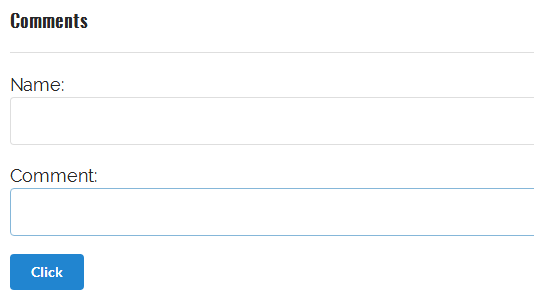
1.article-detail 评论页面的准备工作

(1)model层创建评论模型

class Comment(models.Model):

    """创建评论模型"""

    name = models.CharField(null=True, blank=True, max_length=50)

    comment = models.TextField(null=True, blank=True)

    def __str__(self):

        return self.comment
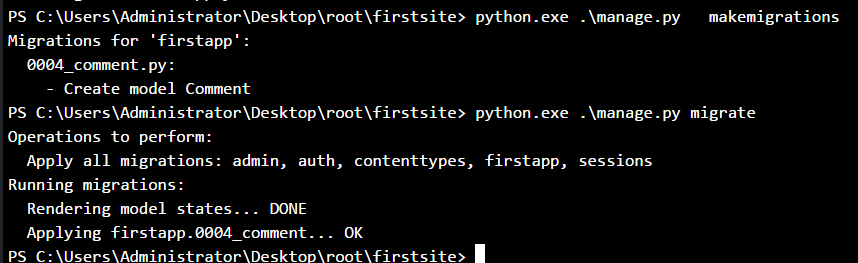
(2)数据合并
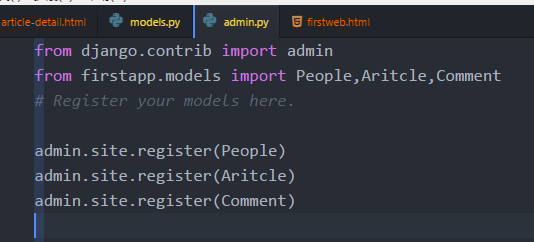
(3)注册到admin.py文件中
(4)admin后台查看

(5)View层:创建评论视图模型


from firstapp.models import People,Aritcle,Comment

def detail(request):

    """评论视图模型"""

    context = {}

    comment_list = Comment.objects.all()

    context['Comment_list'] = comment_list

    detail_page = render(request,'article-detail.html',context)

    return detail_page
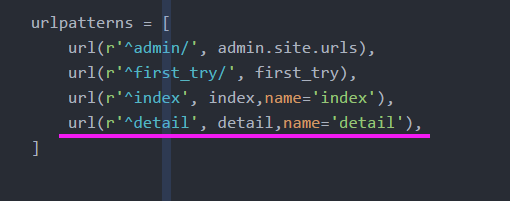
(6)urls 添加
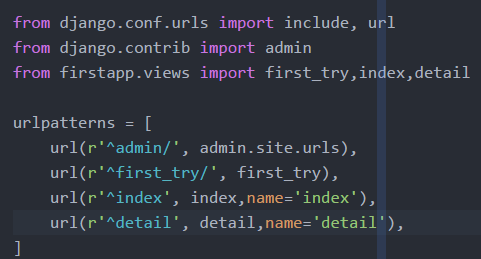
from django.conf.urls import include, url

from django.contrib import admin

from firstapp.views import first_try,index,detail

urlpatterns = [

    url(r'^admin/', admin.site.urls),

    url(r'^first_try/', first_try),

    url(r'^index', index,name='index'),

    url(r'^detail', detail,name='detail'),

]
(7)article-detail.html 页面:替换静态文件
{% load staticfiles %}

  <link rel="stylesheet" href="{% static 'css/semantic.css'%}" media="screen" title="no title" charset="utf-8">

 background:url({% static 'images/star_banner.jpg'%});
<!DOCTYPE html>

{% load staticfiles%}

<html>

    <head>

        <meta charset="utf-8">

        <title></title>

        <link rel="stylesheet" href="{% static 'css/semantic.css'%}" media="screen" title="no title" charset="utf-8">

        <link href="https://fonts.googleapis.com/css?family=Oswald|Raleway" rel="stylesheet">

        <style type="text/css">

            .ui.segment.container {

                width:700px;

            }

            p {

                font-family: 'Raleway', sans-serif;

                font-size:18px;

            }

            body {

                background:url({% static 'images/star_banner.jpg'%});

                background-size:cover;

                background-repeat:no-repeat;

                background-attachment:fixed

            }

        </style>

    </head>

    <body>

        <div class="ui image">

            <img src="" alt="" />

        </div>

        <div class="ui  segment padded container" >

            <h1 class="ui header" style="font-family:'Oswald', sans-serif;font-size:40px">

                Indonesia pointed at Christmas

            </h1>

            <p>

                his is how it happens:

                The most sensible alternative to a life of unbearable hardship is to take a chance on a rubber dinghy in Indonesia pointed at Christmas Island, which is part of Australia. If a refugee survives, this person is not praised for valor but rather ejected 4,000 miles away to another island. Nauru Regional Processing Center. Processing sounds temporary, and it is, in the same way purgatory is temporary. Asylum seekers have been known to wait five years for intercession in the form of a “refugee status determination,” or RSD.

                The agony of waiting is what caused the July 2013 riot. RSDs that were promised were not delivered, and asylum seekers protested. They threw rocks at police and lit fire to buildings. No one was hurt, but the fires caused $60 million in damage. It was probably the most power they’d ever wielded. Nauruan police arrested 153 people around 9:30 p.m. and charged them with rioting. But nothing changed. If anything, the detainees were more forlorn than ever.

                Depression was becoming rampant. The older children noticed it, and the little ones, too, though they couldn’t quite understand. Something was wrong. Happiness should be easy at that age. But not in Nauru.

                Once, a teacher noticed her student searching the ground for something while waiting for the bus to take him home from school. He was a nice little boy. He’d been given something that morning, a sticker. What a thing. But now he’d lost it, and he anxiously combed the dirt and gravel. “Leave it,” the teacher said. “You can find it later.” The boy said nothing. He just slumped into a pile and sobbed.

                When the protests of Sept. 30 amounted to nothing, it was as though a reservoir of grief broke through the last levee, and hopelessness flooded the little camp.

                All around were thoughts of suicide. One asylum seeker, Yusuf, told his case manager he thought the mood in the camp was worse than ever. A week earlier, the Australian government had taken the unprecedented step of paying Cambodia (as it paid Nauru) to resettle refugees there. The head of the U.N. refugee agency called it “a worrying departure from international norms” because Australia was essentially paying a poor, unsuitable country to take over its own moral and legal obligations. But Cambodia wanted the money, Australia didn’t want the refugees and to this day the plan is still in place.

            </p>

        </div>

        <!-- Comments&Form's here -->

        <div class="ui segment container" style="width:700px;">

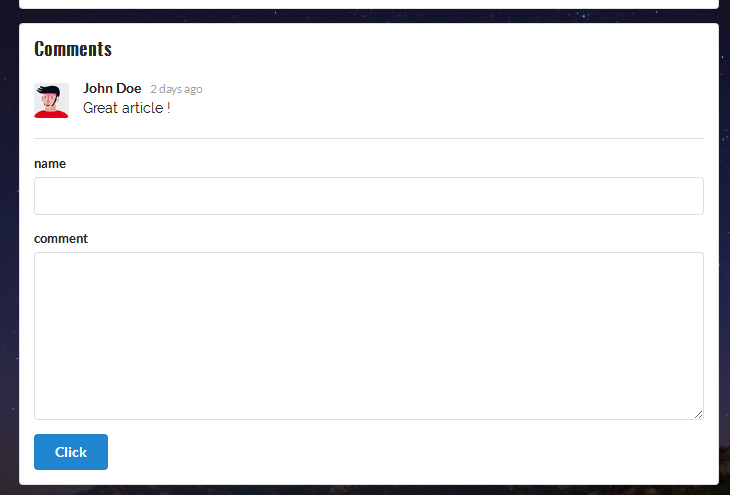
            <h3 class="ui header" style="font-family:'Oswald', sans-serif;">Comments</h3>

            <div class="ui comments">

                <div class="comment">

                    <div class="avatar">

                        <img src="http://semantic-ui.com/images/avatar/small/matt.jpg" alt="" />

                    </div>

                    <div class="content">

                        <a href="#" class="author">John Doe</a>

                        <div class="metadata">

                            <div class="date">2 days ago</div>

                        </div>

                        <p class="text" style="font-family: 'Raleway', sans-serif;">

                            Great article !

                        </p>

                    </div>

                </div>

            </div>

            <div class="ui divider"></div>

            <form class="ui form" action="" method="post">

                <div class="field">

                    <label> name</label>

                    <input type="text" name="name" value="">

                </div>

                <div class="field">

                    <label>comment</label>

                    <textarea></textarea>

                </div>

                <button type="submit" class="ui blue button" >Click</button>

            </form>

        </div>

    </body>

</html>
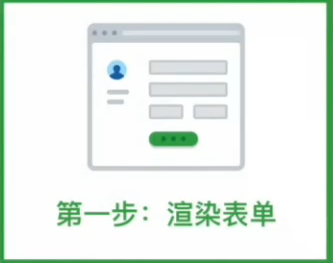
2.渲染表单

(1)view.py中的 Django自带的表单类
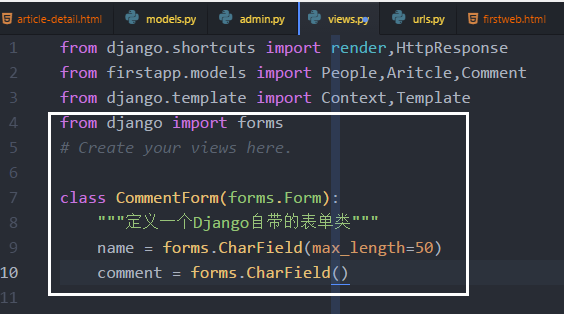
from django.shortcuts import render,HttpResponse

from firstapp.models import People,Aritcle,Comment

from django.template import Context,Template

from django import forms

# Create your views here.

class CommentForm(forms.Form):

    """定义一个Django自带的表单类"""

    name = forms.CharField(max_length=50)

    comment = forms.CharField()
(2) 实例化一个表单,装入context,传入模板层
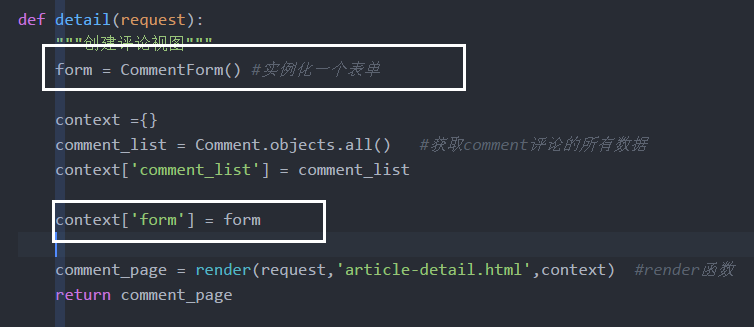
def detail(request):

    """创建评论视图"""

    form = CommentForm() #实例化一个表单

    context ={}

    comment_list = Comment.objects.all()   #获取comment评论的所有数据

    context['comment_list'] = comment_list

    context['form'] = form

    comment_page = render(request,'article-detail.html',context)  #render函数

    return comment_page
(3) 渲染html
- 删除手写的表单
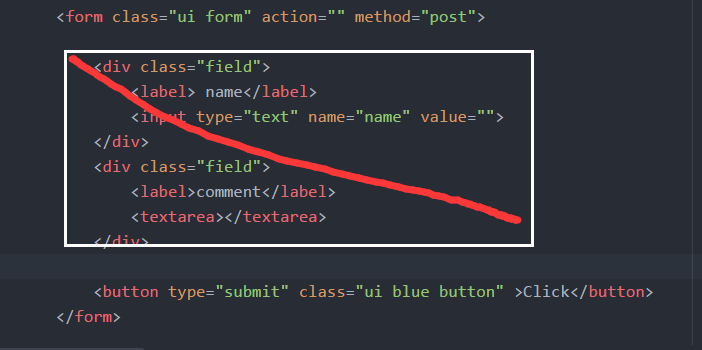
- 添加View层传递的表单
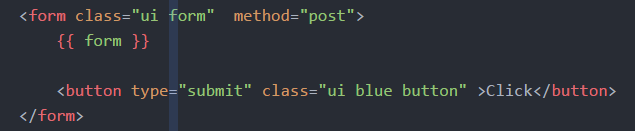
- 表单模板变量
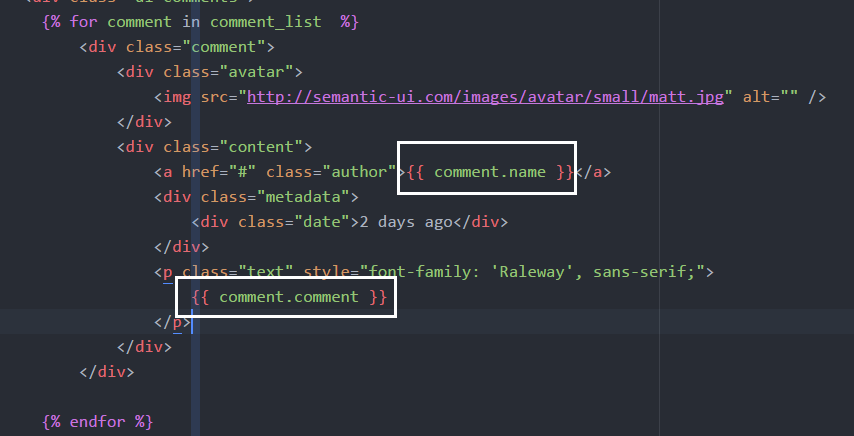

(4)修改form表单的class

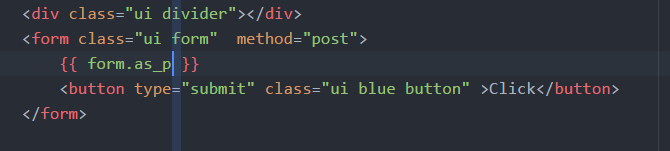
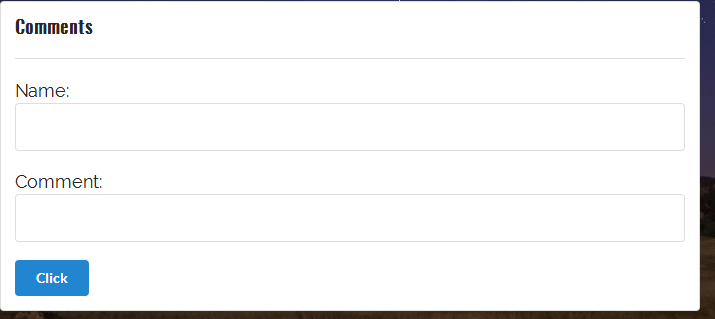
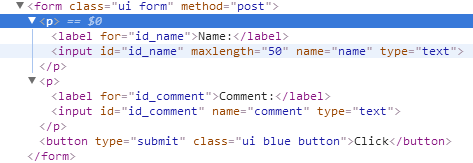
- 两个label各自包含在一个 p标签
{{ form.as_p }}
(5)html代码:form表单
      <!-- Comments&Form's here -->

        <div class="ui segment container" style="width:700px;">

            <h3 class="ui header" style="font-family:'Oswald', sans-serif;">Comments</h3>

            <div class="ui comments">

              {% for comment in comment_list %}

                    <div class="comment">

                        <div class="avatar">

                            <img src="http://semantic-ui.com/images/avatar/small/matt.jpg" alt="" />

                        </div>

                        <div class="content">

                            <a href="#" class="author">{{ comment.name }}</a>

                            <div class="metadata">

                                <div class="date">2 days ago</div>

                            </div>

                            <p class="text" style="font-family: 'Raleway', sans-serif;">

                                {{ comment.comment }}

                            </p>

                        </div>

                    </div>

              {% endfor %}

            </div>

            <div class="ui divider"></div>

            <form class="ui form" action="" method="post">

                {{ form.as_p }}

                {% csrf_token %}

                <button type="submit" class="ui blue button" >Click</button>

            </form>

        </div>
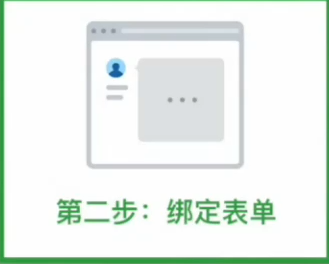
3.绑定表单&返回校验结果

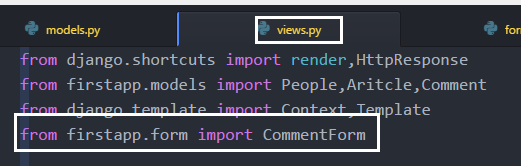
(1)表单文件移动到form.py


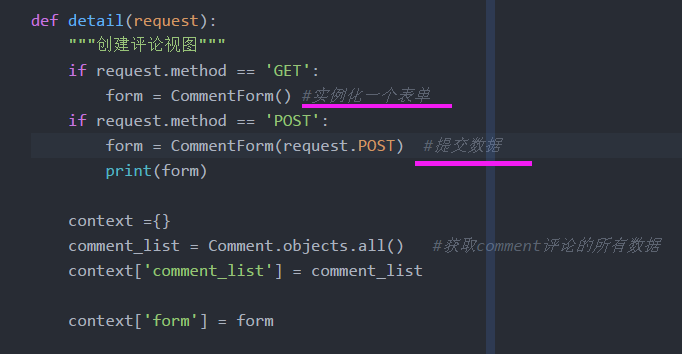
(2)绑定表单,提交表单
- Get方法:传递表单,我要填写表单
- Post方法:我要提交数据,你要校验数据
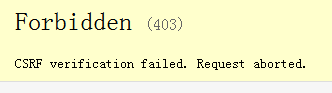
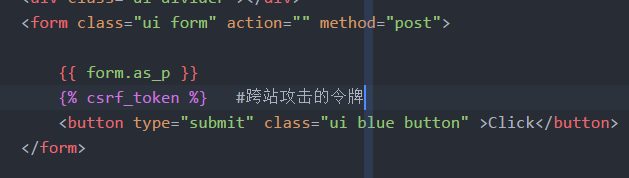
(3)CSRF跨站攻击的防护:证明我还是我,令牌和数据一起提交

(4)post方法提交的数据
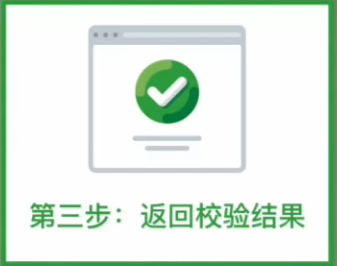
(5)表单校验功能


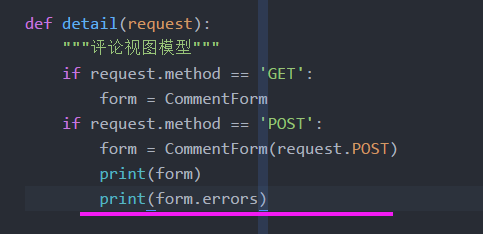
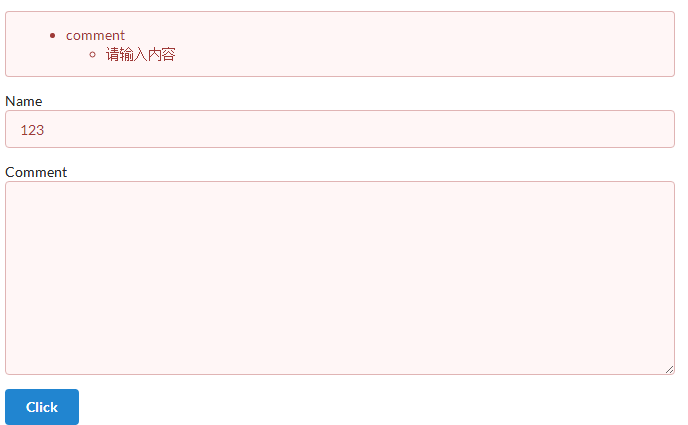
(6)打印errors,返回一个列表,所有的错误信息都存储在这里

4.表单存储数据

(1)判断校验是否通过
- 通过返回数据,不通过什么都不返回


(2)通过后,查看清洗过的数据
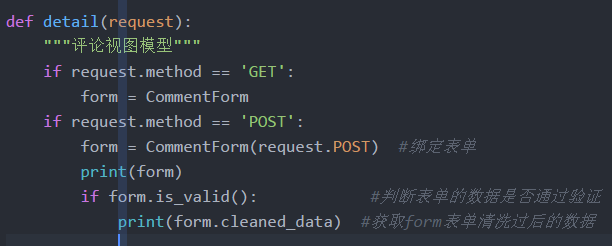

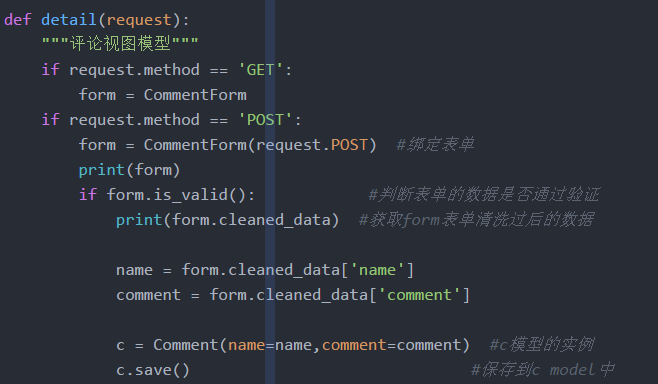
(2)获取字典中的name comment ,把数据储存到Comment模型的实例c中
(3)重定向到detail本页


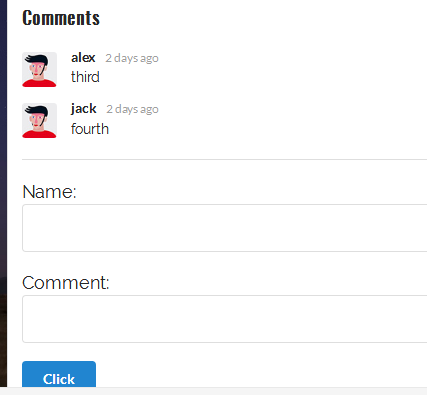
(4)提交评论显示成功
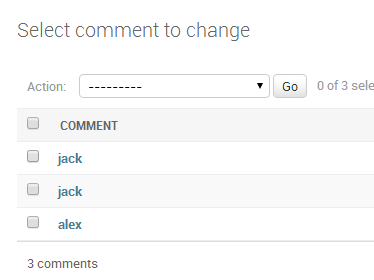
(5)评论视图模型代码
from django.shortcuts import render,HttpResponse,redirect

from firstapp.models import People,Aritcle,Comment

from django.template import Context,Template

from firstapp.form import CommentForm

def detail(request):

    """创建评论视图"""

    if request.method == 'GET':

        form = CommentForm() #实例化一个表单

    if request.method == 'POST':

        form = CommentForm(request.POST)  #提交数据

        print(form)

        if form.is_valid():       #判断表单的数据是否通过验证;

            print(form.is_valid)  #返回布尔值,True 或者False

            print(form.cleaned_data)

            name = form.cleaned_data['name']

            comment = form.cleaned_data['comment']

            c = Comment(name=name,comment=comment)  #把数据储存到Comment模型的实例c中

            c.save()  #保存到数据库

            return redirect(to='detail')

    context ={}

    comment_list = Comment.objects.all()   #获取comment评论的所有数据

    context['comment_list'] = comment_list

    context['form'] = form

    comment_page = render(request,'article-detail.html',context)  #render函数

    return comment_page
5.定制表单的验证逻辑

(1)comment评论的类型
widget=forms.Textarea(), #comment 表单的类型为Textarea
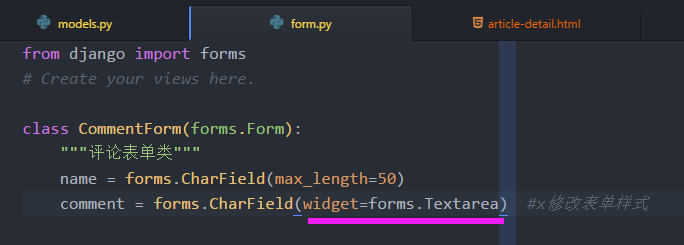
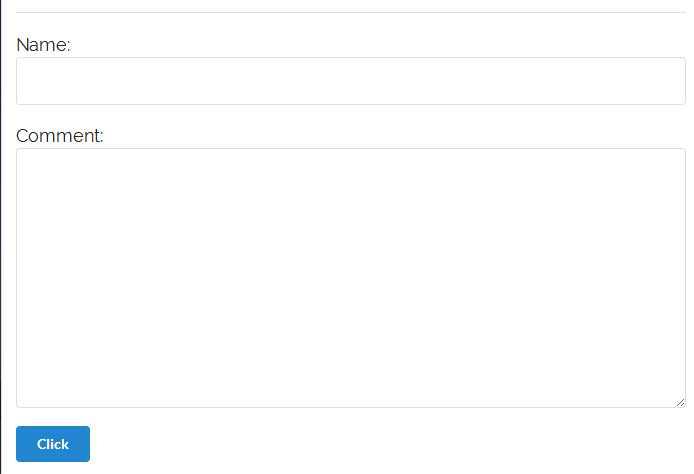
- 不推荐


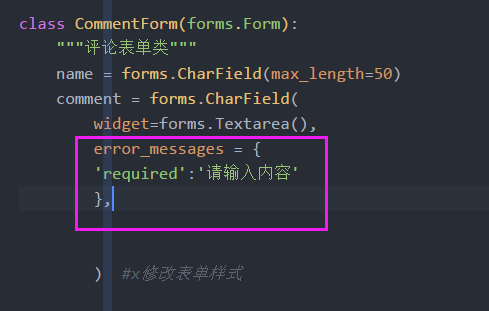
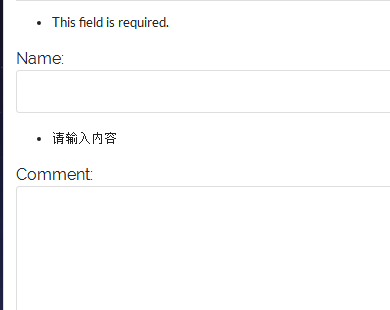
(2)error_messages报错信息
error_messages = { 'required':'请输入内容'}
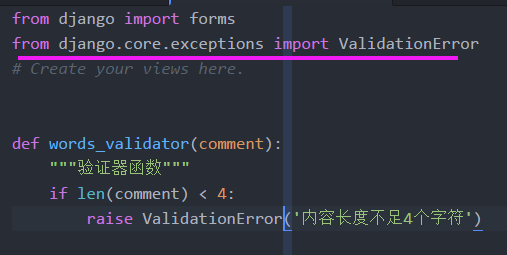
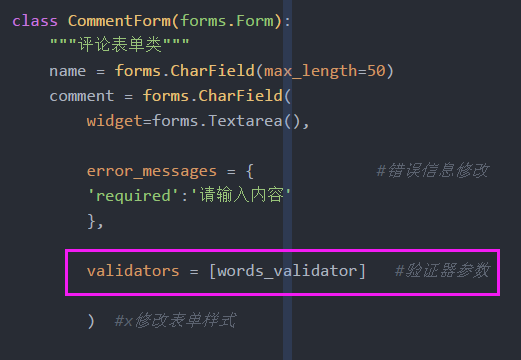
(3)验证器参数
from django.core.exceptions import ValidationError
def words_validator(comment):

    if len(comment) < 4:

        raise ValidationError('内容不足4个字符')  #当comment不足4个字符,升起一个错误
validators = [words_validator], #验证器

(4)验证器2


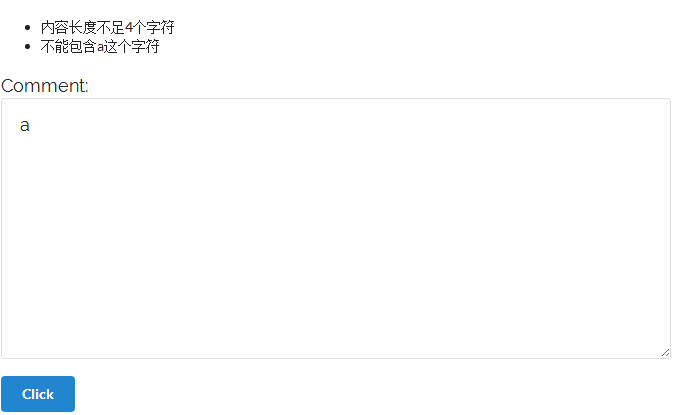
(5)form.py 代码
from django import forms

from django.core.exceptions import ValidationError

# Create your views here.

def words_validator(comment):

    """验证器函数"""

    if len(comment) < 4:

        raise ValidationError('内容长度不足4个字符')

def comment_validator(comment):

    """过滤器"""

    if 'a' in comment:

        raise ValidationError('不能包含a这个字符')

class CommentForm(forms.Form):

    """评论表单类"""

    name = forms.CharField(max_length=50)

    comment = forms.CharField(

        widget=forms.Textarea(),

        error_messages = {             #错误信息修改

        'required':'请输入内容'

        },

        validators = [words_validator,comment_validator]   #验证器参数

        )  #x修改表单样式
6.定制表单的手工渲染

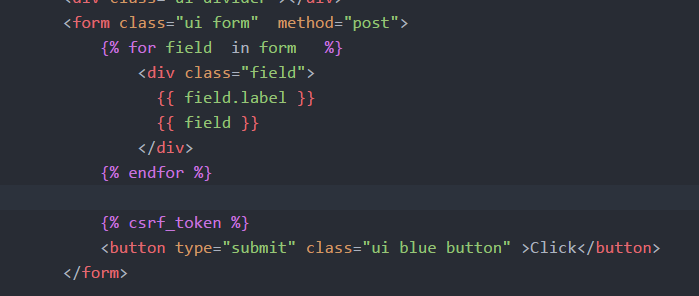
(1)定制sematic ui 的表单

<form class="ui form">

  <div class="field">

    <label>First Name</label>

    <input type="text" name="first-name" placeholder="First Name">

  </div>

  <div class="field">

    <label>Last Name</label>

    <input type="text" name="last-name" placeholder="Last Name">

  </div>

  <button class="ui button" type="submit">Submit</button>

</form>
(2)form表单 展示错误信息,
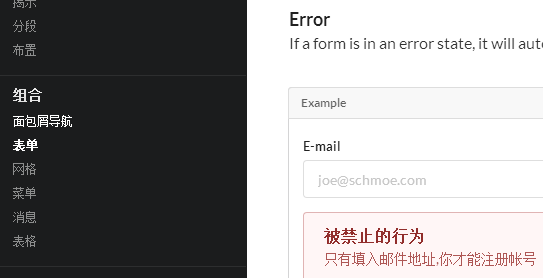
<div class="ui form error">

  <div class="field">

    <label>E-mail</label>

    <input type="email" placeholder="joe@schmoe.com">

  </div>

  <div class="ui error message">

    <div class="header">被禁止的行为</div>

    <p>只有填入邮件地址,你才能注册帐号</p>

  </div>

  <div class="ui submit button">Submit</div>

</div>
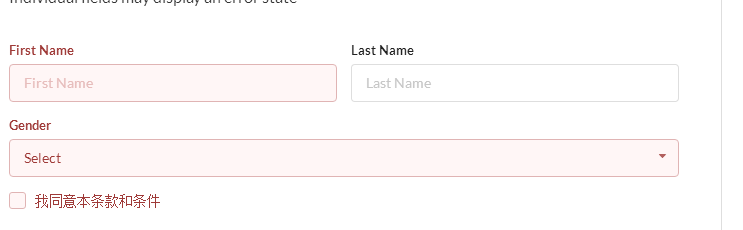
<div class="ui form">

  <div class="two fields">

    <div class="field error">

      <label>First Name</label>

      <input placeholder="First Name" type="text">

    </div>

    <div class="field">

      <label>Last Name</label>

      <input placeholder="Last Name" type="text">

    </div>

  </div>

  <div class="field error">

    <label>Gender</label>

    <div class="ui selection dropdown">

      <div class="default text">Select</div>

      <i class="dropdown icon"></i>

      <input type="hidden" name="gender">

      <div class="menu">

        <div class="item" data-value="male">Male</div>

        <div class="item" data-value="female">Female</div>

      </div>

    </div>

  </div>

  <div class="inline field error">

    <div class="ui checkbox">

      <input type="checkbox" tabindex="0" class="hidden">

      <label>我同意本条款和条件</label>

    </div>

  </div>

</div>


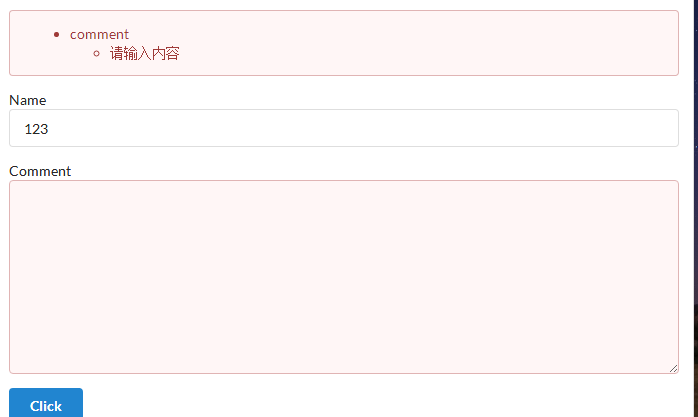
(3)模板过滤器
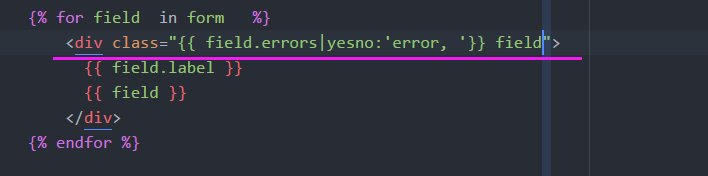
     #只显示comment的错误label

  <div class="{{ field.errors|yesno:'error, ' }} field">

                    {{ field.label }}

                      {{ field }}

  </div>
(4)完整html代码
<!DOCTYPE html>

{% load staticfiles %}

<html>

    <head>

        <meta charset="utf-8">

        <title></title>

        <link rel="stylesheet" href="{% static 'css/semantic.css'%}" media="screen" title="no title" charset="utf-8">

        <link href="https://fonts.googleapis.com/css?family=Oswald|Raleway" rel="stylesheet">

        <style type="text/css">

            .ui.segment.container {

                width:700px;

            }

            p {

                font-family: 'Raleway', sans-serif;

                font-size:18px;

            }

            body {

                background:url({% static 'images/star_banner.jpg'%});

                background-size:cover;

                background-repeat:no-repeat;

                background-attachment:fixed

            }

        </style>

    </head>

    <body>

        <div class="ui image">

            <img src="" alt="" />

        </div>

        <div class="ui  segment padded container" >

            <h1 class="ui header" style="font-family:'Oswald', sans-serif;font-size:40px">

                Indonesia pointed at Christmas

            </h1>

            <p>

                his is how it happens:

                The most sensible alternative to a life of unbearable hardship is to take a chance on a rubber dinghy in Indonesia pointed at Christmas Island, which is part of Australia. If a refugee survives, this person is not praised for valor but rather ejected 4,000 miles away to another island. Nauru Regional Processing Center. Processing sounds temporary, and it is, in the same way purgatory is temporary. Asylum seekers have been known to wait five years for intercession in the form of a “refugee status determination,” or RSD.

                The agony of waiting is what caused the July 2013 riot. RSDs that were promised were not delivered, and asylum seekers protested. They threw rocks at police and lit fire to buildings. No one was hurt, but the fires caused $60 million in damage. It was probably the most power they’d ever wielded. Nauruan police arrested 153 people around 9:30 p.m. and charged them with rioting. But nothing changed. If anything, the detainees were more forlorn than ever.

                Depression was becoming rampant. The older children noticed it, and the little ones, too, though they couldn’t quite understand. Something was wrong. Happiness should be easy at that age. But not in Nauru.

                Once, a teacher noticed her student searching the ground for something while waiting for the bus to take him home from school. He was a nice little boy. He’d been given something that morning, a sticker. What a thing. But now he’d lost it, and he anxiously combed the dirt and gravel. “Leave it,” the teacher said. “You can find it later.” The boy said nothing. He just slumped into a pile and sobbed.

                When the protests of Sept. 30 amounted to nothing, it was as though a reservoir of grief broke through the last levee, and hopelessness flooded the little camp.

                All around were thoughts of suicide. One asylum seeker, Yusuf, told his case manager he thought the mood in the camp was worse than ever. A week earlier, the Australian government had taken the unprecedented step of paying Cambodia (as it paid Nauru) to resettle refugees there. The head of the U.N. refugee agency called it “a worrying departure from international norms” because Australia was essentially paying a poor, unsuitable country to take over its own moral and legal obligations. But Cambodia wanted the money, Australia didn’t want the refugees and to this day the plan is still in place.

            </p>

        </div>

        <!-- Comments&Form's here -->

        <div class="ui segment container" style="width:700px;">

            <h3 class="ui header" style="font-family:'Oswald', sans-serif;">Comments</h3>

            <div class="ui comments">

              {% for comment in comment_list %}

                    <div class="comment">

                        <div class="avatar">

                            <img src="http://semantic-ui.com/images/avatar/small/matt.jpg" alt="" />

                        </div>

                        <div class="content">

                            <a href="#" class="author">{{ comment.name }}</a>

                            <div class="metadata">

                                <div class="date">2 days ago</div>

                            </div>

                            <p class="text" style="font-family: 'Raleway', sans-serif;">

                                {{ comment.comment }}

                            </p>

                        </div>

                    </div>

              {% endfor %}

            </div>

            <div class="ui divider"></div>

            <form class="ui error tiny form" action="" method="post">

              {% if form.errors %}

                  <div class="ui error message">

                    {{ form.errors }}

                  </div>

                  {% for field in form  %}

                    <div class="{{ field.errors|yesno:'error, ' }} field">

                      {{ field.label }}

                      {{ field }}

                    </div>

                  {% endfor %}

              {% else %}

                  {% for field in form  %}

                    <div class="field">

                      {{ field.label }}

                      {{ field }}

                    </div>

                  {% endfor %}

              {% endif %}

              {% csrf_token %}

                <button type="submit" class="ui blue button" >Click</button>

            </form>

        </div>

    </body>

</html>
5 Post实现django表单的更多相关文章
- python 全栈开发,Day111(客户管理之 编辑权限(二),Django表单集合Formset,ORM之limit_choices_to,构造家族结构)
昨日内容回顾 1. 权限系统的流程? 2. 权限的表有几个? 3. 技术点 中间件 session orm - 去重 - 去空 inclusion_tag filter 有序字典 settings配置 ...
- python3之Django表单(一)
1.HTML中的表单 在HTML种,表单是在<form>...</form>种的元素,它允许用户输入文本,选择选项,操作对象等,然后发送这些数据到服务器 表单元素允许用户在表单 ...
- django表单的api
django表单的api,参考文档:https://yiyibooks.cn/xx/Django_1.11.6/ref/forms/api.html 绑定与未绑定形式: Form要么是绑定的,要么是未 ...
- Django表单API详解
声明:以下的Form.表单等术语都指的的广义的Django表单. Form要么是绑定了数据的,要么是未绑定数据的. 如果是绑定的,那么它能够验证数据,并渲染表单及其数据,然后生成HTML表单.如果未绑 ...
- 9:django 表单
django自带表单系统,这个表单系统不仅可以定义属性名,还可以自己定义验证,更有自己自带的错误提示系统 这节我们仅仅粗略的来看一下django表单系统的入门运用(具体的实在太多东西,主要是我觉得有很 ...
- django 表单系统 之 forms.Form
继承forms.Form实现django表单系统 参考: https://www.cnblogs.com/zongfa/p/7709639.html https://www.cnblogs.com/c ...
- 关于创建Django表单Forms继承BaseForm的问题
在创建Django表单时,因为需要验证用户输入的验证码是否正确,因此需要在session里提取当前验证码的值和POST提交过来的值进行比对,如图: form.py from django import ...
- Django 表单处理流程
Django 的表单处理:视图获取请求,执行所需的任何操作,包括从模型中读取数据,然后生成并返回HTML页面(从模板中),我们传递一个包含要显示的数据的上下文.使事情变得更复杂的是,服务器还需要能够处 ...
- 第四章:Django表单 - 2:Django表单API详解
声明:以下的Form.表单等术语都指的的广义的Django表单. Form要么是绑定了数据的,要么是未绑定数据的. 如果是绑定的,那么它能够验证数据,并渲染表单及其数据,然后生成HTML表单.如果未绑 ...
- 第四章:Django表单 - 1:使用表单
假设你想从表单接收用户名数据,一般情况下,你需要在HTML中手动编写一个如下的表单元素: <form action="/your-name/" method="po ...
随机推荐
- Java—运算符和流程控制语句
运算符优先级: siwtch语句注意事项: switch 后面小括号中表达式的值必须是整型或字符型 case 后面的值可以是常量数值,如 1.2:也可以是一个常量表达式,如 2+2 :但不能是变量或带 ...
- sudoers文件解析
分类: LINUX 今天在用户组中新加了一个普 通用户,开始这个用户没有sudo权限,于是通过sudo visudo修改了sudo的配置文件,赋予了普通用户的root权限.后来想着能不能将/etc/s ...
- Sublime Text 3预览Markdown
Sublime Text 3预览Markdown 安装控制器 按下按下ctrl+`出现小控制台 输入import urllib.request,os; pf = 'Package Control.su ...
- PDO数据库类——对query()和exec()的异常监听
PDO异常类中,query()和exec()方法中执行失败时,默认情况下,我们是无法知道,具体执行失败的原因. 那如果我们想要监听异常的话,肿么整呢? 只要使用setAttribute()方法,即可监 ...
- MySQL入门很简单: 9 插入 更新与删除数据
1. 插入数据:INSERT 1)为表的所有字段插入数据 第一种: 不指定具体的字段名 INSERT INTO 表名 VALUES(值1,值2,...,值n): 第二种:INSERT语句中列出所有字段 ...
- MySQL数据库实验四:嵌套查询
实验四 嵌套查询 一.实验目的 掌握SELECT语句的嵌套使用,实现表的复杂查询,进一步理解SELECT语句的高级使用方法. 二.实验环境 三.实验示例 1. 查询与“刘晨”在同一 ...
- hdu-2838 Cow Sorting---逆序对的花费
题目链接: http://acm.hdu.edu.cn/showproblem.php?pid=2838 题目大意: 就是求将之前的排列变成一个递增的排列,每交换两个数的代价为两个数的和,求变成递增的 ...
- 安裝 PHP 時出現undefined reference to `libiconv_open’ 之類的錯誤訊息
在安裝 PHP 到系統中時要是發生「undefined reference to `libiconv_open'」之類的錯誤訊息,那表示在「./configure 」沒抓好一些環境變數值.錯誤發生點在 ...
- 第17章 EXTI—外部中断/事件控制器—零死角玩转STM32-F429系列
第17章 EXTI—外部中断/事件控制器 全套200集视频教程和1000页PDF教程请到秉火论坛下载:www.firebbs.cn 野火视频教程优酷观看网址:http://i.youku.co ...
- js动画效果
js能够按照预定的时间间隔重复调用一个函数,而这意味着我们可以随着时间的推移而不断改变某个元素的样式.动画是样式随时间变化的完美例子之一. js函数setTimeout能够让某个函数在经过一段预定的时 ...