
MySQL跟踪SQL&慢查询分析工具
简介
之前的工作一直使用的SQL SERVER, 用过的都知道,SQL SERVER有配套的SQL跟踪工具SQL Profiler,开发或者定位BUG过程中,可以在操作页面的时候,实时查看数据库执行的SQL语句,十分方便。最近的项目使用MySQL,没有类似的功能,感觉到十分的不爽,网上也没有找到合适的免费工具,所以自己研究做了一个简单工具。
功能
- 实时查询MySql执行的SQL语句
- 查看性能异常的SQL(执行超过2秒)
技术方案
- 前端vue,样式bootstrap
- 后台dotnet core mvc
先看一下的效果:
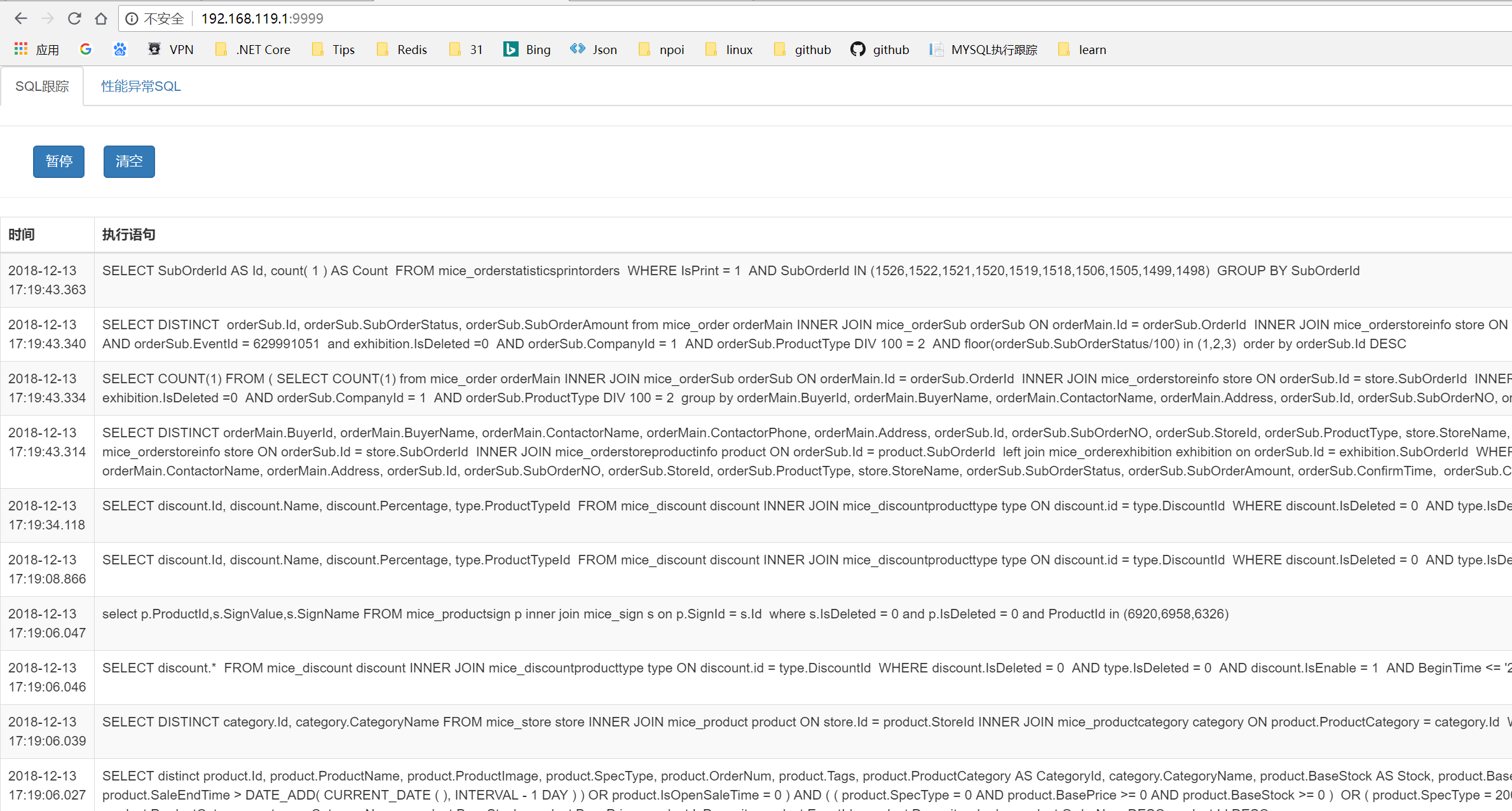

实现原理
Mysql支持输出日志,通过以下命令查看当前状态
show VARIABLES like '%general_log%' //是否开启输出所有日志
show VARIABLES like '%slow_query_log%' //是否开启慢SQL日志
show VARIABLES like '%log_output%' //查看日志输出方式(默认file,还支持table)
show VARIABLES like '%long_query_time%' //查看多少秒定义为慢SQL
下面我们将所有日志、慢SQL日志打开,日志输出修改为table,定义执行2秒以上的为慢SQL
- set global log_output='table' //日志输出到table(默认file)
- set global general_log=on; //打开输出所有日志
- set global slow_query_log=on; //打开慢SQL日志
- set global long_query_time=2 //设置2秒以上为慢查询
- repair table mysql.general_log //修复日志表(如果general_log表报错的情况下执行)
注意:以上的设置,数据库重启后将失效,永久改变配置需要修改my.conf文件
现在日志文件都存在数据库表里面了,剩下的工作就是取数并展示出来就行了。本项目后台使用的MVC取数,然后VUE动态绑定,Bootstrap渲染样式。
前端代码
<!DOCTYPE html>
<html lang="zh-CN">
<head>
<meta charset="utf-8">
<title>开发工具</title>
<link rel="stylesheet" href="https://cdn.staticfile.org/twitter-bootstrap/3.3.7/css/bootstrap.min.css">
<script src="https://cdn.staticfile.org/jquery/2.1.1/jquery.min.js"></script>
<script src="https://cdn.staticfile.org/twitter-bootstrap/3.3.7/js/bootstrap.min.js"></script>
<script src="https://cdn.staticfile.org/vue/2.2.2/vue.min.js"></script>
<script src="https://cdn.staticfile.org/vue-resource/1.5.1/vue-resource.min.js"></script>
</head>
<body>
<div id="app">
<ul id="myTab" class="nav nav-tabs">
<li class="active">
<a href="#trace" data-toggle="tab">
SQL跟踪
</a>
</li>
<li>
<a href="#slow" data-toggle="tab">
性能异常SQL
</a>
</li>
</ul>
<hr />
<div id="myTabContent" class="tab-content">
<div id="trace" class="tab-pane fade in active">
<div>
<input id="btnStart" class="btn btn-primary" type="button" value="开始" v-show="startShow" v-on:click="start" />
<input id="btnPause" class="btn btn-primary" type="button" value="暂停" v-show="pauseShow" v-on:click="pause" />
<input id="btnClear" class="btn btn-primary" type="button" value="清空" v-show="clearShow" v-on:click="clear" />
</div>
<hr />
<div class="table-responsive">
<table class="table table-striped table-bordered">
<thead>
<tr>
<th>时间</th>
<th>执行语句</th>
</tr>
</thead>
<tbody>
<tr v-for="log in logs">
<td>
{{log.time}}
</td>
<td>
@*<input class="btn btn-danger" type="button" value="复制" name="copy" />*@
{{log.sql}}
</td>
</tr>
</tbody>
</table>
</div>
</div>
<div id="slow" class="tab-pane fade">
<div class="table-responsive">
<table class="table table-striped table-bordered">
<thead>
<tr>
<th>执行时长(时:分:秒,毫秒)</th>
<th>锁定时长(时:分:秒,毫秒)</th>
<th>开始时间</th>
<th>数据库</th>
<th>操作者</th>
<th>执行语句</th>
</tr>
</thead>
<tbody>
<tr v-for="query in slowQuerys">
<td>
{{query.queryTime}}
</td>
<td>
@*<input class="btn btn-danger" type="button" value="复制" name="copy" />*@
{{query.lockTime }}
</td>
<td>
{{query.startTime }}
</td>
<td>
{{query.db }}
</td>
<td>
{{query.userHost}}
</td>
<td>
{{query.sql}}
</td>
</tr>
</tbody>
</table>
</div>
</div>
</div>
</div>
<script>
new Vue({
el: '#app',
data: {
startShow: true,
pauseShow: false,
clearShow: true,
logs: [],
slowQuerys: []
},
methods: {
start: function () {
this.timer = setInterval(this.trace, 5000);
this.pauseShow = true;
this.startShow = false;
},
pause: function () {
clearInterval(this.timer);
this.pauseShow = false;
this.startShow = true;
},
clear: function () {
this.logs = null;
},
trace: function () {
//发送 post 请求
this.$http.post('/home/start', {}, { emulateJSON: true }).then(function (res) {
this.logs = res.body;
}, function (res) {
console.log(logs);
});
}
},
created: function () {
},
mounted: function () {
this.$http.post('/home/slow', {}, { emulateJSON: true }).then(function (res) {
this.slowQuerys = res.body;
}, function (res) {
console.log(this.slowQuerys);
});
},
destroyed: function () {
clearInterval(this.time)
}
});
</script>
</body>
</html>
后端代码
using Ade.Tools.Models;

using Microsoft.AspNetCore.Mvc;

using Microsoft.Extensions.Configuration;

using System;

using System.Collections.Generic;

using System.IO;

using System.Linq;

using System.Text.RegularExpressions;

using MySql.Data.MySqlClient;

using Microsoft.Extensions.Caching.Memory;

namespace Ade.Tools.Controllers

{

    public class HomeController : Controller

    {

        public IConfiguration Configuration { get; set; }

        public HomeController(IConfiguration configuration)

        {

            this.Configuration = configuration;

            this.ConnStr = Configuration["Sql:DefaultConnection"];

        }

        public static DateTime StartTime { get; set; } = DateTime.MinValue;

        public static List<string> TableNames { get; set; }

        public string ConnStr { get; set; }

        public JsonResult Start()

        {

            if (StartTime == DateTime.MinValue)

            {

                StartTime = DateTime.Now;

            }

            int size = int.Parse(Configuration["Size"]);

            string[] blackList = Configuration["Blacklist"].Split(",");

            List<string> tableNames = GetTableNames();

            List<LogItem> logItems = new List<LogItem>();

            List<LogItemDTO> logItemDTOs = new List<LogItemDTO>();

            using (MySqlConnection mySqlConnection = new MySqlConnection(this.ConnStr))

            {

                //string sqlStart = "set global log_output='table';set global general_log=on; repair table mysql.general_log;";

                //Dapper.SqlMapper.Execute(mySqlConnection, sqlStart);

                logItemDTOs = Dapper.SqlMapper.Query<LogItemDTO>(mySqlConnection, $" select * from mysql.general_log " +

                     $"where event_time>'{StartTime.ToString("yyyy-MM-dd HH:mm:ss")}' " +

                     $"order by event_time desc ")

                     //+ $"limit {size} "

                     .ToList();

            }

            logItemDTOs.ForEach(e =>

            {

                LogItem logItem = new LogItem()

                {

                    Time = e.event_time.ToString("yyyy-MM-dd HH:mm:ss.fff"),

                    CommondType = e.command_type,

                    ServerId = e.server_id,

                    ThreadId = e.thread_id,

                    UserHost = e.user_host,

                    Sql = System.Text.Encoding.Default.GetString(e.argument)

                };

                if (tableNames.Any(a => logItem.Sql.Contains(a))

                && !blackList.Any(b => logItem.Sql.Contains(b))

                )

                {

                    logItems.Add(logItem);

                }

            });

            return new JsonResult(logItems);

        }

        public JsonResult Slow()

        {

            List<SlowQuery> slowQueries = new List<SlowQuery>();

            using (MySqlConnection mySqlConnection = new MySqlConnection(this.ConnStr))

            {

                string sql = "select * from mysql.slow_log order by query_time desc";

                List<SlowQueryDTO> slowDtos = Dapper.SqlMapper.Query<SlowQueryDTO>(mySqlConnection, sql).ToList();

                slowDtos.ForEach(e => {

                    slowQueries.Add(new SlowQuery()

                    {

                        DB = e.db,

                        LockTime = DateTime.Parse(e.lock_time.ToString()).ToString("HH:mm:ss.fffff"),

                        QueryTime = DateTime.Parse(e.query_time.ToString()).ToString("HH:mm:ss.fffff"),

                        RowsExamined = e.rows_examined,

                        RowsSent = e.rows_sent,

                        Sql = System.Text.Encoding.Default.GetString( (byte[])e.sql_text),

                        StartTime = e.start_time.ToString("yyyy-MM-dd HH:mm:ss"),

                        UserHost = e.user_host

                    });

                });

            }

            return new JsonResult(slowQueries);

        }

        public string On()

        {

            using (MySqlConnection mySqlConnection = new MySqlConnection(this.ConnStr))

            {

                string sql = "set global log_output='table';set global general_log=on; repair table mysql.general_log;";

                Dapper.SqlMapper.Execute(mySqlConnection, sql);

            }

            return "ok";

        }

        public string Off()

        {

            using (MySqlConnection mySqlConnection = new MySqlConnection(this.ConnStr))

            {

                string sql = "set global general_log=off;";

                Dapper.SqlMapper.Execute(mySqlConnection, sql);

            }

            return "ok";

        }

        public string Clear()

        {

            using (MySqlConnection mySqlConnection = new MySqlConnection(this.ConnStr))

            {

                string sql = $@"

                                SET GLOBAL general_log = 'OFF';

                                RENAME TABLE general_log TO general_log_temp;

                                DELETE FROM `general_log_temp`;

                                RENAME TABLE general_log_temp TO general_log;

                                SET GLOBAL general_log = 'ON';

                                ";

                Dapper.SqlMapper.Execute(mySqlConnection, sql);

            }

            return "ok";

        }

        public IActionResult Index()

        {

            return View();

        }

        private List<string> GetTableNames()

        {

            MemoryCache memoryCache = new MemoryCache(new MemoryCacheOptions());

            var cacheKey = "MySqlProfile_TableNames";

            List<string> tableNames = memoryCache.Get <List<string>>(cacheKey);

            if (tableNames != null)

            {

                return tableNames;

            }

            string[] traceDbs = Configuration["TraceDatabaseNames"].Split(",");

            string sqlTables = "SELECT distinct TABLE_NAME FROM information_schema.columns";

            foreach (var db in traceDbs)

            {

                if (!sqlTables.Contains("WHERE"))

                {

                    sqlTables += " WHERE table_schema='" + db + "'";

                }

                else

                {

                    sqlTables += " OR table_schema='" + db + "'";

                }

            }

            using (MySqlConnection mySqlConnection = new MySqlConnection(this.ConnStr))

            {

                //  WHERE table_schema='mice'

                tableNames = Dapper.SqlMapper.Query<string>(mySqlConnection, sqlTables).ToList();

            }

            memoryCache.Set(cacheKey, tableNames, TimeSpan.FromMinutes(30));

            return tableNames;

        }

    }

}
源代码
修改完appsettings.json文件里面的连接字符串以及其他配置(详情自己看注释,懒得写了),就可以使用了。
https://github.com/holdengong/MysqlProfiler
最后一点
开启日志会产生大量的文件,需要注意定时清理
- SET GLOBAL general_log = 'OFF'; // 关闭日志
- RENAME TABLE general_log TO general_log_temp; //表重命名
- DELETE FROM
general_log_temp; //删除所有数据 - RENAME TABLE general_log_temp TO general_log; //重命名回来
- SET GLOBAL general_log = 'ON'; //开启日志
MySQL跟踪SQL&慢查询分析工具的更多相关文章
- Mysql优化_慢查询开启说明及Mysql慢查询分析工具mysqldumpslow用法讲解
Mysql优化_慢查询开启说明及Mysql慢查询分析工具mysqldumpslow用法讲解 Mysql慢查询开启 Mysql的查询讯日志是Mysql提供的一种日志记录,它用来记录在Mysql中响应 ...
- mysql慢查询分析工具比较与实战
00 前言 在进行mysql性能优化的时候,第一个想到的便是查看慢sql. 但是对于慢sql有没有什么好的工具进行分析呢? 推荐两个工具mysqldumpslow及pt-query-digest. m ...
- Red Gate系列之七 SQL Search 1.1.6.1 Edition SQL查询分析工具使用教程
原文:Red Gate系列之七 SQL Search 1.1.6.1 Edition SQL查询分析工具使用教程 Red Gate系列之七 SQL Search 1.1.6.1 Edition SQL ...
- mysql性能优化-慢查询分析、优化索引和配置 (慢查询日志,explain,profile)
mysql性能优化-慢查询分析.优化索引和配置 (慢查询日志,explain,profile) 一.优化概述 二.查询与索引优化分析 1性能瓶颈定位 Show命令 慢查询日志 explain分析查询 ...
- [转]一个用户SQL慢查询分析,原因及优化
来源:http://blog.rds.aliyun.com/2014/05/23/%E4%B8%80%E4%B8%AA%E7%94%A8%E6%88%B7sql%E6%85%A2%E6%9F%A5%E ...
- MySQL慢查询分析工具pt-query-digest详解
一.简介 pt-query-digest是用于分析mysql慢查询的一个工具,它可以分析binlog.General log.slowlog,也可以通过SHOWPROCESSLIST或者通过tcpdu ...
- mysql慢查询分析工具 mysqlsla 安装
概述 mysqlsla 是一款很不错的mysql慢查询日志分析工具,而且简单易用.mysqlsla 是用perl编写的脚本,运行需要perl-DBI和per-DBD-Mysql两模块的支持.mysql ...
- mysql性能优化-慢查询分析、优化索引和配置
一.优化概述 二.查询与索引优化分析 1性能瓶颈定位 Show命令 慢查询日志 explain分析查询 profiling分析查询 2索引及查询优化 三.配置优化 1) max_connec ...
- mysqlsla慢查询分析工具教程
mysqlsla是一款帮助语句分析.过滤.和排序的功能,能够处理MySQL慢查询日志.二进制日志等.整体来说, 功能非常强大. 能制作SQL查询数据报表,分析包括执行频率, 数据量, 查询消耗等. 且 ...
随机推荐
- Hadoop2.X分布式集群部署
本博文集群搭建没有实现Hadoop HA,详细文档在后续给出,本次只是先给出大概逻辑思路. (一)hadoop2.x版本下载及安装 Hadoop 版本选择目前主要基于三个厂商(国外)如下所示: 基于A ...
- ruby逻辑判断符号
puts true and false #相当于 (puts true) and false Use &&/|| for boolean expressions, and/or fo ...
- PHP substr()函数
PHP substr()函数可以分割文字,但要分割的文字如果包括中文字符往往会遇到问题,这时可以用mb_substr()/mb_strcut这个函数,mb_substr() /mb_strcut的用法 ...
- 10个常见的Redis面试"刁难"问题--转
高可用架构 导读:在程序员面试过程中Redis相关的知识是常被问到的话题.作为一名在互联网技术行业打击过成百上千名的资深技术面试官,本文作者总结了面试过程中经常问到的问题.十分值得一读. 作者简介:钱 ...
- HDU——Cover——————【技巧】
Cover Time Limit: 2000/1000 MS (Java/Others) Memory Limit: 65536/65536 K (Java/Others)Total Submi ...
- [转]ASP.NET Core集成微信登录
本文转自:http://www.cnblogs.com/early-moon/p/5819760.html 工具: Visual Studio 2015 update 3 Asp.Net Core 1 ...
- DirectX HLSL 内置函数
Intrinsic Functions (DirectX HLSL) The following table lists the intrinsic functions available in HL ...
- Arcgis for Js之鼠标经过显示对象名的实现
在浏览地图时,移动鼠标经过某个对象或者POI的时候,能够提示该对象的名称对用户来说是很实用的,本文讲述在Arcgis for Js中,用两种不同的方式来实现该效果. 为了有个直观的概念,先给大家看看实 ...
- Oracle11g 卸载教程图解
1:停掉所有Oracle相关的服务 1.1打开服务方式如下: 1.1.1:右击“计算机”–>管理–>服务和应用程序–>服务 1.1.2:开始–>输入“服务”后点击搜索–> ...
- 磁盘空间满了之后MySQL会怎样
大多数用户在对于磁盘进行分区的时候都是习惯性的不给系统盘预留很大空间,其实这并不是一个好习惯.因为系统分区并不像我们想象的那样会仅仅安装一个操作系统,系统分区多数还是会承载操作系统主要应用软件安装任务 ...