
Entity Framework Code-First(21):Automated Migration
Automated Migration:
Entity framework 4.3 has introduced Automated Migration so that you don't have to process database migration manually in the code file, for each change you make in your domain classes. You just need to run a command in Package Manger Console to accomplish this.
Let's see how you can use the automated migration.
As you know, you don't have a database when you start writing your Code-First application. For example, we start writing an application with Student and Course entity classes. Before running the application, which does not have its database created yet, you have to enable automated migration by running the 'enable-migrations' command in Package Manager Console, as shown below:
First, open the package manager console from Tools → Library Package Manager → Package Manager Console and then run "enable-migrations –EnableAutomaticMigration:$true" command (make sure that the default project is the project where your context class is)

Once the command runs successfully, it creates an internal sealed Configuration class in the Migration folder in your project:
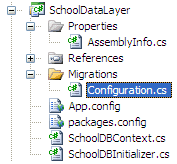
If you open this and see the class shown below, then you will find AutomaticMigrationsEnabled = true in the constructor.
internal sealed class Configuration : DbMigrationsConfiguration<SchoolDataLayer.SchoolDBContext>

    {

        public Configuration()

        {

            AutomaticMigrationsEnabled = true;

        }

        protected override void Seed(SchoolDataLayer.SchoolDBContext context)

        {

            //  This method will be called after migrating to the latest version.

            //  You can use the DbSet<T>.AddOrUpdate() helper extension method

            //  to avoid creating duplicate seed data. E.g.

            //

            //    context.People.AddOrUpdate(

            //      p => p.FullName,

            //      new Person { FullName = "Andrew Peters" },

            //      new Person { FullName = "Brice Lambson" },

            //      new Person { FullName = "Rowan Miller" }

            //    );

            //

        }

    }
You also need to set the database initializer in the context class with the new DB initialization strategy MigrateDatabaseToLatestVersion, as shown below:
public class SchoolDBContext: DbContext

{

    public SchoolDBContext(): base("SchoolDBConnectionString")

    {

        Database.SetInitializer(new MigrateDatabaseToLatestVersion<SchoolDBContext, SchoolDataLayer.Migrations.Configuration>("SchoolDBConnectionString"));

    }

    public DbSet<Student> Students { get; set; }

    public DbSet<Course> Courses { get; set; }

    protected override void OnModelCreating(DbModelBuilder modelBuilder)

    {

        base.OnModelCreating(modelBuilder);

    }

}
As you can see in the code shown above, we have passed the Configuration class name, which was created by command, along with the context class name.
Now you are set for automated migration. It will automatically take care of migration, when you change the model. Run the application and look at the created database:
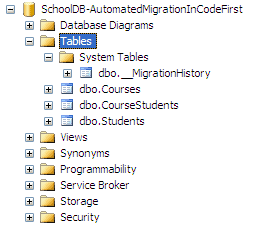
You will find that it has created one system table __MigrationHistory along with other tables. This is where automated migration maintains the history of database changes.
Now let's add a Standard entity class. Run the application again and you will see that it has automatically created a Standard table.
Wait a minute, this works if you add a new entity class or remove an entity class, but what about adding or removing properties from the entity class? To try that, let's remove the Description property from Standard class and run the application.
Oops…. an error message will appear:
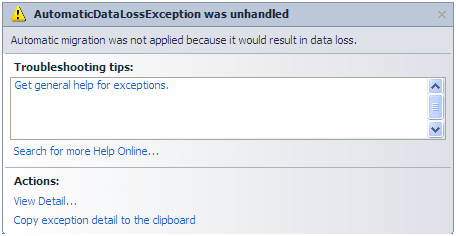
This is because you will lose data in description column, if you remove it from the Standard class. So to handle this kind of scenario, you have to set AutomaticMigrationDataLossAllowed = true in the configuration class constructor, along with AutomaticMigrationsEnabled = true.
Note: You can find more information about parameters that we can pass to the enable-migrations command using the "get-help enable-migrations" command. For more detailed help use "get-help enable-migrations –detailed"
Thus, migration can be handled automatically.
Entity Framework Code-First(21):Automated Migration的更多相关文章
- Entity Framework Tutorial Basics(21):CRUD Operation in Connected Scenario
CRUD Operation in Connected Scenario: CRUD operation in connected scenario is a fairly easy task bec ...
- Entity Framework Code first(转载)
一.Entity Framework Code first(代码优先)使用过程 1.1Entity Framework 代码优先简介 不得不提Entity Framework Code First这个 ...
- Entity Framework Code First (三)Data Annotations
Entity Framework Code First 利用一种被称为约定(Conventions)优于配置(Configuration)的编程模式允许你使用自己的 domain classes 来表 ...
- Entity Framework Code First (二)Custom Conventions
---------------------------------------------------------------------------------------------------- ...
- Entity Framework Code First (一)Conventions
Entity Framework 简言之就是一个ORM(Object-Relational Mapper)框架. Code First 使得你能够通过C#的类来描述一个模型,模型如何被发现/检测就是通 ...
- Entity Framework Tutorial Basics(11):Code First
Code First development with Entity Framework: Entity Framework supports three different development ...
- Entity Framework Code First (七)空间数据类型 Spatial Data Types
声明:本文针对 EF5+, Visual Studio 2012+ 空间数据类型(Spatial Data Types)是在 EF5 中引入的,空间数据类型表现有两种: Geography (地理学上 ...
- Entity Framework Code First (四)Fluent API - 配置属性/类型
上篇博文说过当我们定义的类不能遵循约定(Conventions)的时候,Code First 提供了两种方式来配置你的类:DataAnnotations 和 Fluent API, 本文将关注 Flu ...
- Entity Framework Code First (八)迁移 Migrations
创建初始模型和数据库 在开始使用迁移(Migrations)之前,我们需要一个 Project 和一个 Code First Model, 对于本文将使用典型的 Blog 和 Post 模型 创建一个 ...
随机推荐
- 利用python进行数据分析—数据清洗记录3,map,apply,
社会心态调查报告 导语: 时代决定心态,心态映照时代.社会心态产生于社会个体心理,又以整体的形态存在,进而影响着每个社会成员的社会价值取向和行为方式,影响着国家经济政治和社会发展大局.良好的社会心 ...
- SQL夯实基础(四):子查询及sql优化案例
首先我们先明确一下sql语句的执行顺序,如下有前至后执行: (1)from (2) on (3) join (4) where (5)group by (6) avg,sum... (7 ...
- Oracle中查询前10条记录
在Oracle怎样查询表中的top10条记录呢? select * from test where rownum <=10 ----说明:rownum只能用于<或<=运算,如 ...
- 1.Linux下Git入门学习
1.在Linux下安装git软件,使用以下命令: yum install git 2.设置用户名和邮箱(必须): git config --global user.name "Your Na ...
- ubuntu lts install licode tag pre-v5.4
1. Requirements Ubuntu 14.04 LTS 2. Clone Licode codeYou first need to clone our code from github.Yo ...
- 蓝桥杯 基础练习 BASIC-15 字符串对比
基础练习 字符串对比 时间限制:1.0s 内存限制:512.0MB 问题描述 给定两个仅由大写字母或小写字母组成的字符串(长度介于1到10之间),它们之间的关系是以下4中情况之一: 1:两个字 ...
- Linux cciss磁盘设备文件的说明
在某些机器上安装Linux后,发现在/dev目录下找不到hda.hdb.sda等磁盘设备文件,那么挂接的磁盘 在哪里呢?使用mount命令查看挂接设备情况,发现磁盘文件在.dev\cciss目录下,并 ...
- HTML 和 CSS
HTML html是英文hyper text mark-up language(超文本标记语言)的缩写,它是一种制作万维网页面标准语言. 内容摘要 Doctype 告诉浏览器使用什么样的htm ...
- Mockito为什么不能mock静态方法
因为Mockito使用继承的方式实现mock的,用CGLIB生成mock对象代替真实的对象进行执行,为了mock实例的方法,你可以在subclass中覆盖它,而static方法是不能被子类覆盖的,所以 ...
- Eclipse中的普通Java项目如何部署到Tomcat中
我现在的做法: 1.在Eclipse中配置Tomcat时,选择创建Context文件,而不是server.xml,好处是文件可以随便命名,与虚拟目录一致(即xml中的属性path).Tomcat加载项 ...